
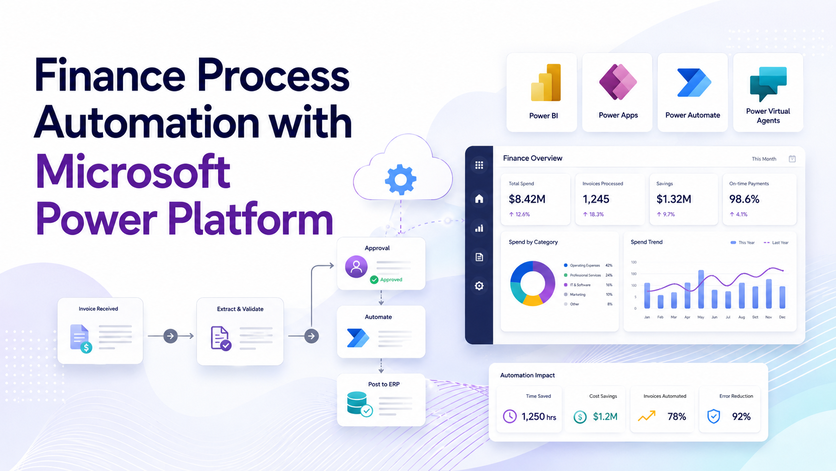
Finance process automation is all about using software and workflows to get rid of tedious and repetitive tasks in finance – like reporting, invoice processing, reconciliations, approvals, and chasing up on payments. To be honest, businesses used to rely on spreadsheets, emails, and just entering data manually, but nowadays they can use tools like Power Automate, Power BI, Power Apps and even AI to streamline their finance operations and reduce the amount of time spent on day-to-day tasks.
As an RPA consultancy, we specialise in helping finance teams automate processes like management reporting, invoice creation, accounts payable, reconciliations and collections using the Microsoft Power Platform. Our projects typically involve using Power BI, Power Automate, Power Apps, SQL databases, and AI Builder to create scalable finance workflows that fit each organisation like a glove.
In this post, we’ll show you some real-life examples of finance process automations we implemented for our clients, including automating financial reporting, creating invoice workflows, processing accounts payable, reconciliations and automated follow-ups on outstanding invoices. We’ll also talk about how RPA and AI agents fit into modern finance operations and which businesses benefit most from automation.
Below, we’ll also share an interview I did with the CFO of Leeward Management – a business we worked closely with over the last two years to automate finance processes across their company. In the interview, we talk about the workflows we automated, the operational challenges we faced, and the impact that automation had on the finance team and overall business operations.
Not every business needs finance process automation. Small companies with low transaction volumes might be able to manage their financial operations without too many issues manually.
However, automation becomes a lot more valuable once businesses start growing, handling more transactions or managing finance processes across multiple people and systems.
Growing businesses quickly are one of the biggest beneficiaries of finance process automation.
When businesses grow fast, their operational and administrative processes often struggle to keep up. This means finance teams get bogged down with manual tasks, reporting delays, invoice backlogs and reconciliation work. Over time, these inefficiencies create operational and cash flow risks.
For example, if outstanding invoices aren’t chased up promptly, it slows down customer payments and increases the risk of bad debt. Similarly, delayed month-end reporting makes it harder for management to react quickly to financial issues.
Automating workflows like invoice reminders, management reporting and reconciliations helps growing businesses keep on top of things while scaling operations.
Accounting firms, bookkeeping companies and outsourced finance providers also gain a lot from automation.
Their profitability often depends on how many clients they can handle with the same team size. Manual invoice processing, reconciliations and reporting tasks limit scalability because they consume a huge amount of staff time.
By implementing RPA in accounting, CPA practices can significantly boost productivity and service more clients without proportionally increasing headcount. This gives them a strong operational advantage over competitors who are still relying heavily on manual work.
Examples of workflows that are commonly automated include:
For example, we helped finance and reporting teams automate reporting processes that reduced reporting preparation time by over 50% while improving data accuracy and visibility.
Process automation in finance is also highly valuable for businesses operating across multiple systems, locations or legal entities.
These organisations often struggle with fragmented finance data spread across ERPs, accounting systems, banks, spreadsheets and operational platforms. As transaction volumes grow, manual consolidation becomes slow and error-prone.
Examples include:
Automation helps centralise financial data, standardise reporting, and reduce manual consolidation work during month-end close.
In general, finance process automation becomes most valuable when manual finance work starts slowing down growth, reducing visibility or creating operational risk.
Not every finance process needs to be automated. The biggest impact usually comes from processes that are repetitive, rules-based, time-intensive or highly dependent on accuracy and compliance.
Below are the types of finance workflows that businesses should prioritise for automation.
Repetitive finance tasks consume a huge amount of time while adding little strategic value. These processes often follow the same steps every day, making them ideal use cases for business process automation.
Examples include:
For example, automated workflows can generate invoices directly from ERP or CRM systems and email them to customers automatically. Finance teams can also automate payment reminders based on invoice ageing rules.
Processes with clear business rules are usually straightforward for RPA implementation because the system can follow predefined conditions without human judgment. Examples of financial processes that can benefit from automation include
For instance, supplier invoices can be automatically routed to the appropriate person to approve based on department, supplier, or invoice value – as long as all the validation checks come back clear, the invoice should be able to go straight into the accounting system without any manual intervention.
Some finance tasks are a big manual effort because they involve getting data from multiple systems together.
Examples include:
Automating these processes lets finance teams get instant access to the information they need, without having to wait for some other team to get around to updating those spreadsheets.
For instance, we’ve helped clients automate the reporting process directly from their ERP system and accounting software into Power BI dashboards. That cut reporting preparation time by over 50% and gave them the ability to make decisions a lot faster because they had instant visibility into the numbers.
Manual data entry is a big risk for errors – even the smallest finance mistake can create reporting inaccuracies, payment issues, or compliance headaches.
Examples include:
Modern RPA tools can use OCR and AI to automatically pull data from PDFs or email attachments – then validate that data and pop it straight into finance software.
For example, our team automated the invoice extraction workflow that automatically picked up incoming supplier invoices from shared mailboxes, stored them in SharePoint, and sent them off for approval. That saved 10+ hours of manual work per month and improved accuracy big time.
Finance teams also spend a lot of time making sure they have all the audit trails, approvals and reporting records they need in case of an audit. Automation helps streamline these workflows and reduces the risk of missing something important.
Examples include:
Automated workflows can keep a complete log of who approved what, when and what time – and also keep track of all the documentation, automatically. That makes audits a whole lot faster and reduces the risk of manual processes going wrong.
Below, we’ll be showing some real examples of how our team automated these finance processes for clients using Power Automate, Power BI, SQL databases, OCR and API integrations.
Automating finance processes can cover everything from invoice approvals to full-on management reporting. Often the biggest impact comes from getting rid of manual reporting work, improving visibility into financial performance and speeding up operations.
We have already automated the processes we described below for our clients so we could easily deploy them for you. Simply reach out to our team to discuss the automation that you are interested in!
One of the most common finance automation projects is financial reporting automation. Lots of finance teams still spend ages every month exporting data, cleaning spreadsheets, consolidating reports and getting management packs ready manually. Automation takes care of all that repetitive work and lets finance professionals focus on analysis and decision-making.
Automating financial reporting usually involves 3 key areas: automatically pulling data in, automating data transformation and scheduled report refreshes.
For example, we helped Neterra Telecommunications automate Power BI reporting straight from their ERP system. That reduced manual reporting work, saved the equivalent of a full-time financial analyst and helped them identify a one-time 50,000 EUR cost saving opportunity and discover opportunities for increasing the monthly recurring revenue by 10K EUR per month.
At Vidi Corp, we provide custom data connectors for systems like Xero, QuickBooks Online and HubSpot. These connectors automatically grab finance and operational data from one or multiple accounts into a central reporting database. The data can then be used to create automated Power BI dashboards and management reporting.
We also provide free Power BI reporting templates to help finance teams get up and running quickly with P&L reporting, cash flow analysis, accounts receivable ageing and executive reporting.
Once the data’s been grabbed, Power BI can automatically run some predefined transformation steps every time the data refreshes. This includes things like removing duplicates, standardising account names, combining entities, allocating costs and calculating KPIs. That removes a lot of repetitive spreadsheet work, while also keeping reporting consistent and accurate.
Finally, reports can refresh automatically throughout the day. Power BI can do scheduled refreshes up to eight times a day, so management teams can always get their hands on the latest financial information without having to ask for it.
Lots of businesses still manage invoice requests by sending emails back and forth between sales, ops and finance teams. In practice, this ends up being slow and painful to manage. Info gets missed, finance teams end up chasing up details and creating invoices becomes really dependent on all this back-and-forth communication.
This creates delays in billing customers and slows down cash collection. As companies grow, these delays become a much bigger operational headache.
We took a step to streamline the process by creating a Power App that makes it easier for invoices to be requested and approved. Employees just click on “Create New Invoice”, select the customer from a pre-populated list, and the system fills in all the customer details – the company name, billing address, and email address – automatically.
Next, users can pick the services being billed, and the system pulls the pricing from QuickBooks, cutting down on manual entry and ensuring consistent pricing across all invoices. Once submitted, the invoice request goes straight to the finance team for approval. They can review and approve it from their mobile phones or PCs. Once approved, the system creates the invoice in the accounting system and sends it off to the customer by email.
This whole process keeps financial control in the finance department and saves a heap of manual coordination between finance, sales, and ops teams. It also speeds things up, reduces errors and helps businesses get their money in a lot sooner.
Following up on outstanding invoices is one of the most important finance tasks to automate because if you don’t get paid on time, it puts a real strain on cash flow. But a lot of businesses still rely on finance teams manually checking up on old invoices and chasing payments by email.
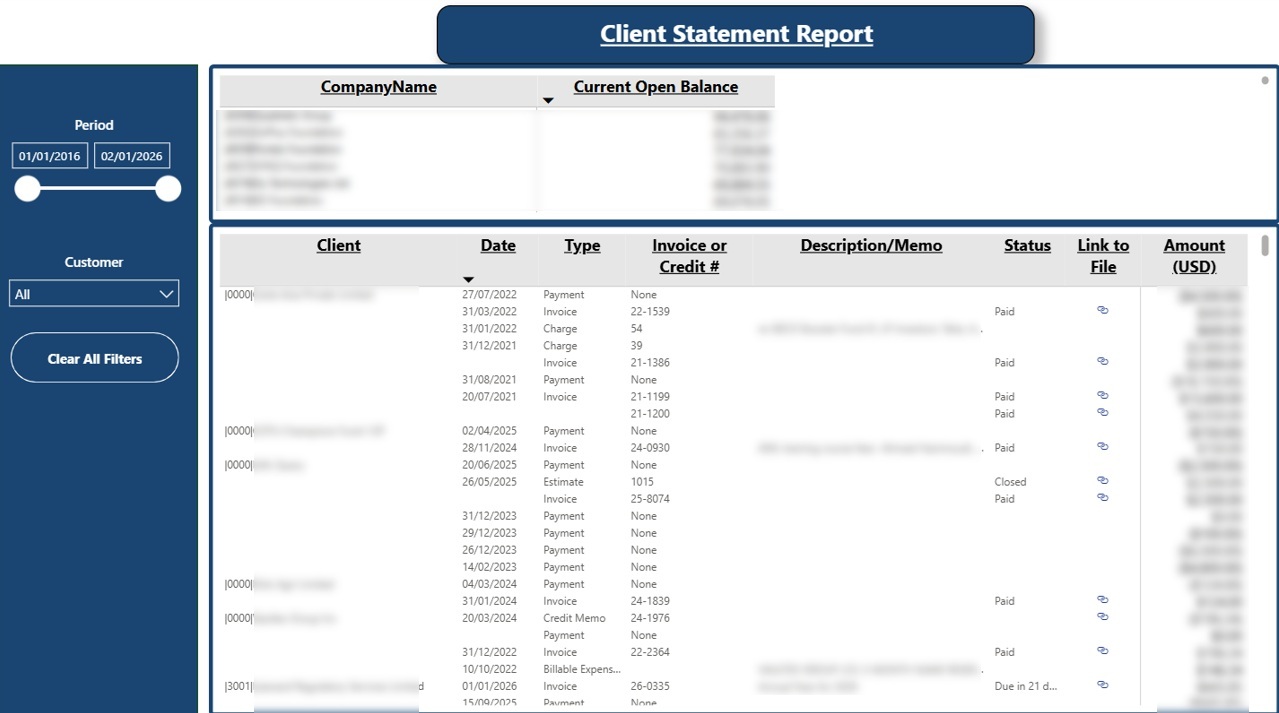
We helped one of our clients out by setting up a Power BI financial dashboard that shows the outstanding balance per client and which invoices are still unpaid. Before a client meeting or call, relationship managers have a look at this dashboard, and if there are any overdue invoices, they can mention them naturally in the conversation. In practice, this has led to invoices being paid a lot more promptly because it’s coming from someone the client already has a relationship with.
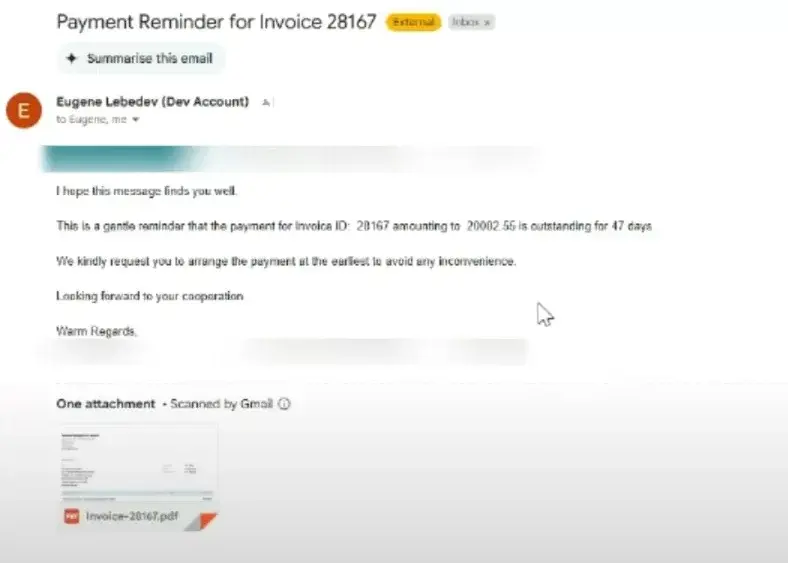
We also set up an Account Receivables automation to scan QuickBooks Online for any overdue invoices and send out automated reminder emails, but we found that sending these emails straight to customers isn’t as effective as routing them internally to relationship managers first.
The reason is that clients are more likely to respond to a personalised payment request from someone they know, than a generic automated email. So a lot of businesses now use automation to identify overdue invoices and send them to internal account managers instead, while keeping the client communication more personal and relationship-driven.
Still a lot of finance teams are still processing supplier invoices manually. They arrive by email, someone downloads the PDF, extracts the info by hand and then enters it into the accounting system. As invoice volumes grow, this process becomes really time-consuming and increases the risk of data entry errors.
To automate this workflow, we set up Power Automate flow where employees can just forward supplier invoices to a dedicated inbox. Suppliers can also send their invoice PDFs straight to this email address.
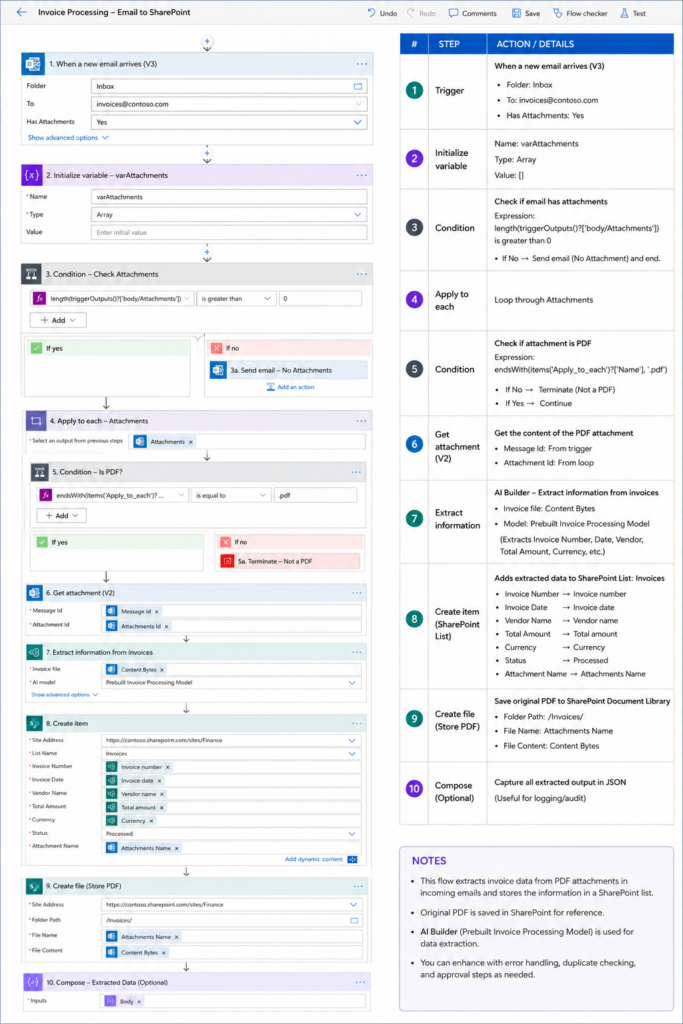
Using Power Automate and AI Builder, we then automatically pull the key information from the invoices, including the supplier name, invoice amount, VAT amount, invoice date, payment due date, and invoice number. Once we have that info, we automatically insert it into accounting systems like QuickBooks Online or Xero.
In one of our use cases, we use Power Automate AI Builder for OCR and invoice recognition. AI Builder learns the layout and structure of supplier invoices, which means we usually create a dedicated extraction flow for each supplier or invoice type.
In practice, these projects usually start by collecting invoices from the company’s main suppliers and building automation flows for those layouts first. As new suppliers come on board, we quickly create additional AI Builder flows to automate those invoice formats, too.
This approach lets businesses gradually automate a bigger and bigger percentage of their accounts payable process, while reducing manual invoice entry work and improving accuracy.
Bank reconciliations are another finance process that we can heavily automate. Still, a lot of finance teams are manually checking bank transactions against invoices and payments in accounting systems, which becomes really time-consuming as transaction volumes grow.
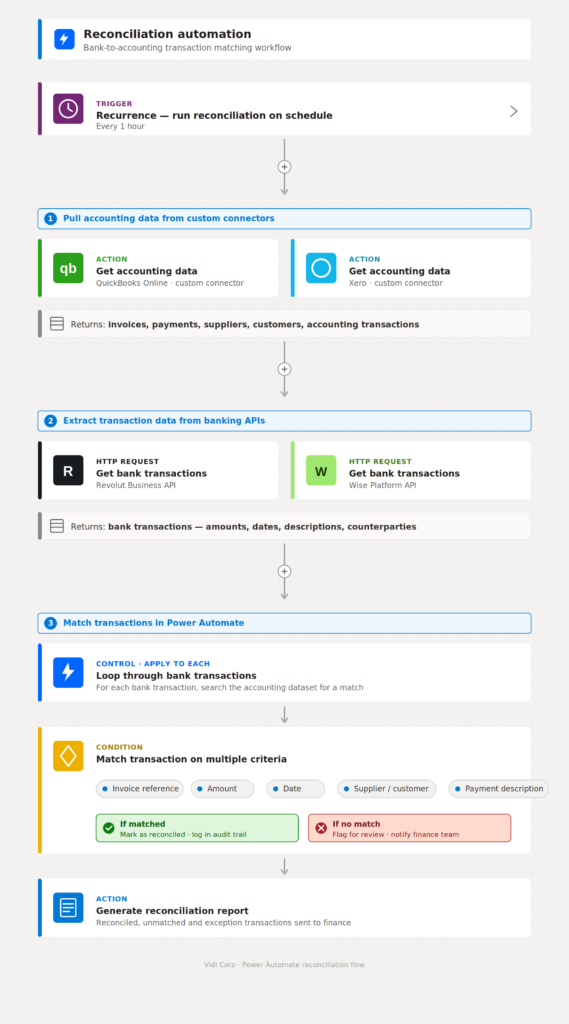
The reconciliation automations we set up as part of our RPA managed services usually work like this – we automatically pull accounting data from systems like QuickBooks Online and Xero using our own custom data connectors. This lets us see invoices, payments, suppliers, customers and accounting transactions in real time.
The next step is extracting transaction data straight from banking platforms. Modern banks like Revolut and Wise give us access to their APIs, which let us automatically pull bank transactions into the automation workflow.
Once we have both datasets, Power Automate workflows can automatically match transactions between the bank and the accounting platform based on invoice refs, amounts, dates, supplier or customer names and payment descriptions.
This really reduces the need for manual reconciliation work, while improving accuracy and visibility into unreconciled transactions. Finance teams can then focus only on the exceptions that need investigating, rather than reviewing every payment individually.
Automating finance workflows helps businesses cut down on manual work, improve data reporting accuracy and create more scalable finance operations. Instead of spending time on repetitive administration, finance teams can focus more on analysis, forecasting and strategic decision-making.
One of the biggest pluses of automating your financial operations is the huge time-saving potential. Tasks such as creating invoices, entering accounts payable, reconciliations, and monthly reporting can gobble up hundreds of hours every month when handled manually. Automation spells huge relief by stripping out the repetitive data entry and spreadsheet drudgery.
Automation also pays off in terms of cash flow management. Faster invoice creation and more regular follow-ups on outstanding invoices means businesses can collect payments more quickly. And improved visibility into receivables & bank balances helps finance teams sniff out potential cash flow risks before they blow up.
Another major benefit is the reduced likelihood of errors – an all-too-common occurrence with manual finance processes that involve copying data between systems, spreadsheets & emails. Automated workflows reduce these risks by grabbing data directly from source systems such as accounting platforms & banks.
Finance automation also helps with operational scalability. As businesses grow, transactions pile up fast but finance headcount doesn’t always keep up the same pace. Automated workflows let finance teams support more customers, suppliers and transactions without overloading themselves with admin work.
For accounting firms and outsourced finance providers, this gives them a real competitive edge. By automating reporting, reconciliations & invoice processing, they can handle more clients with smaller teams and produce faster, more consistent service.
And finally, automation gives you better visibility across the business. Real-time dashboards and automated reporting mean management teams can keep an eye on financial performance 24/7, rather than waiting for month-end reports to roll in. This leads to faster decision-making and earlier identification of operational or financial problems.
When businesses start exploring finance automation, they usually come across two technologies: Robotic Process Automation (RPA) and AI agents. While both automate work, they solve very different types of problems.
RPA is best suited for structured, rules-based workflows. It sticks to a plan, doing the same steps over & over, and works best when the process is predictable and doesn’t change much. In finance, RPA is often used for tasks such as:
For example, a company getting supplier invoices in a standard format can use an RPA workflow to extract the data, check it and plug it into QuickBooks or Xero automatically.
AI agents on the other hand are more flexible and are designed for workflows that involve interpretation, reasoning or decision-making. Instead of following a set of rules, AI agents can take the context into account, summarise complex information and adapt to new or changing circumstances.
In finance, AI agents are increasingly used for tasks such as:
For instance, an AI agent could review supplier emails, figure out whether they relate to invoicing, payment disputes or account changes, and send them off to the right workflow automatically.
In practice, most finance automation projects still rely on RPA because finance operations tend to be quite structured and process-driven. Tasks like reconciliations, invoice approvals and reporting automation are generally more reliable and easier to control using rule-based workflows.
However, AI agents become super valuable when finance teams deal with dodgy documents, inconsistent communication or workflows that require interpretation rather than just following a set of rules.
In many cases, the most effective solution is to use a combination of both technologies. RPA handles the structured operational bits and AI agents assist with interpreting documents, summarising information or making workflow recommendations.
The automations we’ve talked about so far are only a fraction of what finance teams handle. Finance covers loads more repetitive tasks that can be automated using the same approach. Below are the steps to follow if you want to automate other processes in your finance department.
Start by working out every single step in the process from start to finish. A process map shows where work flows smoothly and where it involves a bit of judgment or interpretation.
This exercise helps you figure out whether the process is entirely rule-based or has a bit of subjectivity in there. Fully rule-based steps can be handled by standard automation. Tasks that involve some interpretation are where you’d introduce AI into the workflow.
Work out how much time and money the process consumes when run manually. This number tells you whether automation is worth the investment or whether the current setup is okay.
Two types of processes usually justify automation. The first is any process that takes ages to do on a regular basis. The second is any process where a single mistake has serious consequences, such as losing a client or blowing a regulatory deadline.
Our RPA consultants develop finance automations on the Microsoft Power Platform, using Power Apps, Power Automate, and Power BI. These tools are super low-code, which means automations get built faster than if you wrote custom code from scratch.
They also fit into the kind of licensing that most companies already have . Places that run on Microsoft office are often already covered for Power Apps, Power Automate, and Power BI because their existing licenses cover these tools at no extra cost – which is a big plus for anyone trying to get an automation project off the ground.
Every single automation needs to have a couple of key things – a trigger and an action. The trigger is what gets the ball rolling – that could be some action that gets taken elsewhere in a system, a new record getting created, or a simple timer set to go off at a certain time.
The action is basically what happens next – and that’s everything from taking some data and changing it up, to moving data around between different systems, generating reports or sending out notifications. Most of the finance types of automations I come across are made up of several actions all chained together to get the job done from start to finish.
Set up some automatic alerts that let you know right away if the process starts to go wrong or behaves like it shouldn’t. That way you can catch any problems before they start to cause more issues downstream or impact any reporting deadlines.
Keeping an eye on how the automation is doing over time is also a good way to make sure that things keep working as they should – especially as the business itself starts to change. You start to see where the logic might need to get tweaked.
Automation of finance processes is a great way to get rid of some of that manual work, improve the accuracy of your reports, speed up your cash collection and make your whole operation run smoother and more efficiently. Whether its automated reporting and invoice generation, or accounts payable processing and reconciliations – there are a lot of finance tasks that can be made a whole lot easier with the help of modern automation tools.
At Vidi Corp, we build custom finance automations using the Microsoft Power Platform, which includes Power BI, Power Automate, Power Apps, and AI Builder. If you need help with reporting, invoice workflows, reconciliations or a full-blown end-to-end finance process automation that’s tailored to your business, then our team is here to help.
Get in touch with us if you’d like to get some help automating your finance workflows or building some custom Power Platform solutions for your finance team.


