

Robotic process automation (RPA) in accounting uses software bots to handle repetitive financial work such as invoice processing, reconciliations, and reporting. The bots extract data from your accounting systems, ERPs, and spreadsheets, process it against set rules, and move it where it needs to go, with no manual keying. The result is a faster, more accurate finance function, whether you call it robotic accounting, RPA in finance and accounting, or simply automation.
As an RPA consulting services provider, we have delivered 1,000+ automation solutions to finance teams across a range of industries. That work usually involves connecting accounting systems, automating data flows, and building reporting layers that give real-time visibility into financial performance.
Automation is now well established across finance. In Deloitte’s Automation with Intelligence survey, organisations that have moved beyond piloting intelligent automation reported an average cost reduction of 32%, up from 24% in 2020.
Results from our automation work, verified on our Clutch profile:
- 10 working hours a month saved on reporting
- 75% faster month-end reporting
- A 48-hour process cut to under 5 minutes
- 99.7% data integrity
RPA in accounting, also known as robotic accounting, means building and deploying software robots that take over the repetitive, rules-based tasks in your finance function. These bots work with your existing accounting software, spreadsheets, and databases to move transactions, extract data, and run through workflows without manual input.
In practice, accountants use RPA to process invoices, reconcile bank statements, post journal entries, and prepare financial reports. The bot follows the rules you set, moves data between systems, checks that it lands correctly, and triggers approvals so everything stays consistent.
Unlike full system integrations, which can be costly and disruptive, RPA sits on top of the tools you already run, including your ERP, accounting software, and Excel. That means your team can start automating workflows quickly, without replacing existing systems or overhauling how you work.
There are two main types of RPA, and they differ in how they interact with your systems: cloud (unattended) bots and desktop (attended) bots.
Cloud bots run in a centralised environment, usually hosted in the cloud or on remote servers. They carry out predefined workflows on a schedule or in response to an event, with no one needing to start them manually. Because they connect through APIs, databases, and web services, they are well suited to moving data between cloud applications, processing transactions, and running routine finance work such as reconciliations and report generation. Not relying on a user interface also makes them more scalable and reliable.
Desktop bots run on an individual machine and mimic how a person would use software. They automate tasks by replicating actions such as clicking, typing, and moving between applications. This makes them useful for legacy systems, desktop applications, and any environment where APIs are limited or unavailable. Desktop bots are commonly used for manual accounting tasks like data entry, invoice processing, and extracting information from documents.
In practice, most organisations use both: cloud bots for back-end, system-to-system automation, and desktop bots for front-end tasks that need to interact with a user interface.
Accounting processes are a natural fit for automation because they are repetitive, rules-based, and tied to tight deadlines. Tasks like data entry, reconciliations, and reporting follow a predictable pattern, yet still absorb far more time than they should when done by hand.
RPA removes that manual effort. Bots process transactions, update records, and generate reports far faster than a person can, while reducing the errors that come with manual work. This matters more than ever as finance teams handle growing volumes of data against shorter reporting deadlines. Automating the routine work keeps financial information accurate and up to date.
For accounting firms in particular, RPA is becoming a baseline expectation rather than a nice-to-have. Clients now expect faster turnaround, fewer errors, and scalable processes, and firms that automate can deliver work more efficiently and focus staff on higher-value advisory services. Those still relying on manual processes risk falling behind on speed, consistency, and price.
RPA and AI often come up in the same conversation, but they solve different problems in accounting. RPA automates straightforward, rules-based tasks. AI interprets data, spots patterns, and makes predictions.
RPA is at its best with defined, logical processes: moving data between systems, sorting invoices, or producing reports. It follows the rules and returns the same result every time, which is what makes it reliable for day-to-day accounting.
AI suits the less predictable work that has no fixed rules, such as flagging anomalies in a set of figures, forecasting cash flow, or tracing where a transaction originated.
Most teams get the best results by combining the two. RPA handles the repetitive processing, while AI adds the analysis: predictions that add value and the ability to surface anything unusual. In 2026 this is increasingly delivered through agentic AI, where AI systems can plan and carry out multi-step tasks with limited supervision, taking automation a step beyond fixed rules.
A practical example is Power Automate optical character recognition (OCR). When a supplier invoice arrives as a PDF, the OCR model reads the document and extracts the fields that matter, such as the supplier name, invoice amount, and payment date, then passes them straight into your accounting system. The RPA side moves and files the data, while the AI side is what makes sense of an unstructured PDF that no fixed rule could reliably read.
Another example is building the automation itself with AI. With an agentic tool like Claude Code, instead of assembling each step by hand in Power Automate, you describe the automation you need in plain language and the assistant builds it for you. You might write that you want to read an incoming invoice, pull out the totals, and post them to your accounting system, and Claude Code works through the steps, connects to the systems involved, and returns a working automation you can then adjust and test. For straightforward jobs with a handful of steps, this is often a faster way to get started than building the flow manually.
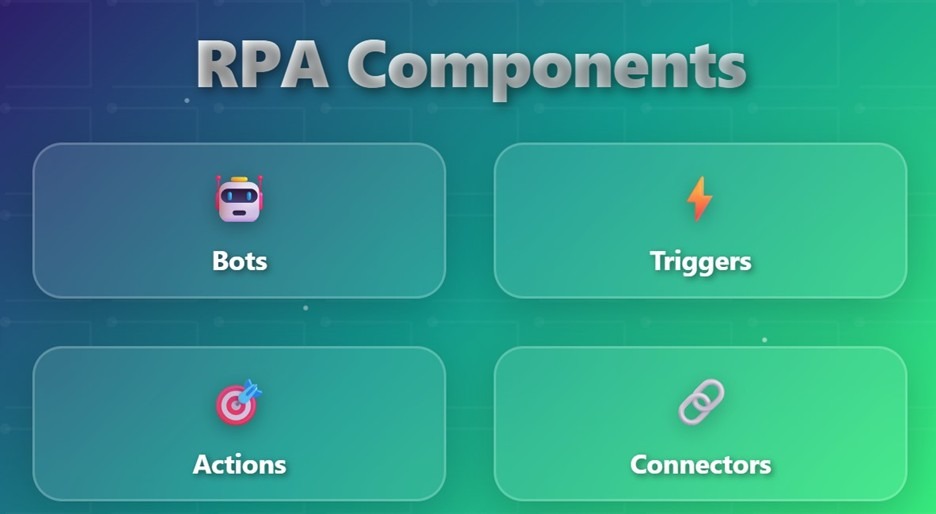
To understand RPA better, let’s break it down into four main parts:
1. Bots
The bots are created using different RPA tools like Power Automate or Zapier. These tools enable you to set up rule-based workflows, which are essentially bots.
Bots can be simple (doing one task) or smart (handling multiple steps and even making basic decisions). These bots consist of a trigger and an action.
2. Triggers
A trigger tells the bot when to start. For example:
Triggers automate the start of a task without someone manually launching it.
3. Actions
Actions are the steps the bot performs. This could be:
A single task may include several actions.
4. Connectors
Data connectors help bots to extract data from different systems or load data in the system. The developers can use the data from the connectors to set up their triggers for launching a workflow. Alternatively, they can use a connector to send the data into a certain system to perform an action, e.g. create an invoice.
Connectors enable the bot to move between tools like Excel, Outlook, SAP, or web portals smoothly, just like a human switching between windows.
Several tools are used to build accounting automations, and the right one depends on your existing stack and how much custom logic you need.
Tool Best for Style Power Automate / Power Apps Microsoft 365 finance teams, Power BI reporting No-code and low-code Claude Code Building simple automations quickly from a plain-language description AI-assisted UiPath Larger enterprise deployments Low-code Blue Prism Regulated, security-heavy environments Low-code Automation Anywhere Broad enterprise automation Low-code Power Automate and Power Apps sit at the centre of the Microsoft Power Platform and are our usual starting point for finance automation. They connect directly to Excel, Outlook, SharePoint, and hundreds of other applications, and they work well alongside Power BI for reporting. For teams already on Microsoft 365, they are the most natural fit.
UiPath, Blue Prism, and Automation Anywhere are established enterprise RPA platforms. They suit larger, more complex deployments and environments with a lot of legacy or desktop-based processes.
Claude Code represents a newer, AI-assisted option, and it works differently from a traditional RPA platform. Instead of dragging and configuring each step in a builder, you describe the automation you want in plain language, for example reading an incoming invoice, extracting the totals, and posting them to your accounting system. It then works through the steps, connects to the systems involved, and returns a working automation. From there you can ask for changes and test as you go, refining it in conversation rather than rebuilding the flow by hand.
This makes it a fast way to stand up simple, self-contained automations, and often quicker than building the same flow manually in Power Automate. It is less suited to long, many-step processes, which are harder to test and verify reliably, so for complex enterprise automations the established RPA platforms are still the safer choice. For now Claude Code sits alongside traditional RPA rather than replacing it, but it is a clear sign of where the tooling is heading.
How to choose: decide first whether you need no-code (business users building simple flows) or low-code (developers handling more complex logic), then pick the tool that fits your existing systems most closely. For most finance teams already using Microsoft, the Power Platform covers the majority of use cases without adding a new vendor.
What You Need to Run RPA
Before you automate anything, a few practical pieces need to be in place:
- Environment: somewhere for the bots to run, typically a virtual machine or a cloud environment for unattended bots.
- Software licences: the RPA platform itself, plus any connectors or add-ons for the systems you are automating.
- Access and permissions: bot accounts with the right level of access to your accounting software, ERP, and email, set up in line with your security policy.
- IT and security: sign-off from IT on where bots run and what they can touch, plus logging and monitoring so you can audit what the bots do.
- In-house or with a partner: decide whether you have the internal capacity to build and maintain automations, or whether it makes more sense to work with an implementation partner.
For accounting firms, the partner question is often the deciding factor. Building an internal RPA capability takes time and specialist skills, so many firms start with a partner to get results quickly, then bring maintenance in-house once the processes are proven.
Robotic process automation in finance and accounting is applied across processes that follow clear rules and require consistent execution. These automations reduce manual workload, improve accuracy, and ensure that financial operations run on time.
RPA automates invoice tracking and follow-ups by identifying overdue invoices and sending reminders automatically. Bots extract invoice data from accounting systems, monitor payment status, and trigger emails based on predefined rules.
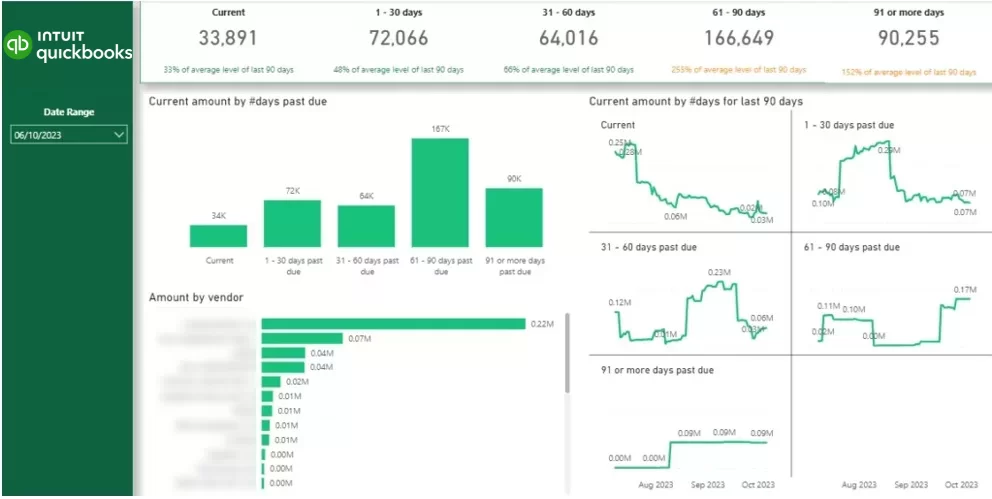
We implemented this for several clients by automating the full follow-up process using QuickBooks connectors, Power Automate, and Power BI dashboards. The solution tracked overdue invoices in real time and sent personalised reminder emails with dynamic data.
The CFO of the client company reported the following measurable benefits in his review after this project:
This case study shows how using RPA in accounting, along with tools like Custom Connectors, Azure, Power Automate, and Power BI, can make work faster and more efficient. It’s not just about saving time, but also about helping accounting teams work smarter, follow rules, and make better decisions using real data.
For the full implementation breakdown, visit the original case
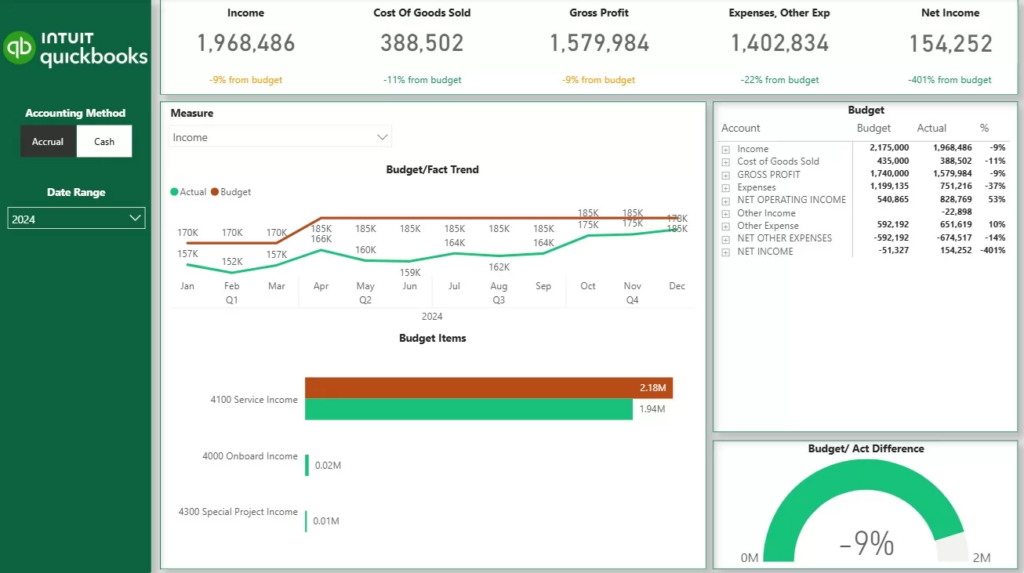
RPA automates data extraction, transformation, and report generation for management reporting. Implementing Power BI for accountants helps to move data from accounting systems, standardise it, and refresh reports automatically on a schedule.
We delivered this for Modern Cannabis by automating their reporting workflow end to end. The system removed manual data preparation and ensured reports were always up to date.
Here are the benefits that their CFO reported in his review:
Here is the step-by-step process for automating financial reports:
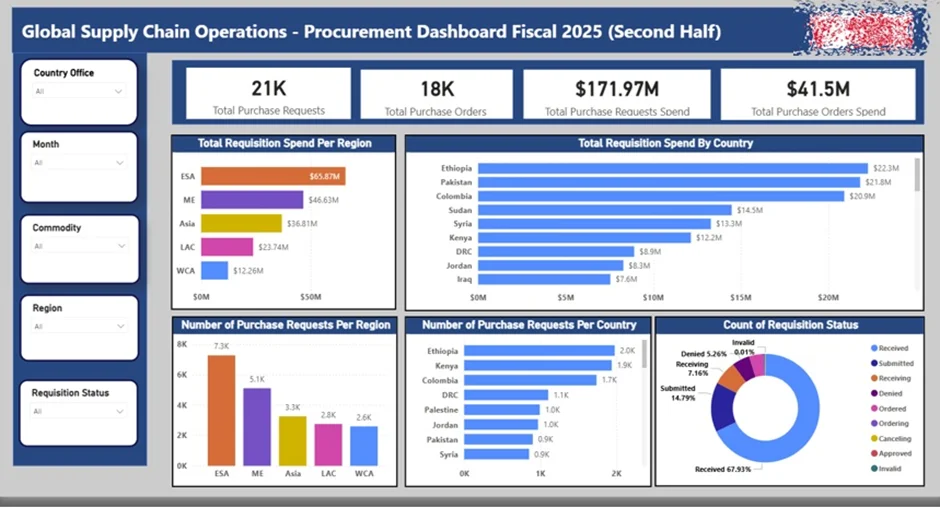
For internal accounting teams, RPA automates invoice processing by extracting data from supplier invoices, validating it against purchase orders, and routing it for approval. This reduces manual data entry and ensures consistent processing across all invoices.
The main benefit is faster invoice approval cycles and fewer errors in financial records. Finance teams can focus on exception handling instead of processing every invoice manually.
Accounting platforms like QuickBooks and Xero already match your bank feed against your ledger, so basic bank reconciliation is largely handled for you. The gap opens up when money arrives through a payment processor or marketplace such as Shopify Payments, Stripe, or Amazon. These pay out in batches, so a single deposit can bundle gross sales, refunds, chargebacks, and processor fees into one figure that never matches the individual orders. QuickBooks sees the lump-sum deposit but cannot break it back down, so someone ends up reconciling it by hand.
RPA closes that gap. Bots pull the detailed payout report from the processor, split the lump-sum deposit back into sales, fees, and refunds, and match each line against the orders and the bank entry, flagging only what does not reconcile.
We built this for an ecommerce client who were reconciling their payment-processor deposits manually each week. The automation now pulls each payout, itemises it, and matches it against their QuickBooks records automatically, leaving the team to review only the exceptions rather than unpick every deposit by hand.
RPA supports tax work by gathering and preparing the data that tax processes depend on. Bots can pull transaction data from your accounting systems, compile the figures needed for tax returns, and collect the supporting documentation for compliance. They can also help identify book-to-tax differences by reconciling accounting records against tax treatments, so the numbers are ready for review rather than assembled by hand each period.
This reduces the manual effort around tax deadlines and lowers the risk of errors in the underlying data.
We built this for an accounting firm who were pulling together client tax data from several systems by hand ahead of each filing period. The automation now gathers the transaction data, compiles the figures, and collects the supporting documents automatically, so their accountants start from a prepared, review-ready position instead of assembling everything manually under deadline.
Payroll Automation
RPA handles routine payroll tasks such as transferring data between HR and accounting systems, validating figures, and preparing payroll reports. This keeps payroll data consistent across systems and removes the manual re-keying that creeps in each cycle.
We implemented this for a professional services client who were moving payroll data between their HR platform and their accounting system by hand every pay run. The automation now transfers and validates the figures across both systems and prepares the payroll reports, so the numbers stay consistent without anyone re-entering them each cycle.
Which Processes Should You Automate First?
Not every process is worth automating first. The best early candidates are high in volume, rules-based, and prone to manual error. The more of these a process ticks, the stronger the case for automating it early:
Automation readiness checkPriority score 0 / 5Not scored yetTick the statements above to see how strong a candidate this process is.
Talk to our automation teamProcesses that tick most of these, such as invoice processing, reconciliations, and recurring reports, usually deliver the fastest return.
A clear plan gives RPA the best chance of success. It does not need to be complicated, just focused.
This keeps RPA implementation straightforward and delivers a strong return over time.
RPA automates the high-volume, rules-based work that slows teams down and introduces errors, so financial reports come out on time and hold up to scrutiny. Here is how that plays out in practice.
Less manual work, faster processing Automating data entry, invoicing, and reporting removes the repetitive tasks that eat into your team’s time. A bot pulls data from one system, checks it, and moves it to another on its own. One client cut manual data consolidation by 95% and brought reporting time down from 48 hours to under 5 minutes.
Fewer errors, better accuracy RPA applies the same rules every time, which sharply reduces the risk of mistakes in financial data. Bots cross-check inputs and keep data standardised. One client reduced data-entry errors by 80% and reached 99.7% data integrity.
Faster reporting, quicker decisions By automating extraction, transformation, and delivery, RPA keeps financial data current and ready to use. One client cut reporting preparation time by more than 50% and made decisions faster as a result.
More efficient operations, lower cost Automating high-volume work frees your team to focus on analysis and planning, and reduces the need to add headcount to keep up. One client saved five working hours a month through faster reporting and automated dashboards.
Real-time financial visibility RPA feeds your reporting tools and dashboards continuously, so you always work from current data. In one case, a client made decisions 40% faster after moving to real-time data and dashboards.
A typical manual workflow looks like this: teams download order or revenue reports from a system like Shopify, clean and reformat the files by hand (removing duplicates, aligning columns, fixing data types), then import the data into QuickBooks or Xero for reconciliation and reporting.
That process creates three recurring problems: human error from manual formatting and copying, delays because entries are only made weekly or monthly, and no real-time visibility into current finances. Together these affect cash flow tracking, billing accuracy, and audit readiness.
RPA removes the manual steps end to end:
The result is accurate data, continuous updates, and decisions based on current figures rather than last month’s.
RPA costs come down to two things: what you pay to build the automation, and what you pay to license the software. On the build side, most bots cost around $1,000 to $5,000 each, with simple automations coming in for as little as a couple of hundred dollars. On the licensing side, costs run from about $10 a month for the most affordable tools up to tens of thousands a year for enterprise platforms. For a full breakdown, see our guide to the cost of RPA implementation.
A few factors move the price within those ranges:
Number of processes and bots: automating one reconciliation is very different from automating an entire month-end close, and a typical project uses several bots.
Integrations: RPA tools come with pre-built connectors, but if an integration has to be built from scratch, that bot moves closer to the $5,000 end.
Number of steps: workflows with a lot of data-transformation steps take longer to build and cost more than simple ones.
Licences: pricing models differ by vendor, per user, per bot, or per credit. Power Automate tends to be the most affordable and predictable (around $15 per user or $150 per bot per month), while UiPath sits at the higher, enterprise end.
To give a sense of what common accounting automations cost to build, here is a rough guide:
Common automation Build cost Extracting data from Outlook emails $200 Sending automatic alerts $400 Extracting data from API or web scraping $1,500 to $4,000 Populating Word/PDF files with data $1,000 to $2,000 Extracting data from PDFs (OCR) $2,000 to $5,000 Automate employee onboarding (e.g. assign Microsoft licences) $2,000 to $3,000
Licensing is the other half of the picture, and it is ongoing. As a guide to the main tools:
Tool Pricing model Cost Power Automate Per user per month $15 Power Automate Per bot per month $150 UiPath Per month $25+ (enterprise use typically $5,000 to $10,000 a year) Zapier Per month, based on number of tasks $20+ Make.com Per month, based on number of credits $9+ Claude Code Subscription or usage-based Varies by plan
The clearest way to size a project is to start with one or two high-value processes, since accounting work like OCR-based invoice capture and report automation sits squarely in these ranges, measure the return, then scale from there. Because RPA cuts operating costs on the processes it runs, the payback period is often under a year.
RPA in accounting is moving from automating individual tasks to automating entire financial workflows end to end. As data volumes grow, the focus is shifting from single processes to complete, connected finance operations.
Real-time finance is a big part of that. With automated pipelines and continuous reporting, teams no longer depend on periodic updates, which supports faster, more proactive decisions. Cloud-based systems and API integrations are making automation easier to scale, letting businesses connect multiple systems and maintain a single source of truth without rebuilding their infrastructure.
As more of the routine work is automated, the role of accounting teams continues to shift toward analysis, planning, and strategic input, with RPA as the foundation for a leaner, more data-driven finance function.
RPA services allow accounting teams to replace manual, time-consuming workflows with automated processes that improve accuracy, speed, and visibility. By automating core tasks such as data extraction, reconciliations, and reporting, businesses can ensure that financial data is always up to date and ready for decision-making.
The examples in this article show that RPA is not just about saving time. It helps build structured, reliable accounting processes that scale with your business and support more efficient financial operations.If you are looking to automate your accounting workflows, we can help you design and implement a solution tailored to your systems and processes. Contact us to discuss your requirements and explore how RPA services can improve your finance function!
RPA in accounting is the use of software bots to automate repetitive, rules-based finance tasks such as invoice processing, reconciliations, and reporting. The bots move and check data across your existing systems, so the work is done accurately and without manual input.
Cost depends on how many processes you automate, the licences involved, and whether you build in-house or use a managed service. A single automation is a small project, while automating a full finance workflow is a larger investment that pays back through time savings and fewer errors. Starting with one or two high-value processes is the best way to gauge return.
No. RPA takes over repetitive processing, not judgement. It frees accountants from manual work so they can focus on analysis, advisory, and decision-making, which is where their expertise adds the most value.
Yes. RPA can gather transaction data, compile figures for tax returns, collect compliance documentation, and reconcile records to highlight book-to-tax differences, which reduces manual effort around tax deadlines.
Common tools include Microsoft Power Automate and Power Apps, which work well alongside Power BI, and enterprise platforms such as UiPath, Blue Prism, and Automation Anywhere. The right choice depends on your existing systems and how much custom logic you need.


