
Hubspot

Azure SQL Server
Move your HubSpot data into a secure, structured SQL database that your entire organization can use. Vidi Corp’s HubSpot SQL integration automates data extraction, organizes CRM records into analysis-ready tables and keeps your database refreshed without repetitive CSV exports.
Centralize HubSpot Data in One SQL Database
Bring critical CRM records into a consistent relational structure instead of relying on disconnected exports and individual HubSpot reports. Sales, marketing, finance and operations teams can work from the same governed dataset while continuing to use their preferred reporting tools.
Automate Data Extraction and Refreshes
Scheduled and incremental data loads keep your SQL tables current without requiring someone to export, clean and import files. We design the refresh process around your data volumes, reporting deadlines and HubSpot API allowances.
Build Flexible Reports Without HubSpot Reporting Constraints
Query HubSpot data using SQL, build reusable reporting views and create calculations that span multiple objects and systems. Your analysts can develop reporting logic once and use it across Power BI, Tableau, Excel, Microsoft Fabric or internal applications.
Preserve Data for Historical Analysis
Maintain a controlled SQL history of important CRM records, properties and pipeline changes based on the agreed integration design. This supports longer-term analysis of conversion trends, lifecycle movement, sales performance and customer behavior.
Improve Data Governance and Access Control
A SQL-based architecture gives your organization greater control over who can query, transform and consume HubSpot data. When Azure SQL is selected, security options can include encrypted connections, transparent data encryption, network controls and Microsoft Entra authentication.
Use our HubSpot Power BI Connector to turn raw customer data into insights you can act on, so you make better decisions and give your business room to grow.
Learn more about our connector below:






Thanks to Vidi Corp LTD’s work, we saved five hours per month and were able to refresh their report more often. Ultimately, the team went the extra mile to deliver a quality solution, and internal stakeholders were impressed with their ability to understand requirements quickly.
Lubna Mousa
Senior Global Procurement Manager, Mercy Corps

Vidi-Corp Ltd’s work helped us reduce manual data consolidation tasks across departments by 95% and data-entry errors by 80%. The team’s report generation time dropped from 48 hours to under five minutes
Travis Kelley
Senior Global Procurement Manager, Mercy Corps
The solution they offer reduced our report load time from 20-30 seconds to less than five seconds and increased report usage by 25%. The team offered effective project management, delivering items on time.
Paul Das
CEO, ProFundCom
Our no-code solution pulls your data from the HubSpot API and lands it in an Azure SQL Server database. It stays reliable even with large datasets, and because the data sits in Azure, you get the freedom to apply your own advanced security controls.

Select Database
Select which database you want to load the data to. Go to the install tab. If you have your own SQL database, go to the install menu and enter the details (server name, database name, schema name, username and password. For an explanation of how to create a database on Azure, see this video.

Connect your HubSpot Account
Click the “connect to HubSpot ” button and authenticate. After this, wait for your data to load for 10-20 min, depending on your data size. You can monitor the progress on the “refresh status” tab. Once every table there reaches 100% the data is ready to use.

Send Database Connection String
Click “send database connection string” on the install tab. Our system will send you an email to your registered email address with your connection details.
You can copy details from the email and insert them into SQL Server Management Studio.
Import your HubSpot data into any destination using our connector.
Our HubSpot Power BI connector gathers data in a convenient format, which can save you countless hours in data integration work. You will receive tables such as:
Additional customisations are available upon request.
$1000 per year

14 days free trial

Unlimited number of HubSpot accounts

Unlimited Customer Support
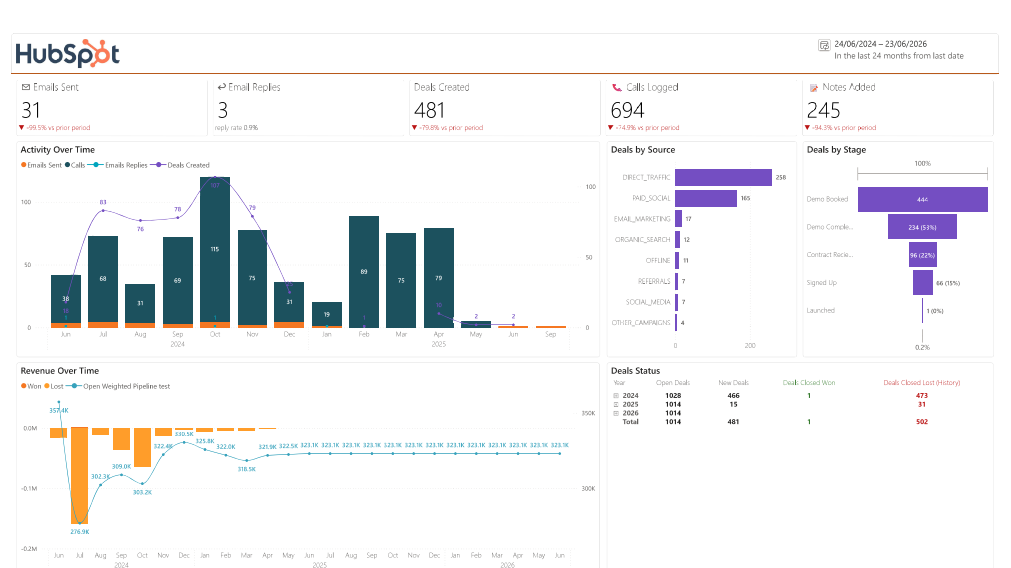
Overview Dashboard
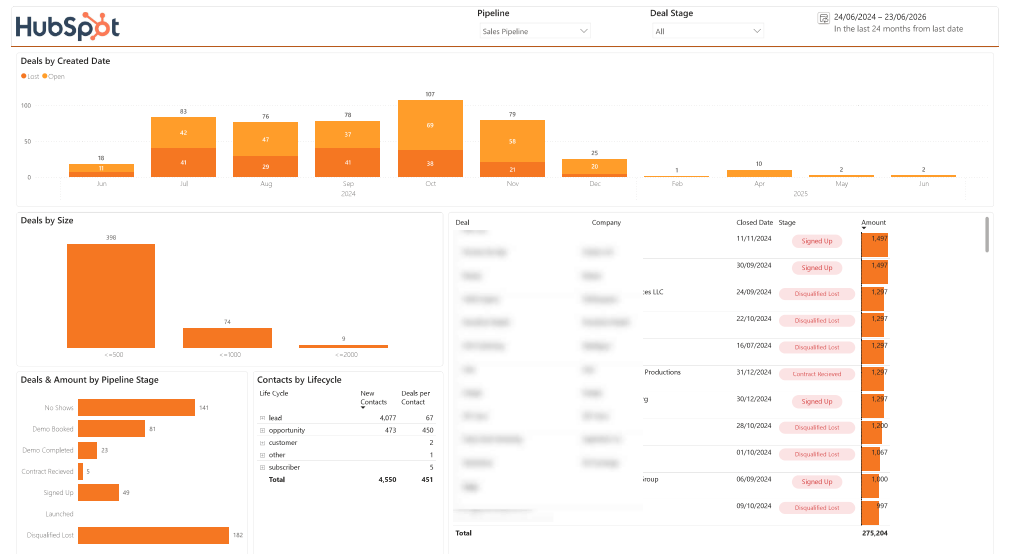
Pipeline Velocity
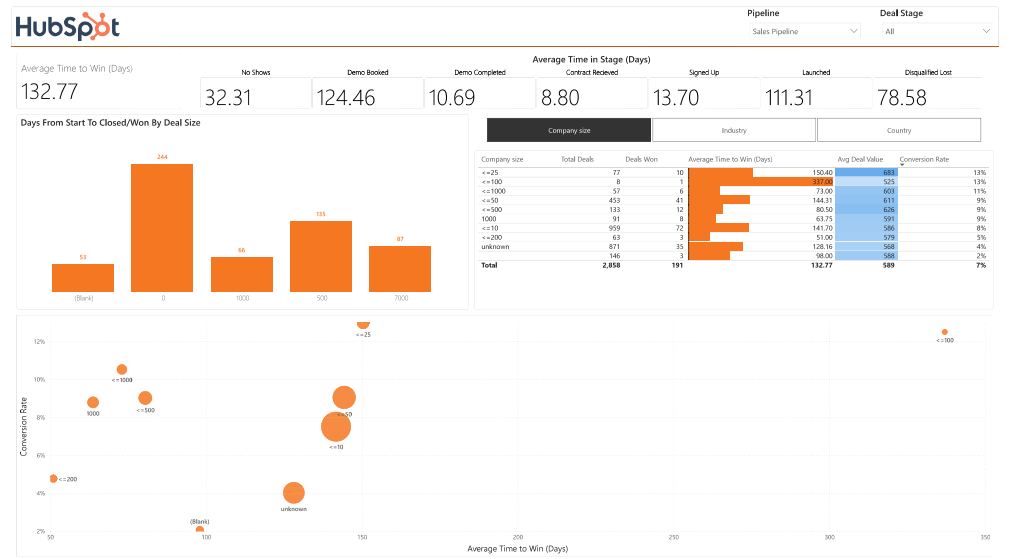
Current Pipeline
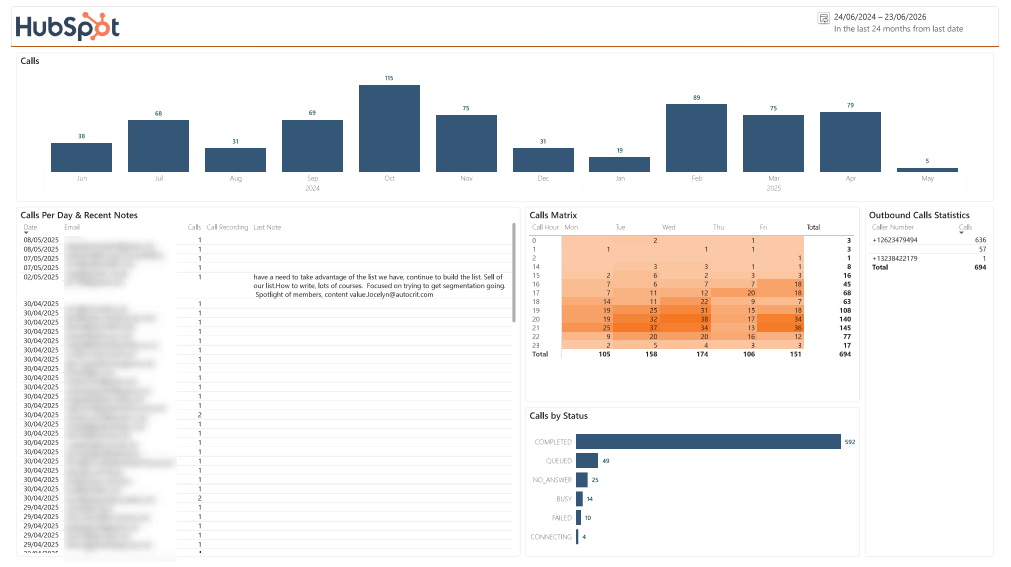
Call Reporting
HubSpot SQL integration is an automated connection that transfers approved HubSpot CRM data into a relational SQL database. The integration extracts records through HubSpot’s APIs, maps them into structured tables and refreshes the data according to an agreed schedule.
This gives your organization a flexible, query-ready copy of HubSpot data for reporting, analysis, automation and application development.
Yes. Vidi Corp can design a HubSpot to SQL Server integration for Microsoft SQL Server environments, subject to network access, security requirements and infrastructure review.
We first assess where the database is hosted, how users and applications will connect, and whether additional gateway or network configuration is required.
Yes. Azure SQL is a strong option for organizations using Microsoft cloud analytics and reporting tools. A HubSpot Azure SQL integration can provide a managed relational layer for Power BI, Microsoft Fabric, Excel and custom applications.
The database can be configured with the appropriate authentication, firewall, encryption and access-control settings for your environment.
Common objects include contacts, companies, deals, owners, pipelines, activities, tasks, calls, meetings and tickets. Products, line items, forms, selected marketing information and other objects can also be assessed.
Final availability depends on your HubSpot subscription, enabled products, account permissions, API scopes and integration requirements.