


Stripe


Azure SQL Server

Power BI
The Stripe Power BI integration by Vidi Corp pulls your payment data into Power BI automatically, so you can analyse Daily Transactions, Gross Revenue, Average Order Value, MRR and more without exporting a single CSV.

Listed on the official Stripe App Marketplace, with Stripe’s technical and security review passed.
Ready to set up your Stripe Power BI integration? Start your 14-day free trial and see your own numbers in the dashboards, or get in touch if you would like a walkthrough first.
Learn more about our connector below:






Our connector handles the Stripe ETL for you, extracting data into Azure SQL Server in a very convenient format and saving you dozens of hours in data blending efforts. Because your data sits in a proper SQL database rather than a feed, you can also query it directly or push it to other tools. You will get tables like:
Additional customisations are available upon request.
$750 per year

14 days free trial

Unlimited number of Stripe accounts

Unlimited Customer Support
Our connector moves your Stripe data into an Azure SQL database, and Power BI reads it from there. Here is how the setup works from start to finish:
Register an account
Open the Vidi Corp connector portal, and register an account with your email
Select Database
Next, decide where your data should end up. Open the Install tab and select your database. Running your own SQL database? Untick “Use Vidi Database” and pop in your connection details: server name, database name, schema name, username and password. If Azure isn’t your thing or you’d rather skip the technical setup, simply tick “Use Vidi Database” and let us handle it. Within a couple of minutes, our system will create a database on our Azure account and set up all the underlying tables for you.
Connect your Stripe Account
Click the “add new company ” button and authenticate. After this wait for your data to load for 10-20 min, depending on your data size. You can monitor the progress on the “refresh status” tab. Once every table there reaches 100% the data is ready to use.

Send Database Connection String
Click “send database connection string” on the install tab. Our system will send you an email to your registered email address with your connection details.

Connect to Your Database
Your Customers, Charges, Refunds, Subscriptions, Invoices and other tables land in a clean, ready-to-query data model in Azure SQL Server
You get a free dashboard when you purchase our connector, which takes care of your core Stripe reporting from day one. Customers avoid the trial-and-error of finding the right setup because they get a ready-made template and just make their numbers match, saving roughly 20 to 40 hours of development work
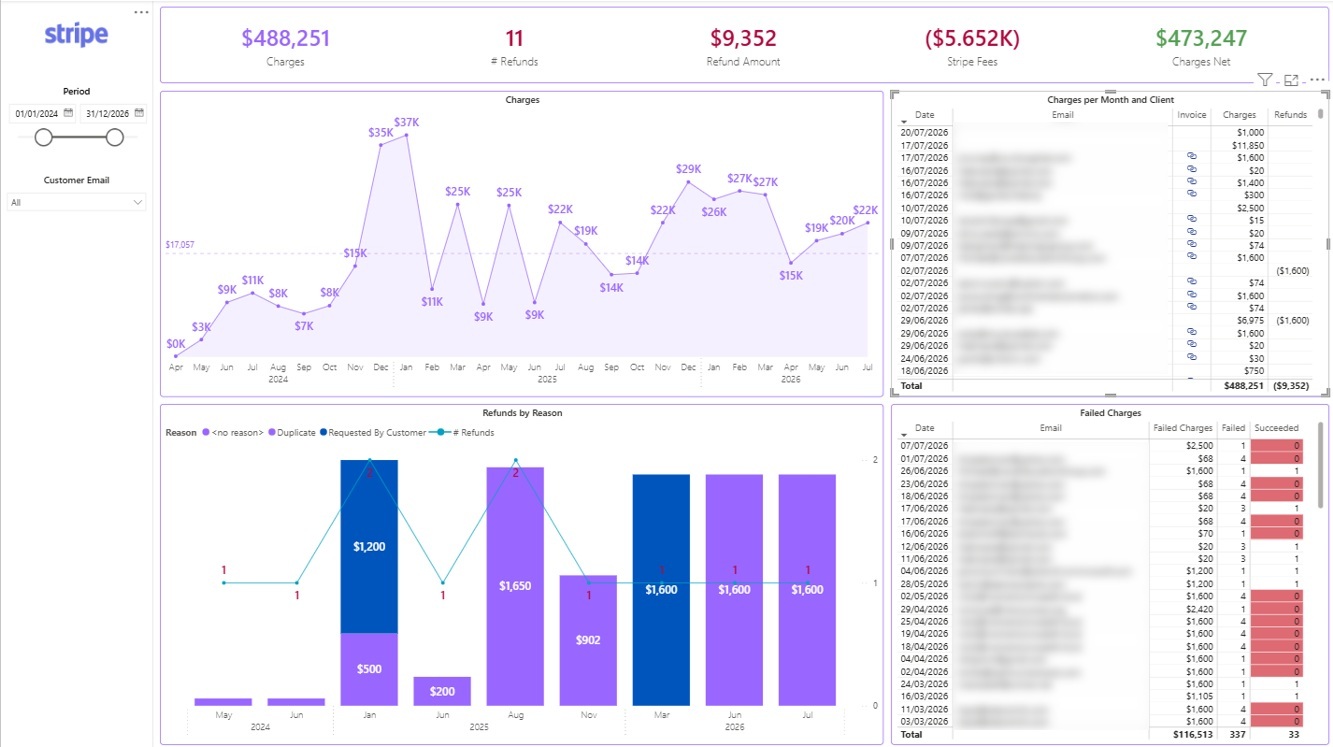
Power BI Stripe Overview Dashboard
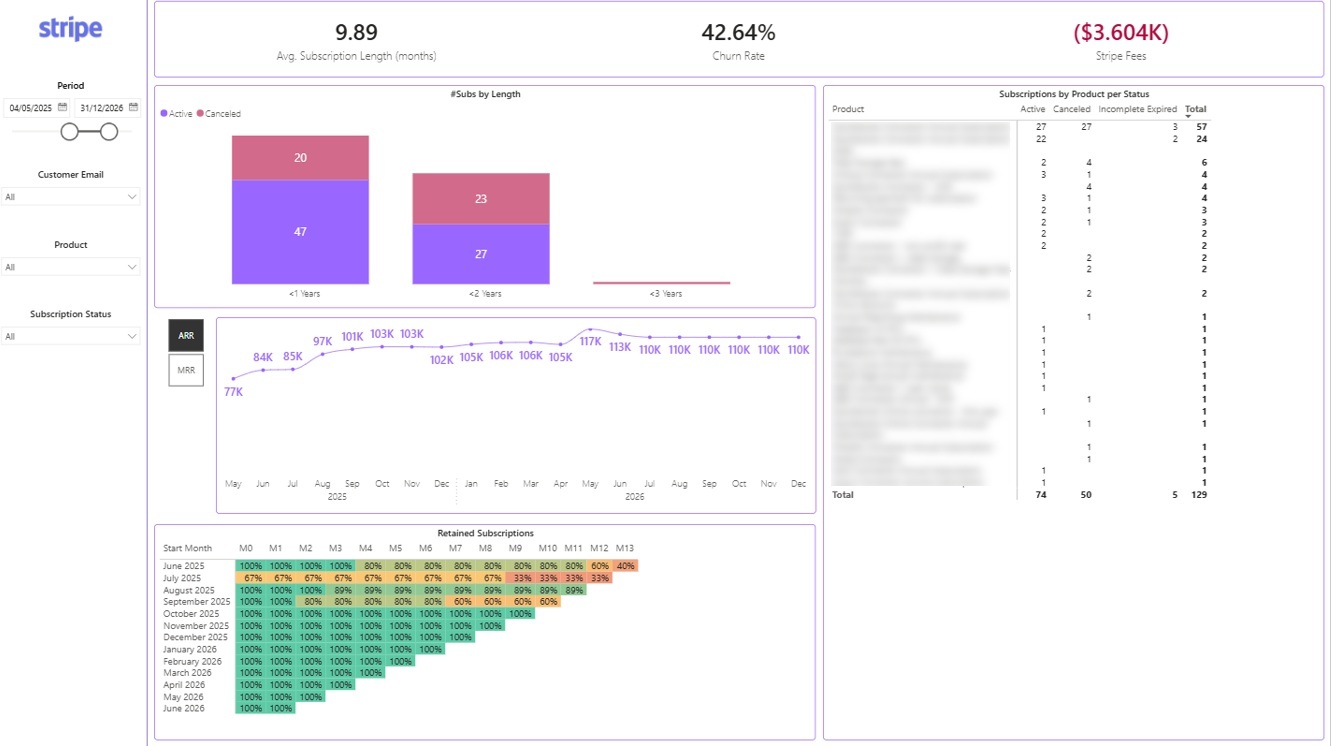
Power BI Stripe Retention Dashboard
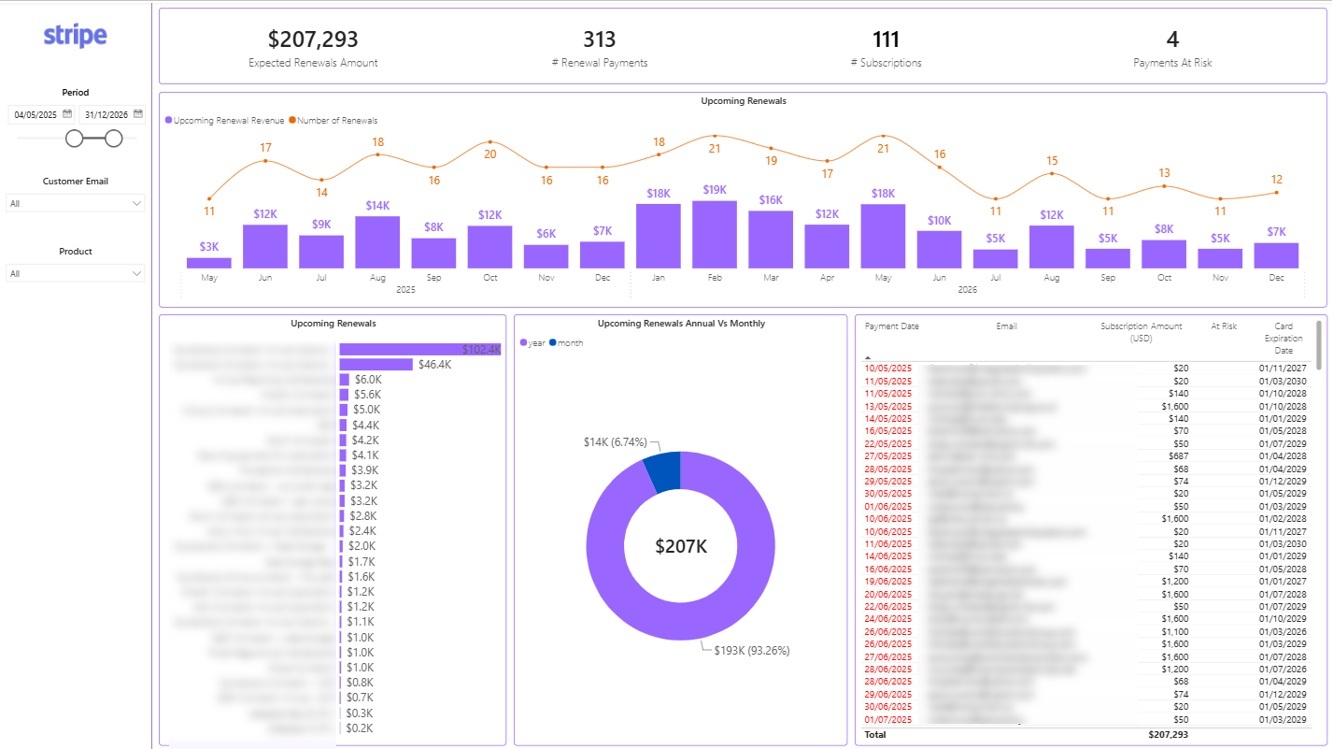
Power BI Stripe Renewals Dashboard

Challenge

E-commerce Industry
The client struggled to track their sales performance and optimize their marketing strategies. They needed a way to combine GA4 data with Stripe.
Solution

They used our Stripe Power BI integration to automatically extract the data and analyse daily purchase conversion rates.

Challenge
SaaS (Software-as-a-Service) Industry
SaaS companies often use Stripe to manage recurring billing and subscription plans. However, monitoring subscription lifecycle events, customer churn, MRR (Monthly Recurring Revenue), and failed payments is challenging when data isn’t centralized for reporting and forecasting.
Solution
Our Stripe connector centralizes subscription data into BI tools to provide SaaS companies with insights on MRR, ARR (Annual Recurring Revenue), churn rates, and payment success rates. This helps businesses forecast revenue, optimize subscription plans, and proactively address churn and payment failures.

Challenge
Nonprofit Organizations
Nonprofits that use Stripe to manage donations often face difficulties tracking donor patterns, campaign performance, and recurring donation schedules. Without consolidated reporting, they struggle to optimize fundraising efforts and donor engagement.
Solution
Our Stripe connector extracts donation data and integrates it with BI tools, offering nonprofits insights into donation trends, recurring donor behaviors, and campaign success rates. This helps them optimize donor outreach, increase fundraising effectiveness, and improve transparency for stakeholders.
The team at Vidi has been great to work with! Super responsive to my numerous questions, and even going so far as to help me learn and make small changes on my own.
Chris Ginsbach

Great service and tools worked exactly as expected
Michael Khoury
Great group to work with, understood my needs and helped me design a solution that works
Michael Russell
Your data refreshes automatically on a set schedule, so your Power BI reports stay current without any manual exports. If you need a specific refresh frequency, talk to us and we will see what we can do.
The connector gives you tables for Customers, Balance Transactions, Charges, Refunds, Subscriptions, Subscription Items, Invoices and Payment Methods. That covers everything from daily transaction volume and gross revenue through to MRR, churn and payment success rates. Additional customisations are available on request.
Most customers are up and running the same day. The free dashboard templates mean you skip 20 to 40 hours of report development, because you start from a working design and simply make your numbers match.
The connector costs $750 per year flat. That includes an unlimited number of Stripe accounts, unlimited customer support, the free dashboard templates and a 14 day free trial. There is no per-row pricing and there are no usage tiers.


