

Stripe


Azure SQL Server
Bring your Stripe data into a structured SQL Server database designed for reporting, analytics, automation, and business intelligence. Vidi Corp’s Stripe to SQL Server integrations extract your payment and customer records automatically, organise them into analysis-ready tables, and keep your database refreshed on their own, so you can leave the repetitive CSV exports behind
Maintain structured Stripe data inside SQL Server for historical reporting and longitudinal analysis. Your team can analyze changes in revenue, transaction volume, subscription performance, refund behavior, and customer activity.






Vidi Corp helped us build a centralized relational database connected through APIs and hosted in Microsoft Azure. The solution reduced our manual data consolidation work by 95%, cut report generation time from 48 hours to under five minutes, and reduced data-entry errors by 80%. They understood our requirements in a very short period and delivered just as quickly. They have been a staple to our success.
Travis Kelley
CEO, War Room Operations

Vidi Corp built an automated process that extracts our data and loads it directly into an Azure SQL Server database that we own. The automation saves us around five hours every month and allows us to refresh our reporting more frequently. We can also reuse the extracted data for additional automations and Power BI reports. Their team went the extra mile when the source API created unexpected challenges.
Lubna Mousa
Senior Global Procurement Manager, Mercy Corps
Vidi Corp created automated reports from our SQL Server ERP database, which contained tens of millions of rows and required significant performance optimization. One report identified an opportunity that immediately saved us EUR 50,000 in costs, while other analysis helped uncover opportunities worth EUR 10,000 to EUR 20,000 in monthly recurring revenue. We also removed the need for one full-time analyst position dedicated to maintaining Excel reports. The delivery quality was outstanding.
CFO, Neterra EOOD
CEO, ProFundCom
Our Stripe SQL integration is designed to remove the repetitive development normally required to extract Stripe API data, transform nested records, and load them into relational tables.

Select Database
Select which database you want to load the data to. Go to the install tab. If you have your own SQL database, go to the install menu and enter the details (server name, database name, schema name, username and password. For an explanation of how to create a database on Azure,

Connect your Stripe Account
Click the “Add new company” button and authenticate. After this, wait for your data to load for 10-20 min, depending on your data size. You can monitor the progress on the “refresh status” tab. Once every table there reaches 100% the data is ready to use.

Send Database Connection String
Click “send database connection string” on the install tab. Our system will send you an email to your registered email address with your connection details.
You can copy details from the email and insert them into SQL Server Management Studio.
Import your Stripe data into any destination using our connector.
Our Stripe integration structures commonly used Stripe information into convenient tables that can be queried directly and incorporated into your existing data models.
Additional customisations are available upon request.
$750 per year

14 days free trial

Unlimited number of Stripe accounts

Unlimited Customer Support
You get a free dashboard when you purchase our connector. Customers avoid the trial-and-error of finding the right setup because they get a ready-made template and just make their numbers match, saving roughly 20 to 40 hours of development work.
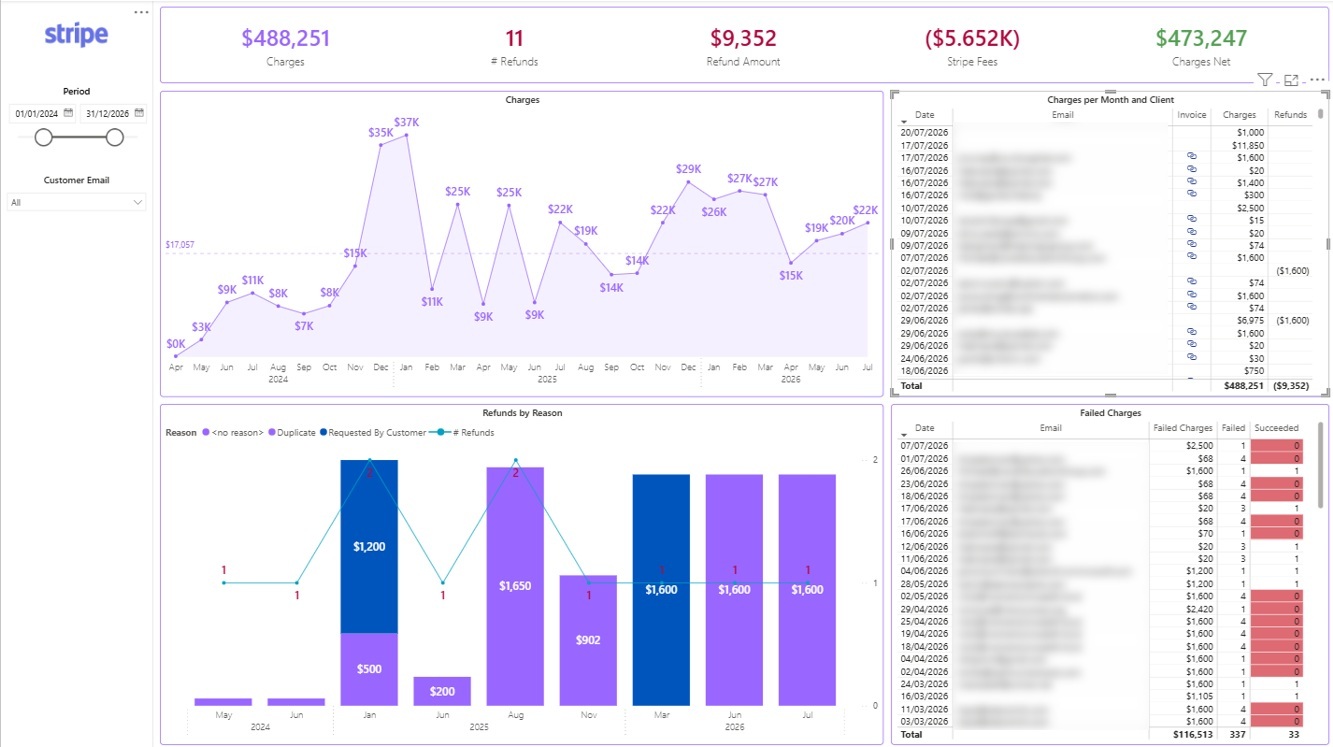
Power BI Stripe Overview Dashboard
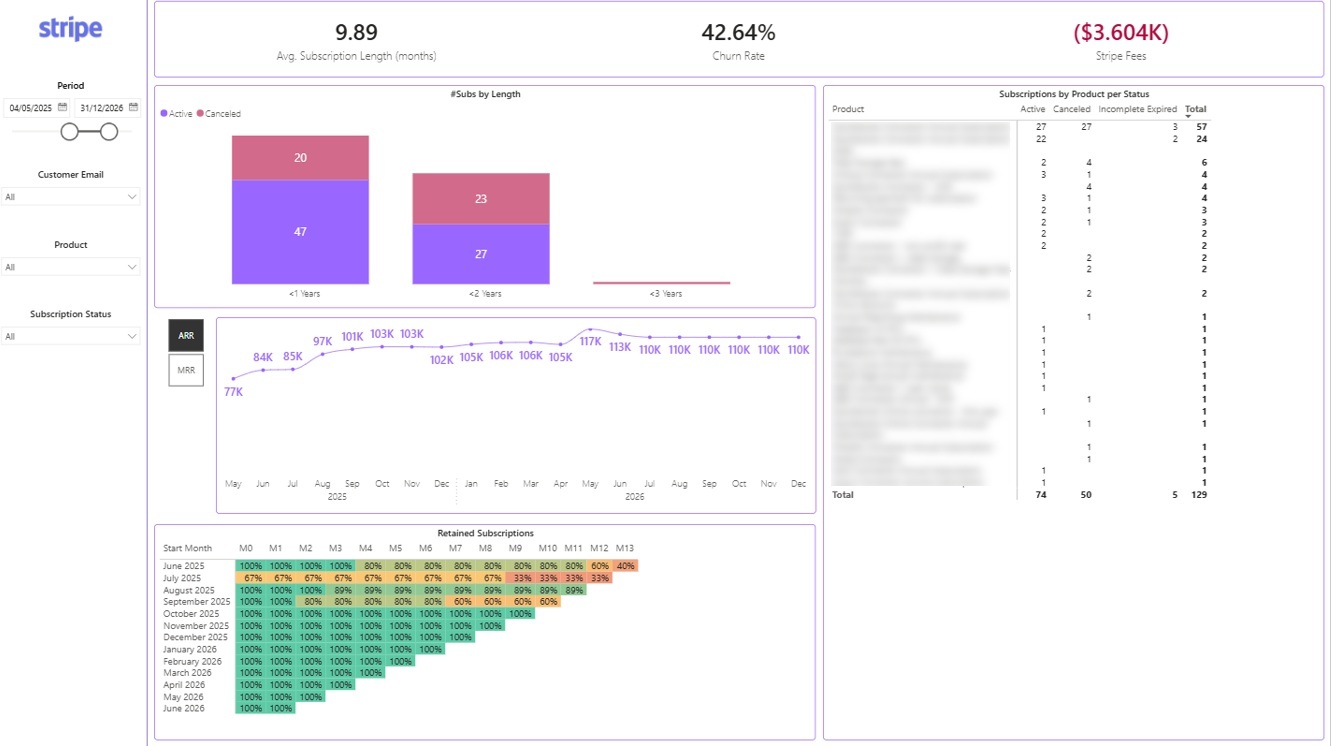
Power BI Stripe Retention Dashboard
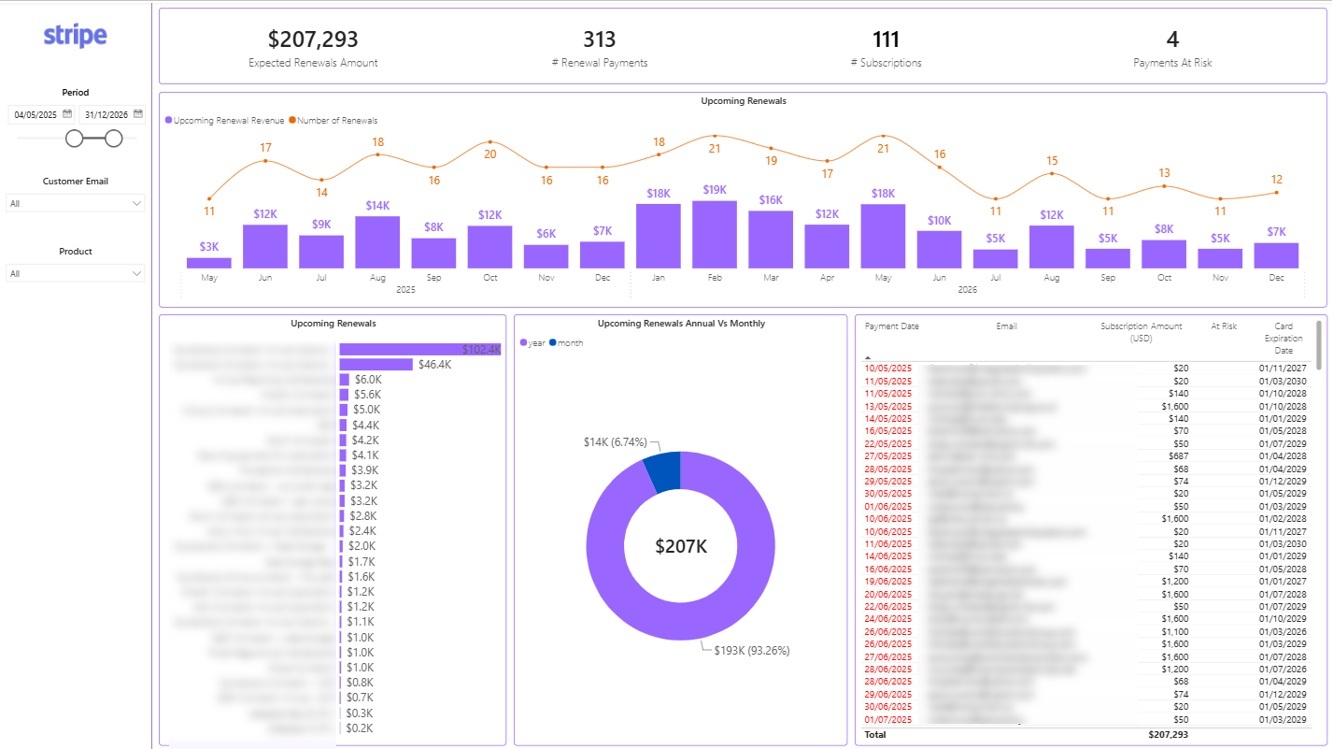
Power BI Stripe Renewals Dashboard
A Stripe SQL Server integration is an automated data pipeline that transfers Stripe information into a Microsoft SQL Server or Azure SQL database.
The integration extracts approved Stripe data, converts it into relational tables, and refreshes those tables according to the required schedule. This gives analysts and applications a query-ready source for reporting, analytics, automation, and data warehousing.
Yes. Stripe data can be extracted through its APIs and loaded into Microsoft SQL Server using an integration layer.
Vidi Corp can design the pipeline around your SQL environment, security requirements, database architecture, reporting use case, and required Stripe objects.
Yes. Azure SQL is particularly useful for organizations already using Microsoft reporting and analytics technology.
Stripe data stored in Azure SQL can support Power BI, Microsoft Fabric, Excel, custom applications, and other downstream analytics workflows.
Common data includes customers, charges, refunds, balance transactions, invoices, subscriptions, payment methods, and subscription items.
The final data model depends on your Stripe configuration, API permissions, reporting requirements, and any additional customization required.
Multiple Stripe accounts can be assessed as part of the integration architecture.
The data model can be designed to preserve account-level information while supporting consolidated reporting where required.