
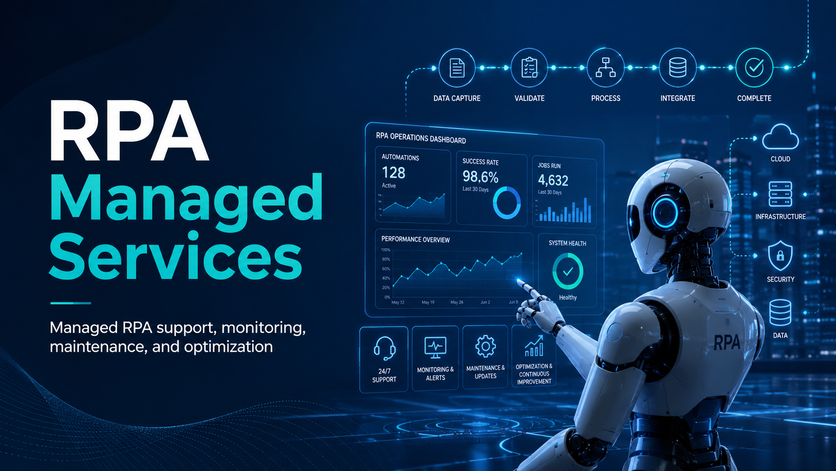
RPA Managed Services help businesses keep their automation programmes reliable, efficient, and scalable after deployment. Instead of leaving bots unmanaged once they go live, a managed service provides ongoing managed RPA support, monitoring, maintenance, and optimization to ensure automations continue to perform as business systems, processes, and requirements change.
With the right RPA managed services partner, organisations can reduce bot downtime, resolve issues faster, improve automation performance, and get more value from platforms such as UiPath, Microsoft Power Automate, and Automation Anywhere. Whether you already have bots in production or are planning to scale automation across departments, managed RPA services give you the technical support, governance, and continuous improvement needed to keep automation delivering measurable business results.
Our RPA developers have helped 600+ clients, including Ray Ban, Dell, and Teleperformance, to automate manual work, eliminate manual errors, and save costs through our various RPA solutions. These solutions deliver significant ROI and help reduce the total cost of ownership for businesses across industries.
In this article, we will discuss everything you should know to get started with RPA managed services and see similar outcomes in your business.
We can’t talk about RPA-managed services without first explaining what RPA is.
RPA, which stands for Robotic Process Automation, is a technology that uses software bots to handle repetitive, rule-based tasks that people normally do on a computer.
These bots click, type, move data, process transactions, and generate reports the same way a human would, but faster and without mistakes. This frees your team to focus on higher-value work that actually requires their judgment.
As seasoned RPA consultants we want to emphasise that RPA is about copying human actions, not human thinking. That is what separates it from its close cousin – AI. Cognitive technologies, such as AI and NLP, are used in intelligent automation to enable more advanced decision-making and end-to-end process automation, going beyond basic RPA capabilities.
RPA managed services involve outsourcing parts or all of your RPA planning, development, and maintenance to a trained third-party team of experts. Instead of trying to hire in-house employees, train staff, or maintain bots on your own, RPA managed services providers take full ownership of the work. They help you with everything RPA, from choosing the right processes to automate, designing and building the bots, setting up the infrastructure, fixing issues, all the way to keeping everything running every day. These capabilities are often delivered as part of broader business process automation services, helping organisations streamline operations end-to-end.
A recent report from Grand View Research revealed that the global RPA market is expected to reach 30 billion dollars by 2030. That means more businesses, especially SMBs, want automation, but they do not want the cost, risk, or long timelines that come with building an in-house RPA team. This, right here, is exactly why RPA managed services are not only the biggest drivers of RPA market expansion globally today but also something you should consider if you’re looking for the most affordable and low-risk way to take your business to the next level with RPA.
Our most common RPA-managed services include data flow automation, system integration, reporting automation, and automatic document creation. These services can be tailored to support different departments within an organization, ensuring scalability and seamless integration across various business units.
This is a non-exhaustive list of our RPA services. If you’re curious about more ways an RPA managed service provider could add value to your business, check out our RPA case studies.
Data flow automation involves moving data from one system to another in real time or on a schedule. This RPA service saves hours of manually copying, pasting, or downloading files every time that the data has to be transferred. These types of solutions are typically designed and maintained by data integration consultants, ensuring reliable data flow across systems.
There are 2 main ways to automate data flow based on our experience in RPA consulting:
One of our clients needed a way to gather product pricing data from 3 million online pages and then identify the lowest one for their own customers. We built a Python scraper that pulled the data automatically, compared prices in real time, and removed the hours of manual checking that their team used to do.
System integration brings together all the tools in your workflow so that actions in one system trigger the next steps in another. This type of RPA managed services eliminates the need for manual data entry or updates across platforms.
For example, B2B companies would usually mark the new deal as “sold” in their CRM when they win new business. As soon as this happens, an RPA bot can create a set of tasks in its project management system and assign them to relevant team members.
System integration helps companies to speed up their processes, standardise them, and save time through automation.
Does your team spend countless hours refreshing Excel management reports? RPA managed services can help you automate this process entirely.
Reporting automation involves automatically extracting data from multiple sources, transforming it to a convenient format, and scheduling automatic data refresh. Automated analytics is usually set up in business intelligence tools like Power BI and Tableau.
For example, we helped DS Smith automate their marketing reports that pull data from 6 Facebook Ads, 7 Google Ads, 14 LinkedIn Ad accounts, and Dynamics CRM. We then built the automated Power BI report that handled the entire workflow hands-off, from pulling the data to refreshing the visuals, which saved them over 30 hours each month and eliminated manual errors.
If you’d like to build an automated dashboard for your organization, get in touch with us today! Our Power BI consultants would be happy to help.
RPA managed services help companies to automatically create Word or PowerPoint documents. Automatic document creation usually involves automatically extracting data from internal systems, transforming it, and inserting it into placeholders inside your documents.
For example, we worked with an engineering consultancy that visited customers to perform audits and record their findings in a tool called iAuditor. Once they collected data and uploaded images, they needed to create an audit report for their clients.
Our Power Automate consultants created an RPA bot that automatically extracts the data from iAuditor, inserts it into Word templates, and sends them to clients. As a result, our client’s organisation saved 80h+ per week, which is equivalent to 2 admin salaries.
Bots can fail for many reasons, including application changes, login issues, broken selectors, missing data, process exceptions, unavailable systems, or changes to business rules. With bot monitoring and incident management, we track automation performance, identify failures quickly, and help resolve issues before they create wider business disruption.
Our monitoring approach helps teams understand which bots are running successfully, which processes need attention, and where recurring errors are affecting productivity. When an incident occurs, we investigate the root cause, prioritise the issue based on business impact, and support the fix, retest, and redeployment process.
This helps reduce downtime, improve automation reliability, and give stakeholders more confidence in the processes handled by RPA.
RPA support and maintenance keeps your bots working as the surrounding business environment changes. Even well-built bots need regular updates when applications are upgraded, interfaces change, credentials expire, workflows are adjusted, or new compliance requirements are introduced.
Our RPA support services include troubleshooting, bug fixes, bot updates, workflow adjustments, regression testing, release support, and documentation updates. We also help maintain automation assets so your internal teams are not left managing fragile bots without the right technical support.
With structured RPA maintenance, your business can extend the life of existing automations, reduce unexpected failures, and avoid losing value from bots that were already built and deployed.
RPA managed services are not only about fixing problems. They also help improve how your bots perform over time. As more data becomes available from live automation runs, it becomes easier to identify bottlenecks, repeated exceptions, slow steps, and opportunities to simplify or redesign workflows.
We review existing automations to find ways to improve speed, accuracy, resilience, and scalability. This may include streamlining bot logic, improving exception handling, reducing manual handoffs, enhancing integrations, or redesigning parts of a process to make the automation more efficient.
Continuous optimization helps your RPA programme deliver stronger results over time, rather than simply maintaining the original version of each bot.
A reliable RPA programme depends on more than the bots themselves. It also requires stable infrastructure, properly configured platforms, secure access, and effective administration across development, testing, and production environments.
Our RPA infrastructure and platform administration services can include environment monitoring, queue management, orchestrator support, bot scheduling, user access management, credential management, licence administration, platform updates, and support for cloud, on-premise, or hybrid RPA setups.
This gives your organisation a stronger operational foundation for automation, helping ensure bots are not only built correctly but also managed securely and efficiently at scale.
Every automation programme needs a clear plan for exceptions. Some exceptions are technical, such as failed logins, missing files, unavailable applications, or system timeouts. Others are business-related, such as incomplete records, invalid data, approval delays, or process variations that require human review.
Our managed RPA services help define, monitor, and improve exception handling so issues are routed, reviewed, and resolved in a controlled way. We help make sure failed transactions do not disappear into queues without ownership, and that business teams have visibility into what needs attention.
Strong exception handling supports business continuity by reducing the risk of stalled processes, missed tasks, and unmanaged automation failures.
Regular reporting helps you understand whether your automation programme is delivering the expected value. Through monthly performance reviews, we help track bot activity, success rates, failures, exceptions, processing volumes, time saved, improvement opportunities, and support trends.
These reviews give business and technology leaders a clearer view of automation health and ROI. They can also reveal which bots need maintenance, which processes should be optimized, and where new automation opportunities may exist.
With consistent reporting and performance reviews, RPA managed services become more than a support function. They become a practical way to improve automation governance, measure results, and scale RPA with greater confidence.
Finance teams use RPA to keep back-office workflows, like invoice approval and updates, running smoothly 24/7. This is especially useful when processes are dependent on email, shared folders and lots of different approval steps.
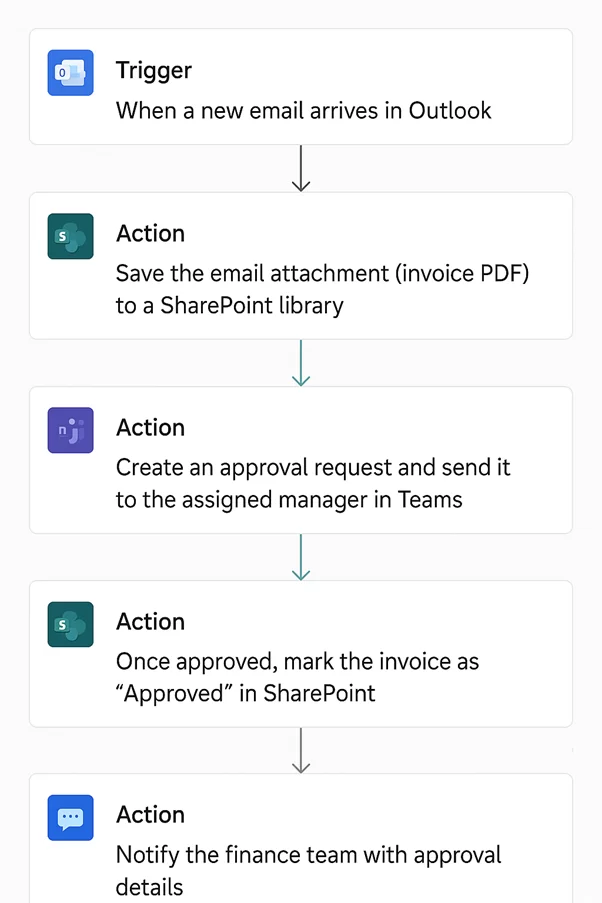
Invoice processing using RPA is the automation of all the tedious tasks involved in handling supplier invoices. This includes capturing invoices from email, storing them, routing them to the right people for approval, and updating records after approval.
Our Power Automate consultants implemented RPA for a finance team that was getting overwhelmed by the manual handling of supplier invoices. Every day, new invoices would land in their inbox, and the team would have to open each one, download the attachment, save it to a shared folder, forward it to the right person, and then manually update the financial system or Excel once it was approved.
We automated this process using Power Automate, SharePoint and Microsoft Teams. Power Automate keeps an eye on a shared invoices mailbox, captures any incoming attachments, and stores them in a SharePoint library with all the relevant details like supplier name and date received. The workflow then sends an approval request in Teams to the right person. Once approved, the financial system or SharePoint list is updated with the invoice details and approval status. If it gets rejected, the finance team gets a notification.
This saved them a heap of time, got approvals done faster, and gave them a centralised place to store invoices – plus digital logs for audit purposes. That all meant they could pay suppliers faster too.
In sales, RPA managed services are often used to handle document-based workflows that just need to get done again and again. This is especially relevant when teams get lots of structured business information in PDFs and need to get it into tracking systems quickly and accurately.
OCR is used to turn printed text from PDFs or scanned documents into digital data. In a managed services context, it lets teams automate recurring document processing without having to manually re-type that text every single day.
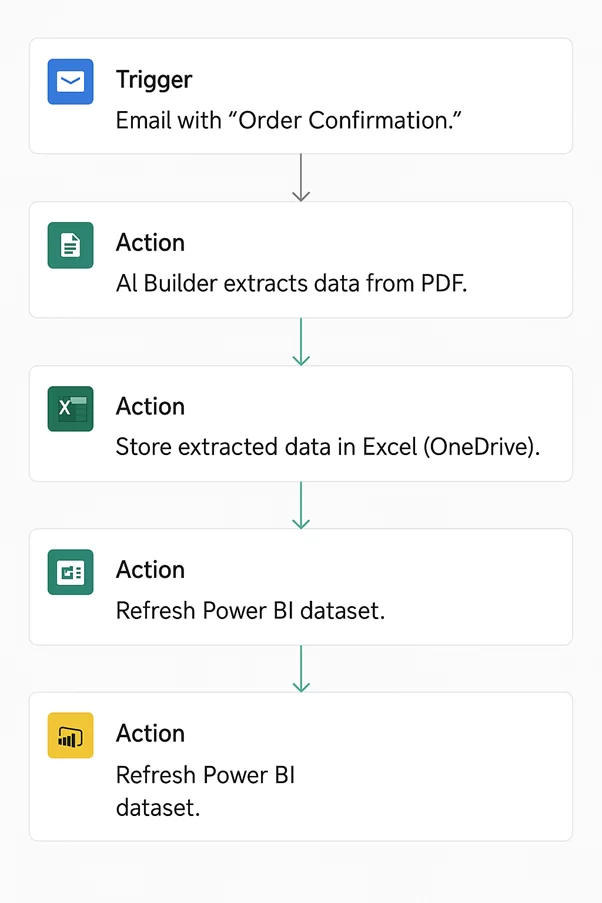
Our team implemented RPA for a sales team that had to deal with customer order confirmations in PDF format. Before that, team members had to open each PDF, manually type in all the customer details, product info, quantities and prices into an Excel tracker – and then get another team member to double-check the data because mistakes happened all the time.
We introduced an automated PDF data extraction solution using Power Automate and AI Builder. The flow keeps an eye on incoming emails for order confirmation PDFs, saves them to SharePoint, and uses AI Builder to extract the details we need. The extracted data is then written into a central Excel file or SharePoint List for sales tracking. The sales team gets a Teams or Outlook notification once the order is logged and all they need to do is review and validate the result.
This saved them loads of time, improved accuracy and got orders processed faster. It also meant the team could focus more on building customer relationships rather than doing data entry.
Customer service teams use RPA managed services to standardise their communication with customers and make sure important follow-up processes happen regularly. This is particularly useful when it comes to collecting feedback after customer interactions.
This example is all about automating customer feedback collection after support tickets are resolved. It eliminates the need for support teams to remember to follow up manually and makes sure feedback gets captured in one place.
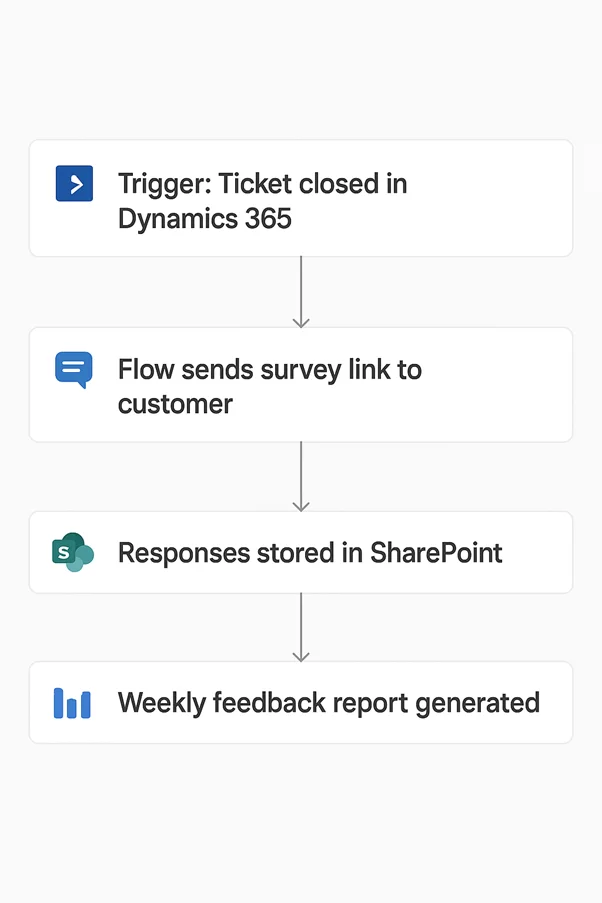
We implemented RPA for a support team that wanted to collect customer feedback after resolving tickets. Before that, team members would have to remember to draft and send survey emails manually. As a result, surveys were sometimes sent late, sent in inconsistent formats, or not sent at all. Responses were then scattered across emails and spreadsheets, making it really hard to analyse.
Our RPA business consultants automated the workflow using Microsoft Forms and Power Automate. We created a customer satisfaction survey in Microsoft Forms. When a support ticket is marked as resolved, Power Automate sends a standardised email with a personalised message and a survey link. Survey responses are then captured automatically in Excel Online or a SharePoint List, and management can view trends through Power BI dashboards.
This meant they could reach out consistently, got a better view of customer feedback, and gave managers a clearer way to analyse satisfaction data.
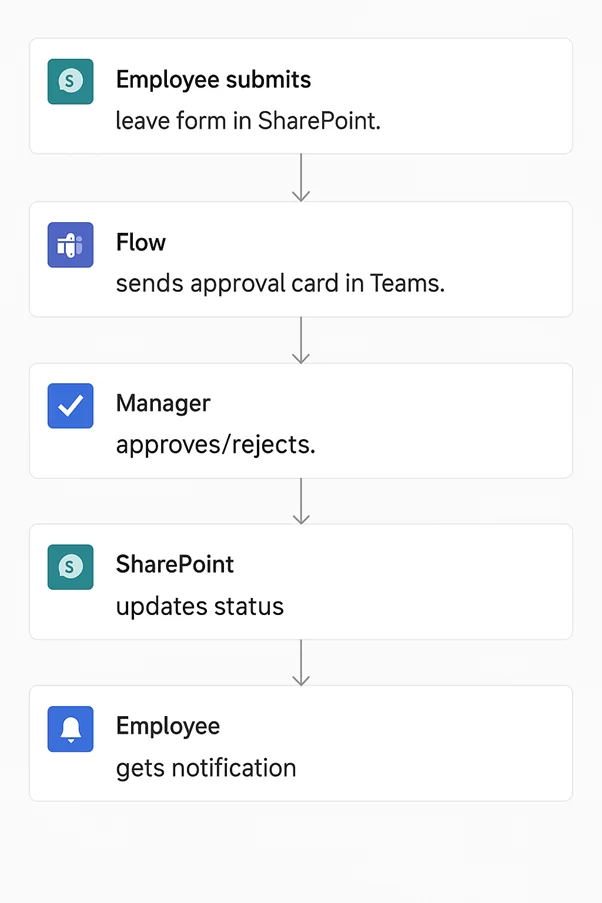
HR teams use RPA-managed services to reduce the manual effort involved in employee administration. This is particularly useful for approval workflows and internal tracking processes that just need to get done again and again.
The automation is focused on leave request management. It replaces email-based leave handling with a structured process.
Our team implemented RPA for a company that had no centralised system for managing employee leave requests. Employees would email their managers or HR when they needed leave, HR would track requests in Excel, check for duplicates and update the file manually, while managers would reply by email to approve or reject requests.
We automated this whole thing with SharePoint and Power Automate. Now employees submit their leave requests through a SharePoint form that asks for the date range, reason, and leave type – and Power Automate sends a request for approval to their manager over in Teams or Outlook. The approved requests get automatically stored in a SharePoint list with the all important status and comments, and the employees get a notification on the spot whether their request has been approved or rejected.
This has given HR and managers a whole lot better visibility into what’s going on, cut back on manual tracking a million percent, and meant they don’t miss or get overlapping requests any more.
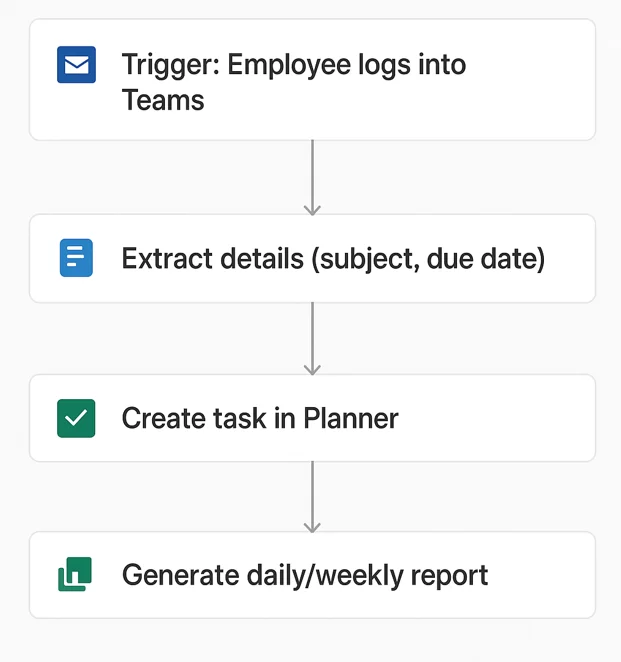
Automating employee work hours tracking has been a huge help for businesses who want to keep an eye on their staff’s attendance and working hours without having to have them fill in timesheets by hand.
Our RPA consultants did this for a company where employees had been logging in and out in a shared spreadsheet. But the problem was, they often forgot to do so, or the stuff they did put in was inaccurate – and then HR had to spend ages chasing up the missing info. And the managers were stuck with no real-time view of what was going on.
So what we did was use Power Automate to automate the whole process. When an employee logs into Teams we get their login time, and when they go off-line or stop being active, we get their logout time. All of this gets stored in a nice neat SharePoint list with the employees name, date, login time, logout time – and the duration. And then we share a daily and weekly summary with the managers in the form of an Excel report or through a Power BI dashboard. And if an employee doesn’t turn up to work at all we can even set up an alert to let the manager know.
This got rid of the need for all that tedious manual logging, and gave managers a much more accurate and up to the minute view of what’s going on with attendance.
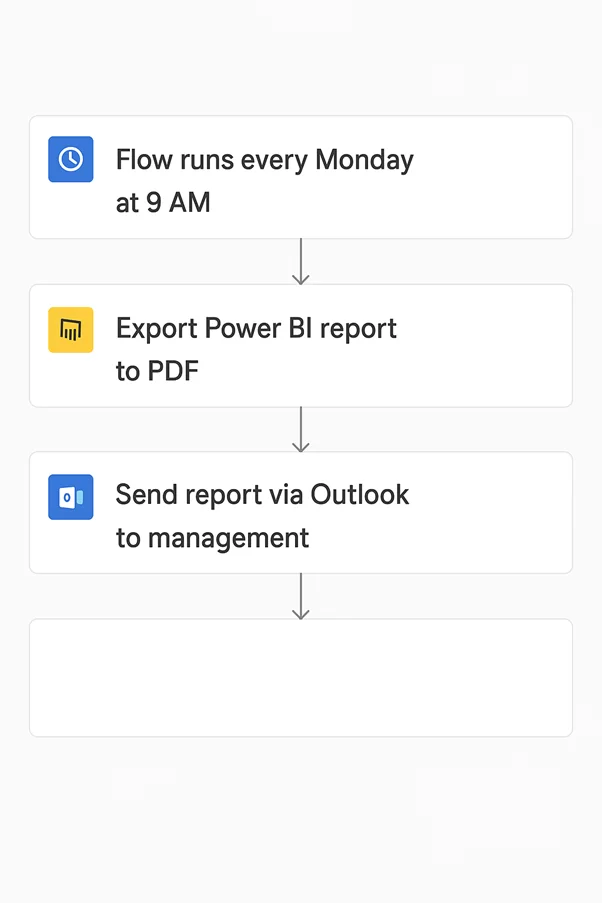
The Operations teams use RPA managed services to make sure that the internal workflows keep on rolling without them having to intervene manually. This is often things like report distribution, file handling and task creation.
This particular use case is all about automating those recurring reporting workflows – so that your stakeholders get the information they need on time, without having to rely on someone to sort it out for them manually.
We did this for a company where the management team were relying on Power BI dashboards to track their weekly sales performance. But the thing was, the execs would rarely log in to Power BI, the sales teams would have to export data or take screenshots manually – and the reports would often be a bit hit or miss depending on who was doing the prep work.
So we used Power Automate and Power BI to automate the whole process. We got a flow set up to run every Monday morning, which exports the latest weekly sales report in PDF or Excel format – and then emails it on to the execs with a summary and a link to the live dashboard.
This has given the client consistent reporting, cut back on the manual work a huge amount – and meant the execs get the insights they need when they need them.
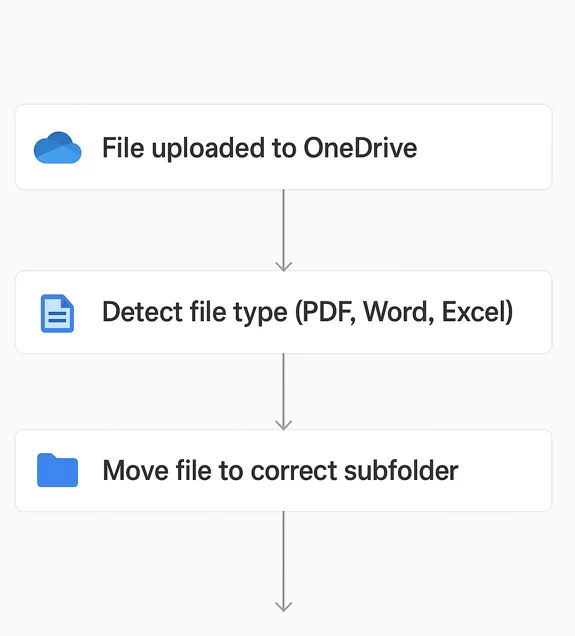
Automating file organisation means you can sort and store files automatically instead of relying on employees to sort them out manually.
Our Power Automate experts did this for an organisation where employees from across the department were saving files into a shared folder. The problem was, over time that folder got cluttered up with all sorts of stuff – documents, spreadsheets, PDFs, images and presentations – making it a nightmare to find the important stuff.
So we used Power Automate to monitor the folder and categorise any new files that get added – and then moved them into subfolders like invoices, reports and presentations. And we could even set up a notification to let the employee know where their file has been stored.
This has improved the accessibility of the files, cut back on the risk of lost documents – and saved employees a whole load of time.
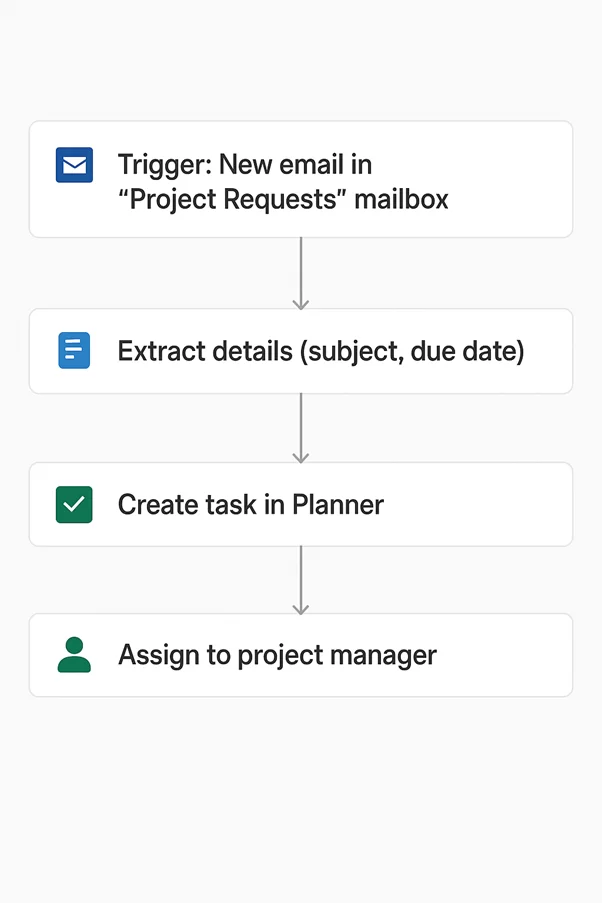
This example is about automating the creation of work tasks from incoming emails – so project managers don’t have to enter them manually.
We did this for a company where project managers were getting new work requests and updates by email – and they had to read each email, interpret the request, create a task in Microsoft Planner by hand, copy the details in manually – and then assign it to the right person.
So what we did was use Power Automate and Microsoft Planner to automate the whole process. When a new email arrives in the project requests mailbox, the flow extracts the key details, creates a new task in Planner, attaches the original email for reference – and sends a notification to the person who it’s been assigned to.
This has cut back on all that tedious admin work, improved the accuracy of the task creation – and meant the team can respond to requests a whole lot faster.
Marketing teams use RPA managed services to automate their repetitive backend stuff, freeing them up to do what they do best – run faster & more consistent marketing campaigns.
Social media monitoring automation means teams no longer need to manually log in to every single platform to see what people are saying about their company or brand.
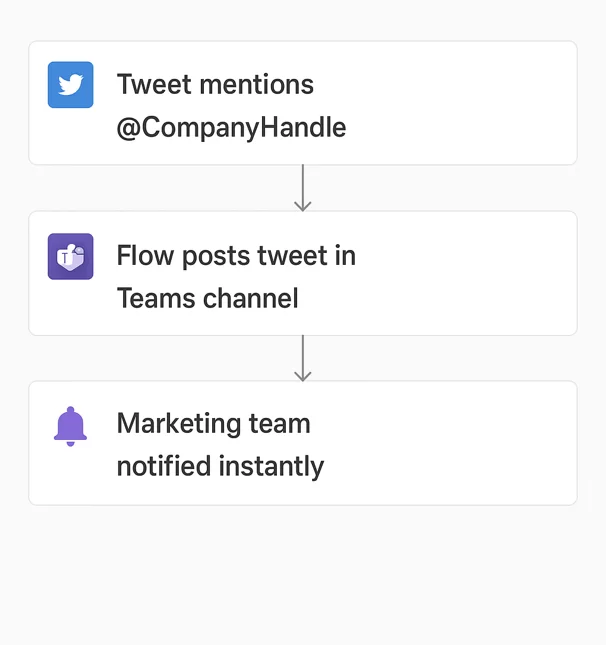
We implemented something similar for a marketing team that was responsible for keeping an eye on Twitter mentions. Before hand, team members were spending way too much of their day logging in, refreshing the feed & trying to keep up with comments themselves. So its no surprise they were missing out on opportunities to engage with customers.
Our team built a simple real-time notification system in Power Automate. When the company’s Twitter handle gets mentioned, the system snatches the tweet details, posts a nice formatted message with a link to the tweet into a special Teams chat. This has given the marketing team an instant view of what’s being said, and made it much easier for them to respond quickly.
Post scheduling automation lets marketing teams get their content published on time, without having to do it all manually.
We helped a marketing team who were in a similar boat, but this time with LinkedIn posts. They wanted to save cash on third party tools and avoid doing the tedious work of posting content at just the right moment.
We built a custom scheduling system using SharePoint & Power Automate. The team can just add their planned posts to a SharePoint list with the details – what they want to say, when to post it, who’s posting it, and what campaign it’s for. Each day, a Power Automate flow checks the list & publishes the content to the company’s LinkedIn page, so long as it’s the right time. And after its been posted, they get a Teams notification.
This has helped the team keep to a regular posting schedule, and has cut down a bit of the manual work.
Supply chain teams use RPA managed services to help improve their visibility into stock levels & reduce the manual drudge of dealing with stock.
Inventory management automation helps companies stay on top of stock levels, keep records up to date, and get a clear view of where their inventory is.
Our RPA consultants helped a company that rents out office plants to corporate clients, who were struggling with inventory tracking. They spent way too much of their week updating spreadsheets, hunting down specific items, and just couldn’t get a clear picture of what they had in stock by location.
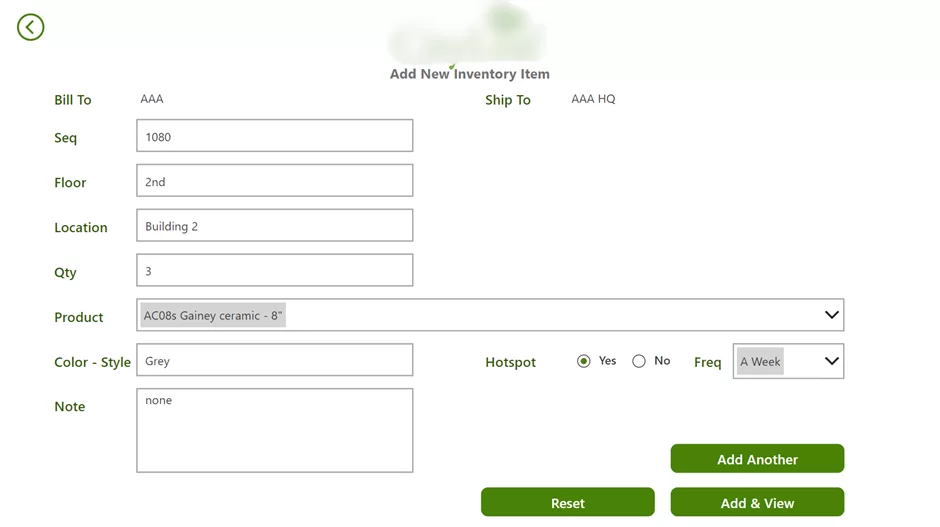
We built a custom inventory management app in Power Apps. Warehouse staff can now place orders through it, automatically generate shipping labels from Ship Station, and just scan a barcode to update stock records & schedule deliveries.
We also built a Power BI report that shows how many items each customer has & where they are located.
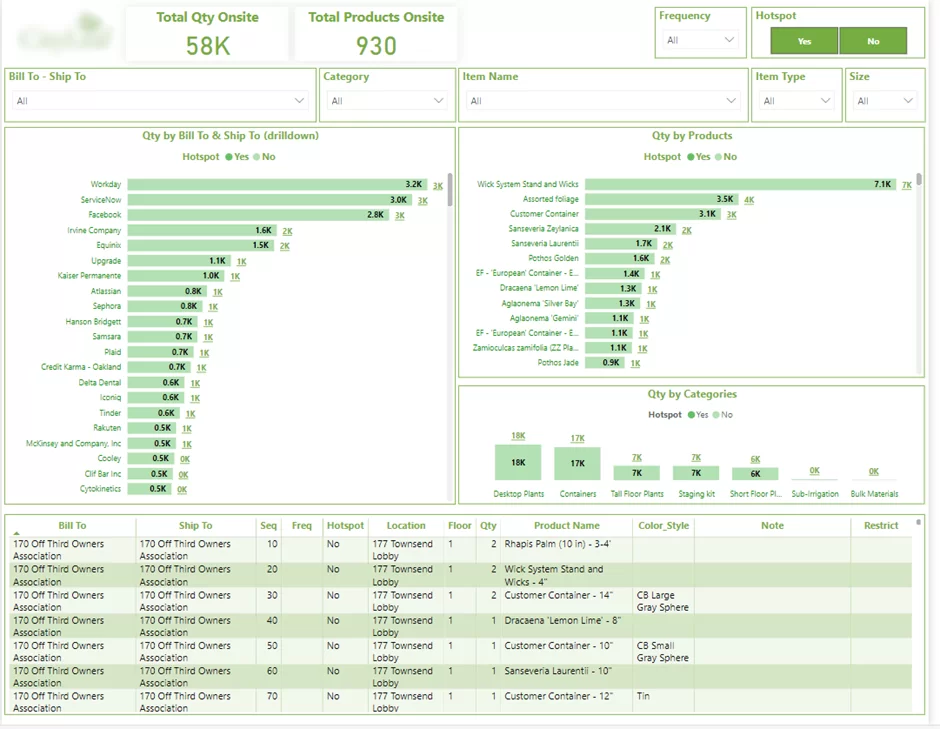
This has really helped them get on top of their stock levels & made managing inventory so much easier.
IT & data teams use RPA managed services when they’re dealing with big data – extracting, moving, or restructuring it.
Website scraping automation is a big help when businesses need data from websites for reporting or market research.
We used a combination of Power Automate & Python to get the job done. Power Automate was handy for browser-based tasks, like mimicking what a user would do. But when it came to big jobs like getting 2 million rows of data in one hit, Python was the better option
Our Python solution took just 3 hours to get all the data they needed, while Power Automate would have taken 2 months. This shows just how flexible & helpful managed automation support can be.
Data migration automation helps companies move data from one system to another, with a lot less hassle and a lot more security.
We helped companies move their SharePoint 2013 to SharePoint Online using Sharegate to migrate all the files & permissions. We did a big project once involving 10 GB of files – and it seemed like the migration was taking too long. So we broke it down into smaller chunks to avoid any timeout errors.
This made the job a lot more reliable and made sure all the user permissions ended up in the right place.
Our RPA managed services plan gives your business ongoing support for automated workflows after implementation. It helps keep bots, integrations, dashboards, and approval flows running reliably as systems, data, and business rules change.
This is especially useful for automations built with tools like Power Automate, Power Apps, Power BI, SharePoint, APIs, and desktop flows. Vidi Corp’s RPA developers’ automation projects often include workflow monitoring, system integrations, reporting automation, and ongoing improvements based on business needs.
| Service | What it covers | Business value |
|---|---|---|
| Automation monitoring | Regular checks on active bots, flows, triggers, and scheduled processes to confirm they run successfully. | Reduces downtime and helps teams trust automated processes. |
| Error handling and issue resolution | Investigation and fixing of failed runs, broken connectors, missing files, API errors, or data refresh issues. | Prevents small automation failures from disrupting daily operations. |
| Workflow maintenance | Updates to existing automations when business rules, approval paths, file formats, or system structures change. | Keeps automations aligned with real business processes. |
| Performance optimisation | Review of slow flows, inefficient logic, duplicate steps, and unnecessary manual interventions. | Improves speed, reliability, and scalability. |
| System and API support | Maintenance of integrations between Microsoft tools, CRMs, ERPs, finance systems, email inboxes, SharePoint, and third-party platforms. | Ensures data moves correctly between systems without manual copying. |
| Data and reporting automation support | Support for automated data extraction, Power BI refreshes, report distribution, and alert-based workflows. | Gives teams access to updated reports without manual refreshes or exports. |
| Change requests and enhancements | Small improvements, new fields, extra notifications, updated routing logic, or additional automation steps. | Allows automation to grow with the business instead of becoming outdated. |
| Security and access management | Review of permissions, user roles, connection ownership, credentials, and access to shared folders or systems. | Reduces operational risk and protects sensitive business data. |
| Documentation and handover materials | Clear records of how each automation works, what systems it uses, and what to do when something fails. | Makes support easier and reduces reliance on individual employees. |
| User support and guidance | Help for employees using Power Apps, approval flows, Teams notifications, or automated reporting tools. | Improves adoption and reduces confusion around new processes. |
| Continuous improvement reviews | Periodic review of automation performance, user feedback, and new opportunities for automation. | Helps identify further savings, better controls, and process improvements. |
A strong RPA managed services plan is not just technical support. It protects the value of automation by keeping workflows accurate, stable, and useful over time.
RPA managed services pricing is usually structured around the level of support, number of bots, complexity of automations, and how much ongoing improvement your business needs. The right model should give you predictable support, clear accountability, and enough flexibility to keep your automation programme stable as processes change.
A monthly retainer is one of the most common RPA managed services pricing models. It gives your business ongoing access to RPA support for monitoring, troubleshooting, minor enhancements, bot maintenance, and performance optimisation.
This model works well for organisations with several live automations that need consistent oversight. Instead of waiting for issues to become operational blockers, a managed services team can proactively resolve failures, update workflows, and improve bot reliability over time.
Per-bot support pricing is based on the number of bots under management. Each bot is covered for defined support activities such as incident resolution, scheduled maintenance, exception handling, documentation updates, and platform compatibility checks.
This model is useful when you have a clear inventory of production bots and want support costs to scale directly with your automation footprint. It also helps finance and operations teams understand which bots are delivering value and which may need redesign, retirement, or additional optimisation.
A dedicated team model gives you ongoing access to RPA developers, support engineers, business analysts, and automation specialists. This is best suited for companies with a mature automation estate, frequent change requests, or a roadmap that includes continuous bot development and improvement.
With a dedicated team, support goes beyond fixing issues. The team can manage releases, improve exception handling, identify new automation opportunities, and help scale RPA across departments. This model is often the strongest fit for businesses that view automation as a long-term operational capability rather than a one-off project.
The project plus support model combines initial RPA development or optimisation with a defined support period after launch. This gives the business confidence that new bots will be monitored, stabilised, and improved once they move into production.
This model is ideal when launching new automations, rebuilding unstable bots, migrating workflows, or expanding an existing RPA programme. It reduces the risk of handover gaps and ensures the automation continues to deliver value after deployment.
Flexible support blocks allow businesses to purchase a set number of support hours that can be used as needed. These blocks can cover troubleshooting, bot enhancements, documentation, reporting, process reviews, or platform support.
This model works well for organisations with occasional RPA needs or smaller automation environments. It provides access to experienced specialists without committing to a larger managed services agreement. It can also be a practical option for testing a support relationship before moving into a monthly retainer or dedicated team structure.
The best RPA managed services pricing model depends on how critical your bots are, how often workflows change, and how much internal RPA expertise you already have. Businesses with mission-critical automations usually benefit from retainers or dedicated teams, while smaller environments may prefer per-bot support or flexible support blocks.
A strong managed services partner should also help improve automation performance over time. Vidi Corp clients have reported measurable outcomes from automation and RPA-driven workflows, including reduced manual work, improved data accuracy, faster reporting, and around 10 working hours saved per month in several automation projects.
A clear RPA managed services SLA gives your business confidence that automation issues will be identified, prioritised, and resolved before they disrupt operations. The support model should define response times, escalation paths, monitoring cadence, support channels, uptime goals, and reporting expectations so every bot has structured operational ownership.
Response times should be aligned to business impact. Critical issues, such as a production bot failure affecting finance, customer service, payroll, or compliance workflows, should receive the fastest response and immediate triage.
Lower-priority issues, such as minor enhancement requests, documentation updates, or non-urgent configuration changes, can follow standard support windows. This priority-based structure ensures urgent incidents are addressed quickly while planned improvements are managed efficiently.
An effective RPA support model should include a defined escalation path from first-line support to senior RPA developers, solution architects, and platform specialists. This prevents complex issues from getting stuck in basic troubleshooting and ensures the right expertise is involved at the right time.
Escalation should be based on severity, time unresolved, and operational risk. For example, a recurring bot failure may move from incident support to root cause analysis, then to redesign or workflow optimisation if the issue points to a deeper process problem.
RPA bots should be monitored on a regular cadence, with frequency based on how critical each automation is. Mission-critical bots may require daily or near-real-time monitoring, while lower-risk automations may be reviewed weekly.
Monitoring should cover bot status, failed transactions, exception volumes, queue performance, application changes, credential issues, and process bottlenecks. This allows the support team to move from reactive fixes to proactive improvement.
RPA managed services support should be accessible through clear communication channels such as email, ticketing systems, messaging apps, and scheduled review calls. The best model gives stakeholders one structured way to raise issues and track progress, while still allowing direct communication for urgent operational problems.
Support channels should also define who can submit requests, how requests are prioritised, and how updates are communicated. This keeps business users, IT teams, and automation owners aligned during both incidents and planned changes.
Uptime goals should focus on bot availability, successful run rates, and process continuity. For business-critical automations, the SLA may include defined uptime targets, maximum incident response windows, and recovery objectives.
Reliability should also be measured by more than whether a bot is online. A strong support model tracks whether the bot completes transactions accurately, handles exceptions correctly, and continues performing after changes to source systems, user interfaces, APIs, or business rules.
Managed RPA reporting should give leadership visibility into automation performance and support quality. Monthly or quarterly reports can include bot uptime, incident volumes, response and resolution times, failed transaction trends, enhancement requests, root causes, and improvement recommendations.
These reports help business leaders understand the real value of their automation programme. They also create a practical roadmap for stabilising bots, removing recurring issues, and identifying new opportunities to reduce manual work through RPA.
RPA managed services, RPA consulting, and RPA support are closely related, but they serve different purposes. Understanding the difference helps businesses choose the right type of help based on where they are in their automation journey.
RPA consulting is usually focused on strategy, planning, process discovery, and implementation. RPA support is more focused on fixing issues when bots fail or need updates. RPA managed services provide a broader, ongoing service model that combines support, maintenance, monitoring, optimization, governance, and continuous improvement.
| Service type | Main focus | Best for | Typical activities |
|---|---|---|---|
| RPA Managed Services | Ongoing operation and improvement of automation | Businesses with live bots that need continuous monitoring, maintenance, and optimization | Bot monitoring, incident management, maintenance, platform administration, reporting, governance, performance reviews |
| RPA Consulting | Strategy, planning, and implementation | Businesses starting or scaling an automation programme | Process discovery, automation roadmap, platform selection, business case, bot design, implementation support |
| RPA Support | Troubleshooting and maintenance for existing bots | Businesses that need help fixing or updating automations | Bug fixes, bot updates, failure resolution, testing, application change support, technical troubleshooting |
If you are just starting with automation, RPA consulting may be the right first step. It helps you identify the best opportunities, choose the right platform, and build a roadmap for successful implementation.
If you already have bots running but need help fixing issues, RPA support may be enough. This gives you access to technical expertise when bots fail, need updates, or require maintenance.
If your business depends on automation for important processes, RPA managed services are usually the stronger option. They provide a more complete model for monitoring, maintaining, supporting, and improving your bots over time.
For many organisations, the right approach is a combination of all three. Consulting helps define and build the automation programme, support keeps bots working, and managed services provide the long-term operational structure needed to scale automation with confidence.
Every RPA program is at a different stage of maturity, and your operating model should match where you are. We offer four engagement models so you can choose the level of ownership that fits your team, your budget, and your in-house capability.
In this model, the RPA managed service provider does everything for you. They design, build, deploy, monitor, and maintain all your bots while you run your business. We own the bots end to end, handle every incident under SLA, and report outcomes to your leadership monthly. Best fit: organizations with 20 or more bots in production and no internal RPA Center of Excellence.
Responsibility is shared. Your team handles business-side ownership and process knowledge; our engineers handle monitoring, maintenance, and complex incidents. Best fit: companies with a small internal RPA team that needs after-hours coverage and senior technical depth.
A named team of RPA developers, support engineers, and a delivery lead operates as a direct extension of your organization. You set the priorities; we deliver against them. Best fit: enterprises with a steady pipeline of new automations alongside a growing production estate.
Certified RPA engineers are embedded into your existing team under your management. You retain full control of bots, processes, and incident workflows. Best fit: organizations with a mature CoE that needs to scale capacity quickly without long hiring cycles.
Not only do RPA managed services automate your business processes, but they also give you the peace of mind of knowing you have a solid safety net of continuous support, monitoring and optimisation. By handing the reins to an expert provider, you don’t have to rely on your internal teams to keep workflows running smoothly – you get scalable, stable automation that adapts to your growing business needs.
Here are the key benefits businesses see when RPA is delivered as a managed service:
1. Less Manual Drudgery, More Time to Focus
RPA managed services take care of tedious, rule-based tasks by automating processes like data entry, approvals, reporting and file handling. This frees up your employees to do what they do best – and lets workflows hum along in the background with minimal maintenance by the provider.
We saw a great example of this in a project where automation chopped manual data consolidation tasks by a whopping 95% – and eliminated the headaches of juggling multiple disconnected systems.
2. Light Speed Processing and Real-Time Insights
With managed RPA workflows, you get instant data processing and seamless execution – no more waiting around for manual handling to catch up. And with the provider keeping a close eye on things, you can be sure processes will run smoothly without any bottlenecks.
One of our clients was amazed to find that report generation time dropped from 48 hours to just 5 minutes – giving them instant access to the insights they needed to make fast business decisions.
3. Better Data Accuracy, Less Headache
RPA managed services do away with human errors by automating data extraction, transfer and processing. And because the provider is always on top of things, your data stays consistent across systems.
We saw an 80% reduction in data-entry errors and a 99.7% increase in data integrity in one implementation – a huge win for the business.
4. Speed Up Decision-Making with Real-Time Insights
Automated reporting and real-time data processing mean you can access the latest insights at the drop of a hat – no more waiting around for manual reports to be churned out. And with the provider taking care of dashboards and data pipelines, you can rest assured they’ll always be running smoothly and reliably.
One of our clients saw a 40% boost in decision-making speed and cut their executive review cycles by 2 business days per week thanks to their automated workflows.
5. Scale Without Breaking the Bank
With RPA managed services, you can scale your automation without having to build an internal team to support it. The provider handles monitoring, updates and optimisation as your processes grow in volume or complexity.
For example, one client was able to switch from weekly or monthly reporting to daily dashboards without adding to their operational workload – thanks to automated data extraction and reporting.
6. Long-Term Support and Continuous Optimisation
Unlike one-off implementations, managed services come with ongoing improvements – so the provider can adjust workflows as your business processes evolve, fix any issues proactively and ensure the long-term stability you need.
We saw an example of this in a project where automation enabled continuous data flow from multiple systems into a centralised environment, replacing siloed processes and ensuring long-term scalability and performance.
RPA managed services are a godsend for businesses that want to automate processes without going down the road of building in-house expertise. But they also introduce a whole bunch of operational and strategic risks that can totally limit the value of automation or even create new inefficiencies unless you’re careful.
Here are the most common challenges businesses run into when using RPA managed services, along with some practical ways to actually address them.
1. Losing Sight of What’s Going On – Visibility and Control
When you’re managing RPA externally, you might lose direct visibility into how automations are running, how decisions get made, and where things go wrong. That can really slow down issue resolution and make internal teams feel like they’re completely disconnected from the critical processes.
To fix this, providers need to implement some transparent monitoring frameworks with shared dashboards, logs and alert systems. Get regular reporting and give internal stakeholders real-time access to performance data so they can stay informed and still keep an eye on automation workflows.
2. Not Being Aligned with Business Processes
RPAs managed services can tank if the provider doesn’t fully understand the client’s operations – so you end up with automations that just don’t reflect the real business logic. That often results in a whole lot of rework, inefficiencies, or low adoption.
So, what you need to do is set up a structured discovery and documentation phase before automation begins. Have some ongoing collaboration, process reviews and clearly defined ownership between teams – that way the automations stay aligned as business processes evolve.
3. Being Too Dependant on External Providers
Relying heavily on a managed service provider creates a big risk if the relationship ends or service quality takes a nosedive. Businesses can then struggle to maintain or modify automations without having any internal capability.
The way to mitigate that is to get proper knowledge transfer, documentation, and training for your internal teams – that way you’re not stuck with a provider and have to start from scratch if the relationship ends. A hybrid model where the provider manages the operations but your internal teams retain a bit of control is a good idea to have in your back pocket too.
4. Scalability and Performance Issues
If RPA environments aren’t designed with scalability in mind, you can end up with performance issues as automation volumes grow. That’s not exactly what you want to happen – bot failures, scheduling conflicts, delays in execution are all major headaches.
To address this, managed services should include capacity planning, infrastructure monitoring and a scalable architecture from the start. Providers need to be continuously optimising bot performance and adjusting resources based on usage patterns.
5. Data Security and Compliance Risks
RPA often involves interacting with other business data across multiple systems – and that creates risks around data access, storage and compliance with regulations.
The answer is to enforce some strict governance policies – think role-based access control, encryption, audit logs and compliance with standards like GDPR. Providers should also align with your internal security protocols and get regular audits.
6. Not Getting Any Continuous Optimisation
Some managed service providers are only focused on keeping existing automations running rather than improving them – and that just leads to stagnation. You end up with processes that are still inefficient, even though they’ve been automated.
To avoid this, organisations should define some clear optimisation KPIs and include continuous improvement as part of the service scope. Get regular performance reviews, process audits, and enhancement roadmaps – that way automation can actually evolve with business needs.
By taking a balanced approach, RPA managed services can deliver real value while keeping operational, technical and strategic risks to a minimum.
When it comes to getting your RPA managed services up and running, you’re going to need a combination of automation platforms, AI tools and data integration technologies. The tools you choose will depend on just how complex your processes are, the kind of data you work with and how much scalability you need.
Below are the main RPA tools and software that are actually being used in real-world implementations.
An RPA platform is what you need to build and run automation workflows that replicate the actions that humans do, like clicking on things, entering data and navigating through systems.
These tools get used in all sorts of processes, including things like handling invoices, keeping files sorted, automating reports and creating tasks.
To understand how these solutions are implemented and maintained as part of managed services, explore our Power Automate consulting services.
AI tools are what you need to get data out of unstructured documents like PDFs and scanned files.
These tools are pretty essential for automating document-heavy workflows in sales, finance and operations.
These are the tools you use to get data moving between systems and to enable automation at scale.
These kinds of tech get used in real-world scenarios like web scraping, data migration and real-time data pipelines. To see how these solutions are designed and implemented in practice, explore our data engineering consulting.
These are the tools you use to store data and for teams to collaborate on.
These tools get used in all sorts of workflows like storing invoices, keeping files sorted and tracking requests.
Reporting tools are what you need to get a view into all your automated processes and business performance.
These tools let you track KPIs, operational metrics and business performance in real-time. For a deeper look at how these dashboards are designed and implemented, see our Power BI consulting services page.
These are the tools you use to interact with automation workflows and to support approval processes.
These are widely used in approval workflows, notifications and task coordination.
All this comes together to let RPA managed service providers automate end-to-end processes, integrate multiple systems and maintain reliable, scalable workflows across the business.
After completing more than 1000+ automation projects, Vidi Corp has won dozens of awards for its automation services. We are a top 5 RPA consultancy in the world according to G2, and we have been named as the best data analytics and automation consultancy of 2025.
We also bring the capacity and depth that most companies need. With a team of 20+ RPA specialists across five countries, you get the reliability of a large consultancy, minus the slow timelines or inflated pricing.
We are also the top 4 RPA consultancy worldwide on Clutch, based on 50+ verified reviews from clients like Heineken, DS Smith, and Mercy Corps.
If you want an automation partner who brings world-class technical expertise, long-term support, and tangible outcomes all in one package, we would love to work with you.
Contact us to discuss your RPA needs!
It is when you outsource the planning, building, and day-to-day management of your automation bots to a specialised team.
You save time, cut costs, avoid manual errors, and get stable automations without hiring a full internal team.
A simple example is a bot that reads incoming invoices, extracts the details, sends them for approval, and updates your finance system automatically.
RPA managed services typically include ongoing bot monitoring, incident management, troubleshooting, maintenance, platform administration, exception handling, performance reporting, and continuous optimization. The goal is to keep your automations running reliably after deployment, especially as business systems, applications, and processes change.
The cost of RPA managed services depends on the number of bots, process complexity, support hours, RPA platform, required service level, and whether you need monitoring, maintenance, optimization, or full platform administration. Common pricing models include monthly retainers, per-bot support plans, dedicated support teams, and flexible support blocks.
RPA support usually focuses on fixing issues, updating bots, and resolving failures when they occur. RPA managed services are broader because they include support plus ongoing monitoring, maintenance, reporting, governance, platform administration, and continuous improvement. In simple terms, support helps fix bots; managed services help run and improve your automation programme over time.
Yes. We can review and support existing RPA bots, even if they were built by another provider or internal team. The first step is usually an assessment of the bot design, documentation, workflows, dependencies, credentials, exception handling, and platform setup so we can understand how the automation works and what level of support is needed.
Yes. RPA bots need ongoing maintenance because the systems they interact with often change. Application updates, new screen layouts, changed business rules, expired credentials, data format changes, and infrastructure issues can all affect bot performance. Regular maintenance helps prevent failures, reduce downtime, and keep automations aligned with current business processes.
When an RPA bot fails, the issue should be detected, logged, prioritised, investigated, and resolved based on business impact. Common steps include reviewing error logs, checking input data, validating system availability, identifying whether the failure is technical or business-related, applying a fix, testing the bot, and redeploying it where needed. Strong incident management also helps prevent the same issue from happening again.
Yes. RPA managed services can reduce automation costs by improving bot reliability, reducing downtime, lowering the need for ad hoc fixes, extending the life of existing automations, and helping teams avoid expensive rework. Ongoing optimization can also make bots faster, more accurate, and easier to maintain, which improves the return on investment from automation.
RPA monitoring can be provided based on your business needs, automation criticality, and service agreement. Some processes may only need business-hours support, while high-volume or business-critical automations may require extended-hours or 24/7 monitoring. The right model depends on how important the bot is to daily operations and how quickly issues need to be resolved.


