
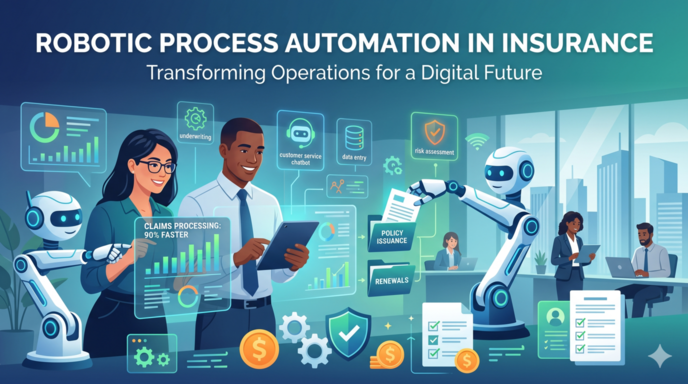
Robotic Process Automation in Insurance uses software robots to handle the drudge work that people have always had to put up with – like claims data entry, policy issuance, and compliance reporting – the kind of stuff where you can just write down a set of rules and let the robot get on with it.
We’ve got a long history of delivering 50+ RPA consulting projects across all sorts of business processes in insurance, including claims, underwriting, and policy administration workflows for insurers. Our workflow automation consultants have built these systems for insurers handling claims, underwriting and policy administration. And this guide is going to give you the lowdown on what RPA in insurance is all about, where it works best, and the sorts of use cases where our clients get the best return – with some real-life examples from our own projects to boot.
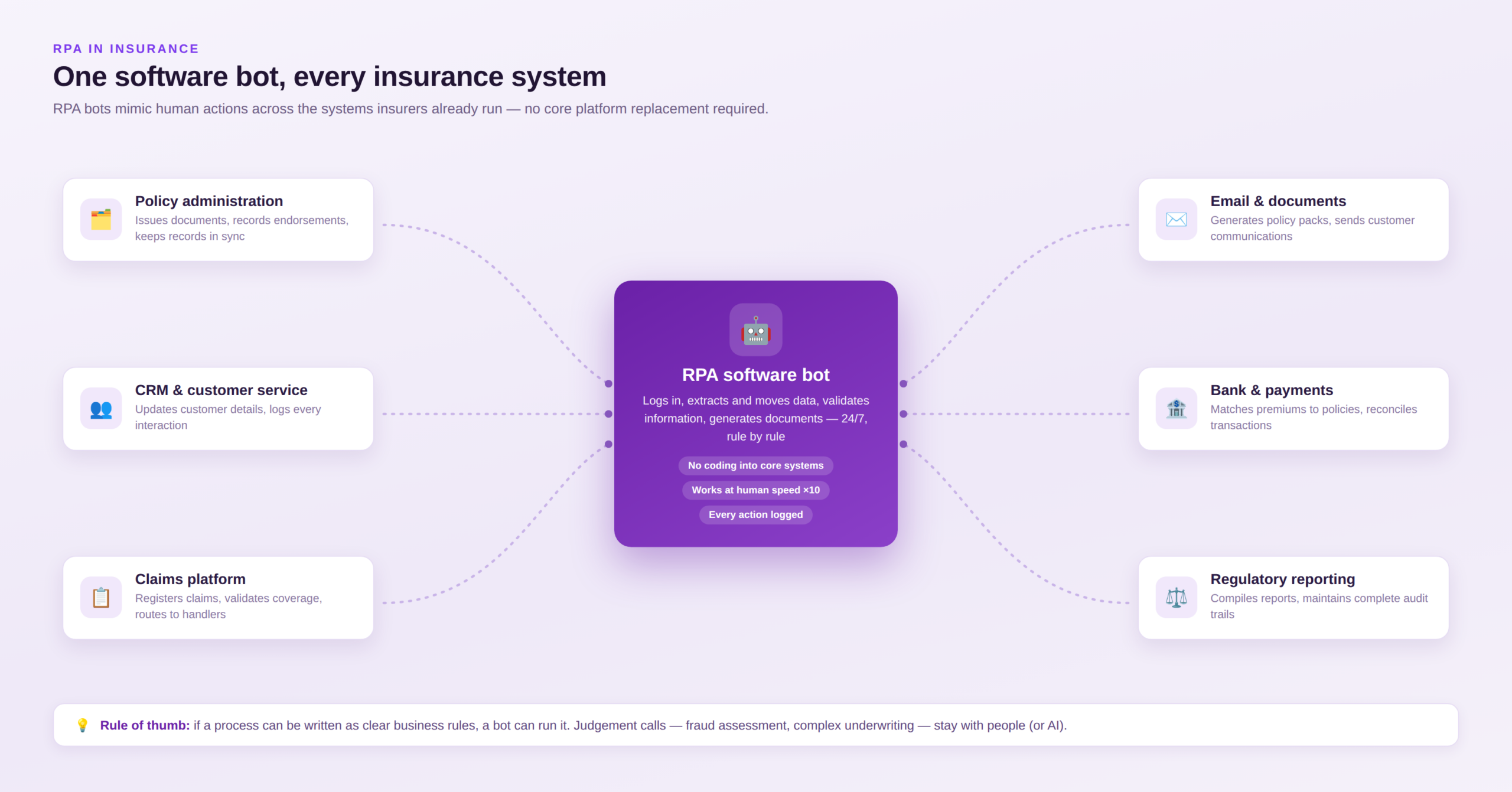
RPA in insurance is when you use software robots (or bots for short) to mimic the action of a human and automate the repetitive, rule-based tasks that crop up all over insurance systems. These bots can log-in to different systems, pluck out data, process claims, check policy details, whip up documents, and move info between systems all without needing anyone to lift a finger.
The thing is, insurers use RPA to automate all those high-volume processes that take up so much of their time, like claims processing, policy administration, underwriting support, getting customers set up, compliance reporting, and doing all the maths to work out premiums. Because RPA works with the systems people already use, insurers can get more efficient without having to rip out the core of their platform.
We’ve got a lot of people using these three terms interchangeably, but actually each one solves a different problem.
| Technology | Best For | Insurance Examples |
| RPA | Repetitive, rule-based processes | Policy administration, claims data entry, premium calculations, regulatory reporting |
| AI | Analysis, predictions, and decision-making | Fraud detection, risk assessment, claims document analysis, chatbots |
| Intelligent Automation | End-to-end processes combining execution and decision-making | Automated claims processing, underwriting workflows, policy servicing |
RPA just follows the rules. It moves data around, checks the info is all correct, makes documents and does the admin tasks. It just does what its told and automates that whole workflow.
AI on the other hand analyses the information and makes a recommendation. Unlike RPA it can work with all sorts of unstructured data like emails, claim documents, images and whatnot.
Intelligent Automation is a combo of both. The AI decides what the next step should be, and then the RPA goes and gets on with executing the steps in all the different systems.
In our experience RPA implementation is usually sufficient when a process is nice and simple and follows all the same rules all the time, like policy renewals, customer onboarding, doing the maths on premiums, claims registration and compliance reporting. All those sorts of things are just straightforward workflows that RPA can automate without needing any AI.
But the moment something needs interpreting or a bit of good judgement – like looking at a handwritten document, working out how complex a claim is, detecting fraud, of making a subjective underwriting decision, then RPA hits its limits and you need to bring in the AI.
Our rule of thumb is simple. If you can describe the process in a load of detailed business rules, then RPA is probably all you need. If people are always having to use their heads and understand what they are dealing with, then you probably need AI.
One of the most common mistakes we see is when people try to chuck AI at a process that can actually be sorted by RPA on its own. That’s a waste of money and causes all sorts of problems – extra implementation costs, governance headaches and getting to the point where the AI starts making mistakes. And to be honest, there just isn’t much point in using AI to do tasks that follow all the same rules every time.
We’ve seen insurers trying to use AI to copy policy data between systems, generate papers, check policy numbers, update customer records and do all the regulatory reporting – and do you know what ? Theres no need for AI to do that at all. RPA can do it all more cheaper and more reliably.
In our experience, the automation projects that get the best return are the ones that start off with nice simple, rule-based processes. Once those are automated, then and only then can you bring in the AI to do the really tricky stuff.
Insurance has loads and loads of repetitive administrative tasks that would be perfect for RPA. And the fastest ROI comes from RPA use cases that focus on high-volume, rule-based processes that are just sucking up loads of employee time. Based on the automation projects we’ve delivered, the 10 use cases below are where our insurance clients have got the biggest benefits.
Claims processing is one of the top insurance automation use cases because it’s got loads of repetitive steps – checking coverage, collecting documents, assigning adjusters, updating systems and all that sort of thing. From the RPA projects we’ve delivered, claims teams can typically cut the amount of manual effort on straightforward claims by 50 to 80%. That’s just got to be one of the fastest places to get a return.
One Power Apps project we did was to automate part of a motor insurance claims process by building a Power Apps app to let a customer report an accident, instead of them having to fill in loads of different systems.
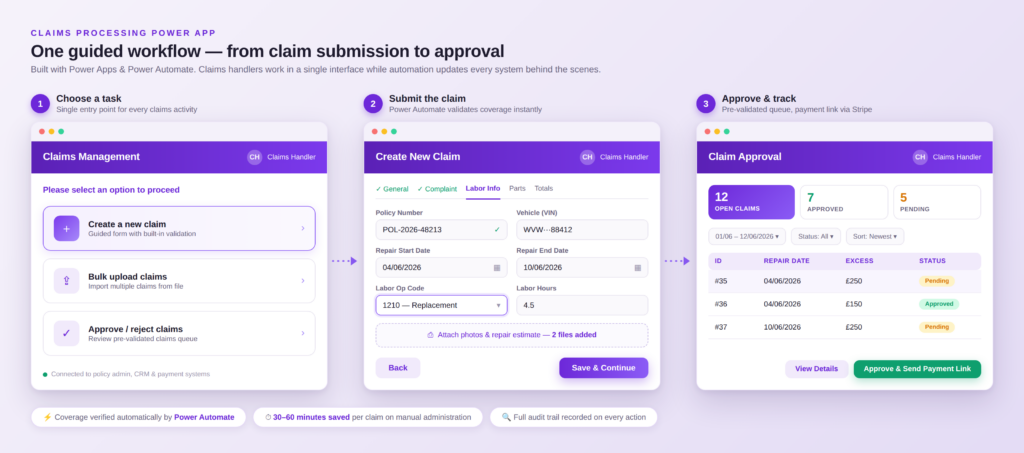
Then the automated workflow kicked in to:
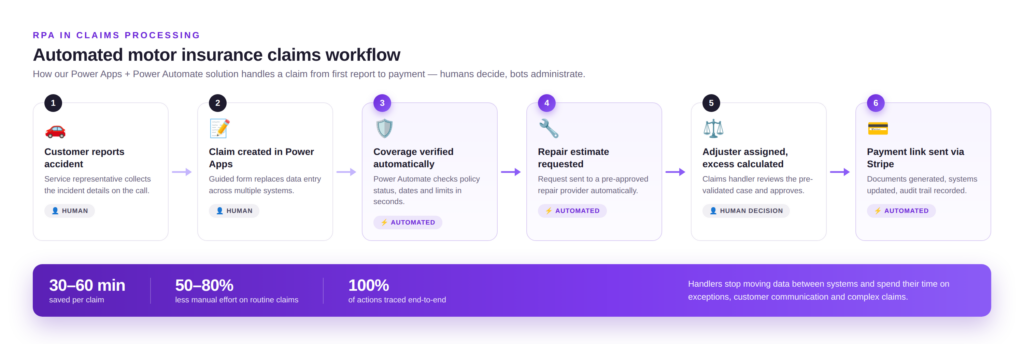
It gave the insurer complete traceability across the whole claims process and cut the amount of time claims handlers spent on each claim by a third.
Before letting a claim be approved insurers have to double-check its validity, whether the policy is still active, and if the customer is entitled to coverage. Typically these checks are routine, rule-based, and involve info that already exists elsewhere in the organisation – making them perfect targets for RPA automation.
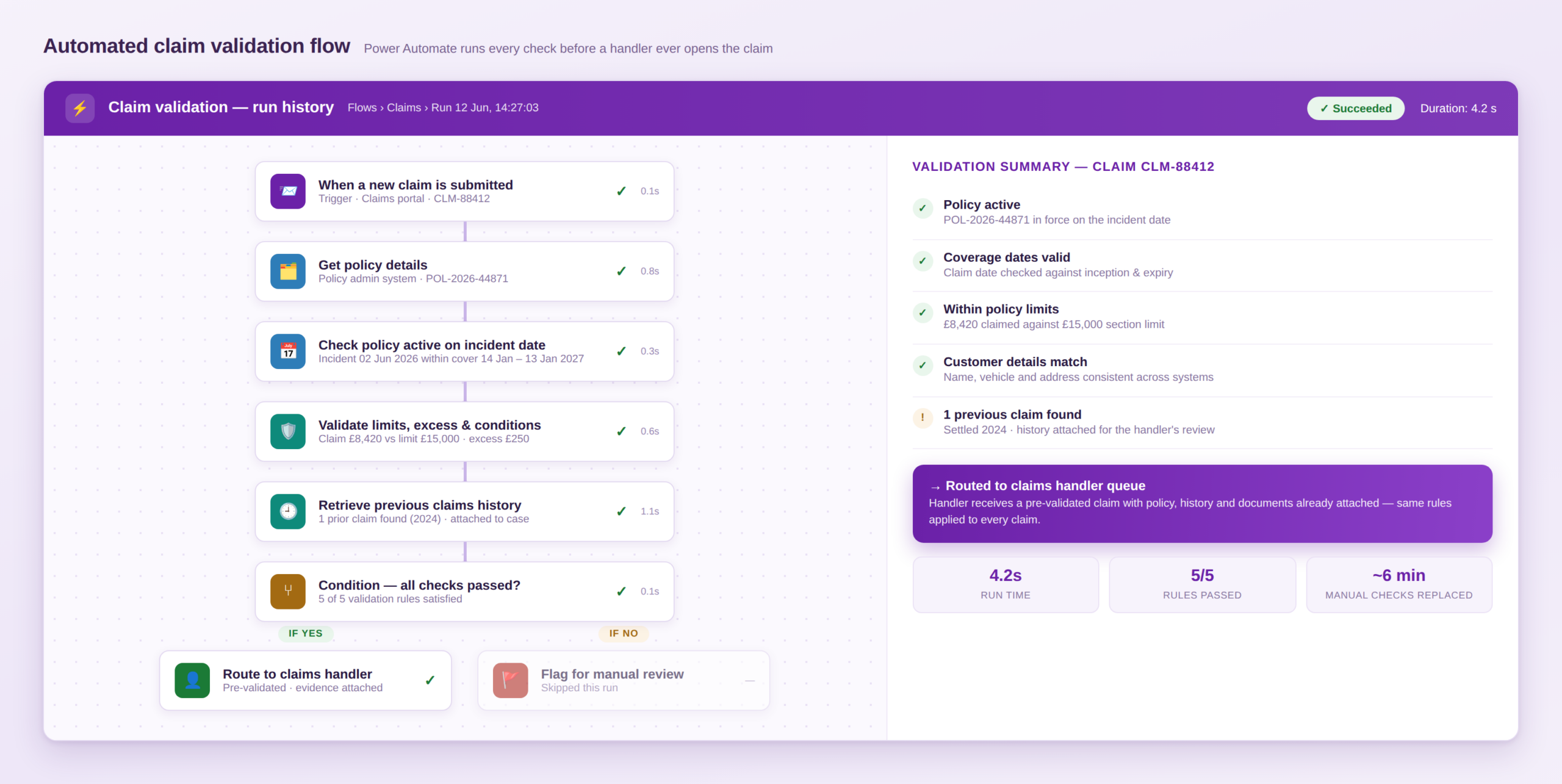
Common claim validation automations we’ve set up for clients include:
A recent project we worked on for an insurance provider used Power Automate flows to automate claim validation. When a claim is submitted, the workflow goes out and grabs the policy details, makes sure it was active on the date of the claim, checks policy limits and conditions, digs up the customer’s claims history, and flags anything that’s missing. Valid claims get routed to the right handler with all the relevant info attached.
Claims handlers now get to deal with pre-validated claims that are basically ready to go for approval, and every claim is reviewed against the same set of business rules.
Underwriting decisions require a human touch, but a lot of the work that goes on behind the scenes is administrative and rule-based. Our insurance clients have been most interested in automating quote generation, policy document creation, renewal offer prep, data collection from multiple systems, and underwriting file preparation. From what we’ve seen, these tasks typically save 15-45 minutes per policy.
One underwriting automation we built as part of our RPA managed services dealt with policy renewals. The underwriting team used to spend hours each week finding expiring policies, gathering customer info, and preparing renewal offers.
We built a Power Automate solution that:
Now underwriters get complete renewal cases ready to review, so their time goes into assessing the risks and setting prices rather than doing paperwork.
Once an application gets approved there’s a whole series of administrative steps that have to be taken before the customer gets their policy. The processes that our clients most often automate here include creating policy documents, updating policy admin and CRM systems, sending welcome packs, processing endorsements, and archiving policy documents for compliance. In our experience this saves 10-30 minutes per policy issued.
For one car insurance provider we built an enterprise workflow automation solution that covered everything that happens after a customer buys a policy. Before automation employees were manually copying policy data into multiple documents, generating PDFs, updating systems, and emailing customers.
The automated process now:
Customers now get their paperwork faster, records stay consistent as a result of SharePoint automation, and employees can focus on customer support and exceptions rather than routine admin tasks.
Onboarding is the first experience a new policyholder has with the insurer, and it usually involves verifying the customer’s identity, doing Know Your Customer (KYC) checks, and setting up customer records across multiple systems. In many insurers, these activities take 15-45 minutes per application, and most of that time can be automated.
Automation targets for onboarding typically include:
One onboarding project we worked on used Power Apps and Power Automate. Customer info is captured through a digital form, mandatory fields get validated automatically, and ID checks run against approved data sources. If any info is missing, the system triggers an automated request to the customer, records get created in the core systems, and the completed app is routed for final review.
The insurer cut onboarding admin significantly, improved data quality, and employees stopped wasting time transferring data between systems and chasing up documents.
Compliance is one of the most document-heavy areas of insurance, and teams have to prove that processes were followed correctly and show evidence for auditors when they ask for it. Here, the biggest benefit of automation isn’t labour savings – it’s a complete, reliable audit trail that makes regulatory requests much, much easier to handle.
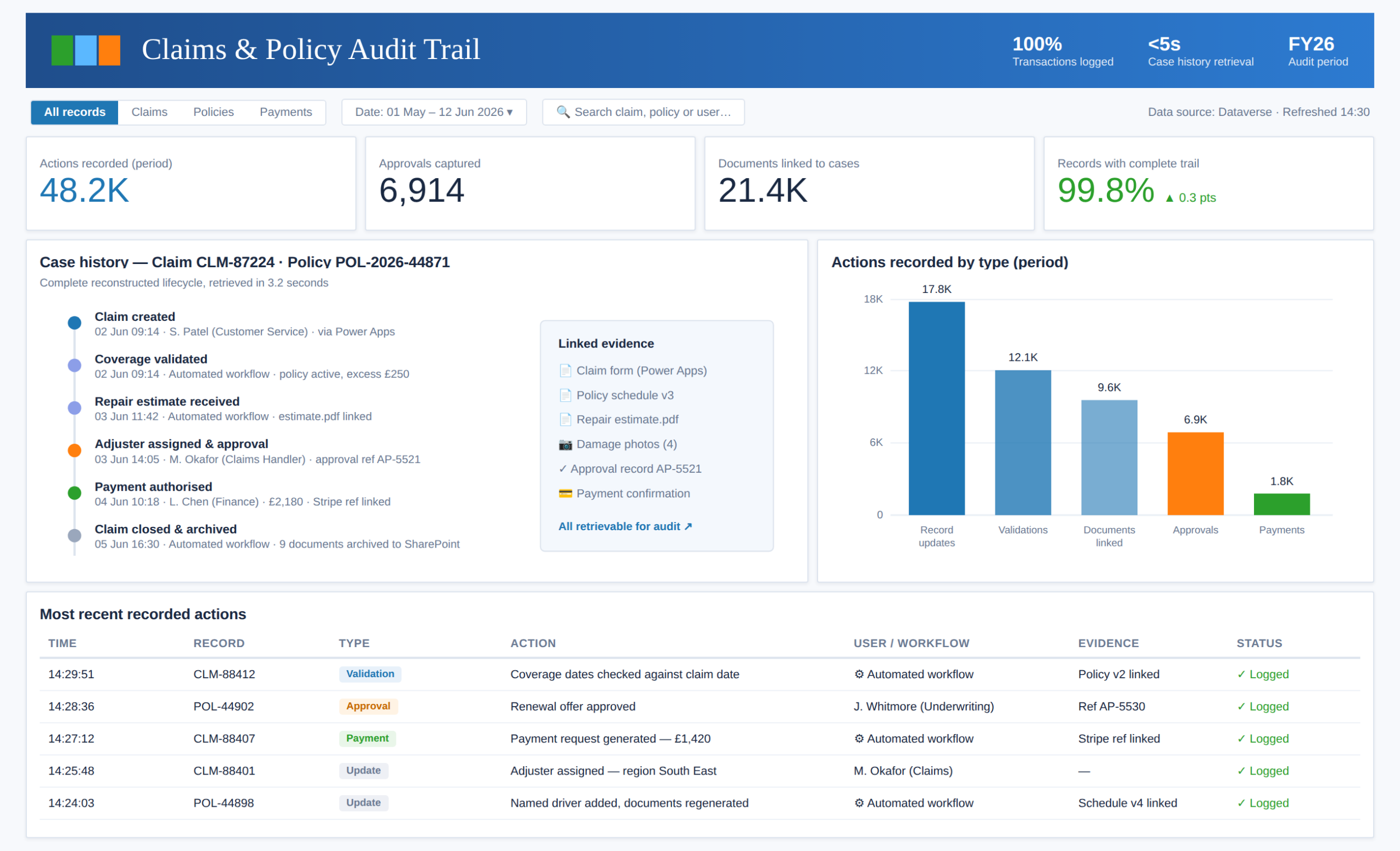
For one insurance client we built a Power Platform solution using Power Apps, Power Automate, Dataverse, and Power BI that automatically generates audit trails for every claim and transaction. Each action – by employee or workflow – gets recorded with the user, timestamp, action type, and affected record, with supporting documents and approvals linked to the transaction. Power BI dashboards make the whole history searchable in seconds.
Compliance teams can now open any claim and immediately see when it was created, who approved it, when coverage was validated, and when payments were authorised. Evidence that used to take ages to dig out of multiple systems is now retrieved in seconds.
Finance teams have a real headache on their hands – matching every single incoming payment to the right policy, investigating discrepancies and keeping multiple systems up to date. With a good finance process automation system, you can match premium payments to policies, reconcile bank transactions, identify under payments and over payments, generate payment reminders and produce reconciliation reports. If you’re dealing with a large volume of payments, this can save you a bunch of time – and reduce the risk of missing payments.
One of our clients came to us with exactly that problem. Payments were coming in from direct debit, bank transfers, and online card payments, and the employees were having to spend a lot of time matching them up to policy records by hand.
We put together a Power Automate solution that grabs incoming bank transactions, pulls out the customer references and policy numbers, matches payments against active policies, and marks them as paid if it’s a match. If it can’t match the payment, it sends it off to the finance team and automatically generates a reconciliation report.
Now the finance team only has to deal with the genuine exceptions, and management has a clear view of all the outstanding payments.
Now, RPA on its own isn’t going to catch all the fraudsters – you need some analytical rules or AI for that. What we do see is that suspicious activity is often only picked up on too late because nobody’s got the time to manually keep an eye on every single claim and payment. Reporting automation plugs that gap by spotting an anomaly and kicking off an investigation workflow in real time.
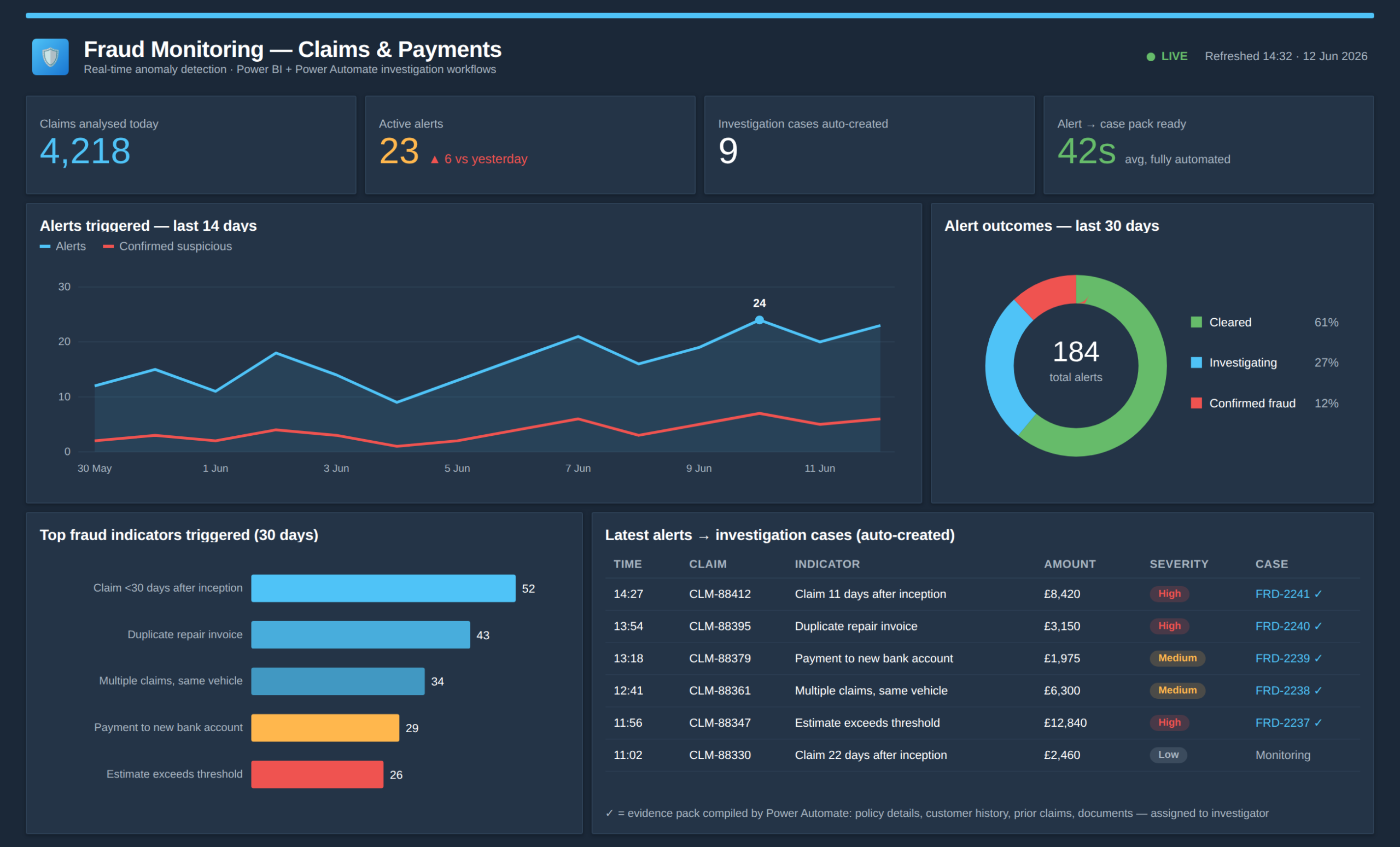
We had a project that combined Power BI and Power Automate to create a real-time fraud monitoring system. Power BI was continuously analysing claims and transaction data against a list of fraud indicators and anomaly rules. When it spotted something that looked suspicious:
Now the investigator gets to spend their time assessing the evidence rather than digging it all up. The insurer was able to move from a manual system that just reacted to problems to a near real-time system that could prevent them from happening in the first place.
Customer service teams deal with loads of requests from customers, like updating their details or vehicle information, adding or removing named drivers, processing amendments, generating new documents and verifying coverage. Most of these need updating in multiple systems, which is where automation comes in and takes the strain.
For one of our clients, we built a Power Pages portal that acts as a one-stop-shop for the customer service team. When a customer wants to make a change, the agent logs in, fills out a little form and Power Automate takes care of the rest – updating the policy, generating the new documents, emailing them to the customer and putting it in the audit trail.
The agent no longer has to mess around with multiple systems, and the customer gets the confirmation of the change a lot quicker.
Renewals and cancellations are a huge deal for insurance companies – they can make or break retention and revenue. But teams often spend most of their time on the admin side rather than actually trying to keep customers. And the good news is that both of these processes follow a pretty set of rules, so they’re great candidates for automation: identifying expiring policies, sending renewal reminders, processing cancellations, calculating refunds, updating systems and keeping records.
One project we did automated policy cancellations for a car insurance provider. The Power Automate workflow pulls down the policy, checks if the customer can actually cancel, calculates the refund or outstanding balance, updates the policy record, generates the cancellation documents and emails them to the customer. And it records the cancellation reason so the management can see why customers are actually leaving.
Employees no longer have to do all the repetitive system updates, and the management got a clear view of cancellation trends and why customers are leaving.
Most business process automation use cases will work across all types of insurance, but life insurance has got some unique processes around record keeping, document collection, and long-term policy servicing.
Medical underwriting needs questionnaires, medical evidence and declarations before an underwriter can even start assessing the risk. RPA takes care of the admin work around that decision: getting the questionnaires, tracking down any missing evidence, checking the documents are all there and sending reminders.
In life insurance workflows like this, we implement Power Platform technologies to automatically detect any missing medical documents, chase them up automatically and compile a complete underwriting pack once everything’s been received. The underwriter gets a complete file to review rather than having to check if everything is ready.
Beneficiary management is probably the most life insurance-specific RPA use case. Customers add, remove or update beneficiaries over the lifetime of a policy, and every change has to be done by the book with an audit trail to prove it.
Our typical approach is to use a Power Apps form to guide the service teams through the change request. Power Automate then checks all the required fields and signatures, updates the policy and generates the new documents, sends the customer confirmation and sticks the supporting evidence away in a safe place. The insurer gets a clear record of who changed what, when and what documents were used – really useful if a dispute comes up years later.
P&C insurers deal with a huge volume of claims, policy updates, and customer interactions. Most P&C automation projects that have been successful focus on getting claims sorted out and processed as quickly and as consistently as possible.
FNOL the process where a customer first reports a claim and you have to capture the claim. With Robotic Process Automation (RPA) you can automate the policy validation, claim record creation, document requests and lets you communicate with repair providers at this stage. From the moment a claim is reported, the whole process is handled consistently and with a lot less administrative tedium.
Once a claim comes in the insurer has to figure out how best to deal with it. Using Power Automate, claims can be automatically sorted and routed to the right team based on some predefined business rules. High value claims, specialist claim types, or claims that are missing some information are spotted and assigned to the relevant people straight away so that resources aren’t wasted on manual sorting.
The results vary widely depending on what process is being automated, but when insurers automate high volume, rule based workflows they normally see the most significant benefits.
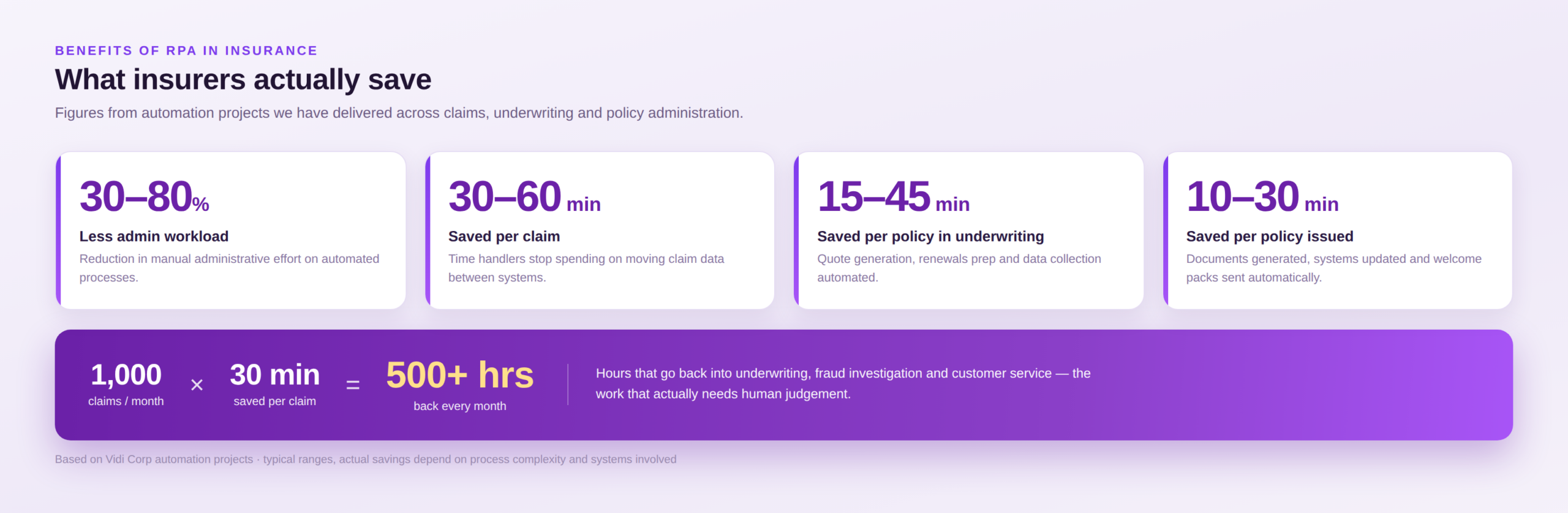
Automating all the usual data entry, policy updates, validation checks and document generation cuts down on the amount of manual effort that has to go into everyday operations. Across all of our projects, the amounts of administrative work that people have to do has typically dropped by 30 – 80% depending on what process is being automated.
Bots can do in seconds what would take employees minutes to do. The claims workflows we’ve talked about so far save 30 – 60 minutes per claim and policy issuance tasks which took 10 – 30 minutes now get done automatically.
Manual data entry is bound to have errors in it; RPA applies the same rules every time and never gets tired. And the same consistency applies to policy data, compliance checks, and billing – one client we worked with in the manufacturing sector was able to reduce their manual errors and save about 10 hours of work each month (it’s a Clutch review) – the same principle applies to policy data, compliance checks and billing.
When you reduce your workload by even a small amount over a large volume of transactions its huge – a team processing 1,000 claims per month is going to save hundreds of hours of employee time if each claim needs to be done a minute less manually – time which can then be redirected to underwriting, fraud investigation, and customer service.
Renewals, claims events, and regulatory deadlines all have the potential to bring a huge increase in workload to the insurance sector. Automated workflows can handle greater volumes of transactions without requiring an equal increase in headcount – this means that you can keep your service levels consistent even through the peaks.
Customers want a quick response to their claims and to get things sorted out as quickly as possible. By automating routine processes you can get documents, status updates and decisions out to customers much more quickly.
With RPA you get detailed audit trails automatically – what happened, when it happened, and who approved it. This makes regulatory reviews much easier and makes it easy to go back and check the history of a transaction if you need to.
RPA is not the right solution for every insurance process and you need to know its limitations in order to know what to expect.
Many insurers have legacy systems that were never designed to be automated. You can still use RPA with them but interface or workflow changes can break the automations. That is why it’s so important to have good governance and ongoing support in place.
RPA requires structured data and clear rules – so things like handwritten forms, medical records, free text emails and photographs usually require AI-powered document processing or human review.
Automations are not something you can “set and forget” – processes evolve, regulations change, and systems get updated so you need to plan for periodic maintenance to make sure the automations are still working as they should.
The technical build is sometimes the easy bit – getting the real benefits out of the system requires getting your staff on board, redesigning your processes, engaging with stakeholders, and having clear governance in place.
Processes that are dependent on human judgement or negotiation are generally not good candidates for RPA – for example evaluating unusual claims, assessing medical risk, and negotiating settlements are all best left to experienced people.
The dividing line is the same as the rule of thumb we shared earlier – if a process can be written down as clear business rules then RPA will do the job, but if it requires interpreting documents or making subjective decisions then you need AI or Intelligent Automation. In most insurance businesses, the best results come from combining both.
The success of an RPA initiative depends on both the processes you choose to automate and the governance you put in place. Insurers that start with the most suitable processes are the ones who see the fastest results and the strongest returns on their investment.
A common mistake that many people make is trying to automate everything at once – the most successful programmes we have been part of started with a small number of high impact workflows.
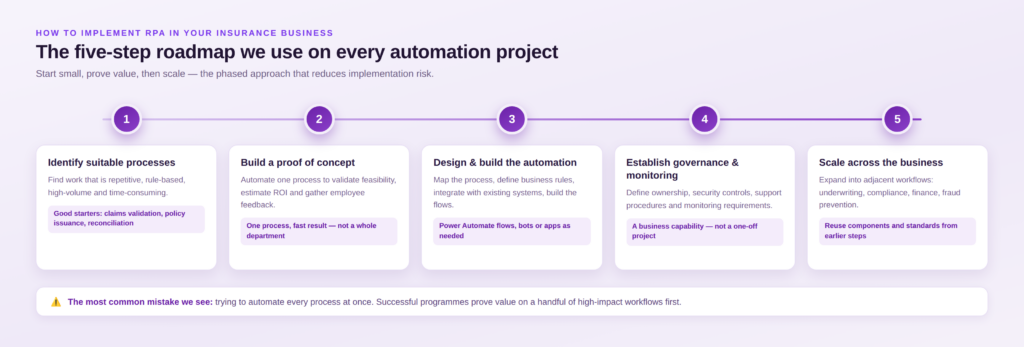
Look for processes that are repetitive, rule based, high volume, and time consuming in nature – claims validation, policy issuance, premium reconciliation, and compliance reporting are all usually strong candidates to start with.
Start with a single process that can show you some immediate value – a proof of concept will give you an idea of technical feasibility, show you the potential return on your investment, and get some feedback from your staff before you go off and do a larger-scale rollout.
Map out the existing process and define the business rules – this is where you start building your Power Automate flows or applications to integrate with existing systems.
Think of automation as a business-fundamental, not a one-time project. Work out who is responsible, put in place some basic security measures, sort out the support procedures and – crucially – set some monitoring in place to keep those automations running smoothly even when things change.
Once you’ve got the one thing working, take a good hard look at what else you might automate next. Most insurers start off with claims or policy administration, then see if they can push on into underwriting, compliance, finance and anti-fraud measures.
What are you looking for in an RPA company? Does it depend on how complex the process is you are trying to automate, the systems you are working with or the regulatory hoops you need to jump through ? Or maybe you are looking for someone who has a clear vision for where this is going and can deliver tangible business benefits. Consider this:
When you build your own stuff or work with a specialist, try to focus on solving the business problem rather than just automating a task. Best results usually come from finding ways to build reusable components, establish solid governance and create a clear roadmap for future automation – all of which should ultimately deliver real gains in efficiency, compliance and customer satisfaction.
RPA can be a massive help to insurance companies – helping to take the hassle out of the day-to-day work, speeding up key processes and making everything a lot more accurate when it comes to claims, underwriting, policy administration, compliance or customer service.
You’ll usually get the best results by starting with the high-volume, rule-based workflows where people are spending all their time moving data around, generating documents, checking information over and over or bashing away at systems with a keyboard.
For anyone in the insurance sector planning to start automating, the first step is to figure out which processes are best suited to RPA and which need a bit more AI or human brainpower. A bit of a proof of concept can then show where you can get the most return from your automation before scaling it up across the whole business.
If you are looking at RPA for your insurance business, Vidi Corp can help you assess your processes, point you towards the best automation opportunities and get you building practical solutions with Power Automate, Power Apps, Power BI and other Microsoft tech.


