
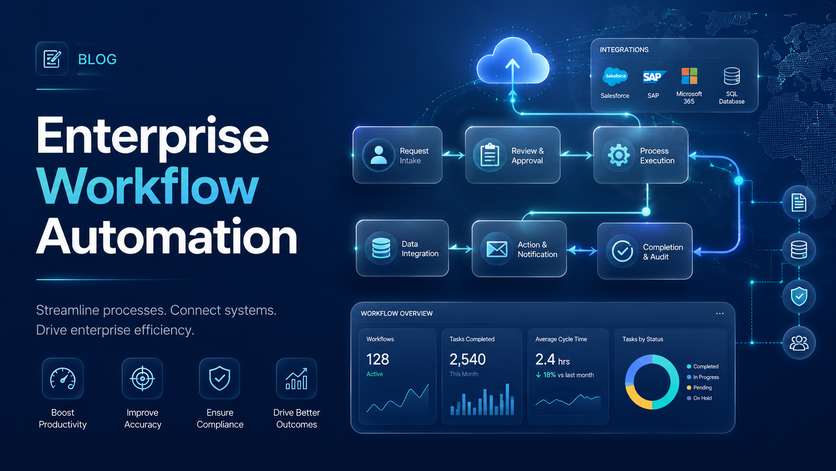
Most businesses run on a surprising amount of manual work. People copying data between systems, chasing approvals over email, updating spreadsheets that someone else will need to update again next week. Enterprise workflow automation puts a stop to that by building proper digital workflows that move data, documents, and approvals between people and systems without anyone having to push them along.
The impact is hard to ignore. Companies using modern workflow platforms often see process times drop by as much as 80%, operational costs fall by around 30%, and a real shift in how staff feel about their work once they’re no longer buried in admin.
At Vidi Corp, Robotic process automation specialists build these solutions for companies that have outgrown basic task automation. Our projects typically combine Power Automate, Power Apps, SharePoint, Power BI, APIs, SQL databases, and cloud infrastructure to automate work across finance, operations, HR, sales, procurement, and reporting.
In this article, we’ll walk through what enterprise workflow automation is, how it works, where it delivers the biggest wins, and how to roll it out properly, with real examples from client projects.
Enterprise workflow automation is the process of using software, integrations, and business rules to automate multi-step processes across departments, systems, and teams.
A workflow can be triggered by all sorts of things. Someone submitting a form, uploading a document, an email landing in an inbox, a record being updated, or a KPI hitting a certain threshold. From there, the automation takes over and routes the next step to whoever (or whatever) needs to deal with it, with no one having to pass the baton manually.
Take finance as an example. An automated workflow can pull invoice data straight from an email, drop the document into SharePoint, fire off an approval request in Teams, update the finance system, and refresh a Power BI report, all without anyone touching it.
This is a different beast from basic automation. Enterprise workflows tend to involve several systems working together, role-based permissions, approval rules, data validation, reporting layers, and proper audit trails, because at this scale, the details matter.
Enterprise workflow automation improves efficiency by removing routine manual steps from repeatable processes. This is achieved by connecting systems, triggering actions automatically, routing tasks to the right people, and updating records without manual copying.
A good workflow should reduce handoffs, shorten waiting time, and give employees one clear place to complete each task. It should also make the process easier to monitor through dashboards and status tracking.
Isovolta AG hired Vidi Corp to implement RPA and Power BI for finance reporting. The solution replicated complex Excel VBA logic in Power BI, automated reporting workflows, and saved approximately 10 working hours per month.
Digital workflow automation improves accuracy by reducing manual data entry, spreadsheet copying, and inconsistent file handling. It uses APIs, databases, validation rules, and structured forms to move data between systems reliably.
This is especially important in enterprise environments where small errors can affect financial reporting, procurement decisions, customer records, or compliance evidence. Automated workflows also create a stronger audit trail because every step is recorded.
War Room Operations worked with Vidi Corp on RDBMS setup, custom API scripts, and real-time analytics. The project reduced data-entry errors by 80% through automated REST API feeds and increased data integrity across business units to 99.7%.
Enterprise workflow automation speeds up decision-making by making reliable data available sooner. Instead of waiting for manual exports and report preparation, leaders can access refreshed dashboards that pull data directly from operational systems.
This is achieved through automated data extraction, scheduled refreshes, cloud databases, API integrations, and Power BI dashboards. The workflow turns reporting from a manual task into an always-on decision support system.
TGUC Financial hired Vidi Corp to set up DOMO reports, custom API scripts, and real-time analytics. Report generation time dropped from 48 hours to under 5 minutes, and strategic decision turnaround became 40% faster.
Enterprise workflow management becomes much easier when teams can see live process status. Automation gives managers visibility into open tasks, delayed approvals, workload, exceptions, and performance trends.
This is achieved by capturing each workflow step in a structured system and visualising the data in dashboards. Leaders can see where work slows down and take action before delays affect customers, suppliers, or internal teams.
ProFundCom worked with Vidi Corp to replace a dated PHP reporting system with Power BI. The migrated reporting solution achieved 100% transition of legacy users within 4 weeks, increased report usage by 25%, and delivered daily automated refresh with over 95% success rate.
Workflow solutions help companies scale because they reduce dependence on individual employees, manual instructions, and informal process knowledge. When a workflow is automated, the same process can run consistently across more teams, locations, entities, and systems.
This is achieved through standardised rules, reusable workflow components, central data storage, and system integrations. As volume grows, the process can handle more work without increasing admin effort at the same rate.
Advanced Spirits hired Vidi Corp to automate financial statement consolidation by connecting QuickBooks to a SQL database. The client expected the automated process to cut days off the monthly accounting close.
Finance teams often manage recurring processes such as invoice approvals, month-end reporting, payment follow-ups, expense approvals, budget reviews, and financial consolidation.
Automation can extract financial data from systems like QuickBooks, SAP Ariba, Zoho, Excel, and SQL databases. It can then refresh reports, send alerts, route approvals, and support month-end close activities.
For example, a finance workflow can identify outstanding invoices and automatically send follow-up messages to clients. This reduces manual chasing and helps finance teams stay focused on cash flow control.
Procurement teams often rely on multiple systems to track suppliers, purchase orders, approvals, contracts, and spend. When data must be exported manually, reporting becomes slow and inconsistent.
Automated procurement workflows can extract data from platforms such as SAP Ariba, move it into a structured database, and refresh dashboards more often. This gives procurement leaders faster access to supplier, spend, and operational performance data.
Mercy Corps hired Vidi Corp to automate Power BI reporting from SAP Ariba. The automated extraction now saves around 5 hours per month and allows the team to refresh procurement reports more often.
SharePoint is a strong foundation for enterprise workflow management because it can store documents, lists, permissions, pages, and structured records in one Microsoft environment.
When combined with Power Automate and Power Apps, SharePoint can support request systems, approval processes, document libraries, case management tools, internal portals, and compliance evidence tracking.
Hakim Group worked with Vidi Corp to move an internal content repository into SharePoint, create a new structure, and streamline access to resources. The project delivered scalable SharePoint pages, navigation, and permission levels while supporting RPA-driven workflow improvements.
Reporting is one of the strongest use cases for enterprise workflow automation. Many companies still prepare management reports by exporting files, copying data into spreadsheets, checking formulas, and rebuilding presentations.
Automated reporting workflows connect source systems directly to databases, dashboards, and scheduled refreshes. This allows teams to work from current data instead of waiting for manual updates.
Vidi Corp has built automated reporting workflows using Power BI, SQL, Azure, REST APIs, Python, SharePoint, and third-party connectors. These solutions reduce reporting effort and improve visibility across business functions.
Approval workflows are common in finance, HR, procurement, legal, and operations. They usually involve a request, validation, manager approval, document storage, and status tracking.
Digital workflow automation can replace email chains with structured forms, automatic routing, reminders, audit logs, and dashboards. This makes it easier to see which requests are pending, approved, rejected, or overdue.
A good approval workflow should include clear ownership, approval thresholds, escalation rules, and automatic notifications. It should also store every decision in a structured system for future reporting.
HR teams can automate onboarding, leave requests, employee document collection, training reminders, payroll checks, recruitment tracking, and policy acknowledgements.
For enterprise HR teams, automation is especially useful when several departments need to take action during the same process. A new employee onboarding workflow may involve HR, IT, finance, facilities, and the hiring manager.
Instead of tracking these steps by email, HR can use Power Apps and Power Automate to assign tasks, collect documents, send reminders, and show completion status in a dashboard.
Operations teams often manage recurring tasks across inventory, field work, compliance, quality control, service delivery, and customer support.
Automation can standardise these workflows by collecting data through forms, validating inputs, assigning tasks, triggering alerts, and creating management reports. This helps operational leaders track activity without depending on manual status updates.
For example, a workflow can capture field data from a mobile app, save images and forms in SharePoint, update a central database, and refresh a Power BI dashboard for managers.
Enterprise workflows generate vast amounts of unstructured data, much of which is still processed manually. Power Automate, combined with AI Builder and ChatGPT, offers a practical way to bring intelligent automation into finance, sales, operations, and executive workflows.
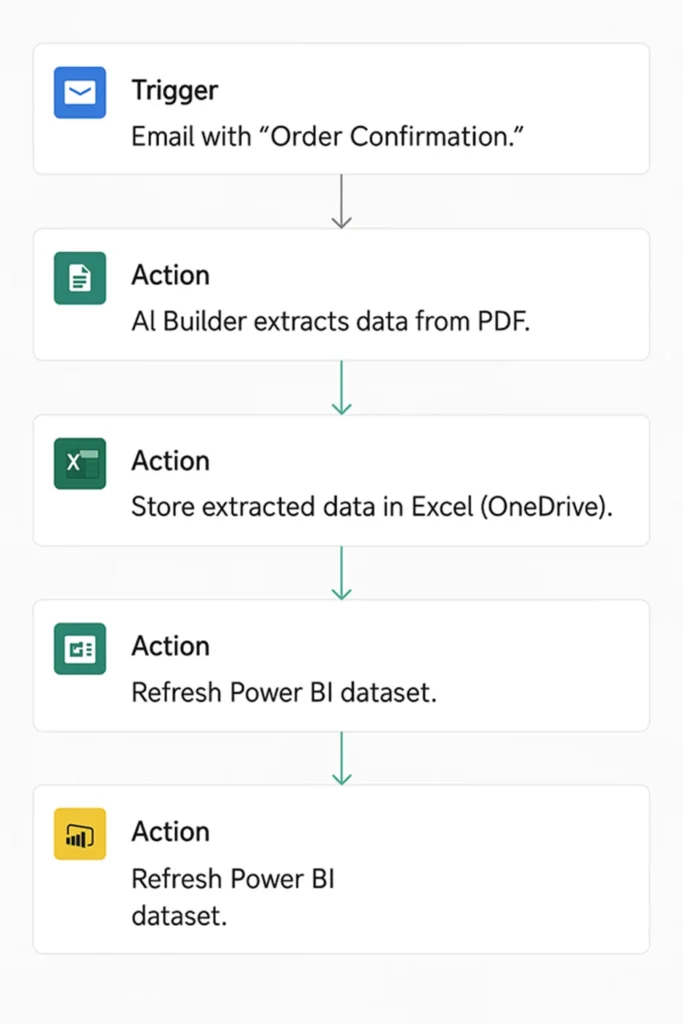
PDFs such as invoices, order confirmations, and contracts often contain critical data that teams rekey by hand. Automating this extraction is one of the quickest ways to cut admin work and improve data accuracy.
In 2025, we helped a sales team that spent hours each day manually pulling order details from PDF confirmations into Excel, causing errors in stock allocation and invoicing. Using Power Automate and AI Builder, we built a flow that captured PDFs from email, applied OCR to extract key fields, and wrote the data into a SharePoint List with review notifications. The solution removed around 5 hours of manual work per week, improved accuracy, and scaled to hundreds of PDFs daily.
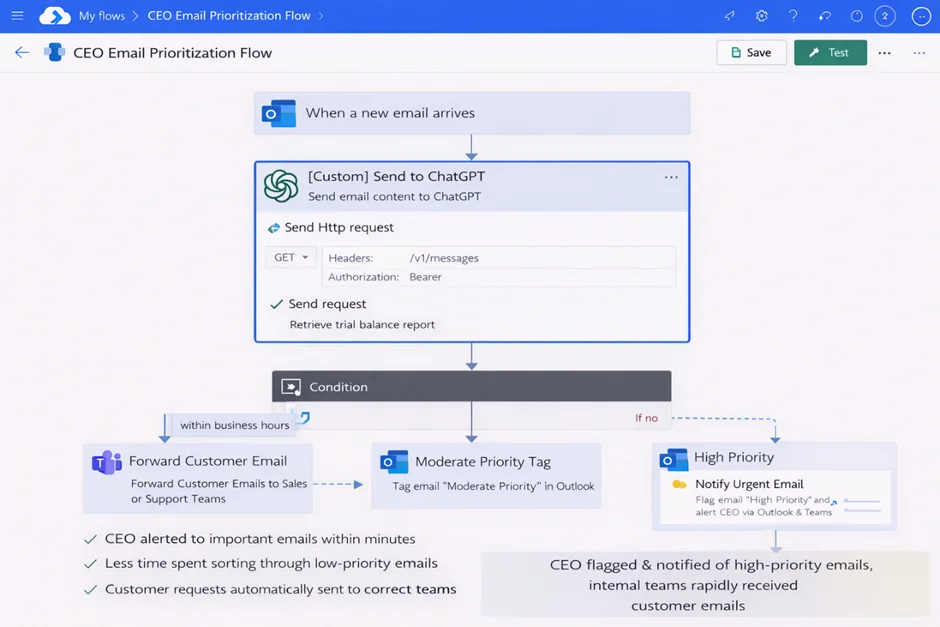
Power Automate can also integrate with ChatGPT to introduce AI-driven decision-making into everyday workflows.
We worked with a CEO whose inbox was overwhelmed by newsletters, CCs, and low-priority updates that buried important messages. We built a flow that sent incoming emails to ChatGPT via API, which assessed each for urgency and returned a priority classification. Power Automate then flagged, tagged, or notified the CEO through Outlook or Teams, and automatically routed customer emails to the right internal teams.
The result was a smarter, AI-assisted inbox that surfaced high-priority messages, reduced cognitive load, and freed the CEO to focus on decisions that mattered.
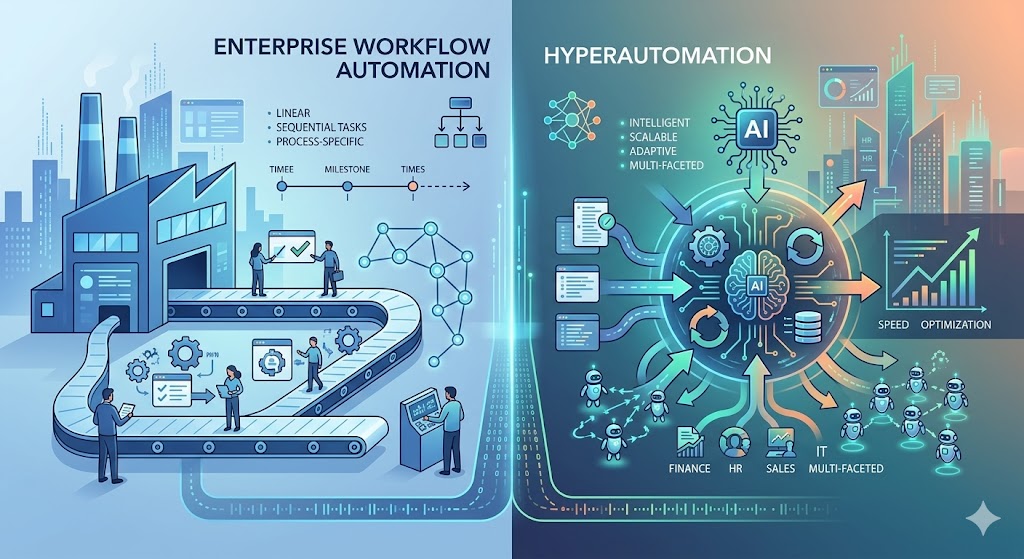
There is a real difference between automating a workflow and pursuing hyperautomation, and the distinction matters more than the jargon suggests.
Workflow automation, at its core, is process automation. You take a sequence of steps, usually involving people, data, and approvals, and you let software run that sequence instead of having someone push it along manually. It is bounded, predictable, and structured around known business processes.
Hyperautomation is the broader story. It is what happens when workflow automation stops being a standalone discipline and becomes part of a wider ecosystem that pulls in artificial intelligence, robotic process automation, orchestration platforms, analytics, and increasingly, intelligent agents. The goal is no longer to digitise one process at a time. It is to build a coordinated automation fabric across the entire organisation, where workflows, bots, AI models, and human decisions all hand off to each other in real time.
A practical way to think about it:
Workflow automation answers the question, how do we make this process run without manual intervention.
Hyperautomation answers a different question entirely, which is how do we build an enterprise where automation, intelligence, and orchestration work together to continuously improve operations.
The reason this matters for enterprise buyers is that most large organisations are no longer evaluating workflow tools in isolation. They are looking at how a chosen platform fits into a longer-term digital transformation roadmap. Vendors talk in terms of intelligent automation ecosystems, orchestration layers, and end-to-end process intelligence because that is the language enterprise decision-makers are using when they plan their two and three-year strategies.
If you are scoping a workflow automation programme today, it is worth asking which side of this line your investment sits on. A pure workflow tool will solve specific process problems. A hyperautomation strategy will set up your business to keep improving long after the initial rollout.
Once you move past small-team automation and into genuinely enterprise territory, governance stops being optional. It becomes the thing that determines whether your programme survives its first audit.
Enterprise workflow platforms touch sensitive data constantly. Customer records, financial information, employee details, contracts, medical data, and procurement decisions. Each automated process becomes a potential point of exposure if it is not properly governed, and each one becomes a potential point of trust if it is.
The areas that matter most in practice tend to cluster around a few themes.
Access control sits at the foundation. Role-based access control determines who can build workflows, who can approve them, who can run them, and who can see the data they handle. Without this, you end up with shadow workflows built by individual employees that nobody else knows about, which is precisely the kind of risk that drove organisations to centralise automation in the first place.
This is non-negotiable in regulated industries. GDPR governs how personal data flows through your workflows. SOC2 and ISO27001 set the bar for security controls and operational maturity. If your automation platform cannot demonstrate compliance with these, enterprise procurement teams will not even put it on the shortlist.
These are what allow your business to prove what happened, when, and why. Every workflow execution should produce a complete, immutable record of decisions, approvals, data changes, and exceptions. This is what auditors, regulators, and your own internal risk teams will ask for, and it is what gives leadership the confidence to let automation run unsupervised.
This governs how long workflow data is kept, where it is stored, and how it is eventually deleted. This becomes especially important when your workflows process personal data, contracts with statutory retention requirements, or financial records governed by tax law.
This prevents single individuals from controlling end-to-end processes in ways that create fraud or error risk. A well-designed enterprise workflow platform makes this enforceable through configuration rather than relying on people to remember the rules.
Enterprise buyers in finance, healthcare, legal, procurement, and IT do not buy workflow tools because the marketing looks good. They buy them because they have done the security review, the compliance assessment, and the risk analysis, and the platform has passed. Treating governance as a first-class part of your automation programme is what gets you past those gates.
There is a pattern that plays out in failed automation programmes, and it rarely has to do with the technology. The platform works. The workflows are well-designed. The integrations function. And yet six months in, half the organisation is still doing things the old way.
The problem is adoption, and it deserves far more attention than it usually receives.
Successful adoption is not something that happens at the end of a project. It starts before the first workflow is built. The organisations that get this right tend to do the same set of things.
Involve End Users Early – The people who will actually use the workflows are brought into design conversations from the start. This sounds obvious, but it is routinely skipped in favour of letting business analysts or external consultants design processes in isolation. The result is workflows that look correct on paper but ignore the messy realities of how work actually gets done.
Identify Workflow Champions – These are not project managers or executives. They are respected practitioners who understand the work and who can advocate for the new way of doing things to their peers. A single champion in a team of twenty will move adoption further than a memo from the CEO.
Executive Sponsorship – not just an endorsement, sponsorship means a senior leader who attends steering meetings, removes blockers, and visibly uses or supports the platform. Without this, automation programmes get deprioritised the moment a new strategic initiative arrives.
Plan Rollout in Stages – rather than launching everything at once, a phased approach lets you build confidence, gather feedback, fix problems, and create success stories that the next wave of users can see. Big bang launches almost always create more resistance than they need to.
Constant Communication – Adoption is partly a storytelling exercise. People need to understand why the change is happening, what it means for their day-to-day work, and how it benefits them personally. Communication plans that focus only on training schedules and go-live dates miss this entirely.
Measure Adoption Explicitly – Not just whether workflows are running, but whether the people who are supposed to use them actually are. Login frequency, workflow completion rates, exception volumes, and user surveys all tell you whether adoption is real or theoretical.
And critically, they plan for resistance. Some pushback is inevitable. People worry about job security, loss of autonomy, or simply having to learn something new. Acknowledging this directly, listening to concerns, and adjusting where it makes sense is far more effective than dismissing resistance as a barrier to overcome.
Adoption is the difference between an automation programme that transforms how the business operates and one that becomes an expensive case study in shelfware.
If you cannot demonstrate the return on your automation investment, you will eventually struggle to get funding for the next phase. This is true even when the programme is genuinely working, because executive sponsors and finance teams need numbers, not testimonials.
The good news is that workflow automation tends to produce measurable outcomes if you set up the measurement properly from the start.
A useful ROI framework covers several categories.
These are usually the easiest places to start. Process cycle time, the total elapsed time from process initiation to completion, often drops dramatically once automation removes handoffs and waiting periods. Approval turnaround time is another straightforward measure, particularly in finance, procurement, and HR processes where bottlenecks are common.
These capture the operational gains. Full-time equivalent savings quantify the labour hours that automation frees up, though this rarely translates into headcount reductions. More often it shows up as capacity that gets redirected to higher-value work. Operational throughput measures how much work the same team can now handle, which is often the more meaningful number for growing businesses.
These matter just as much as speed. Error reduction is one of the most reliable benefits of automation, because software does not get tired, distracted, or interrupted in the middle of a task. Tracking error rates before and after automation gives you a clean comparison. SLA improvements show whether you are now meeting service commitments you previously missed.
These speak directly to the concerns of regulated industries. Compliance incidents, audit findings, and policy violations should all trend downward as automation enforces controls that were previously dependent on human discipline.
They are easy to overlook but valuable. Reporting latency, the time between something happening in the business and leadership seeing it in a report, often improves dramatically once data flows through automated pipelines rather than being assembled manually each month.
These are the ones organisations forget to measure and later wish they had. Employee satisfaction with the new processes, time spent on meaningful work versus administrative tasks, and reduction in overtime can all be tracked through surveys and time-tracking data.
The strongest ROI cases combine hard financial numbers with operational and human evidence. Saying that automation saved fifteen thousand hours of manual work last year is powerful. Saying it also reduced compliance incidents by sixty percent and improved employee satisfaction scores in the affected teams is what wins funding for the next phase.
Most workflow automation guides treat integration as a feature checkbox. Does the platform connect to Salesforce, SAP, your HR system, your finance stack. The answer is almost always yes. The harder question, and the one that determines whether your programme succeeds, is how those integrations actually behave under real enterprise conditions.
Integration in an enterprise environment is rarely a clean API-to-API affair. It is a layered architecture problem that touches systems built decades apart, running on different infrastructure, with different data models and different ideas about what reliability means.
A serious integration strategy needs to think through several layers.
Modern systems expose APIs that workflow platforms can call directly, and these should be the preferred integration method wherever they exist.
They are faster, more reliable, and easier to maintain than the alternatives. But not every system has a good API, and not every API behaves well under load, so an API-first approach has to be paired with a realistic understanding of what each system can actually deliver.
Power Automate can connect Microsoft tools with external business systems and automate data movement between them. Its connectors work with platforms like SharePoint, Outlook, Teams, Power BI, Dataverse, Dynamics 365, and many third-party tools.
It can also route data based on business rules. A flow can receive data, check conditions, split it into different paths, and send it to the right system, team, or approver.
When a ready-made connector is not available, Vidi Corp can build a custom connector for API integrations. For example, our RPA developers created a custom Power Automate connector for a client to extract trial balance data through authenticated API requests and trigger downstream finance workflows automatically.
Many companies connect dashboards directly to each CRM, ERP, finance, or marketing platform. This creates fragile integrations because every report depends on separate system connections, data formats, and refresh logic.
An enterprise data warehouse solves this by acting as middleware. Data flows into one central warehouse first, where it is cleaned, standardised, and prepared before reaching Power BI, Tableau, or Looker Studio.
This makes the integration architecture easier to scale. New systems can be added to the warehouse without rebuilding every dashboard, and shared business logic can be managed centrally in SQL.
Legacy system handling is where most enterprise integrations get hard. There is almost always a system somewhere in the estate that predates modern APIs, runs on infrastructure nobody wants to touch, and contains data the business depends on. Integrating these systems often means falling back on database-level integration, file transfers, or in some cases UI automation through robotic process automation tools. Each of these has trade-offs in reliability and maintainability that need to be understood up front.
This is a decision that comes up repeatedly. APIs are almost always preferable when available. UI automation is what you use when there is no other option, but it should be treated as a temporary bridge rather than a permanent solution, because it breaks every time the underlying application changes.
These deserve special attention because they are usually the highest-risk and highest-value integrations in any enterprise programme. SAP, Oracle, Dynamics, and similar systems sit at the centre of finance, supply chain, and operations. Integrating with them well means understanding their data models, their batch processing windows, their transaction integrity requirements, and the governance processes around changes to their configuration.
Hybrid cloud architectures are now the norm rather than the exception. Most enterprises run workloads across on-premises infrastructure, public cloud, private cloud, and software-as-a-service platforms. Workflow automation needs to operate across all of these, which means thinking carefully about network connectivity, data residency, authentication, and latency.
Sync failures and data mapping are the unglamorous but critical operational concerns. What happens when an integration fails midway through a workflow? How do you handle data that exists in slightly different shapes in different systems? How do you detect and resolve duplicates, missing fields, or conflicting updates? These questions sound mundane, but they are what determine whether your automation runs cleanly in production or generates a steady stream of exception tickets.
The organisations that get integration right tend to treat it as an architectural discipline rather than a configuration exercise. They invest in proper integration design, they document data flows clearly, they monitor integration health continuously, and they plan for failure rather than assuming everything will work. That is the difference between automation that quietly delivers value for years and automation that becomes a maintenance burden.
One workflow automation architecture you see all the time across big enterprise organisations is the Microsoft Power Platform ecosystem, and that’s a structure that our RPA consultants routinely apply to enterprise clients because it lets companies get all their data entry, workflow orchestration, reporting, governance, and integrations dialled in and working together seamlessly in one environment.
Rather than trying to use a single, standalone tool for workflow automation, this approach builds a layered automation architecture where each component fills a specific operational role.
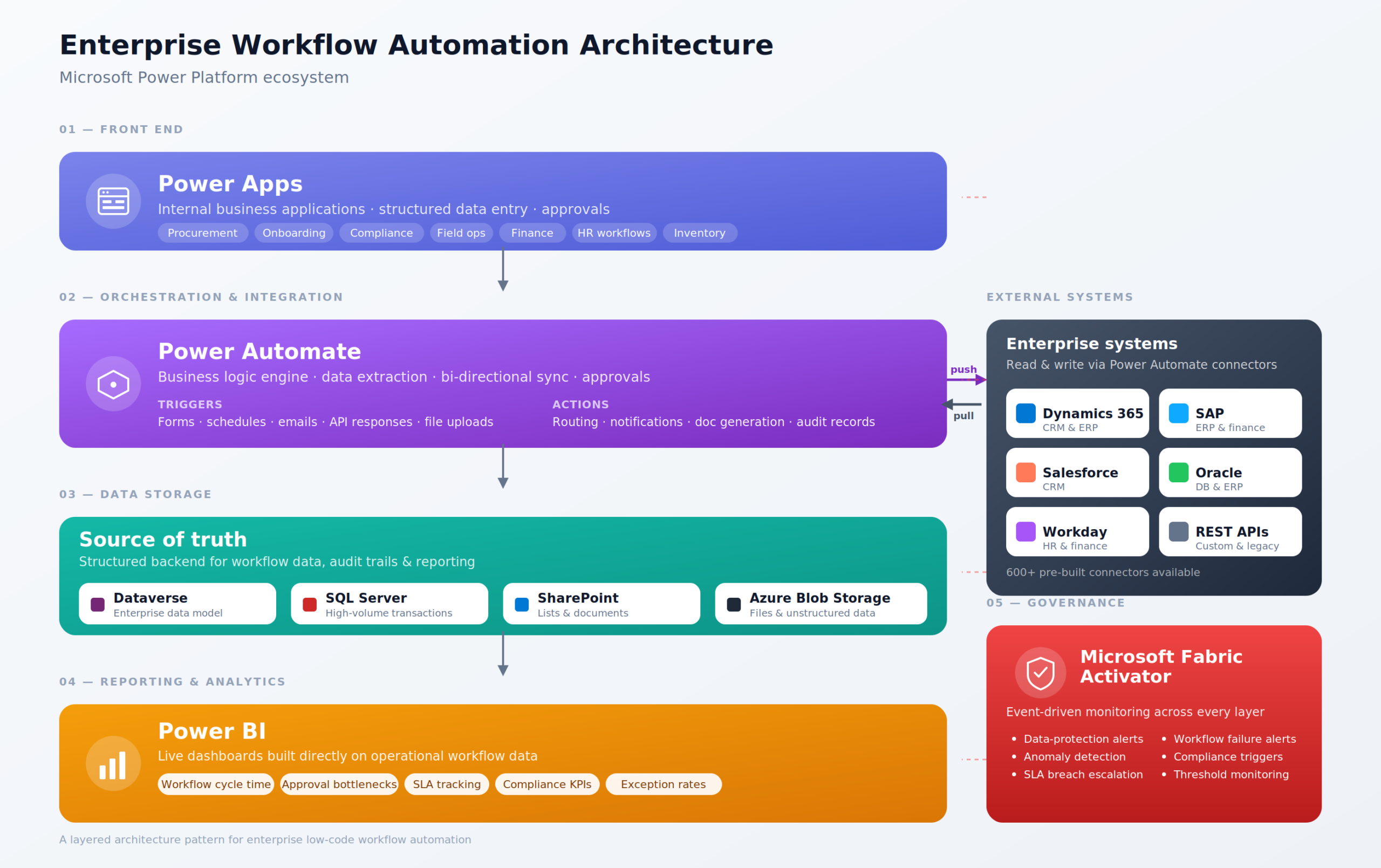
Power Apps is usually used as the front-end of the system where employees interact with the workflow system. Companies use Power Apps to build their own internal business applications without having to develop traditional custom software from scratch.
These apps often handle things like:
Employees can submit requests, upload documents, capture operational data, approve actions, and track the workflow status through structured interfaces that connect directly to the business systems in the background.
In big enterprise environments, Power Apps is particularly useful because it gives a controlled and standardised way for users to interact with workflows, rather than relying on spreadsheets, scattered email chains or disconnected forms.
Once data is entered into Power Apps, Power Automate is usually used as the orchestration and automation layer that runs in the background.
Power Automate is responsible for the business logic that moves data, approvals, notifications and actions around between systems and users. Workflows can be triggered by things like:
For example, a procurement request submitted through Power Apps might automatically:
In an enterprise workflow automation architecture like this, Power Automate effectively acts like the orchestration engine that connects systems, people, APIs, business rules and automation processes together in one place.
The data collected through Power Apps and processed by Power Automate is usually stored in a backend database like:
The storage layer acts as the central source of truth for the workflow system.
For smaller workflows, SharePoint Lists are often good enough for storing structured operational data. For bigger enterprise environments with higher transaction volumes, more complex reporting needs or more advanced data models, Dataverse or SQL Server is usually a better option.
Using a structured data storage system has loads of benefits, including:
Power BI is usually used as the analytics and reporting layer on top of the workflow architecture.
Rather than teams manually exporting spreadsheets and building reports by hand, Power BI dashboards can automatically pull live workflow data from Dataverse, SQL databases, SharePoint, APIs and operational systems.
This lets organisations keep an eye on things like:
The reporting layer becomes an integral part of the workflow itself, rather than a separate reporting exercise performed after the work is done.
As enterprise workflow environments get bigger and more complex, governance becomes a lot more important, especially when different business units are building their own low-code solutions across the organisation.
Microsoft Fabric Activator can help provide governance, monitoring and event-driven automation across the wider Power Platform ecosystem.
For example, Activator can:
This helps central IT and governance teams keep an eye on things and have operational control even when automation solutions are being developed across multiple departments.
| Automation type | Code required | Pricing model | Cost | |
|---|---|---|---|---|
| UiPath | UI + API + AI | Low-code, some C#/VB | Per bot, per user, plus modules | From ~$420/mo, enterprise quotes climb fast |
| Power Automate | UI + API + AI | Low-code | Per user and per flow, premium add-ons | $15/user/mo, $150/mo per unattended bot |
| Blue Prism | UI + API | Low-code, more dev-heavy | Per bot, enterprise contract | Quote only, high entry point |
| Zapier | API only | No-code | Per task, tiered plans | Free tier, paid from $20/mo |
| Make | API only | No-code with logic blocks | Per operation, tiered plans | Free tier, paid from $9/mo |
Two camps here. The first three are traditional RPA tools that automate by driving user interfaces (clicking buttons, reading screens, filling forms in legacy apps). The last two are iPaaS workflow tools that connect cloud apps through APIs.
If you are staring down a pile of legacy desktop apps, terminal emulators, or anything else without a decent API, you are in proper RPA territory and should be looking at UiPath or Blue Prism. They are not interchangeable, though. Blue Prism is the safer pick when governance, audit, and security are the loudest voices in the room, which is usually the case in banking, insurance, or healthcare. UiPath tends to win on developer experience and has a stronger AI story, so it is often the better fit when speed of building matters as much as the controls around it.
If your company already lives inside Microsoft 365, Dynamics, or Azure, Power Automate is hard to argue with as a starting point. A lot of the basic functionality is bundled into licenses you are already paying for, which changes the economics completely, and the Copilot integration is genuinely the best in the category right now.
At the other end of the spectrum, Zapier is the right call when you just want something working by lunchtime. If all your tools have APIs, your volume is reasonable, and your workflow is not doing anything too clever, nothing else gets you from zero to running faster. Make is what you reach for when you have outgrown that. The visual scenario builder handles loops, branching, error handling, and data transformations that would either need a chain of separate Zaps or push you onto a more expensive Zapier tier.
One mistake worth flagging: people sometimes pit UiPath against Zapier as if they are competing for the same job. They are not. The two camps solve different problems, and plenty of companies run both quite happily. RPA handles the ancient SAP screen nobody wants to touch, then Zapier or Make picks up the output and pushes it into Slack, HubSpot, or Airtable. Often, the right answer is not one tool; it is the right tool for each part of the chain.
A trigger starts the workflow. This can be a form submission, new email, file upload, database update, system event, scheduled refresh, or manual button click.
The trigger should be selected based on the real business process. For example, an invoice workflow may start when a PDF arrives in a shared mailbox.
Business rules define what happens next. They decide who receives the task, what data is required, when approval is needed, and what happens if the workflow fails.
These rules should be documented before development begins. Unclear rules usually lead to confusing workflows and low adoption.
Enterprise workflows often depend on multiple data sources. These may include ERP systems, CRMs, finance platforms, spreadsheets, SharePoint lists, SQL databases, APIs, and email inboxes.
The automation should connect to the source of truth wherever possible. This reduces duplication and keeps the workflow aligned with real business data.
Some workflows need a user-facing app or form. This is where employees submit requests, upload files, check statuses, or approve tasks.
Power Apps is often used for this layer because it can create structured interfaces for internal users. It can also connect directly to SharePoint, Dataverse, SQL, Excel, and other systems.
The automation logic moves the process forward. It can send notifications, update databases, create documents, assign tasks, extract data, or call external APIs.
Power Automate is commonly used for this layer in Microsoft environments. For more complex requirements, Python scripts, custom APIs, Azure Functions, or RPA bots may also be used.
Every important workflow should produce data that can be monitored. This includes task volume, completion time, bottlenecks, failed runs, approval status, and business outcomes.
Power BI dashboards help managers see whether the process is working. They also help teams improve workflows over time.
The best first candidates are repetitive, time-consuming, error-prone, or genuinely important to the business. You want something with structured data, clear rules, and lots of handoffs between people or systems. Invoice approvals, financial and procurement reporting, customer and employee onboarding, document generation, KPI alerts — these are the usual suspects, and they are usual suspects for good reason.
One trap to avoid: do not automate a broken process. If the workflow itself is a mess, automation just makes the mess happen faster. Clean it up first, strip out the steps that nobody can justify, then think about automation.
Before you touch anything, write down how the process currently works. Every step, every system, every role, every data source, every approval, every weird edge case. This is unglamorous work, and people are tempted to skip it, but it is where you spot the bottlenecks and where you catch the exceptions that would otherwise blow up your automation three weeks after launch.
You do not need a fancy tool for this. A simple map showing the trigger, the main path, the exception paths, and the final output is enough.
Now design the future-state workflow on paper, before anyone picks a tool. Decide what runs automatically and what still needs a human in the loop. Not everything should be automated. High-risk decisions, unusual exceptions, and anything sensitive often belongs with a person.
The point is not to remove people. It is to remove the boring admin work so people can spend their time on the parts that actually need judgement.
Tool choice depends on your existing systems, your data volume, your security needs, and who is actually going to use the thing. There is no universal best answer.
Power Automate is a strong default for cloud workflows, approvals, notifications, and anything in the Microsoft 365 world. Our workflow automation consulting team helps enterprises pick the right mix across Power Automate, Power Apps, SQL, Azure and RPA rather than forcing everything through one tool. Power Apps fits when users need a custom form or internal app, and SharePoint handles document storage and structured lists. For heavier data workflows you may need SQL, Azure, APIs, Python, and Power BI in the mix. And for legacy desktop systems with no API to speak of, RPA is the right answer.
Start small. Build a focused version that solves the core problem and nothing else. This lowers your risk, gets users testing the real thing quickly, and stops you from spending six months on a workflow that turns out to miss the mark.
An invoice workflow might start as document capture, approval routing, and storage. Later you add OCR, payment tracking, ERP updates, and dashboards. Enterprise automation works best when you ship something useful early and then improve it based on what you actually see, not what you guessed in the planning meeting.
Testing has two sides: does the technology work, and do the people who have to use it find it usable. Both matter. Run it against real data, real documents, real approval rules, real exceptions. Have users tell you whether it makes sense. Have managers confirm the dashboards give them what they need to do their jobs.
Whatever you do, do not skip exception testing. Most workflow failures in the real world come from missing data, weird file formats, duplicate records, or approval paths nobody thought to map. Find those before launch, not after.
Training should focus on what users need to do, not how the automation was built under the hood. They need to know where to submit requests, how to approve things, how to check status, and who to call when something breaks. That is it.
Documentation, separately, should cover the logic, who owns it, where the data comes from, who has access, and how to maintain it. This is what makes the automation supportable when the business inevitably changes.
Workflow automation is not a project you finish. Systems change, teams grow, data evolves, new requirements appear. After launch, track the things that tell you whether it is actually working: failure rates, completion times, adoption, user feedback, and the business impact you originally set out to achieve.
The best automation programs treat each workflow as a starting point, not a finish line. Done well, every workflow you ship makes the next one easier and your operation a bit more connected and a bit more intelligent.
This is the quiet killer. A workflow without a clear business owner drifts. When a rule needs to change, or an exception needs a decision, or someone needs new permissions, there is no one to ask, so things sit. Small changes turn into multi-week negotiations, users stop trusting the system, and the whole thing slowly loses momentum.
Every workflow needs a named person on the business side who can actually make calls. Not a committee, a person.
Automation only works as well as the data feeding it. If the source data is incomplete, inconsistent, or full of duplicates, the workflow will route things to the wrong people and spit out reports nobody trusts. Then everyone blames the automation, when the real problem was always upstream.
It is worth doing a proper review before you build anything. What fields exist, what they are called, what is required, what counts as valid. Boring work, but it pays for itself many times over.
Teams sometimes try to design for every possible exception in the first version. The result is usually a slow, painful build that takes months to ship and still misses cases nobody anticipated.
Automate the main path first. Watch how it actually gets used. Then handle the exceptions you see in the wild, in priority order. You will end up with a better system in less time.
If your workflow tool is harder to use than email or a spreadsheet, people will quietly go back to email and spreadsheets. The interface has to be simple, and the time savings have to be obvious from the first interaction.
Adoption tends to climb when users can see exactly where their request stands, get notifications that actually tell them something useful, and complete their tasks inside tools they already live in. Teams, Outlook, and SharePoint are good places to meet people where they already are.
Automated workflows still need someone keeping an eye on them. Connectors break, permissions change, source systems get updated, and runs fail. Small technical problems that go unnoticed become operational problems fast.
Build alerts and dashboards in from the start, not as an afterthought. Support gets dramatically easier when you can see what is failing and why, before users have to tell you about it.
Workflow automation, done well, gives an organisation more speed, fewer errors, better reporting, and a clearer picture of what is actually happening day to day. It pulls disconnected systems together, takes the manual work off people’s plates, and gives leaders something they rarely have enough of: real visibility into their own operations.
The biggest wins come from picking workflows that are repetitive, measurable, and tied to outcomes the business actually cares about. Start with one process where the impact will be obvious. Build it properly. Then use that success to make the case for the next one, and the one after that. Automation programmes that try to do everything at once usually achieve very little. The ones that compound, win.
If you have a process that is eating too much time, throwing off too many errors, or leaving you flying blind, Vidi Corp can help. We build workflow automation around the systems, data, and goals you actually have, not the ones a vendor wishes you had. Drop us a line, and we can take a look at it together.


