
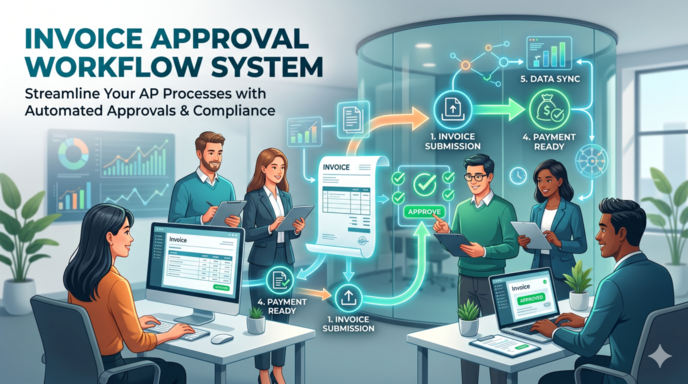
An invoice approval workflow is the set of checks an invoice goes through before it gets paid or sent to a customer. The invoice comes in, the numbers get checked against what was ordered, it is matched to a purchase order, someone signs off, and the payment goes out. How many of those steps you actually have depends on the invoice and the company’s own rules, and it runs differently for accounts payable than for accounts receivable.
For a lot of businesses this still runs on email, spreadsheets, and a few systems that were never meant to talk to each other. Approvals drag, invoices go missing, the same one gets paid twice, and nobody can say where anything stands. Finance spends its time chasing bottlenecks instead of doing the work that matters.
Our Power Platform consultancy builds these workflows in Power Apps and Power Automate. This article covers how the AP and AR workflows work, where manual processes break down, and the real app screens from two of the builds we did for clients.
An invoice approval workflow is the structured process a company uses to check, route, and approve an invoice before it is paid or sent to a customer. It is doing three jobs at once: keeping the invoice data accurate, keeping approvals in line with company policy, and giving finance real control over what gets spent and billed.
Most workflows are built around four actions:
Get those four consistent and you have something a machine can follow. That is the point where robotic process automation in accounting becomes realistic, because every step now has a rule sitting behind it.
How many steps you end up with depends on the business, the invoice, and how much needs checking before it gets paid. The bones are usually the same core sequence though, whether it runs on paper or through software.
A good approval workflow does more than move invoices toward payment. It gives finance a steady read on what the business is committing to, and it catches the messy stuff while it is still cheap to fix.
Errors are the obvious one. Run every invoice through the same checks and a duplicate bill or a wrong total gets caught before the money leaves, not in a reconciliation three weeks later. It also makes the whole thing harder to game. Keep the person who raises an invoice separate from the person who approves it and you have closed off the easiest route for a payment that should never have happened.
Then there is visibility. A manager can see what is sitting with them and how much has already been committed, which is usually the difference between a calm month-end and a nasty one. And when an auditor wants to know who signed off a particular payment, that is already on record, not reconstructed from an email chain.
Vendors feel the speed. Route invoices to the right people, nudge them when they sit too long, and suppliers get paid on time. That quietly removes a lot of the disputes and chasing calls.
Invoice approval workflows turn up anywhere the invoice count has outgrown one person’s memory, which is most businesses past the very early days. Who is involved, and how many checks sit in the middle, shifts as the company grows.
On the AP side the invoice usually passes whoever raised the purchase, an AP clerk or accountant doing the coding and matching, the budget owner confirming the spend is real, and a controller or senior approver once the amount gets big enough. AR is shorter. It is the salesperson or ops person who asked for the invoice, and the finance team checking it before it reaches the customer. Run across several entities or locations and you add a layer on top, since each entity tends to keep its own rules and limits.
Size changes the shape more than anything. A small business gets by on a shared inbox and one or two people who check and approve everything, and that holds right up until those people are busy or away. Mid-sized teams usually feel it first: enough volume and enough approvers to need real routing, without the structure to do it. Larger and multi-entity setups need that structure from day one, both to keep things moving and to keep each entity’s audit trail its own.
When it comes to Accounts Payable, the focus is on supplier invoices. The goal is to make sure invoices are accurate, authorised and approved before you make the payment.
The AP workflow usually looks like this:
Without a structured AP workflow, you’re stuck with delayed approvals, duplicate payments, lost invoices, and a lack of visibility into outstanding liabilities.
In Accounts Receivable automation, the workflow focuses on the invoices that get generated internally before they get sent to customers. This is used to check over the invoices that get raised by sales teams, account managers or operations teams.
The AR workflow usually looks something like this:
The goal is to reduce billing errors, prevent disputes and just generally make sure invoices are accurate before they get to the customer. This helps with cash flow, reduces rework for finance teams and helps keep customer relationships strong.
Way too many organisations still handle invoice approvals through emails, spreadsheets, paper forms or disconnected accounting systems. While this works okay at a small scale, manual workflows create all sorts of problems when invoice volumes start to go up.
Below are some of the most common problems businesses face with manual invoice approval processes.
Manual approvals just depend on managers responding to emails or physically signing documents. This creates bottlenecks when approvers are away, travelling or working remotely.
Finance teams also spend a lot of time chasing approvals through email chains or follow-up messages – all of which slows down invoice processing and supplier payments.
Paper invoices and email attachments can just get lost across inboxes, folders or departments. In many organisations, invoices get forwarded multiple times between finance teams and managers without a central tracking system.
This creates all sorts of confusion around which invoices were received, reviewed or approved.
Without a centralised invoice tracking system, businesses risk processing the same invoice multiple times. Duplicate payments come from all sorts of places – manual data entry, invoice resubmissions or invoices being stored across multiple systems.
These errors can cost you a bunch of unnecessary money and leave you with a lot of extra reconciliation work to do.
Manual workflows provide zero visibility into invoice status and approval progress. Finance teams often struggle to answer simple questions such as:
Poor visibility can make a real headache out of management reporting and financial forecasting.
Having to manually approve things increases the risk of people slipping in unauthorised approvals and policy violations. And when approvals are done over email or by verbal confirmation, you’re just asking for trouble – such is the lack of a reliable audit trail that comes with it.
This creates all sorts of compliance issues and makes it a right old pain to investigate financial discrepancies or prove your approval controls in an audit.
Loads of businesses do the thing where they manually match invoices up to purchase orders, contracts, or delivery records. Guess what? That’s a recipe for disaster – it takes ages and is so prone to human error.
Some of the issues you’re likely to run into include:
These little errors can delay payments and cause all sorts of disputes with suppliers or customers.
As your business starts to grow, manual invoice approval workflows just become more and more of a nightmare to manage. Higher volumes of invoices, multiple departments and whole approval hierarchies to navigate – it all just adds to the administrative burden on finance teams.
Without some sort of automation in place, you’ll often find yourself struggling to keep approval speed, consistency and visibility in line as you get bigger.
Any of this can run by hand or through software. Same steps either way. What changes is how much lands on a person, and how easily anyone can see where an invoice has actually got to.
| Stage | Manual | Automated |
|---|---|---|
| Data capture | Someone keys the details in from a PDF or paper copy | The system reads the invoice and pulls the details out |
| Routing | Invoices go out by email, then reminder emails | Rules send each invoice to the right approver on their own |
| Visibility | Hard to tell where an invoice is or who is holding it | A dashboard shows the status of every invoice in real time |
| Error handling | AP catches duplicates and mismatches by eye | Duplicates and mismatched totals get flagged automatically |
| Fraud controls | Depends on someone noticing that something is off | Separation of duties and checks are built into the routing |
| Audit trail | Records sit across inboxes and shared folders | Every approval is logged against the invoice as it happens |
By hand is fine while volume is low. It stops being fine at the point where the hours spent chasing sign-offs and unpicking errors cost more than automating would, and for most teams that arrives earlier than they would guess.
One of the best ways to get a handle on your invoice approval workflows is to build a structured process in Power Apps, with Power Automate workflows running on in the background. Our workflow automation consultants build these structured approval processes for finance teams across sectors.
Most of the time, we build two separate Power Apps:
This makes the whole experience nice and simple for each user group. Requesters just see the bits and bobs they need to see, while approvers have a clear view of all the pending approvals and outstanding actions.
Power Automate flows then handle the automation bit behind the scenes. Depending on what’s required, Power Automate can:
This all reduces the back-and-forth emailing that slows down invoice approvals so much – instead of having to chase down approvals on spreadsheets or through emails, users get automatic alerts and can track requests in real time.
The workflow also gives you a much better view into the approval process. You can see what’s pending, approval status, where the bottlenecks are and any overdue requests all from one centralised system.
Next up, we’re going to walk through the workflow step by step, showing you the individual Power Apps screens we developed for each stage of the process. That way, you can see how the apps support invoice submission, approval routing, status tracking and financial review in practice.
If you want to standardise your invoice approval workflows using Power Apps and Power Automate, you can just get in touch, and we’ll work with you to build something tailored to your business needs.
Many businesses let sales teams, account managers or operations teams raise invoices directly for customers. It’s great for speeding up billing, but there’s a catch – unless finance teams can keep a handle on the approval process, you’re just asking for trouble.
Without a proper invoice approval workflow in place, you’ll often run into issues like duplicate invoices, cancelled invoices not getting removed, wrong billing details, overwritten invoice numbers or invoices being sent to customers more than once. That’s just a recipe for customer confusion and a higher chance of accounting errors.
Our RPA consultants tackled this by building a structured workflow for Accounts Receivable invoice approval in Power Apps, Power Automate and QuickBooks Online integration.
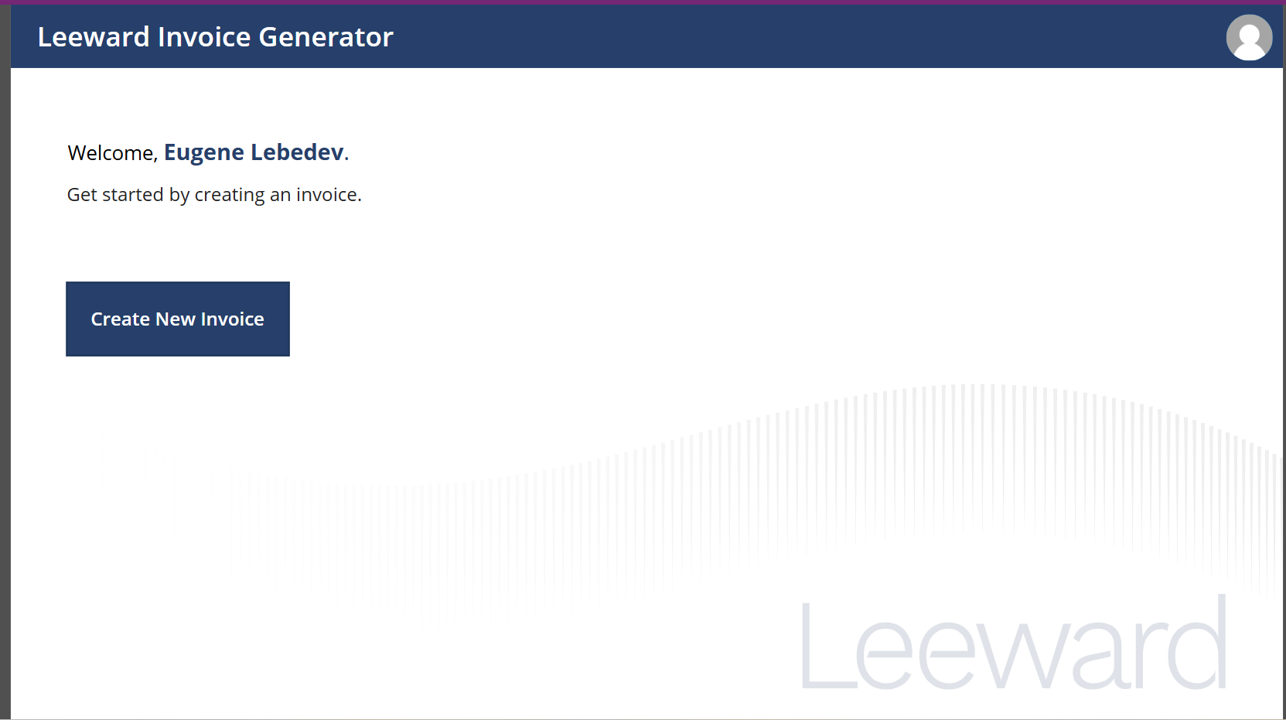
The process starts when users open up the Power App to create a new invoice request. You can access the app from a desktop browser, mobile phone, tablet or even embed it straight into SharePoint for easier internal access.
That way, employees can raise invoice requests from anywhere without having to get direct access to the accounting system.
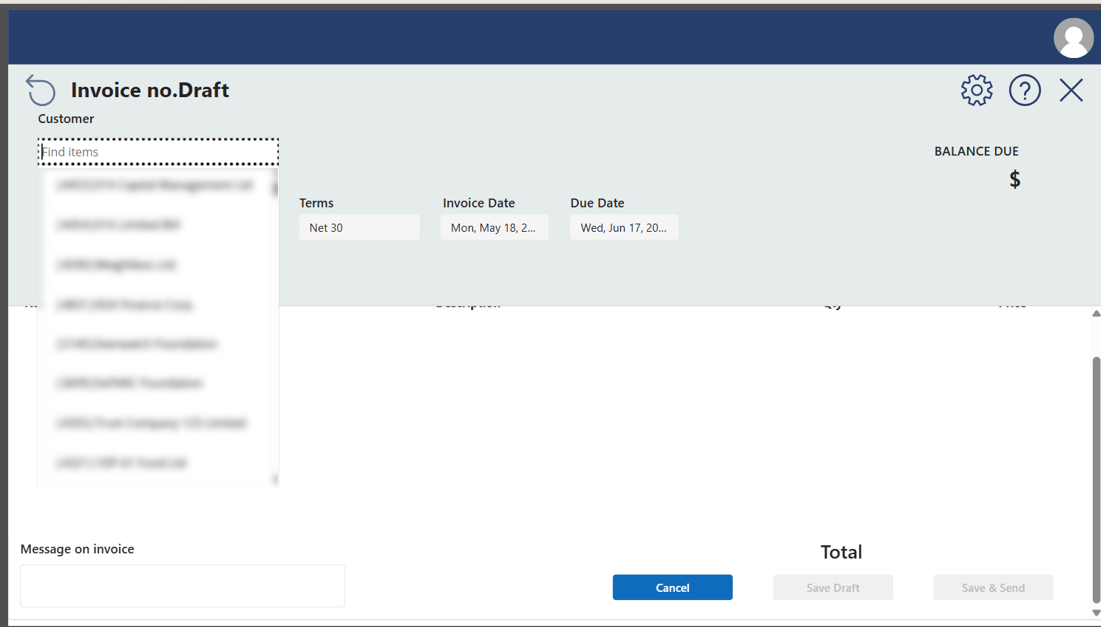
Users then pick the customer they want to invoice. In this particular project, the customer list is pulled in real time from QuickBooks Online, but we can also develop data integrations with systems like Xero, Sage, NetSuite, Dynamics 365 or other accounting platforms.
If the customer doesn’t exist yet, users can even create a new customer straight through the Power App.
Once the customer is picked, the app populates lots of the important invoice details like:
That reduces all the manual data entry and keeps consistency across invoices.
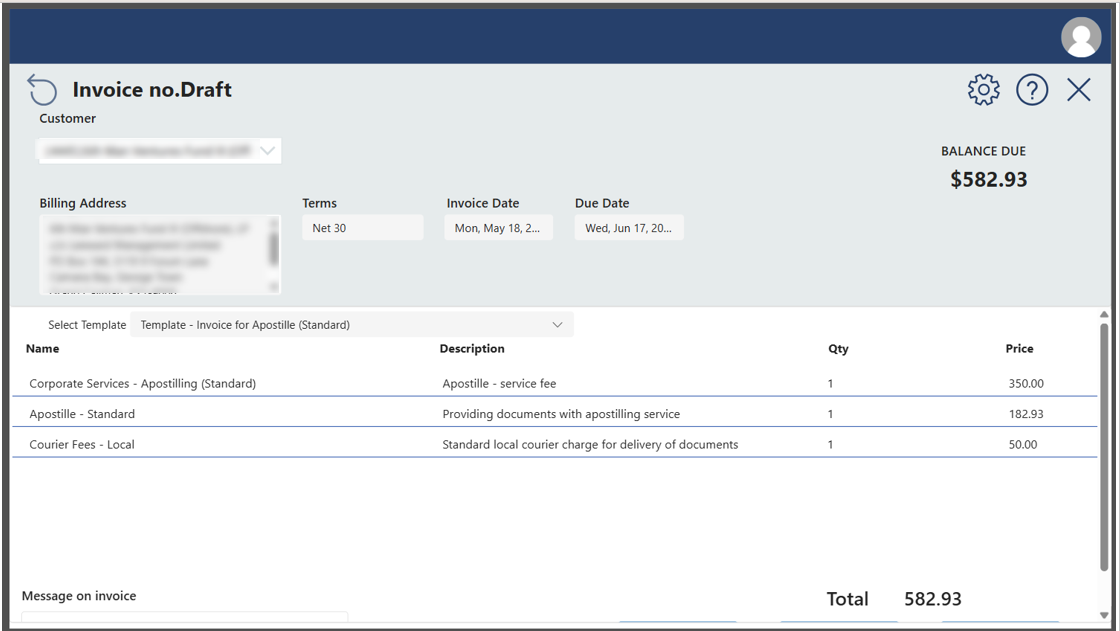
After picking the customer, users choose the invoice template for billing. That’s a really important bit of the workflow – it lets businesses standardise invoice structures and group predefined invoice line items into reusable templates.
Instead of having to add invoice rows one by one, employees can just pick a predefined billing structure that automatically populates the invoice with the required products, services or pricing logic.
That reduces all the manual work and minimises billing inconsistencies.
Once you’ve finished entering all the invoice details, click Save and Send. At this point, the invoice request is passed on to finance for approval through the workflow – and you can breathe a sigh of relief knowing it’s out of your hands.
The good news is that you don’t have to send invoices directly to the customer yourself. That way, finance teams keep a tight grip on invoice approvals and customer billing right from the start.
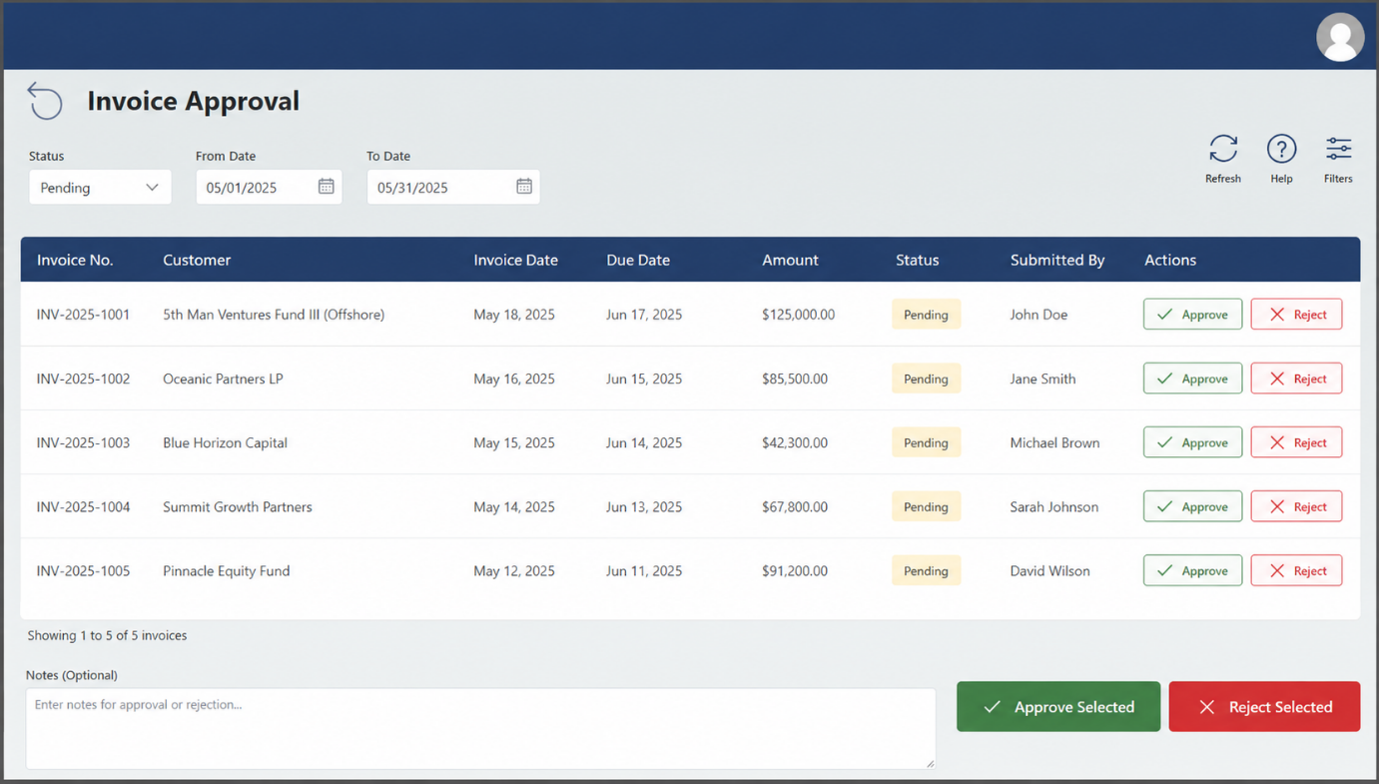
When a new invoice request comes in, finance teams get an automatic notification. Then they can just open up their approval Power App – where all the outstanding invoice requests are laid out in a nice neat queue.
From the approval app, finance users can:
All of which helps create a controlled and auditable approval process before the invoice goes out to the customer.
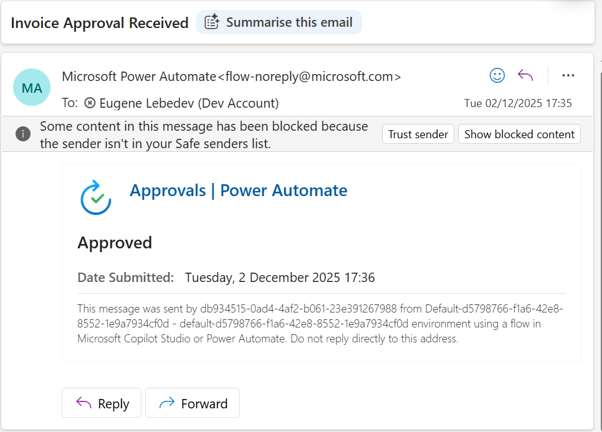
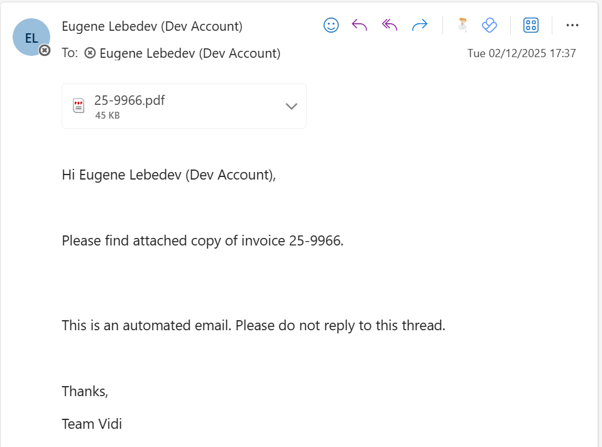
Once the invoice gets approved, automated workflows spring into action, sending out notifications to confirm the approval status. You’ll get an email, and the final invoice PDF will automatically be generated and sent both to you and the customer as well.
At the same time, the approved invoice gets automatically posted into QuickBooks Online. This keeps the accounting system as the single source of truth, and all approved invoices are fully in sync with the finance records.
By combining Power Apps, Power Automate, and accounting system integrations, we’ve standardised invoice creation – while still letting finance teams keep a tight grip on customer billing.
As part of our RPA-managed services we have also built an Accounts Payable invoice approval workflow in Power Apps for American Express to help standardise supplier invoice processing and reduce finance admin for them.
This project is a prime example of RPA in procurement. The goal was to centralise invoice submissions, validate invoices automatically, and make sure that supplier invoices matched approved purchase orders before payment processing – all to keep things as smooth as possible.
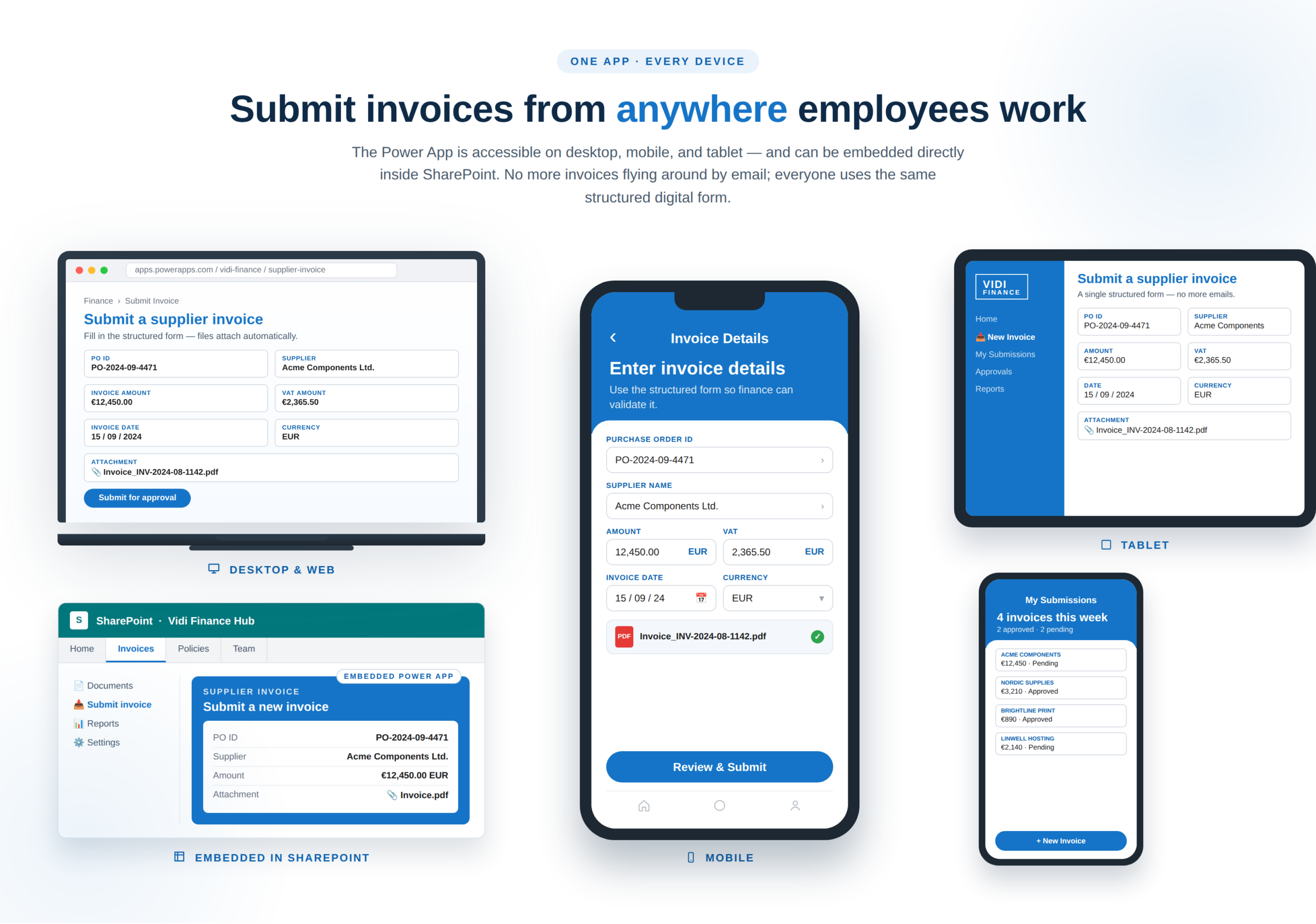
Things kick off when employees open the Power App to submit a supplier invoice. The app is accessible from desktop, mobile devices, tablets, or even embedded directly into SharePoint.
Instead of passing invoices around by email, employees can just submit everything through a well-structured digital form.
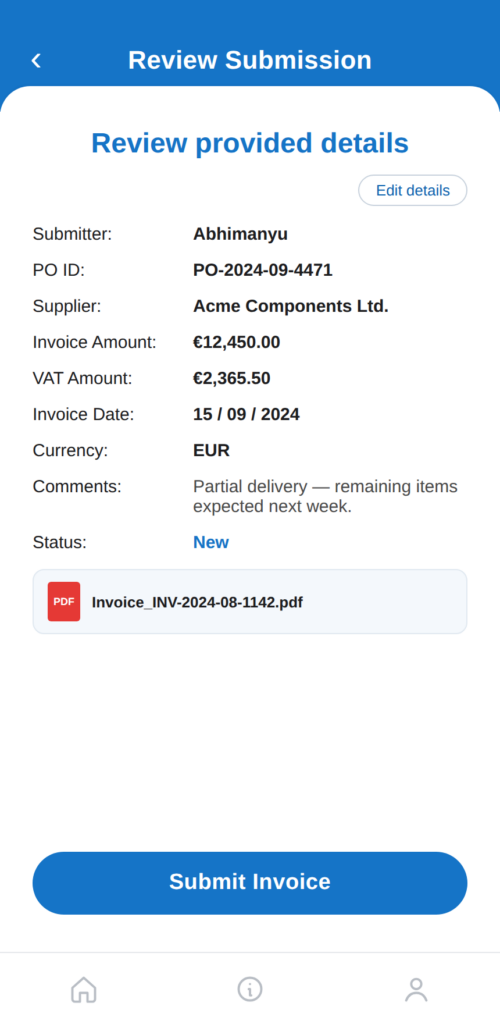
Users can upload the supplier invoice PDF directly into the app, and fill in the important details like:
By getting all that information upfront, finance teams can make sure their invoice records are standardised – and downstream validation processes are that much more accurate.
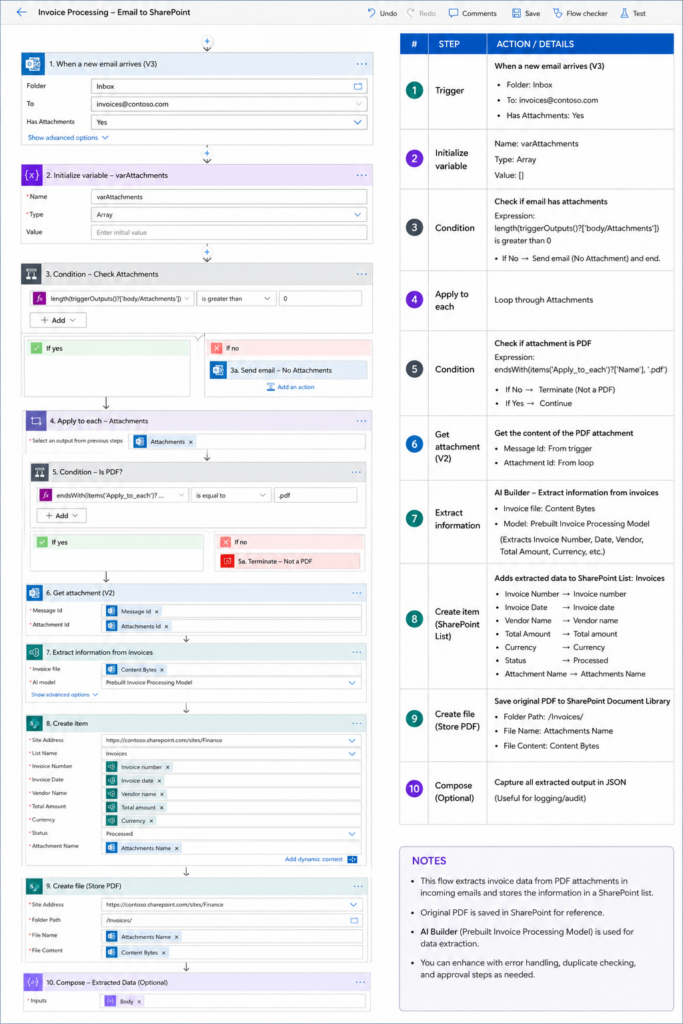
To reduce manual data entry even further, we also implemented Power Automate AI Builder to automatically scrape invoice data from uploaded PDF invoices using OCR and AI.
The system reads invoice fields like supplier details, invoice numbers, VAT values, dates, and totals – and stores the extracted data inside Dataverse tables. This creates a structured and searchable invoice database in the background.
All of which reduces manual processing effort while improving data consistency.
Once the invoice data is in the system, the workflow validates the provided purchase order against the company’s SAP Ariba procurement system.
The automation checks several key conditions, including:
This automatic validation step helps prevent wrong payments, duplicate invoices, and unauthorised purchases before they even get to the payment process.
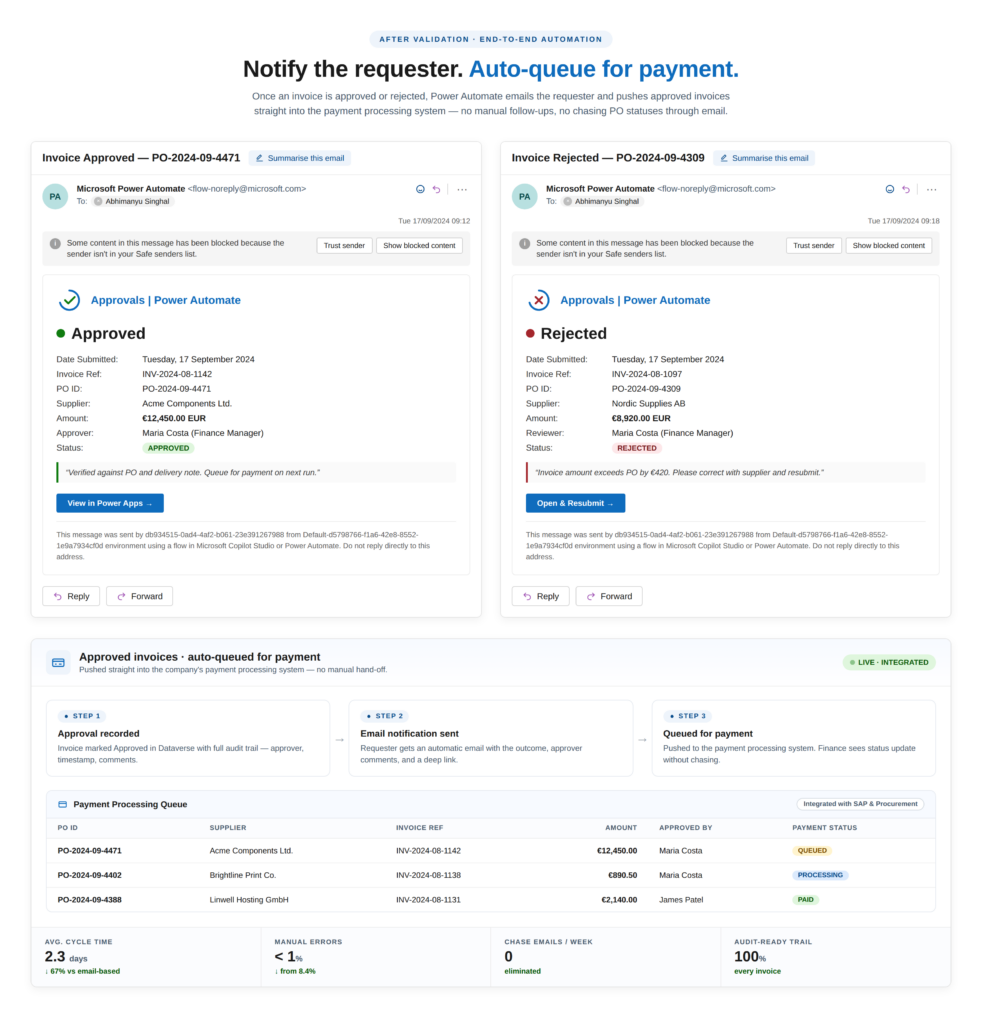
After validation is done, the requester gets an automatic email notification to let them know whether the invoice got approved or rejected.
Approved invoices are then automatically queued for payment using the company’s payment processing system. With our workflow fully integrated with procurement and finance systems, the finance team no longer needs to chase down invoices against purchase orders or approval status through email.
The end result is a much faster and more controlled Accounts Payable process with better visibility, fewer manual errors, and strong financial controls in place.
Standardising invoice approval workflows through Power Apps and Power Automate helps businesses move away from disconnected manual processes and create a more scalable, controlled and efficient finance operation.
The biggest advantage of digital invoice approval workflows is that you can keep a complete audit trail for every invoice and approval action.
The system automatically records:
This makes compliance reporting a whole lot easier and helps organisations meet internal control requirements during audits. It also reduces the risk of unauthorised approvals or missing approval documentation.
Automated workflows reduce approval delays by routing requests instantly to the right people and sending out notifications in real time.
Instead of relying on email chains or manual follow-ups, finance teams can keep an eye on approval queues from one place – while managers can approve requests directly from their desktop, mobile or Microsoft Teams.
All of which helps businesses process invoices a whole lot faster and reduces administrative workload across departments.
Faster and more reliable invoice processing is a game-changer, leading to consistent supplier payments. Gone are the days of vendors chasing payment updates because the approval process is now more predictable and transparent.
Reducing delays, invoice disputes, and payment errors means that businesses can build stronger supplier relationships – and enjoy the trust that comes with working with external partners.
Manual invoice approval processes often become a nightmare to manage as businesses grow and invoice volumes shoot up. Power Apps and Power Automate offer a scalable workflow structure that can handle multiple departments, approval hierarchies, locations, and accounting systems without increasing manual admin work.
The fact is – because the workflows are standardised and automated, finance teams can handle a lot more invoices while keeping a close eye on things, maintaining visibility, consistency and financial control.
One of the biggest advantages of taking your invoice approval workflows digital is that every single approval action, status update, validation step and timestamp gets automatically stored in the workflow audit trail.
This metadata can then be easily pulled into Power BI KPI dashboards so you can see how efficiently your procurement and finance teams are processing invoices. By keeping an eye on invoice approval KPIs, organisations can identify bottlenecks, reduce delays, improve compliance and optimise supplier payment processes.
Some of the most important invoice approval workflow KPIs to focus on are:
Because all of this workflow activity gets stored centrally, you can analyse these KPIs by supplier, department, approver, invoice type or approval stage. This gives finance and procurement leaders a much better view of how things are going – and helps them identify areas where approval workflows can be further optimised.
Even when you’ve designed an invoice approval workflow that’s well thought out, it can still become inefficient if you implement it in a way that’s overly complicated or poorly managed. Based on our experience building Power Apps and Power Automate approval solutions, these are some of the most common mistakes businesses should avoid.
A workflow stays reliable when it is kept simple and looked at now and then. A few things carry most of the weight:
Manual invoice approval workflows are a major source of delays, approval bottlenecks, duplicate payments and limited visibility for finance teams. And as invoice volumes grow, managing approvals through emails, spreadsheets and disconnected systems becomes increasingly difficult to scale.
By standardising invoice approval workflows with Power Apps and Power Automate, businesses can create a fully digital process with automated approvals, real-time notifications, centralised tracking, audit trails and direct integration with accounting systems like QuickBooks Online, Xero, SAP and others. This helps finance teams process invoices faster, maintain stronger financial controls and improve operational efficiency across Accounts Payable and Accounts Receivable workflows.
In this article, we showed real examples of invoice approval workflows that we developed using Power Apps, Power Automate, AI Builder and accounting system integrations to automate invoice processing and reduce manual administration.
If you are looking to get your invoice approval workflows organised, automate the approval process, or create some similar customised Power Apps for your finance team, then you should get in touch with us & we’d be happy to help set up a tailored solution that fits your business needs.


