
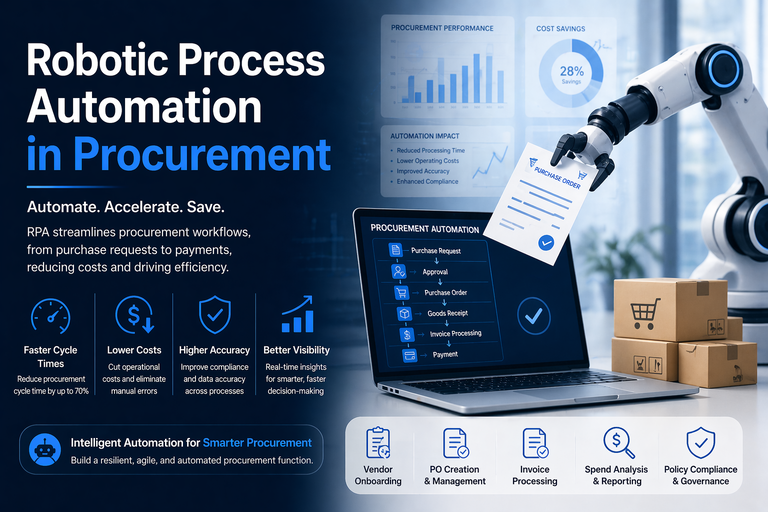
RPA in procurement is all about using software robots to automate the dull, repetitive tasks that bog down your procurement team – like creating purchase orders, processing invoices, updating vendor info, and chasing up approvals. These software bots can interact with the systems you already use – like ERPs, email, and supplier portals – to speed up transactions and make sure they get done right, without you having to tweak the underlying infrastructure.
At Vidi Corp, we’re a team of RPA consultants who specialise in building custom automation solutions using tools like Power Apps and Power Automate. We design workflows that connect up your procurement systems, automate the bits that take up too much time, and make sure data flows smoothly between teams. We’ve got experience working with the likes of Delta Airlines, American Express and Ray-Ban – and over 600 other clients across loads of different industries.
In this article, we’re going to take a closer look at how RPA is used in procurement, which processes give the most bang for your buck, and how to get started with implementing it step by step. You’ll also get to see some real-life examples of automation in action – along with the kind of results that procurement teams can actually achieve by adopting RPA.
RPA in procurement is all about using RPA software bots to automate the dull, repetitive tasks that bog down your procurement team – like creating purchase orders (POs), matching invoices, updating vendor master data and sending status updates. These bots follow a set of predefined rules to make sure they get it right, every time, and reduce the amount of manual effort you need to put in.
RPA works by tapping into the same systems and interfaces that your procurement team already use:
That means RPA implementation can be done without messing with the systems you already use, making it a low-risk automation option.
Now, it’s worth noting that RPA is a pretty mechanical process – it follows the rules it’s given and doesn’t “think” for itself. It’s not like AI, which can interpret context and make its own decisions. However, RPA is often used alongside other technologies to make it more powerful – for instance:
Take invoice data extraction for example – a common use case in procurement. RPA bots can be trained to recognise the layout of different invoices from different suppliers, and then pull out the key bits like supplier name, invoice number and total amount. Once it’s been set up, the bot can do this automatically from incoming PDF invoices and feed the data straight into the ERP system – reducing manual data entry and making it more accurate.
Procurement teams are under the gun to do more with less. Since 2020, supply chain disruptions and inflation have made sourcing more unpredictable, while shared service centres are dealing with talent shortages. As a result, procurement functions need to process more volume, keep suppliers on track and control costs without having to hire more people.
In practice, this means that teams are bottlenecks in a few key areas. Many teams are still stuck with manual invoicing, which slows things down and increases errors. Approval cycles get delayed, leading to missed discounts or late payment penalties. Vendor master data goes out of sync as a result of manual updates across systems. And because systems aren’t properly integrated, it’s hard to get a clear view of spend in real-time.
These inefficiencies have a real cost impact, too – manual invoicing can cost anywhere from $8 to $15 per invoice, while RPA-enabled workflows can knock that down to $2 to $4 by streamlining data entry and validation. Across thousands of invoices a month, that adds up quickly.
Business Process Automation addresses these challenges by automating the core transactional workload in procurement. Bots take over the routine bits – extracting, validating and entering data automatically – and work 24/7 to keep things moving, even outside of working hours. Every action gets logged, so you’ve got a clear audit trail for compliance and reporting. And when things go wrong – like a mismatched invoice – RPA flags them up straight away and routes them to the right person, so you can get them sorted out quickly. That transactional workload is the natural starting point, but our workflow automation consulting extends the same approach into finance, HR and operations once procurement is running smoothly.
The most effective RPA use cases in procurement focus on high-volume, rule-based processes that rely on structured data – where there’s a predictable format, clear rules and a big volume of transactions to automate. That usually means operational workflows that sit between request creation, supplier interaction and financial processing.
The following sections break down the core procurement processes where RPA delivers the most value – including PR-to-PO automation, inventory and stock monitoring, RFP processing, procurement reporting and invoice processing.
RPA bots automate the transition from purchase request (PR) to purchase order (PO) by plucking data directly from ERP systems or structured e-forms. They also make sure that the data they extract is valid by checking budget availability ,account codes ,and making sure it meets all of the predefined business rules to see if the request is genuinely able to proceed. Once that’s all sorted the bot makes the purchase order all on its own, to ensure consistency across all the transactions that come in.
In the real world these bots take care of every single step in the workflow -no need for any manual intervention. They log in to check the approval status for each requisition to see if it’s been okayed. Using predefined supplier rules they then pick out the best vendors for the job and make sure that PO line items are populated with all the right quantities, prices and cost centres. The bot then whips up the purchase order in the ERP system and sends a confirmation email to the suppliers to make sure that orders get processed and communicated as fast as possible.
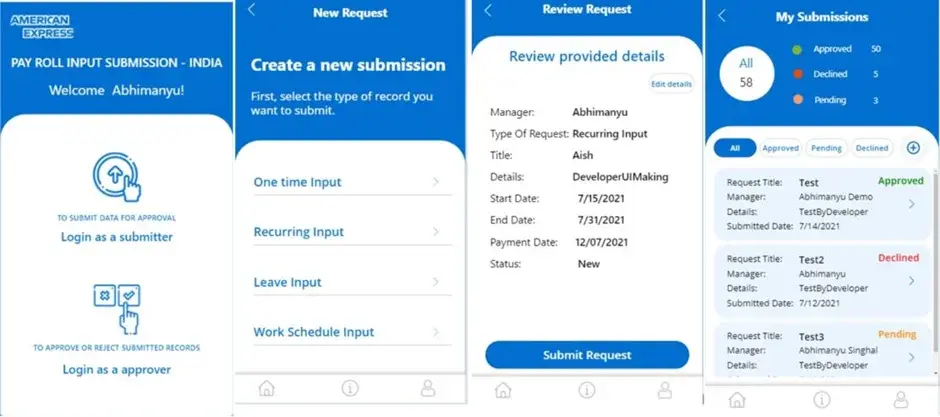
Our Power Apps consultants did the exact same thing for an expense approval workflow with American Express. Used to be that employees would submit expenses via Excel and email, which caused all kinds of delays and visibility issues. But once we automated the process, submissions would trigger instant approval notifications with reminders and real-time tracking built in. The result was a 65% drop in approval times, which just goes to show how structured, rule-based workflows like PR-to-PO can get a massive speed boost from automation.
Using RPA we can automate inventory monitoring by having the bot log into warehouse management systems (WMS) or inventory platforms and just pull out the stock reports. Then it compares the current stock levels against the predefined levels at which we want to reorder. Based on those rules the bot can automatically trigger a purchase requisition or send an alert when stock falls below the threshold -that way we can make sure that replenishment decisions get made consistently and without any delays.
In practical terms these bots automatically extract the data from the API to get updates on the current stock level. Then they check the available quantities against the safety stock levels and the reorder points ,all of which have been defined by the business. When those thresholds get breached the bot can either go ahead and generate a purchase request in the ERP system or send a notification to the right team. And that really helps reduce our reliance on manual monitoring and means that we can take timely action across all our locations.
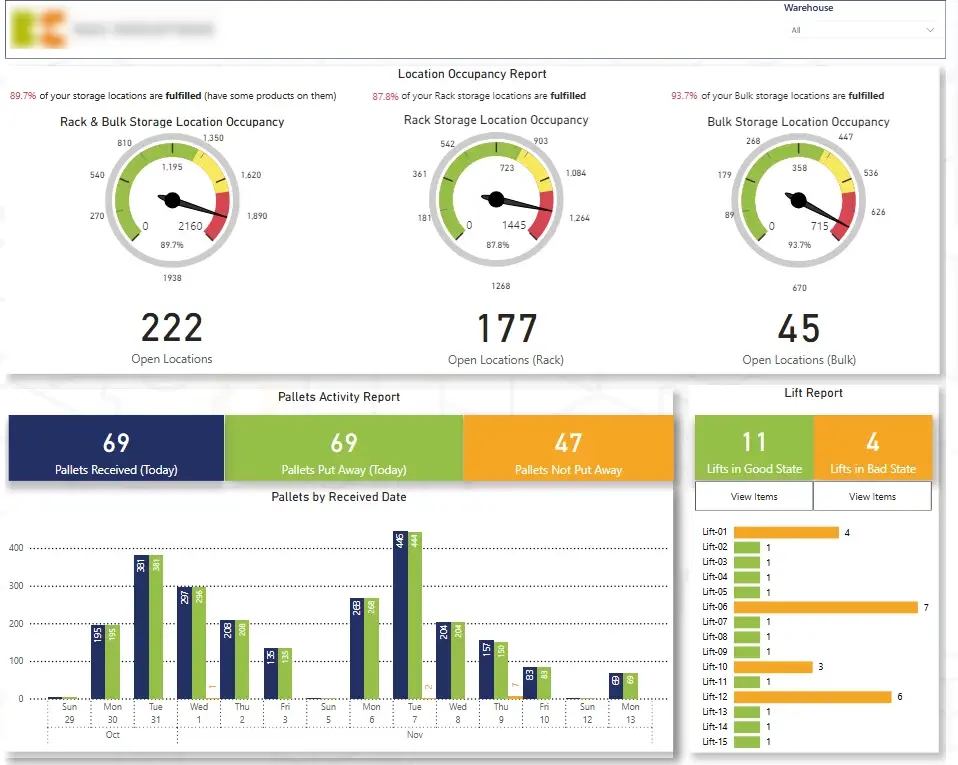
This approach really does make a big difference when it comes to supply reliability and cost control. Our procurement teams end up with fewer stockouts, avoid expensive rush orders and achieve better on-time-in-full (OTIF) performance. For example, our Power BI developers created a warehouse dashboard using data from DaVinci WMS that lets us see how many locations are taken up versus how many are free and it triggers an automated email alert when occupancy goes down to 40% -at that point the warehouse manager can start thinking about restocking before things get out of hand.
Using RPA we can automate the RFP process by capturing supplier responses, getting the data all sorted out and then getting it ready for evaluation. Bots can collect responses from forms, emails or portals ,get the data into a standard format for easy comparison and eliminate the need for manual consolidation. And that lets us make sure that all supplier responses get processed the same way.
In practice, the automation takes care of the full intake and evaluation workflow. The suppliers submit their responses through structured forms and that gets stored in a central repository. The bots then send out confirmation emails ,extract the key data points like pricing, technical specs and delivery terms and then push that data into comparison templates. And the process can even rank suppliers based on predefined criteria which lets procurement teams evaluate the options faster and more consistently.
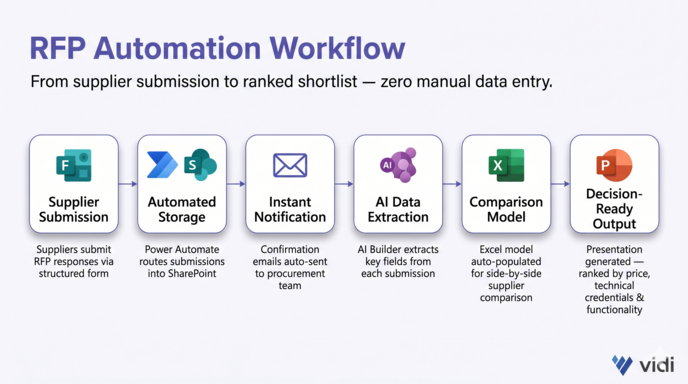
For example, we built a SharePoint automation workflow using Microsoft Forms and Power Automate and got the supplier submissions automatically stored in SharePoint. And the confirmation emails were sent out straight away to the procurement team. Then we used AI Builder to extract key data from each submission and populate an Excel-based comparison model which then got fed into a presentation. And that lets procurement teams compare the supplier quotes side by side and rank them based on price, technical credentials and required functionality without having to do any manual data entry.
Using RPA and automated reporting tools we can take all the fragmented purchasing data and turn it into a clear view of spend, approvals and compliance. Which is especially important in big organisations with operations across multiple countries -procurement teams need to be able to monitor request volumes ,budget usage and approval progress across lots of different regions. A Power BI procurement dashboard makes all the request-to-purchase lifecycle visible in one place.
In real terms automated reporting can track the total number of purchase requests, the requested budget and the approved budget and break it all down by country, region and requisition status. And it can even link each purchase request directly to a purchase order so procurement teams have confidence that spend is only committed once the right approvals are complete. Which means that its way easier to spot bottlenecks in the approval pipeline ,prioritise overdue requests and keep a tighter grip on procurement governance.
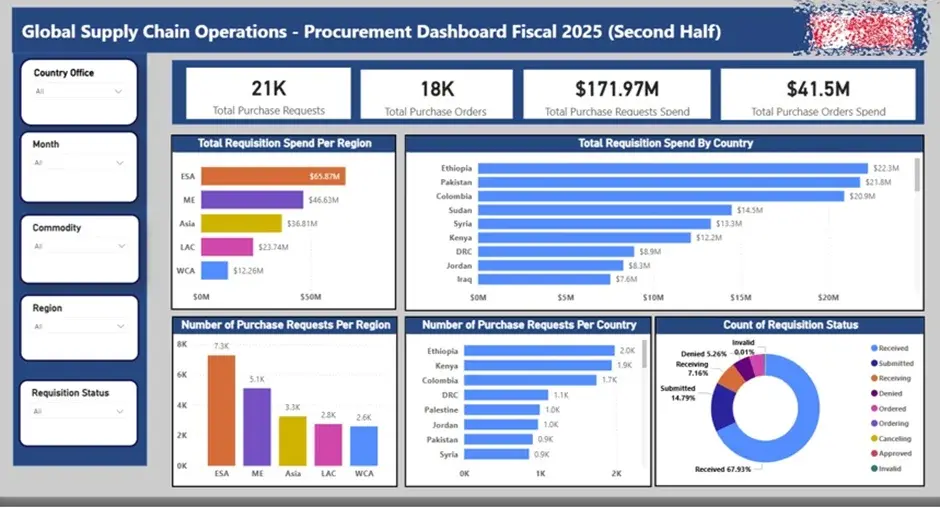
For example, our Power BI built a procurement dashboard for a global humanitarian charity with a presence in multiple regions. The dashboard gave the team a live bird’s-eye view of purchase requests, budgets, and approval workloads, while automatic data refresh from SAP Ariba saved the team about 5 hours per month and let them churn out reports more often. This improved spend control, reduced approval risk, and made their audit situation a whole lot stronger.
Invoice processing is one of the most compelling use cases for RPA in procurement because invoice data often comes in all over the place in formats like PDFs and email attachments. So a bot can sit on a shared inbox, grab those invoices as they come in, automatically extract key fields like supplier name, invoice number, amount, and line item details, and then shove that data into SharePoint, ERP systems, or whatever approval workflows are in place. This cuts way down on the drudgery of data entry and makes invoice handling faster and a lot more consistent.
In real life, RPA Power Automate flows can handle the whole shebang from intake to review. Bots can download those invoices from email, use OCR and AI Builder to scrape the required fields, and then validate the data against business rules. If there are any exceptions, the bot can route them to the right person. Once the data is captured, the bot can update a tracking list, send out notifications to approvers, and make sure there’s a clear paper trail of what was received, extracted, and approved. This cuts down on manual admin work, improves accuracy, and lets procurement and finance teams handle way more volume without having to hire more people.
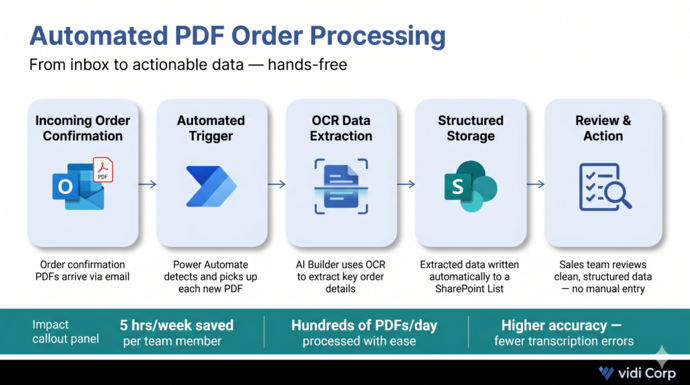
For instance, we used Power Automate and AI Builder to automate PDF processing for a sales team that was manually extracting order details from PDF confirmations into Excel. Incoming PDFs came in via email, the key details were plucked out automatically using OCR, and the data was written into a SharePoint List for review. That solution knocked out 5 hours of manual work per week, improved data accuracy, and could handle hundreds of PDFs per day with ease.
A smooth rollout is key to making RPA in procurement really work. Small businesses can get away with simply scoping the project, documenting steps and doing multiple revisions on their bots. However, in the enterprise automation projects require a longer planning process for proper delivery of RPA managed services.
A clear 7-step framework cuts down on delivery risk, makes sure everyone is singing from the same hymn sheet, and reduces RPA cost across both P2P and sourcing processes. This approach has been used in recent 2024-2025 projects, starting with targeted automation and scaling it out across multiple business units.
Each step below gives you a focused set of actions to get from initial assessment right through to enterprise-wide deployment. This framework is designed to work with all major procurement systems, including SAP, Oracle, Microsoft Dynamics, and cloud platforms like Coupa, Jaggaer, and Ariba.
First off, figure out the business process automation use cases where automation is going to make the biggest impact. This means having a deep understanding of procurement workflows and how they’re currently performing.
For example, a global manufacturer processing 50,000 invoices a month could save the equivalent of 15-20 FTEs by automating 70% of invoice entry and matching.
RPA in procurement touches all sorts of different functions, so get alignment early on. Good governance is key to a smooth deployment and long-term scalability.
For example, if IT isn’t on board early, bot deployment can get held up due to security approvals or lack of API access to ERP systems.
Choosing the right RPA tool makes all the difference to how easily you can scale automation across procurement processes.
Common platforms for Robotic Process Automation (RPA) include UiPath, Automation Anywhere, Blue Prism, and Power Automate.
Don’t roll out bots all at once – start with some controlled pilots to make sure they’re working as they should.
By doing things this way, you can be pretty sure the bots are reliable and will work the way you need them to in real life.
It’s really important to get the people working in procurement to understand how their roles are going to change with RPA. We need to make sure they’re clear on what’s expected of them.
This will help the teams take to RPA smoothly and keep getting better over time.
When it comes to procurement, RPA needs to fit in with the existing controls and regulatory requirements.
This way, RPA is actually strengthening the governance rather than undermining it.
After the new system is live, you need to keep monitoring its performance and expanding its use to get the most out of RPA.
For example, you might start with automating invoices in one region in late 2026 and then roll it out globally by mid-2028.
By automating procurement processes, we can see really tangible improvements in efficiency, data quality and compliance – and that’s not just limited to the pilots. As we roll RPA out more widely, we typically see the benefits stacking up over 12 to 24 months as we automate more P2P and sourcing processes.
The following sections break down the key areas of benefit in more detail. We’ll be using procurement-specific examples to show how RPA delivers real-world results.
RPA improves data accuracy by getting rid of common errors that creep in when people do manual data entry. Bots will always apply the same rules and checks to the data, and that means fewer errors and a much cleaner dataset.
In high-volume environments, for example, invoice entry error rates can drop from 3-5% to below 0.5% once we’ve put in RPA. This is because the bots check the fields against the master data, flag any inconsistencies, and ensure that only clean, validated data gets into the system.
That, in turn, means that the data downstream is more reliable and easier to work with – and that’s a big deal for procurement teams who need to get insight from their spend data.
RPA reduces the cost per transaction by automating all those tedious, manual tasks that procurement teams have to do on a daily basis. Processes like invoice entry, PO creation, and vendor onboarding can be automated, freeing up the team to focus on more strategic and high value work.
In high-volume environments, we often see a 40 to 60% reduction in processing costs once the automation is fully rolled out. That’s because we’re both reducing the labour effort and reducing the errors that need to be fixed.
We also see organisations avoiding late payment penalties and capturing more early payment discounts because they’re able to process things faster. And that’s real money that they can put back into the business. The productivity gains help teams to shift their focus to higher-value work. For example, AP staff who used to spend most of their time doing data entry can now move into roles that focus on supplier query resolution, exception handling, and spend analysis. This shift makes a big difference in both efficiency and the overall quality of procurement operations.
RPA lets teams zip through procurement workflows at a much faster pace by keeping machines going 24/7. Unlike humans working in regular hours, bots don’t have to wait for a paycheck or follow a standard workweek. That means tasks like approvals, PO creation and invoice posting can keep moving without any delays. This is super helpful during busy periods like month-end or quarter-end.
For regular items, organisations can bring down PR-to-PO cycle times from 3-4 days to under 24 hours. Bots can quickly check if a request is valid, if it has all the necessary approvals, and then automatically generate purchase orders, cutting out all the waiting time between manual steps. This gives the procurement function a whole lot more responsiveness.
Faster cycle times also make a big difference when it comes to working with suppliers. Suppliers get order confirmations earlier and get to know exactly when payments will be made. To give you an example: during those crazy end-of-quarter invoice spikes, bots can handle huge volumes automatically without the accounting team having to put in overtime, keeping operations running smoothly and with consistent results.
RPA helps organisations stay on top of compliance by making sure that procurement policies are always being followed. Bots follow the rules for picking suppliers, approval limits and tax handling, to make sure every single transaction goes by the book and in line with the law.
Every action that a bot takes is logged with the date and time, plus the rules that were followed – giving a very detailed trail that auditors can follow. This makes it super easy to show that you’re on the right side of the law when it comes to frameworks like SOX, your internal rules for delegating authority and fighting bribery.
Automation also makes proactive risk management a lot easier. For example, bots can flag up invoices that don’t have a valid PO attached, or point out pricing differences between what the supplier said and what was actually agreed in the contract before posting. This means that the chances of non-compliant transactions go way down, and you’re always ready for an audit.
RPA lets you collect data continuously from your procurement systems, which gives you a rock-solid foundation for doing analytics. Bots can dig up data from your ERP system, your sourcing tools and your contract repositories, then mash it all together in a central reporting layer like Power BI. This means you don’t have to spend ages getting the data ready – it’s all up to date in your Supply Chain Business Intelligence dashboards and ready to go.
Procurement teams can automate the process of updating their spend analytics, supplier scorecards and their payment performance dashboards. This brings reporting cycle times right down – for example, from 10 days to 2 days for monthly reporting – while making sure the data is consistent across the board.
Category managers get instant access to all the KPIs they need, so they can act on what they see way faster. And this data foundation also supports more advanced use cases like AI-driven supplier risk scoring, demand forecasting and dynamic discounting models. As a result, RPA isn’t just about making reports more efficient; it’s also about letting you make strategic decisions way faster.
RPA is no longer just a “nice to have” in procurement – it’s a practical way to handle all those extra transactions that are pushing you to the limit, reduce errors and get control back in your hands when it comes to all those complicated systems. When you implement it in a proper structured way, you can see the real benefits across cost, speed, compliance, and decision-making within the first year to 18 months.
The secret is to start with the right processes, prove value quickly and then scale up across the whole procurement lifecycle. Teams that follow this approach go way beyond just automating a few bits here and there and build a procurement function that’s more efficient and data-driven.
If you’re thinking about how RPA could fit into your procurement process, contact us, and our team will help you work out where automation can make the biggest impact.


