

Accounting workflow automation means using software to handle the repetitive, rule-based tasks that eat up your accounting team’s day. Think invoice processing, bank reconciliations, payment reminders, approval routing and month-end reporting. Instead of someone downloading a PDF, retyping the numbers into QuickBooks and then chasing a partner for approval by email, the whole chain runs automatically from the moment the invoice lands in the inbox.
As a leading RPA consulting services provider, we’ve built these automations for accounting firms, outsourced finance providers and in-house accounting teams using the Microsoft Power Platform.
In this article, we will explain how accounting workflow automation, a subset of finance process automation works, which processes are worth automating, and how to implement it in practice. We will also share measurable results from accounting and finance automation projects we have delivered.
An accounting workflow is any sequence of steps that moves work through your accounting function. A supplier invoice arrives, someone checks it, someone approves it, someone enters it, someone pays it. A client’s books need reconciling, so someone pulls the bank feed, matches transactions and flags the exceptions. Each of these is a workflow, and most of them follow the same steps every single time.
Accounting workflow automation takes those predictable sequences and hands them to software. A trigger kicks things off (an email arriving, a new record appearing, a scheduled time) and a chain of actions follows: extracting data, validating it, routing it for approval, updating the accounting system and notifying the right people.
The key point is that automation doesn’t replace your accountants’ judgment. It removes the copying, pasting, chasing and re-keying that sits around that judgment. Your team still decides what to do about a mismatched payment. They just don’t spend three hours finding it first.
The best processes to automate are usually repetitive, rules-based, time-consuming, and performed at sufficient volume to justify the effort of building the automation in the first place. If a task follows the same predictable steps every time, requires little to no human judgement, and eats up hours that your team could spend on higher-value work, it belongs on your automation shortlist. Volume matters too: a process that takes ten minutes but runs hundreds of times a month will deliver a far greater return than one that takes an hour but only happens twice a year.
Processes involving repeated data extraction, copying information between systems, chasing approvals, or recreating the same management reporting every month are particularly strong candidates. These tasks tend to be error-prone when done manually, since fatigue and distraction lead to typos, missed rows, and inconsistent formatting.
The table below shows where automation generally fits within accounting operations.
| Accounting workflow | What can be automated | Where human input remains useful |
| Accounts payable | Invoice capture, extraction, validation, routing | Exceptions and payment approval |
| Accounts receivable | Ageing analysis, reminders, task assignment | Sensitive customer communication |
| Financial Reporting | Data integration, calculations, refreshes | Analysis and commentary |
| Reconciliation | Data extraction and transaction matching | Unmatched transactions |
| Invoice Requests | finance tasks | Review missing information |
| Invoices Follow-Up | Transaction | No. of follow-ups |
| Compliance, Audit Trails | Log, timestamp, archive | Approval decision |
Accounting workflow automation reduces the time employees spend extracting data, refreshing reports, transferring information between applications, and coordinating predictable tasks. The saving comes from removing repeated process steps while allowing accountants to retain control over reviews and exceptions.
For Angel Oak Accounting, Vidi Corp connected QuickBooks Online to Power BI and automated financial data refreshes. The CEO reported saving 4 hours every month from the new workflow.
Close automation speeds up the flow of information into consolidation and reporting. Automated extraction, standardised transformations, consolidated entities, and continuously refreshed reports mean fewer close activities depend on someone preparing another spreadsheet first.
Vidi Corp integrated several QuickBooks Online companies for Modern Cannabis and created consolidated financial reporting. The client reported a 75%+ reduction in time spent compiling reports and said its month-end close was shortened by several days.
Automated accounting workflows retrieve information directly from source systems and apply the same validation and transformation rules each time. This reduces the number of points where data has to be copied, retyped, or reformatted by employees.
One Vidi Corp client implemented REST API feeds and a centralised database as part of its data automation project. The client reported an 80% reduction in data-entry errors and data integrity of 99.7% across business units.
When accounting data is extracted and transformed automatically, reporting no longer needs to wait for someone to rebuild the report. Finance teams can refresh information daily or several times per day and keep the same reporting logic across every cycle.
Vidi Corp automated data extraction from QuickBooks Online, Shopify, and Excel for Omnycode. The automation saved 5 working hours per week and allowed a report that had previously been refreshed weekly to refresh automatically every day.
Workflow automation improves decision-making when the final output gives finance leaders faster access to useful financial information. Automated dashboards can continuously analyse revenue, cash flow, costs, receivables, profitability, and other financial indicators so opportunities and problems become visible sooner.
Vidi Corp automated Power BI reporting from Neterra’s ERP and created analysis covering revenue, cash flow, depreciation, and other areas. Neterra reported identifying an immediate €50,000 cost-saving opportunity, finding opportunities worth €10,000–€20,000 in monthly recurring revenue, and avoiding the cost of one full-time business analyst position used to maintain Excel reports.
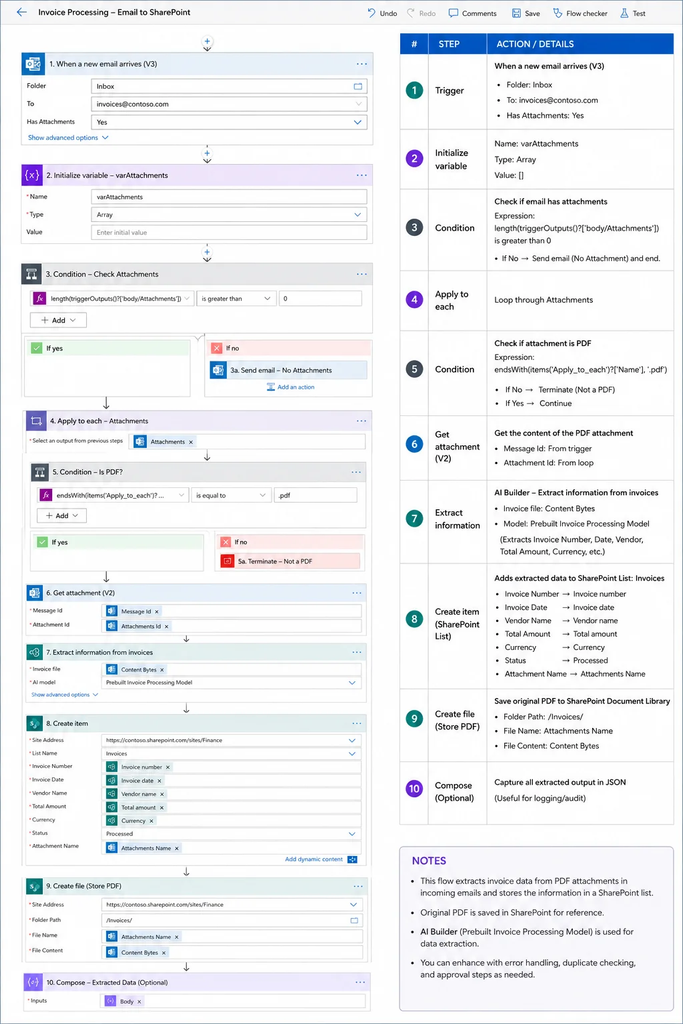
Many finance teams are still handling supplier invoices by hand. An invoice lands in someone’s inbox, they open the PDF, read off the details and type everything into the accounting software themselves. That approach might be manageable at low volumes, but as the number of invoices climbs, it starts swallowing hours of staff time, and the chances of a mistyped figure or missed field go up with it.
Our solution to this is a Power Automate flow built around a dedicated invoice inbox. Employees simply forward any supplier invoices they receive to this address, and suppliers can be given the same email so their PDFs arrive there directly. From that point, Power Automate combined with AI Builder takes over, reading each invoice and capturing the essential details: the supplier name, invoice amount, VAT amount, invoice date, payment due date and invoice number. That extracted data then flows straight into accounting platforms such as QuickBooks Online or Xero without anyone needing to key it in.
In one of our implementations, we rely on Power Automate AI Builder to handle the OCR and invoice recognition. Because AI Builder is trained on the layout and structure of the invoices it processes, we typically build a separate extraction flow for each supplier or invoice format to keep accuracy high.
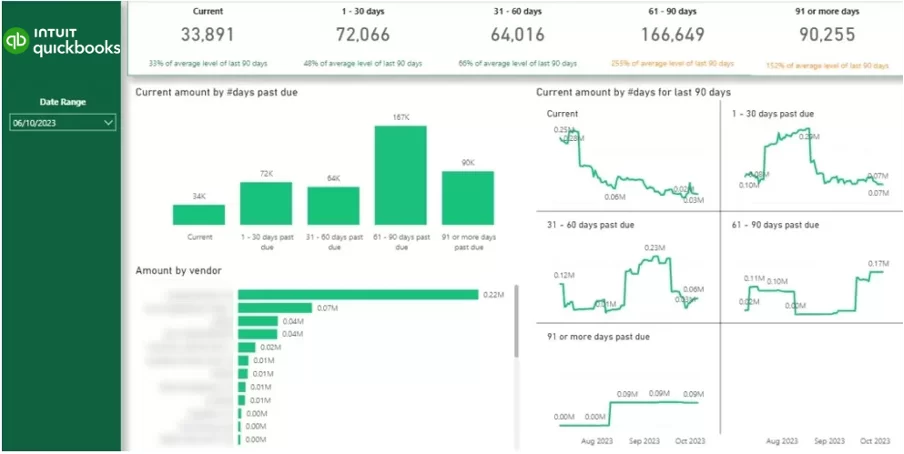
Cash flow is a constant worry for every B2B business, because revenue only counts once it actually lands in the bank. An Ageing Receivables report in Power BI for accountants tackles this head-on by showing exactly which clients still owe money, how much they owe, and how long those balances have been sitting unpaid.
The dashboard above, built on QuickBooks Online data, is a good example of what this looks like in practice. Across the top, outstanding invoices are grouped into ageing buckets: Current, 1 to 30 days, 31 to 60 days, 61 to 90 days, and 91 or more days past due. In this case, the numbers tell an immediate story. While the current balance sits at a healthy 33,891, there is 166,649 stuck in the 61 to 90 day bucket and another 90,255 that has been overdue for more than 91 days. Each bucket is also benchmarked against its average level over the last 90 days, and the report flags problem areas in orange: the 61 to 90 day balance is running at 253% of its usual level, and the 91+ day balance at 152%.
That kind of signal tells a finance team, at a glance, that collections have slipped and older debt is piling up faster than normal.
Among all finance automation projects, financial reporting automation is probably the one we see requested most often. Even today, many finance teams lose days every month to the same routine: exporting data from various systems, tidying up spreadsheets, consolidating figures from different sources and manually assembling management packs. Automating this cycle removes the repetitive grunt work entirely, freeing finance professionals to spend their time on what actually adds value, which is analysing the numbers and supporting better business decisions.
In practice, automated financial reporting rests on three pillars: automated data ingestion, automated data transformation and scheduled report refreshes. To give a real-world example, we worked with Neterra Telecommunications to automate their Power BI reporting directly from their ERP system. The project cut out a significant amount of manual reporting effort, saving the equivalent of a full-time financial analyst. Just as importantly, the improved visibility helped the business uncover a one-off cost-saving opportunity worth 50,000 EUR and identify ways to grow monthly recurring revenue by a further 10,000 EUR per month.
At Vidi Corp, we build custom data connectors for platforms such as Xero, QuickBooks Online and HubSpot. These connectors automatically pull finance and operational data from one or several accounts into a central reporting database, which then serves as the foundation for automated Power BI dashboards and management reporting.
To help finance teams get started faster, we also offer a library of free Power BI reporting templates covering P&L reporting, cash flow analysis, accounts receivable ageing and executive reporting.
In many businesses, requesting an invoice still means a long chain of emails bouncing between sales, operations and finance. On paper it sounds workable, but in reality it’s slow and frustrating for everyone involved. Details get lost along the way, finance staff spend their time chasing missing information, and actually raising an invoice ends up hostage to all that back-and-forth.
The knock-on effect is that customers get billed late, which in turn delays cash collection. And as a company grows, what started as a minor annoyance turns into a genuine operational bottleneck. To fix this, we built a Power App that gives invoice requests and approvals a proper structure. An employee simply clicks “Create New Invoice” and picks the customer from a pre-populated list. The system then fills in everything it already knows about that customer, including the company name, billing address and email address, without anyone typing a thing.
From there, the user selects the services to be billed, and the app retrieves the correct pricing directly from QuickBooks. This removes most of the manual data entry and guarantees that pricing stays consistent across every invoice the business sends out. When the request is submitted, it lands straight with the finance team for approval, and they can review and sign off from a mobile phone or a PC, wherever they happen to be. As soon as it’s approved, the system generates the invoice in the accounting software and emails it to the customer automatically.
The result is a process where financial control stays firmly with the finance department, while the endless coordination between finance, sales and ops disappears. Invoicing gets faster, errors become rarer, and the business collects its money considerably sooner.
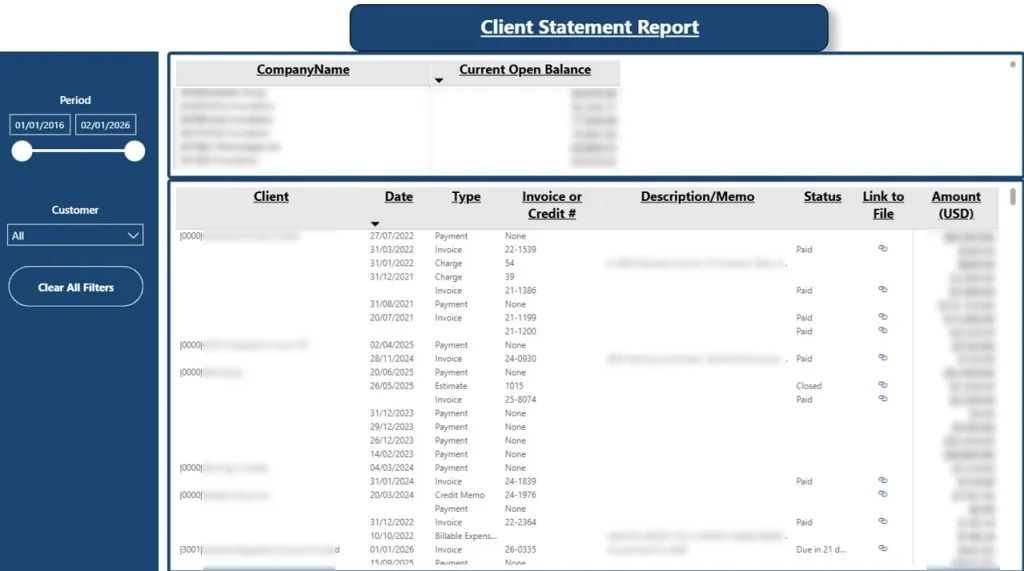
Chasing overdue invoices is one of the finance tasks where automation delivers the biggest payoff, simply because late payments put genuine pressure on cash flow. Yet plenty of businesses still leave it to their finance teams to manually crawl through old invoices and fire off chaser emails one by one.
For one of our clients, we approached the problem differently. We built a Power BI financial dashboard that displays the outstanding balance for each client alongside the specific invoices that remain unpaid. Before any client meeting or call, the relationship managers check this dashboard, and if anything is overdue, they can raise it naturally as part of the conversation. In practice, this approach has made a real difference to how quickly invoices get settled, because the payment reminder is coming from someone the client already knows and trusts rather than from a faceless finance inbox.
Alongside the dashboard, we also implemented an Accounts Receivable automation that scans QuickBooks Online for overdue invoices and triggers automated reminder emails. What we learned, though, is that sending these reminders directly to customers is nowhere near as effective as routing them internally to the relationship managers first.
The logic is simple: clients respond far better to a personalised payment request from a familiar contact than to a generic automated email that’s easy to ignore. That’s why many businesses now use automation for what it does best, which is spotting overdue invoices the moment they arise, while leaving the actual client communication in the hands of account managers so it stays personal and relationship-driven.
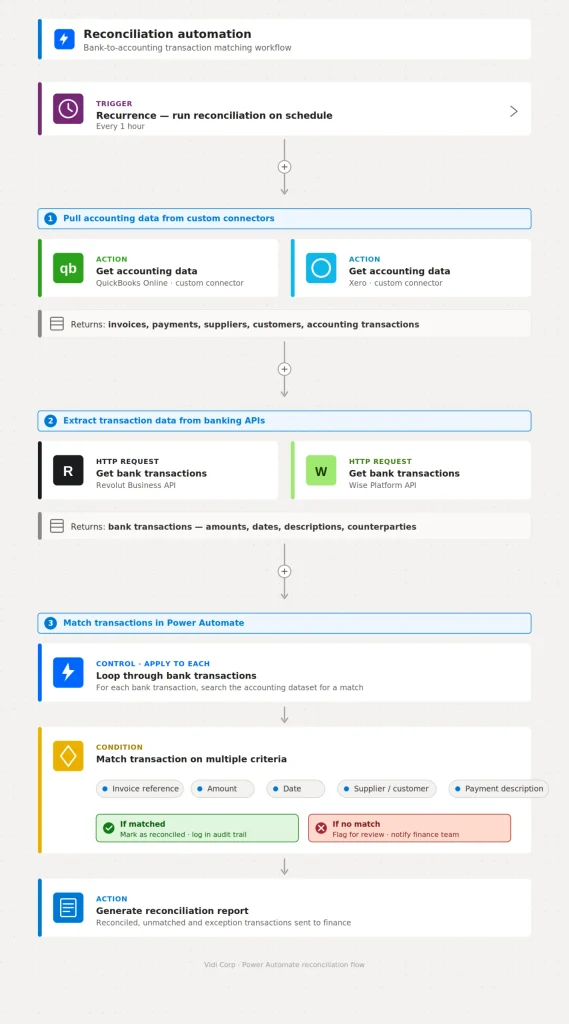
Bank reconciliation is another finance process with huge automation potential. Despite that, many finance teams still compare bank transactions against invoices and payments in their accounting system line by line, a job that only gets more painful as transaction volumes climb.
The reconciliation automations we deliver as part of our RPA managed services typically follow a consistent pattern. First, we automatically pull accounting data from platforms like QuickBooks Online and Xero using our own custom data connectors, giving us a real-time view of invoices, payments, suppliers, customers and accounting transactions.
The second step is bringing in the banking side of the picture. Modern banks such as Revolut and Wise expose APIs that allow us to feed bank transactions directly into the automation workflow, with no manual exports or CSV downloads required.
With both datasets in place, Power Automate workflows handle the matching. Transactions from the bank are automatically paired with their counterparts in the accounting platform using invoice references, amounts, dates, supplier or customer names and payment descriptions.
The effect on the finance team’s workload is substantial. The bulk of manual reconciliation disappears, accuracy improves, and unreconciled items become far easier to spot. Rather than reviewing every single payment, the team only needs to look into the genuine exceptions that require human judgement.
One of the most underrated benefits of finance automation is that it quietly builds a complete audit trail as a natural byproduct of doing the work. When processes run through automated workflows, every extracted invoice, every approval decision, and every posted transaction is logged, timestamped and archived automatically, without anyone having to think about documentation.
There’s no scrambling to reconstruct who approved what, no digging through email threads to find when a supplier invoice arrived, and no gaps where a step was completed but never recorded. When audit season comes around, the evidence is already sitting there in a structured, searchable format, which makes the whole exercise dramatically less painful for both the finance team and the auditors themselves.
The same principle applies to client-facing work. Accounting firms increasingly automate their recurring client deliverables, such as monthly management packs, engagement renewal reminders and records requests, so that these obligations run on a schedule rather than depending on someone remembering to do them.
There is no single best accounting workflow software, because firms and finance teams are usually solving two different problems under the same label. Some need to coordinate work better. Others need the work itself to stop being manual. Most tools do one of those things well and the other badly.
We build custom automation on the Microsoft Power Platform.
Every automation Vidi Corp delivers is built on the Microsoft Power Platform. That is a deliberate choice rather than a limitation, and it makes us the right partner for some teams.
It tends to be the right route when:
It is the wrong route when a product already does the job. If you are a ten-person practice that needs deadline tracking, buy the deadline tracker. If your only pain is receipt capture, buy the receipt capture tool. We will tell you that on the first call rather than three weeks into a scoping exercise.
Power Automate is typically responsible for workflow logic, triggers, notifications, approvals, API calls, and moving information between applications. Desktop flows can also automate legacy systems that do not expose suitable APIs.
Power Apps provides an interface when employees need to enter, review, or approve information. Expense claims, invoice requests, payment approvals, and other structured finance requests are common examples.
Power BI handles financial analysis and reporting. It is particularly useful when accounting data needs to be combined with CRM, sales, operational, or planning information.
AI Builder and OCR handle documents such as invoices and receipts. They extract structured values from PDFs so the information can continue through the automated workflow rather than being retyped.
SQL databases and APIs provide the integration layer for more complex projects. They are useful when several entities or business systems need to feed the same accounting process.
Your accounting platform remains the financial system of record. Automation should connect systems such as QuickBooks Online, Xero, Business Central, or an ERP to the wider workflow rather than unnecessarily replacing them.
Whichever route you take, the same eight questions separate a tool that sticks from one that gets abandoned in month four:
You don’t need a big-bang transformation project. The approach that works is picking one painful workflow, automating it well and expanding from there. Here’s the process we follow with clients, which mirrors our full RPA implementation guide.
Map the Workflow end to end
Write down every step from trigger to completion, including the informal ones like “Sarah checks it looks right.” This tells you which steps are purely rule-based (automate with standard flows) and which involve judgment (keep a human in the loop or apply AI).
Cost the Manual Version
Estimate the hours per month the workflow consumes and what an error costs you. Workflows that take ages on a regular basis, or where a single mistake means a lost client or a missed filing deadline, justify automation fastest. This number also gives you a baseline to measure the automation against.
Choose the Technology and Build
Every automation needs a trigger and a chain of actions. Start with your highest-volume case, get it working reliably, then extend. For invoice extraction, that means automating your top suppliers’ formats first and adding others over time.
Test with a Parallel Run
Run the automation alongside the manual process for a few weeks and compare outputs. In accounting, trust is everything, and nothing builds it like seeing the automated numbers match the manual ones.
Monitor and Maintain
Set up alerts that fire the moment a flow fails or behaves oddly, so problems get caught before they hit a reporting deadline. Automations also need occasional tweaks as your business changes, which is exactly what our RPA managed services cover.
Accounting workflow automation is one of the highest-ROI investments an accounting firm or finance team can make. It cuts manual hours, reduces errors, speeds up cash collection and lets you serve more clients without burning out your team.
At Vidi Corp, we build custom accounting automations on the Microsoft Power Platform, from AP invoice extraction and automated reconciliations to full reporting pipelines in Power BI. We’ve already built most of the workflows described in this article for other clients, so deployment is fast.
Get in touch with our team to talk through the workflow that’s costing you the most time.
Accounting workflow automation uses software to execute repetitive accounting tasks automatically, such as extracting data from invoices, matching bank transactions, routing approvals and refreshing financial reports. A trigger starts each workflow and a series of actions completes it, with humans stepping in only for exceptions and judgment calls.
The most common examples are invoice data capture, payment approval routing, bank reconciliation matching, recurring management reports, expense processing and overdue invoice follow-up. In practice, any step that runs to a rule and repeats every month is a candidate. A finance team automating supplier invoice processing, for instance, can move from manually keying each invoice to having the data extracted, coded and queued for approval automatically, with a person reviewing only the exceptions.
It depends on volumes, but the projects we deliver typically save between 4 and 20+ hours per month per workflow. Automated invoice extraction alone saved one of our clients over 10 hours monthly, and automated reporting pipelines have cut report preparation time by 50 to 75% while removing manual entry errors.
Start by picking one process and measuring what it currently costs you in hours per month. Map the steps exactly as they happen today, including the informal ones, and mark which follow a rule and which need judgement. Automate the rule-based steps, route the rest to a person. Then run the automation alongside the manual process for a full cycle before switching over, so you can see where it disagrees with your team and fix it before it matters.


