
A SharePoint intranet is the internal site where a company keeps its news, documents, policies and everyday tools in one place. Get the structure right and staff stop emailing each other for files. Get it wrong and it becomes another folder nobody opens.
Our SharePoint consultants regularly build SharePoint intranets as project work for clients across manufacturing, healthcare diagnostics, energy consulting, optical retail and franchising. We have delivered those both for small businesses and enterprise-level clients like Delta Airlines and EY.
This article shows 14 real SharePoint intranet examples from those projects. For each one you will see who uses it, what we built, and how it changed the way people work.
A SharePoint intranet is an internal website, built on Microsoft 365, that gives every employee one place to find company information and do routine tasks.
It usually combines a few things. News and announcements sit alongside document libraries, policy files, staff contact details and links to the systems people use daily. Because it runs inside Microsoft 365, it connects directly to Teams, Outlook, and the wider Power Platform.
The people using it vary widely. A shop-floor supervisor might open it to find the current safety procedure. A finance director might open it to read a quarterly report. An HR manager might use it to publish a policy once instead of emailing it 200 times.
What separates a useful intranet from an unused one is structure. The content has to be organised around how people actually work, with permissions that match who should see what.
A properly built intranet removes repeat work. Documents live in one library with version control, reports refresh on a schedule, and routine approvals run through SharePoint automated workflows instead of email chains.
Our SharePoint migration consultants delivered a SharePoint site and RPA workflows for a client, an optical portfolio group. Their Head of Growth reported the work saves around 10 working hours per month through automated reporting, with improved data accuracy and less manual intervention. You can read the full review on Clutch.
Permissions are where most intranet projects succeed or fail. Role-based access means a client, a department or a regional team sees exactly the folders relevant to them and nothing else.
Vedeni Energy, a wholesale power consultancy, needed to share sensitive market information with clients securely. Their Managing Director confirmed that our SharePoint developers delivered a fully functional SharePoint platform that met all requirements, released in phases and on time. The review is published on Clutch.
Intranets often need something bespoke: a custom data-entry app, a regulator-ready evidence trail, an unusual approval path. Standard templates cannot always cover it.
Fledglings Child Care needed a system to monitor and evidence the progress of children in residential care. Their Director noted that other providers said it was not possible, and that Vidi Corp delivered a Power Apps, SharePoint and Power BI solution on time and on budget. The review is on Clutch.
An intranet does not have to be a passive library. Quality checks, inspections and sign-offs can be captured directly in the site, then reported on.
For Lightwave Group, a composite manufacturer and boat builder, we built a Power Automate and Power Apps flow that pushes quality check data into SharePoint and on into Power BI. The Executive reported an increase in quality and a decrease in missing inspection points and documentation, as recorded on Clutch.
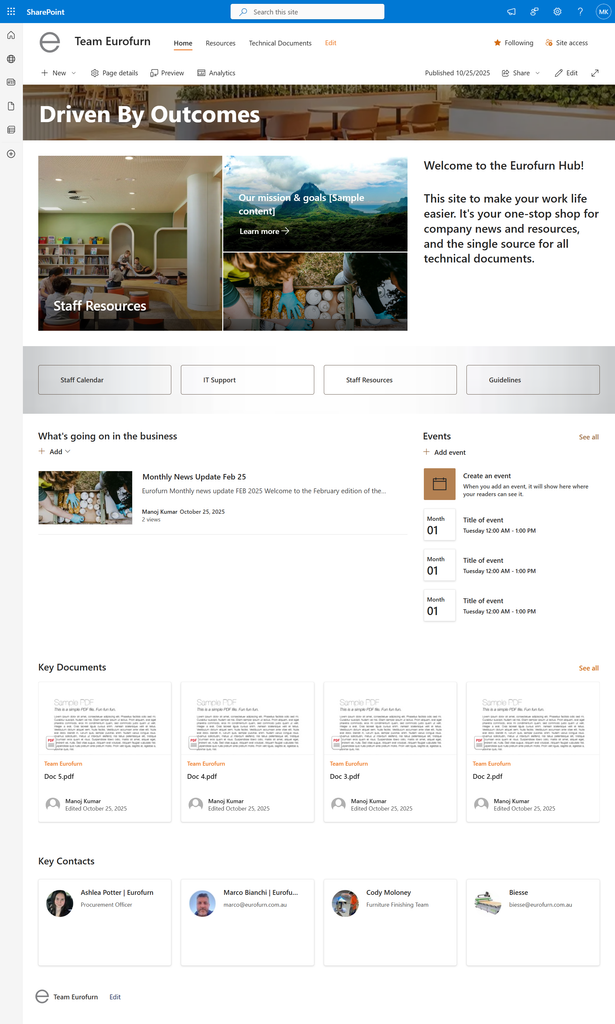
This is a SharePoint Intranet we did for a furniture manufacturer. The homepage serves everyone from the procurement team to the furniture finishing floor, and it exists to answer the question most staff have when they log in: where do I find that thing.
As part of our SharePoint managed services we built the page around a hero web part and a quick-links bar. The hero panel links to Staff Resources, the mission and goals page, and the latest news post. Below it, four buttons cover the most-requested destinations: Staff Calendar, IT Support, Staff Resources and Guidelines. Further down sit a news roll-up, an events web part, a Key Documents library view, and a People web part carrying named contacts for procurement, finishing and the Biesse machinery team.
New starters can find a policy or a technical document without asking a colleague. Because the document web part reads from the technical documents library, the homepage always shows the current version rather than a copy someone saved locally.
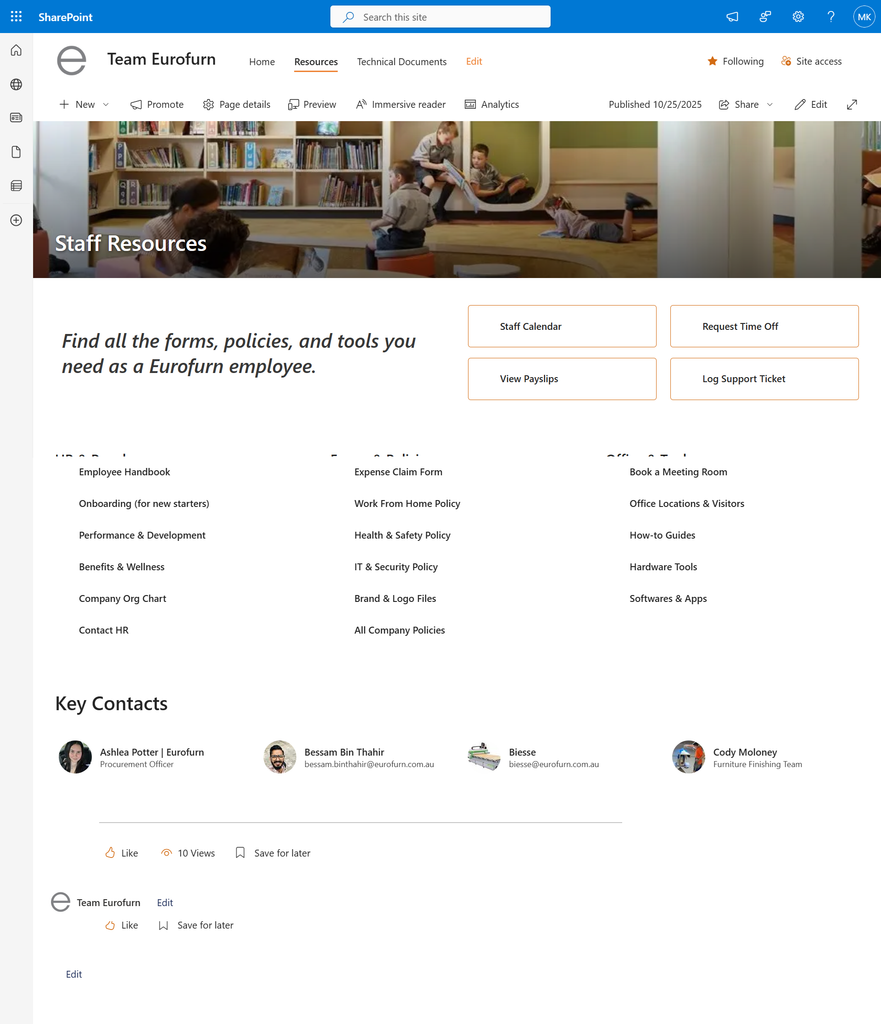
This page is aimed at every Eurofurn employee handling something administrative: booking leave, checking a payslip, finding the work-from-home policy or logging an IT ticket.
We built it as a three-column link directory grouped under HR & Payroll, Forms & Policies, and Office & Tools. Four action buttons sit at the top for the highest-traffic tasks: Staff Calendar, Request Time Off, View Payslips and Log Support Ticket. Each column carries six to seven destinations, from the Employee Handbook and onboarding materials through to brand and logo files, meeting room booking and hardware tools. The Key Contacts strip at the bottom names who to approach for each area.
HR fields fewer repeat questions because the answer is one click from the navigation bar. Grouping by task rather than by department also means staff do not need to know which team owns a form to find it.
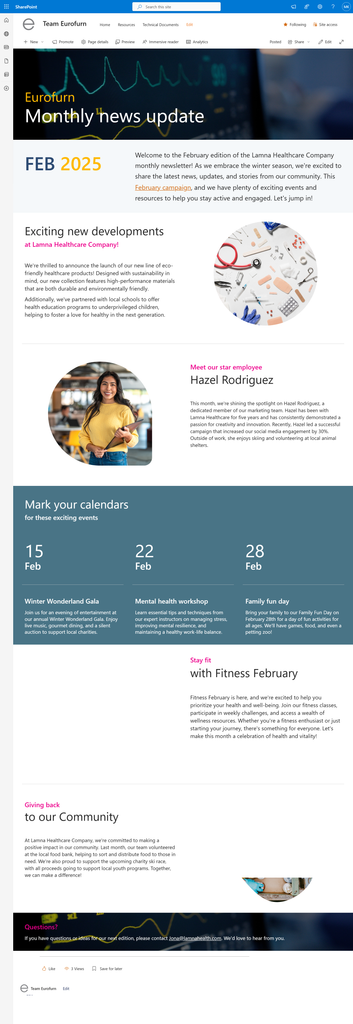
Internal communications teams use this page template to publish a monthly newsletter that staff read in the browser rather than in an email attachment.
Vidi Corp built this as a reusable news post template as part of our SharePoint development services. It opens with a branded banner and a month marker, then moves through editorial sections: a company developments block, a staff spotlight with a profile image, a three-column dated events panel, and a community section. Each new edition is created from the same template, so the layout stays consistent month to month without anyone rebuilding it.
Communications staff publish an edition and it appears automatically in the news SharePoint web part on the homepage. Readership is visible too, because SharePoint reports views on each post.
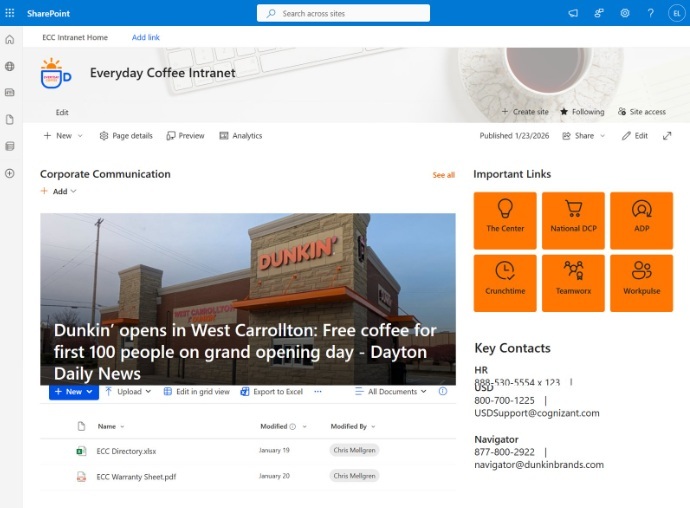
Everyday Coffee operates a multi-site coffee and franchise business and they outsourced SharePoint development to us. The home page is built for store teams and head office staff who need company news and fast access to third-party operational systems.
Our SharePoint developers built a Corporate Communication news carousel across the main column, backed by a document library holding the company directory and warranty documentation. The right rail carries an Important Links tile grid pointing to the external platforms staff use daily, including The Center, National DCP, ADP, Crunchtime, Teamworx and Workpulse. Below that sits a Key Contacts block with named phone numbers and support addresses for HR, IT support, USD and Navigator.
Store staff reach payroll, scheduling and supply systems from one screen instead of bookmarking six logins. Support numbers being on the page also cuts the time spent tracking down who to call.
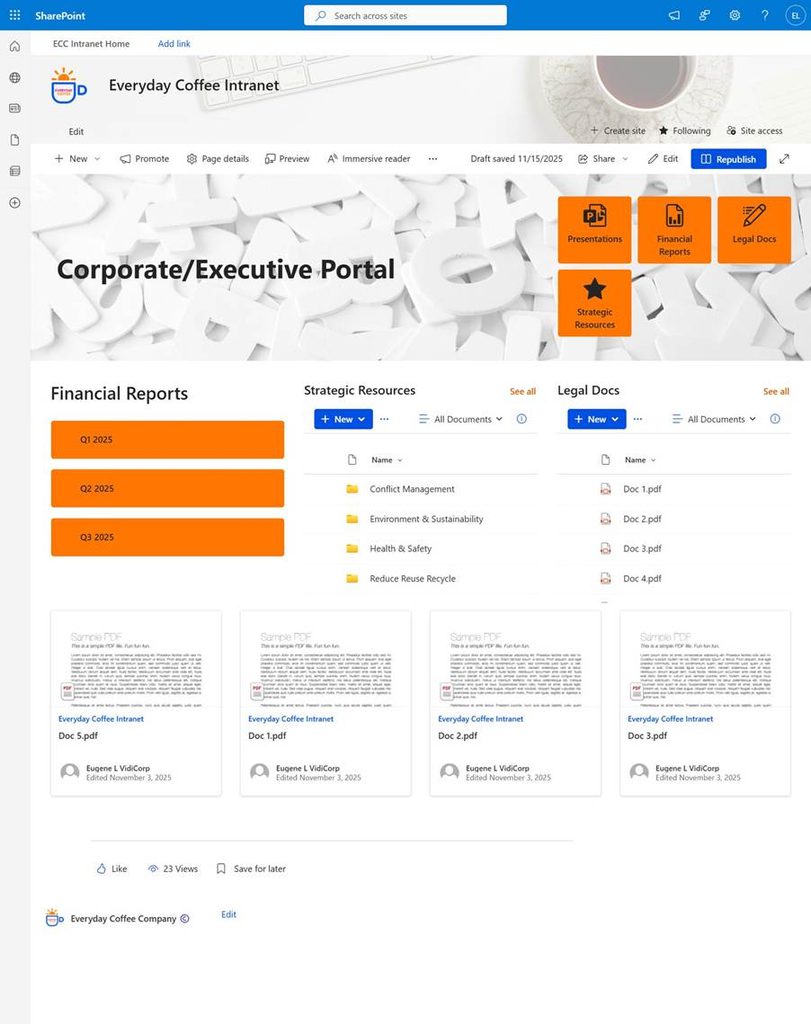
This portal is for the leadership group: directors, finance leads and executives who need board-level material without digging through the general intranet.
We built it as a permission-restricted page combining tile navigation with live library views. The hero carries four tiles covering Presentations, Financial Reports, Legal Docs and Strategic Resources. The body then places three sections side by side: quarterly financial report buttons for Q1 to Q3, a Strategic Resources library folded into folders such as Conflict Management, Environment & Sustainability, Health & Safety and Reduce Reuse Recycle, and a Legal Docs library listing individual files. A document card row underneath surfaces the most recently edited items.
Executives open one page and see the current quarter’s reporting alongside the governance material behind it. Because the libraries render live, adding a file to the folder publishes it to the portal with no page edit.
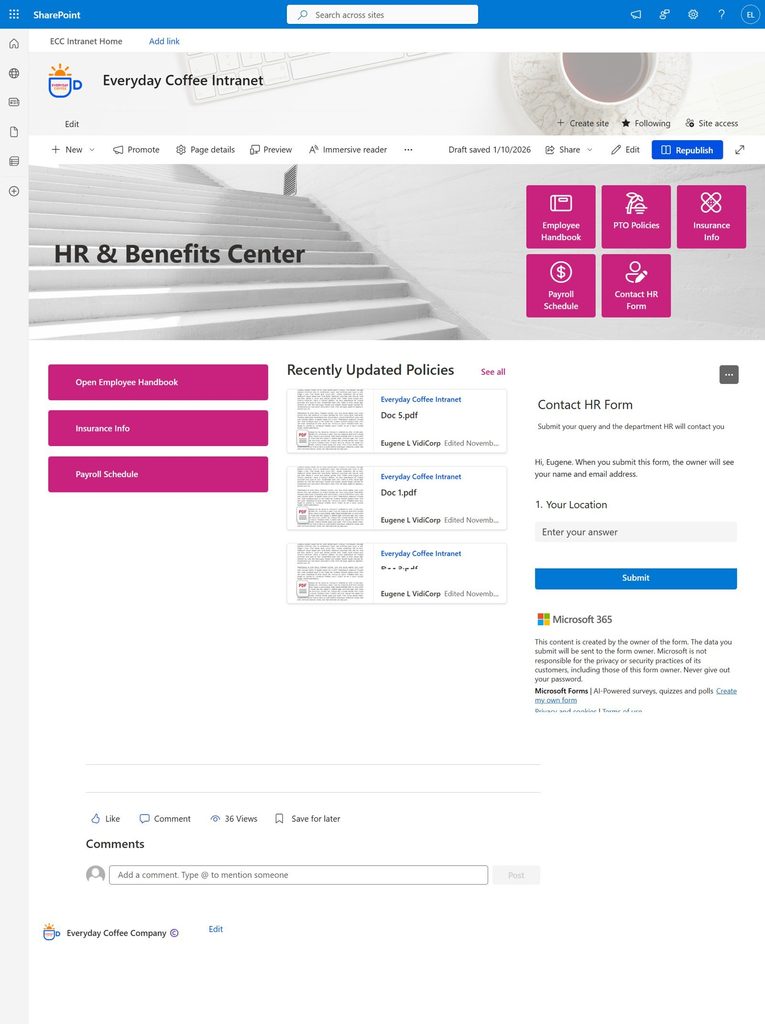
The HR and Benefits Center is aimed at every employee with a question about pay, leave, insurance or policy, and at the HR team who would otherwise answer those questions individually.
Our team built a tile-led layout covering Employee Handbook, PTO Policies, Insurance Info, Payroll Schedule and a Contact HR Form. The left column repeats the three most-used destinations as full-width buttons. The centre column runs a Recently Updated Policies web part that surfaces whichever policy documents changed most recently. On the right, we embedded a Microsoft Form directly into the page so an employee can submit an HR query, including their location, without leaving the intranet or opening an email.
Employees resolve most questions themselves because the current policy is visible on the page. Queries that do need a person arrive through a structured form, so HR receives the location and detail up front instead of chasing for it.
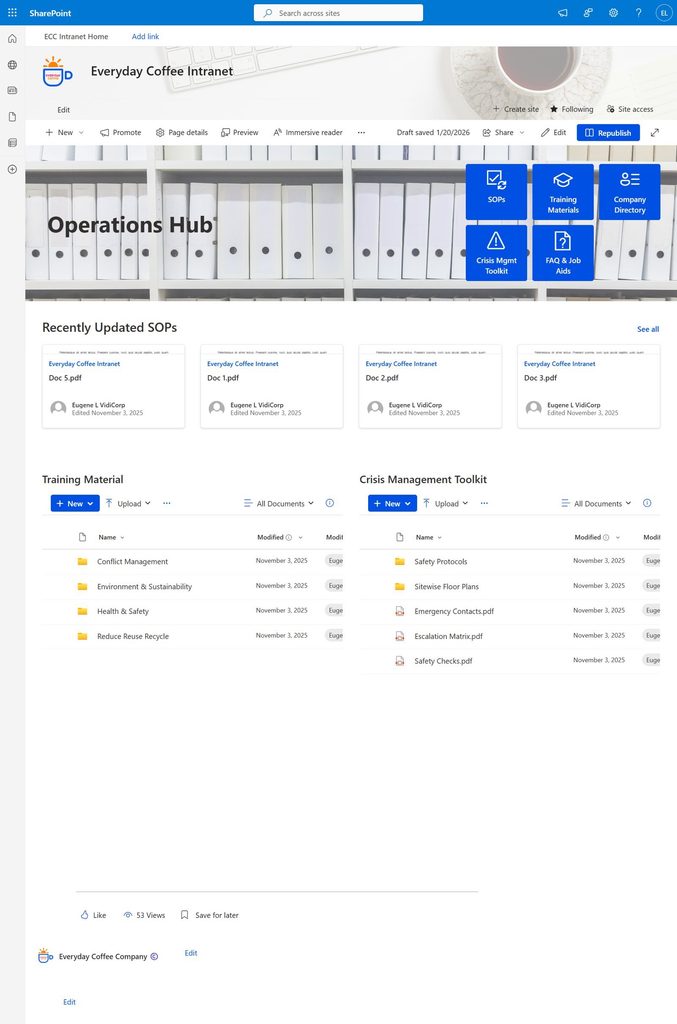
The Operations Hub serves store managers, regional managers and operations leads who need standard procedures, training content and emergency information at short notice.
Our consultants built this around five navigation tiles: SOPs, Training Materials, Company Directory, Crisis Mgmt Toolkit and FAQ & Job Aids. A Recently Updated SOPs card row sits directly beneath, showing the four most recently edited procedures with author and date. Two live library views run side by side below: Training Material organised into folders for Conflict Management, Environment & Sustainability, Health & Safety and Reduce Reuse Recycle, and a Crisis Management Toolkit holding Safety Protocols, Sitewise Floor Plans, Emergency Contacts, an Escalation Matrix and Safety Checks.
A manager dealing with an incident can reach the escalation matrix and emergency contacts in two clicks. Surfacing recently updated SOPs on the page also means staff notice when a procedure changes rather than working from an old copy.
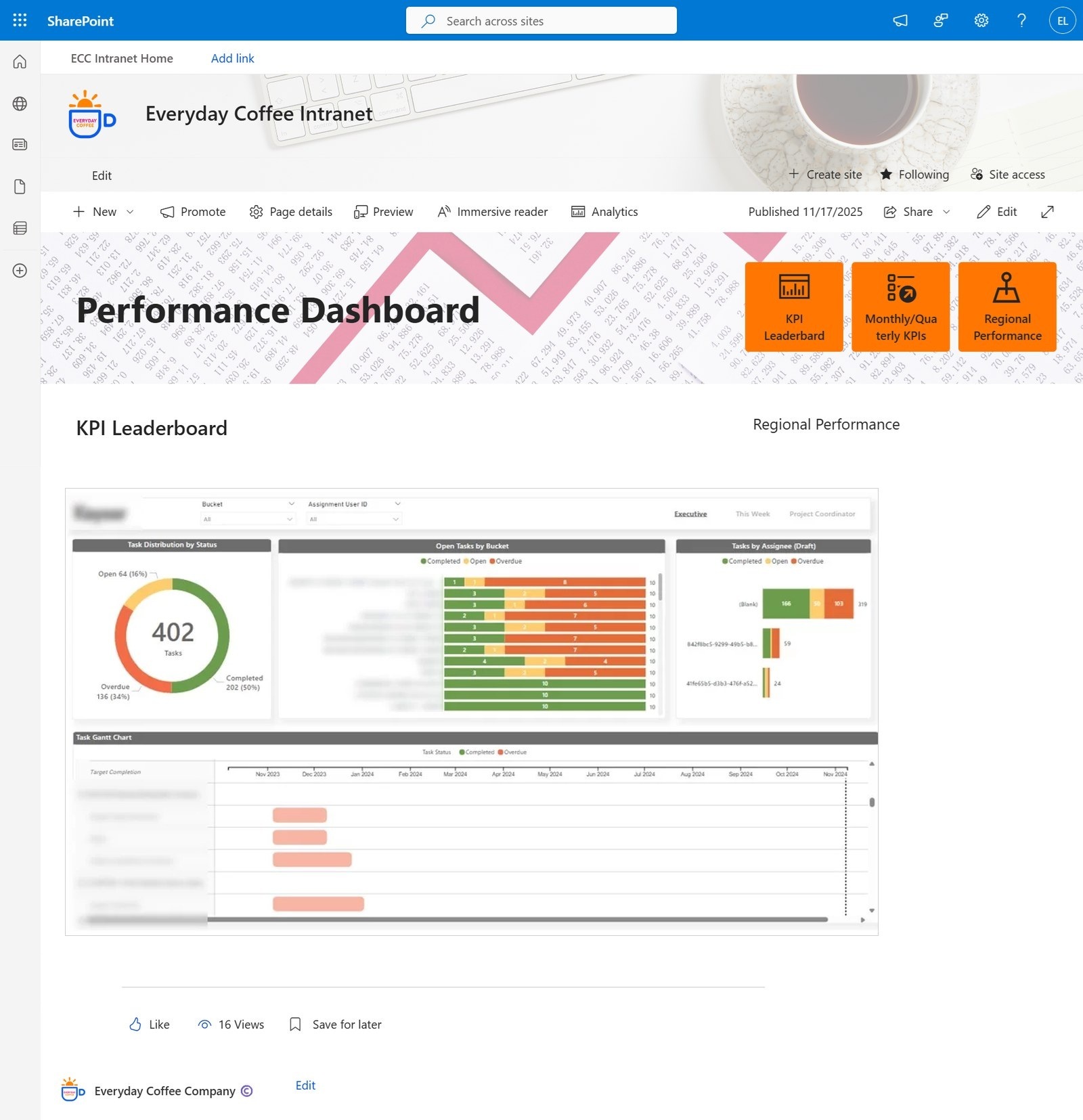
The Performance Dashboard page is for regional and executive users who track KPIs but do not want to open a separate reporting tool to do it.
Our Power BI consultants built this page as a container for embedded reports, using the Power BI web part rather than screenshots or exports. Three tiles cover KPI Leaderboard, Monthly and Quarterly KPIs, and Regional Performance. Each section of the page then hosts a live report region, so the figures update from the underlying dataset on the report’s refresh schedule.
Managers review performance inside the same intranet they use for procedures and policies. Access follows Power BI’s own permission model, so a regional manager sees regional figures without a separate access request to the reporting team.
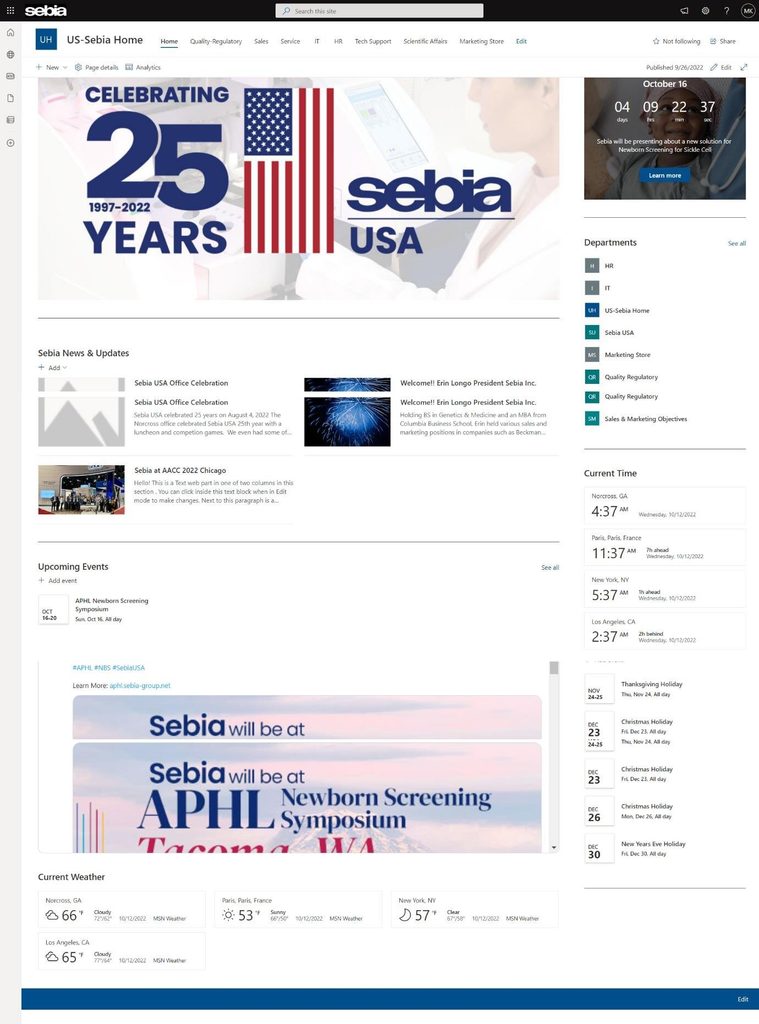
Sebia USA is a medical diagnostics company with teams spread across several US sites and a parent operation in France. The home page is built for staff in HR, IT, Sales, Service, Quality Regulatory, Tech Support, Scientific Affairs and Marketing.
We built a hub site with a top navigation bar carrying each department, plus a Departments web part in the right rail linking through to every associated site. The main column runs a Sebia News & Updates roll-up and an Upcoming Events web part tied to the events list. Because the workforce spans time zones, we added world clock and weather web parts for Norcross, Paris, New York and Los Angeles, alongside a holiday calendar listing company closures.
Staff move between department sites through one consistent navigation bar instead of saved links. The time zone display is a small addition that removes a recurring friction point when US teams schedule calls with the French office.
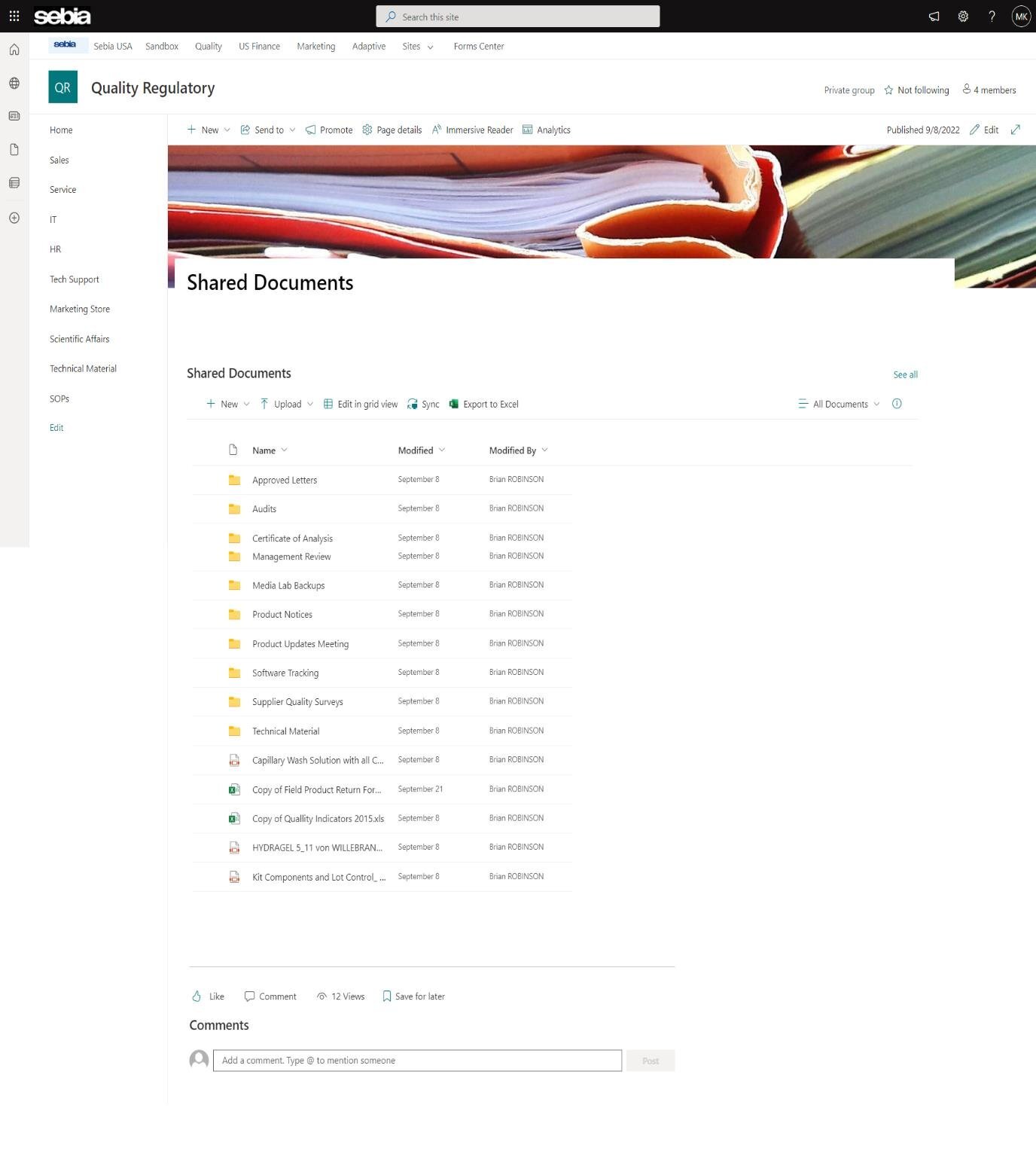
This site belongs to the Quality Regulatory team, who manage controlled documentation in a regulated diagnostics environment where version accuracy is a compliance matter.
Vidi Corp built a private group site with left-hand navigation to each functional area and a SharePoint documents management library structured into folders including Approved Letters, Audits, Certificate of Analysis, Management Review, Media Lab Backups, Product Notices, Product Updates Meeting, Software Tracking, Supplier Quality Surveys and Technical Material. Individual controlled documents sit alongside the folders, each showing modified date and modified-by details.
The quality team can point an auditor to a single library rather than assembling files from inboxes and drives. Modified-by tracking on every item means the document history is available without maintaining a separate log.
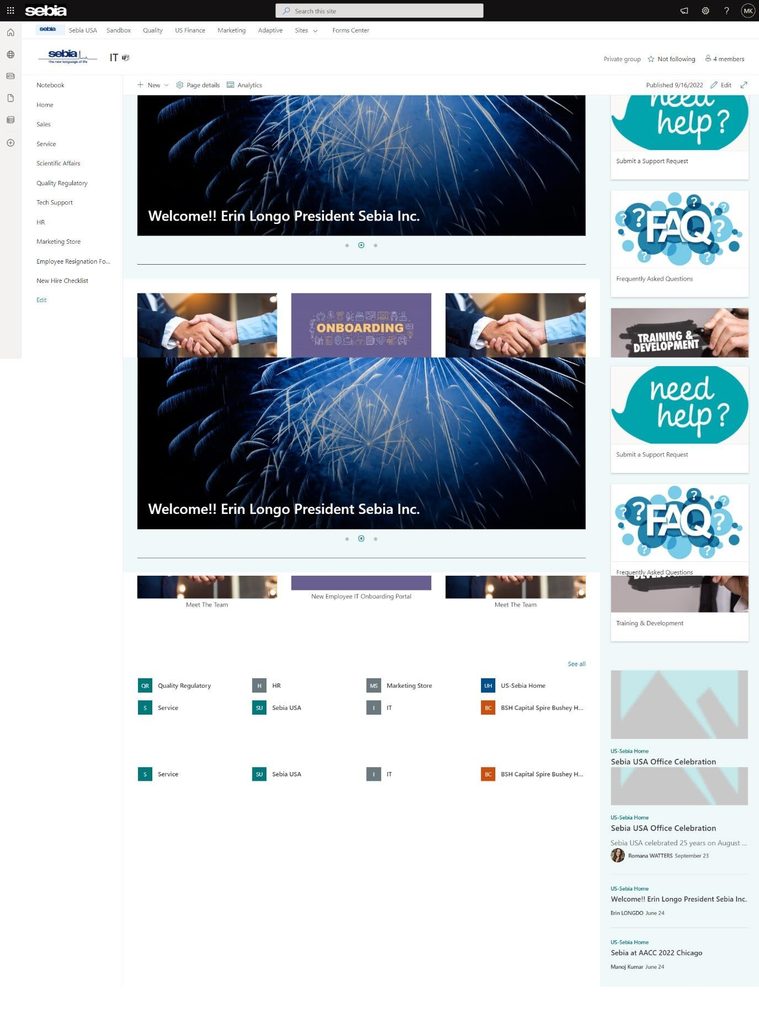
The IT site is for employees who need support, and for the IT team who want to reduce repetitive first-line requests.
Our developers built the page with a news carousel across the main column and a stacked tile column on the right covering Submit a Support Request, Frequently Asked Questions and Training & Development. Beneath the carousel sits a set of hub tiles linking to Quality Regulatory, HR, Marketing Store, US-Sebia Home, Service, Sebia USA and other associated sites, plus a news roll-up drawing recent posts from across the intranet. The left navigation carries direct links to the Employee Resignation Form and New Hire Checklist.
Employees raise tickets through a consistent route rather than by emailing individual IT staff. Putting the FAQ tile next to the support request tile also deflects a share of common questions before a ticket is created.
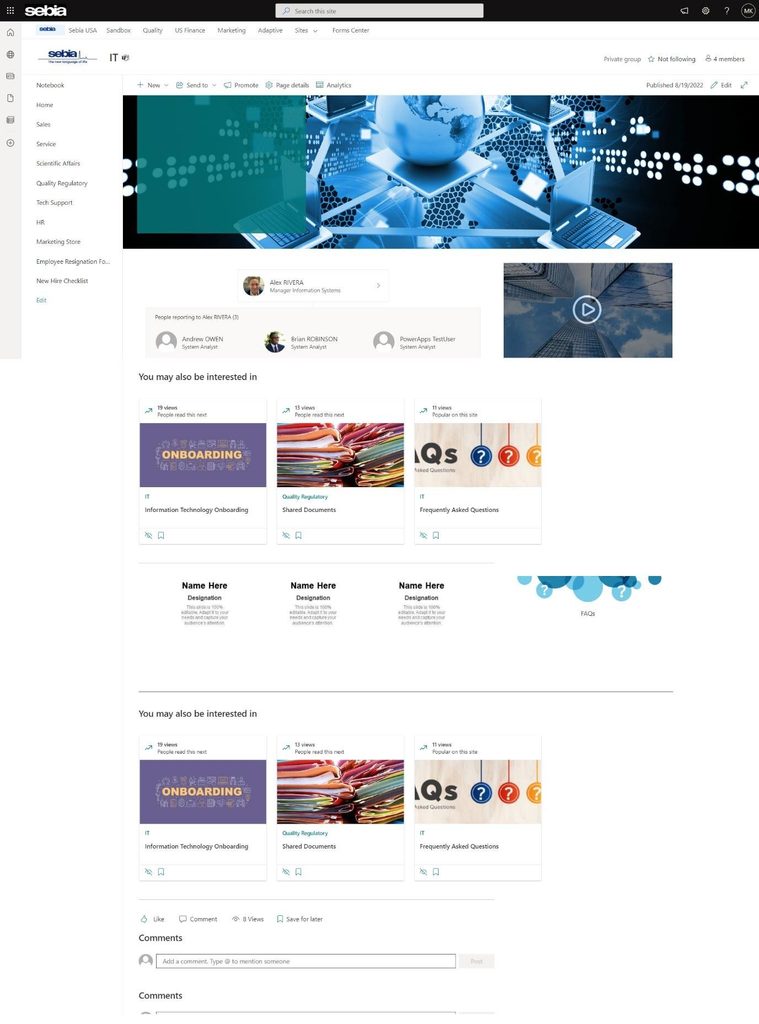
This page is built for new IT starters and for staff who need to know who does what within the technology function.
We used the People web part to display the Manager of Information Systems together with the systems analysts reporting to them, so the reporting line is visible rather than described. An embedded video sits alongside for orientation content. Below that, a “You may also be interested in” web part surfaces related pages including Information Technology Onboarding, Shared Documents and Frequently Asked Questions, each showing view counts. A comments section at the foot lets new starters ask questions in context.
A new starter can see who to approach for what in their first week without an introduction round. Related-content recommendations also move people through onboarding material in a sensible order instead of leaving them to search.
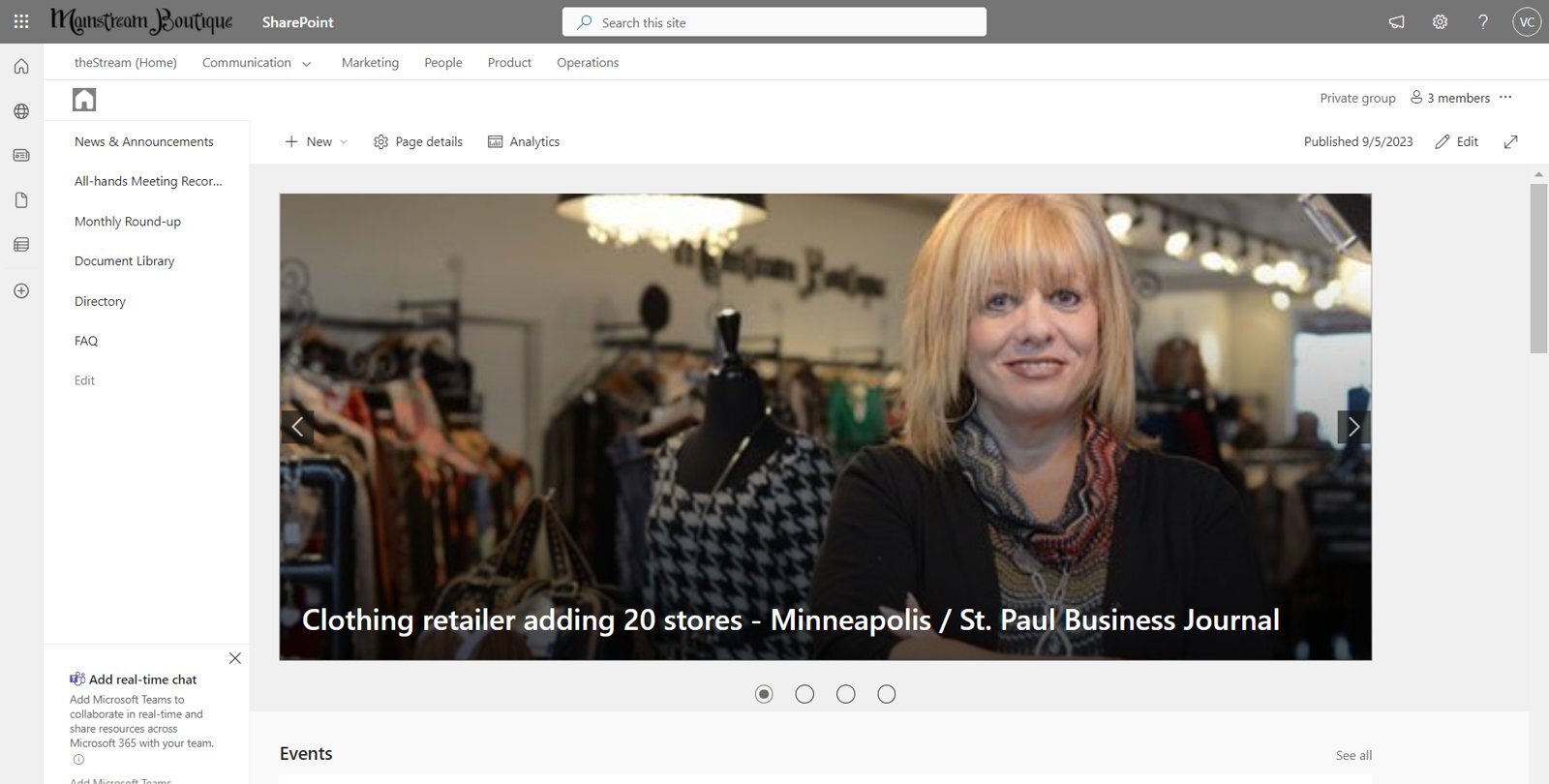
Mainstream Boutique is a clothing retailer operating through franchisees. The site is built for franchise owners and head office staff who need company news, meeting recordings and shared documents.
Vidi Corp built a communication site with top navigation across Communication, Marketing, People, Product and Operations, and left-hand navigation covering News & Announcements, All-hands Meeting Recordings, Monthly Round-up, Document Library, Directory and FAQ. The homepage leads with a rotating news carousel carrying press coverage and industry updates, followed by an Events web part.
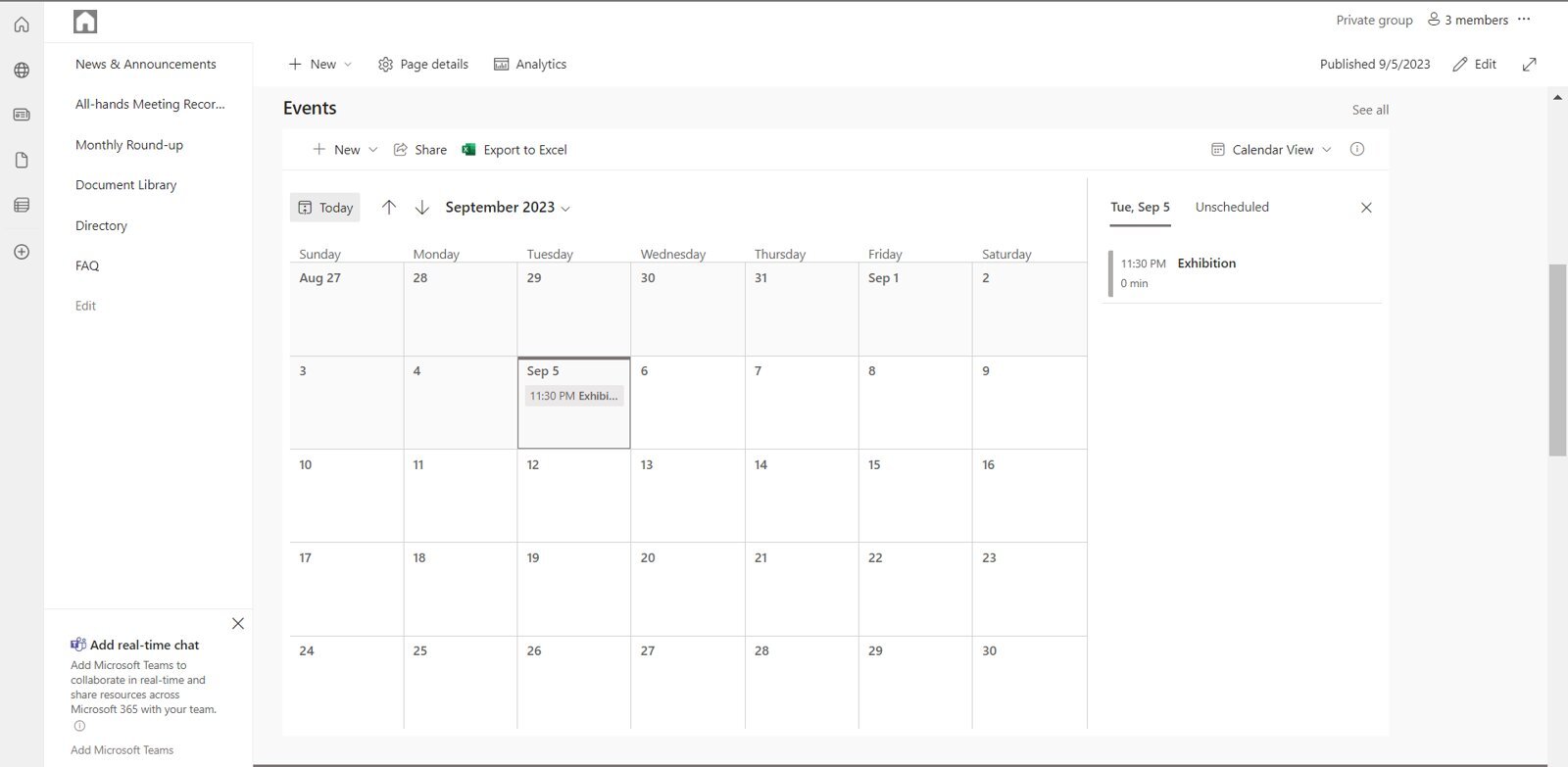
We configured the events web part in calendar view, so franchisees see the month at a glance and can open an individual event for detail. Head office publishes once and every franchisee sees the same date, which removes the version drift that comes from circulating schedules by email.
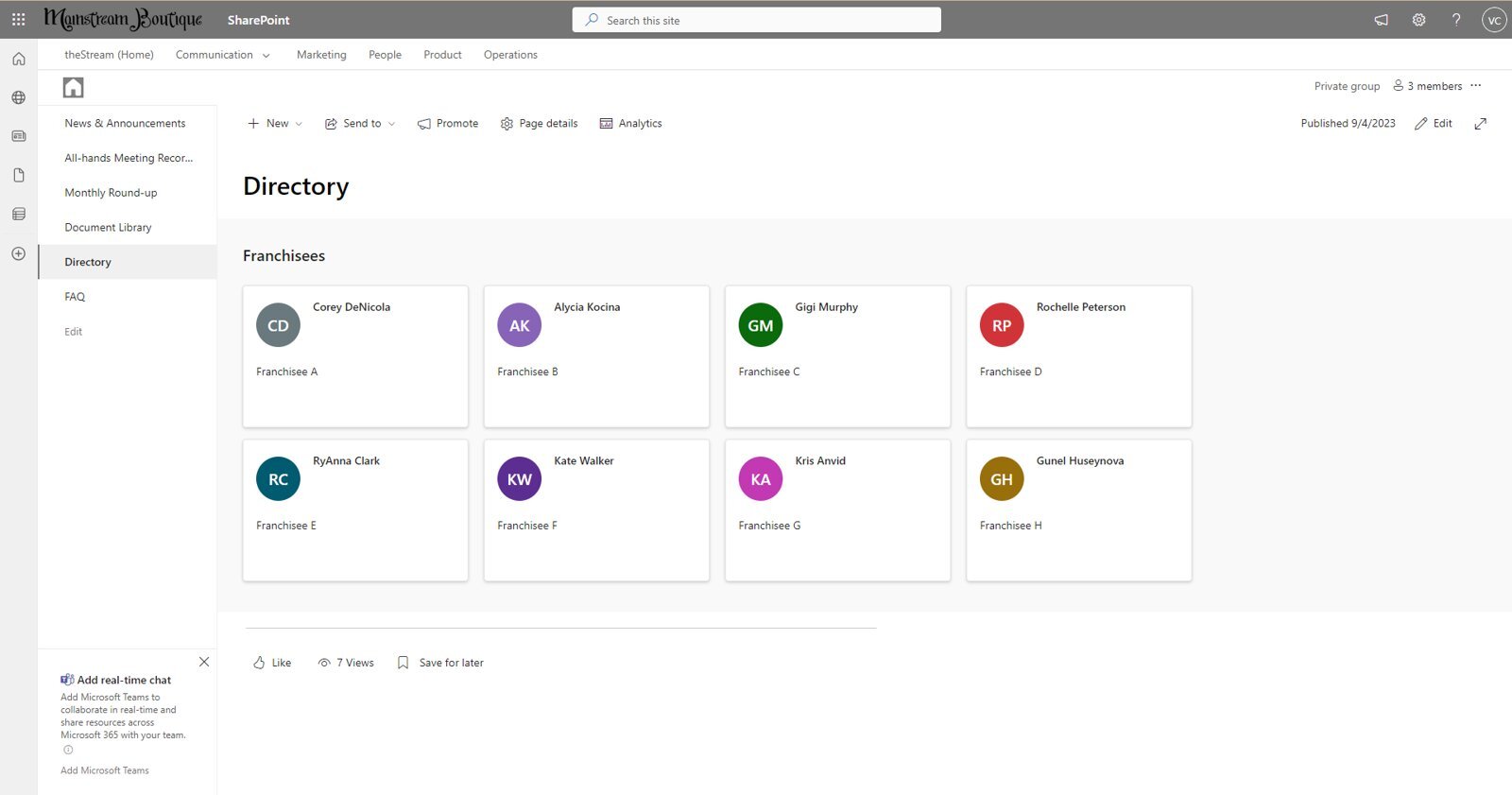
The directory is for franchisees who need to reach each other, and for head office staff who field “who runs that store” questions.
We built it with the People web part, rendering a card for each franchise owner against their franchise identifier. Alongside it, we set up a structured Document Library for shared operational files.
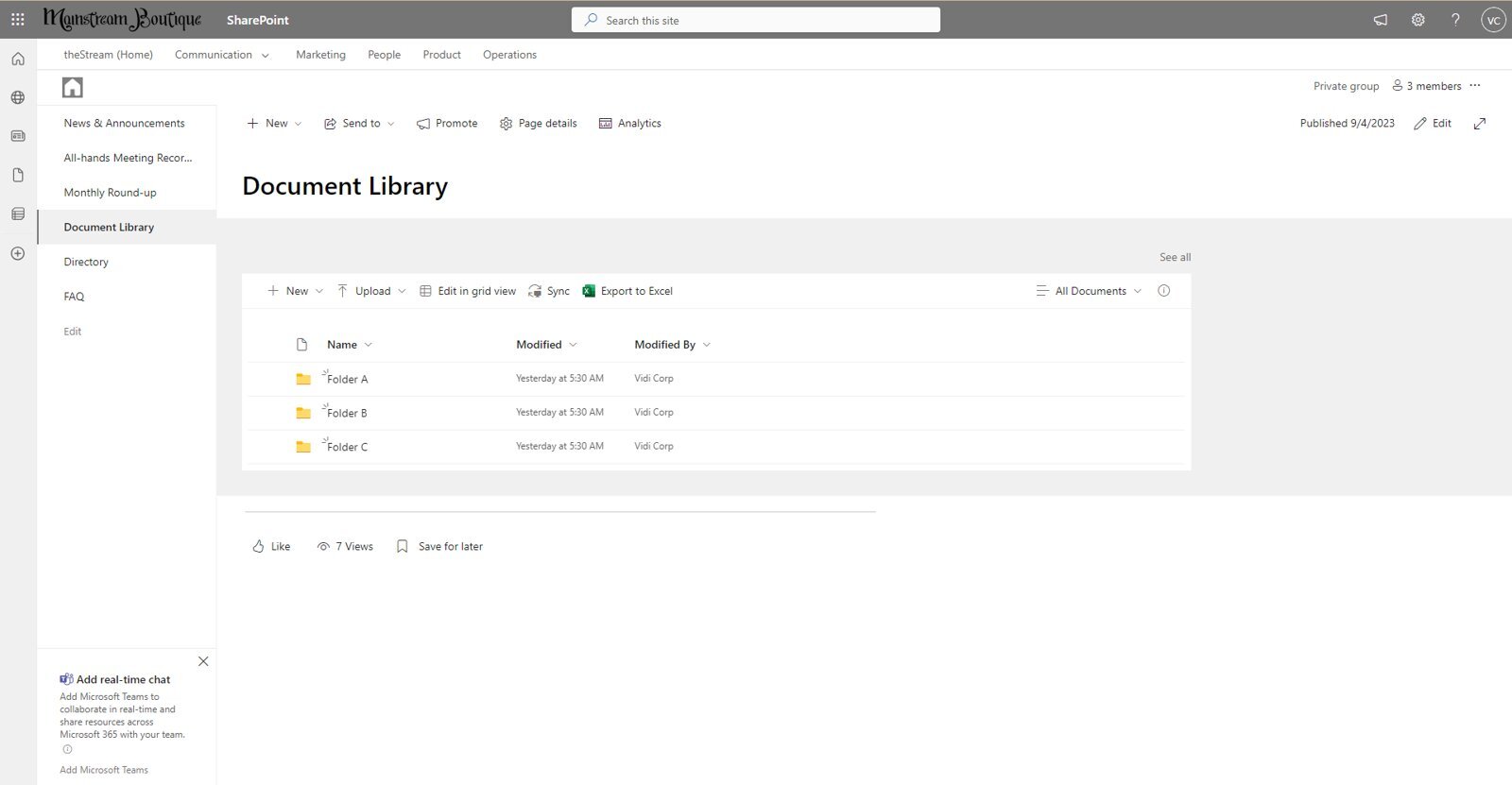
The library uses a folder structure with modified date and modified-by columns, and a FAQ page built on the accordion web part handles recurring questions about registration and event costs. Franchisees answer their own routine questions and contact each other directly, which reduces the volume of enquiries reaching head office.
Most of the intranets above do more than display content, because we embed Power Platform components directly into the pages.
Power BI reports are embedded using the native Power BI web part, as on the Everyday Coffee Performance Dashboard. Reports render live inside the page and follow Power BI’s own permission model, so users see the figures they are entitled to see without a separate portal. For Fledglings Child Care we combined this pattern with Power Apps and SharePoint to monitor the progress of children in care and link evidence to regulators, a project their Director rated 10/10 on G2.
Power Apps are embedded where staff need to enter data rather than read it. A form-based Power App can write straight into a SharePoint list, which means inspections, requests and checks are captured in a controlled structure instead of a spreadsheet. Our work for Lightwave Group used this approach to route quality check data into SharePoint and on into Power BI. If you are unfamiliar with Power Apps, you can see our Power Apps examples to learn more about the technology.
Power Automate handles what happens next. Power Automate flows send approval notifications, alert an owner when a document is due for review, escalate an item that has not been actioned, and copy records between systems. For a client, RPA and automated workflows contributed to the ten hours a month saved and the reduction in manual intervention recorded in their Clutch review.
Used together, these three turn an intranet from a place people read into a place people work.
SharePoint lists are structured tables that live inside the site, and they are often a better fit for record keeping than a document library or a spreadsheet.
We use lists where a client needs to track items rather than store files: equipment registers, inspection records, request logs, training records, asset registers and internal task trackers. Each list carries typed columns, so a date is a date and a status is a controlled choice rather than free text.
The practical advantages come from what a list connects to. Views can be filtered per team or per site, permissions can be set at item level, version history records every change, and Power Automate can trigger on a new or modified item. A Power App can sit on top of the list as the data entry interface, and Power BI can read the same list as a reporting source.
For clients with a records or compliance requirement, this combination gives a defensible audit position. Every entry has an owner, a timestamp and a change history, without anyone maintaining a separate log.
We start by mapping how people currently find information and where that breaks down. This means talking to the teams who will use the site, not only the project sponsor.
For Vedeni Energy this stage identified that document access had to be organised by energy market and stakeholder committee, covering SPP, ISONE, NYISO, PJM, MISO, ERCOT and CAISO. That structure shaped everything built afterwards.
Next we design the site structure: which hub sites exist, which department or team sites sit under them, and how navigation connects them.
Getting this right early matters because it determines search behaviour and permissions later. The Sebia USA build used a hub site with department sites for HR, IT, Sales, Service, Quality Regulatory, Tech Support, Scientific Affairs and Marketing, all reachable from one navigation bar.
We then build the pages using out-of-the-box web parts wherever possible, with custom design applied through branding and layout rather than heavy code.
This keeps the site maintainable by the client’s own team after handover. Hero web parts, quick links, news roll-ups, People web parts, embedded forms and library views cover the large majority of requirements.
Where a client is moving from another platform, we migrate content while preserving formatting, structure and data integrity.
A client’s project involved migrating HelpHub and SharkHub from WIX to SharePoint Online. That covered a home page, around 40 standard subpages, five further pages, and more than 100 dynamic pages that redirected users to third-party sites, plus text, PDFs, videos, images and other assets.
We configure Microsoft 365 groups and role-based access so each audience sees the right content, then test it from the perspective of each role.
For one of our clients, this extended to writing security policies and creating Office 365 groups so different pages could carry different access levels, which mattered particularly for SharkHub content. For Vedeni Energy it meant each client seeing only their own subscribed folders.
Where a client will repeat a structure, we script it rather than rebuild it manually.
On the Vedeni Energy project we created PowerShell scripts to automate the creation of custom sub-site templates, so onboarding a new client meant replicating an established structure with branding, subscribed folders, an events calendar, a news section and a contact block already in place.
Finally we test migrated content for accuracy and page performance, then train the client’s team to manage the site themselves.
We provide documentation covering system functionality and maintenance. On a client’s engagement, this included one month of bug maintenance after go-live, followed by optional ongoing monthly support.
Libraries are organised by how teams actually retrieve documents, with folders or metadata columns and modified-by tracking on every item. Version history means the current file is always identifiable, which matters in regulated environments like the Sebia USA quality function.
Access is set through Microsoft 365 groups so a page, library or list item can be restricted to a defined audience. This is what makes it safe to hold executive reporting, HR records and client documentation on the same platform.
Power BI reports, Power Apps forms and Power Automate flows run inside the intranet rather than alongside it. Staff complete a task in the same place they read the procedure for it.
News posts, department pages and client sites are built from templates, and where volume justifies it, generated by script. Adding a new department site or client portal takes hours rather than repeating a full build.
We build with standard SharePoint web parts wherever they meet the requirement. This keeps sites upgrade-safe as Microsoft releases changes, and it means the client’s own team can edit pages without a developer.
The SharePoint intranet examples above cover manufacturing, diagnostics, retail franchising, energy consulting and multi-site hospitality, and the pattern behind them is consistent: structure the content around how people work, then embed the tools they need into the same place.
If your organisation already has SharePoint but staff are not using it, the fix is usually architecture and integration rather than new software. Talk to a SharePoint consultant about what your intranet could look like.


