

If you work in a hospital or healthcare organization, you probably recognize the signs of an outdated data setup. Reporting still runs on sprawling Excel spreadsheets. Some records exist only on paper. Your EHR, billing, scheduling and lab systems don’t talk to each other, and half of them sit on aging on-premise servers. The result is staff retyping the same information into multiple systems, reports that take weeks to produce, and leaders making decisions on numbers that are already out of date.
Data modernization services in healthcare exists to fix exactly this. It turns those disconnected, manual, aging sources into secure, usable information that supports care delivery, operations, compliance, analytics and AI.
At Vidi Corp, we build data integrations, analytics platforms and business intelligence solutions for healthcare organizations, including hospitals, care homes, medical device companies and pharma firms. Our work includes Power BI reporting for medical-device and medical-software companies, such as solutions that monitor equipment utilization and operational performance.
This guide explains what healthcare data modernization involves, which data to prioritize, how a modern architecture works, and where organizations can create value.
Healthcare data modernization is the process of upgrading how a healthcare organization collects, stores, connects, secures and uses its data, so that information locked in outdated systems becomes accurate, accessible and ready to support decisions. It means replacing or improving aging databases and infrastructure, linking systems that currently work in isolation, and raising the quality and consistency of the data itself. In practical terms, it is the difference between an organization where data sits in silos and spreadsheets, and one where clinicians, managers and finance teams can trust the numbers in front of them and act on them quickly.
Modernization brings together architecture, integration, data quality, governance, security, analytics and document workflow automation design into one program.
In practice, a healthcare data modernization can include:
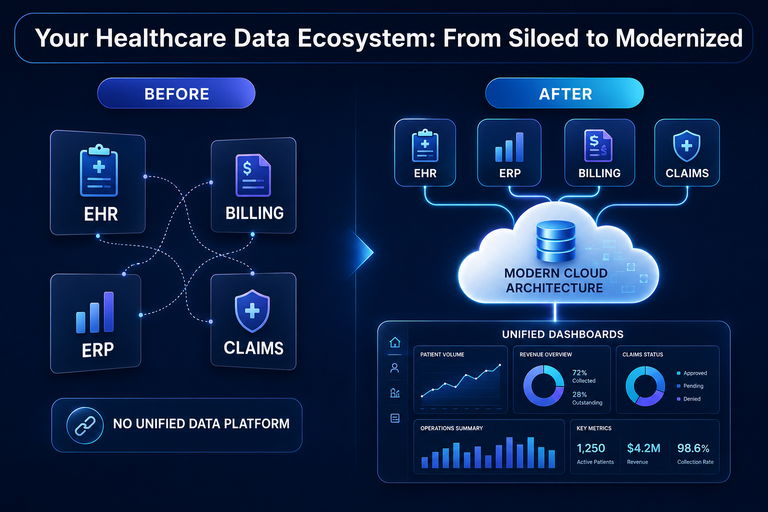
Modernization asks a lot of an organization, so it is fair to ask what you get back. The benefits of healthcare data modernization tend to arrive in a predictable order, starting with time and trust and ending with capabilities you simply cannot build on a legacy estate. Some of them show up within the first few months, others take a year or more to fully mature, but each one builds on the last.
When patient, clinical and financial data flows through one governed platform, the arguments about whose spreadsheet is right disappear. Every department pulls from the same definitions, so a readmission means the same thing to quality as it does to finance, and census numbers match whether the CFO or the CNO is presenting them. Leaders stop debating the numbers and start acting on them, and reports that once took weeks to assemble arrive the same day the question is asked. That speed changes behavior too. When an answer costs an afternoon instead of a month, people ask more questions, test more assumptions and make fewer decisions on gut feel.
Duplicate data entry, manual reconciliation and chasing figures across systems quietly consume thousands of staff hours a year. A scheduler retypes demographics that already exist in the EHR. A revenue cycle analyst spends every Monday morning stitching together exports from three systems. A quality nurse copies chart data into a registry spreadsheet by hand. Modernization automates that movement of data, which means your analysts analyze, your coders code and your nurses spend less of their shift feeding software. In an industry where burnout is driving experienced people out the door, giving clinical staff their time back is not just an efficiency gain. It is a retention strategy.
Connected revenue cycle data surfaces rising denial rates in days rather than at quarter end, which means you can trace a spike to a specific payer, procedure code or registration error while there is still time to correct it. Cleaner patient records mean cleaner claims, fewer rejections, faster reimbursement, and shorter month-end reporting when finance no longer waits on manual extracts. You also gain visibility into questions legacy systems struggle to answer, such as the true cost of a service line or the margin on a specific payer contract. For most organizations, these gains alone justify the investment, and they tend to be the first numbers your board asks about.
Information blocking requests, payer audits and quality submissions all become queries against a governed platform instead of week-long scrambles through shared drives and inboxes. Retention rules are enforced automatically, access controls follow the data wherever it moves and every access to patient data leaves an audit trail. When OCR asks how you protect PHI or a payer requests documentation for a sample of claims, the answer is a report, not a project. That posture matters more every year as HIPAA enforcement, information blocking penalties and state privacy laws keep raising the cost of getting it wrong.
A master patient index and integrated records mean every care team sees the complete picture: history, medications, labs and prior encounters in one view. The emergency physician sees the cardiology note from last month, the discharge planner sees the home health referral and nobody orders a duplicate MRI because the first one lived in a different system. That translates into fewer repeated tests, fewer medication errors and handoffs that do not lose information along the way. Patients notice too. They stop repeating their history at every visit and stop receiving bills for services their insurer already covered, which quietly rebuilds trust in your organization.
Data modernization looks different depending on where your organization is starting from. A regional hospital still running a 20-year-old records system has a very different journey ahead of it than a payer group that already lives in the cloud. The examples below show what modernization actually looks like in practice, from the first migration project through to advanced healthcare data analytics and automation.
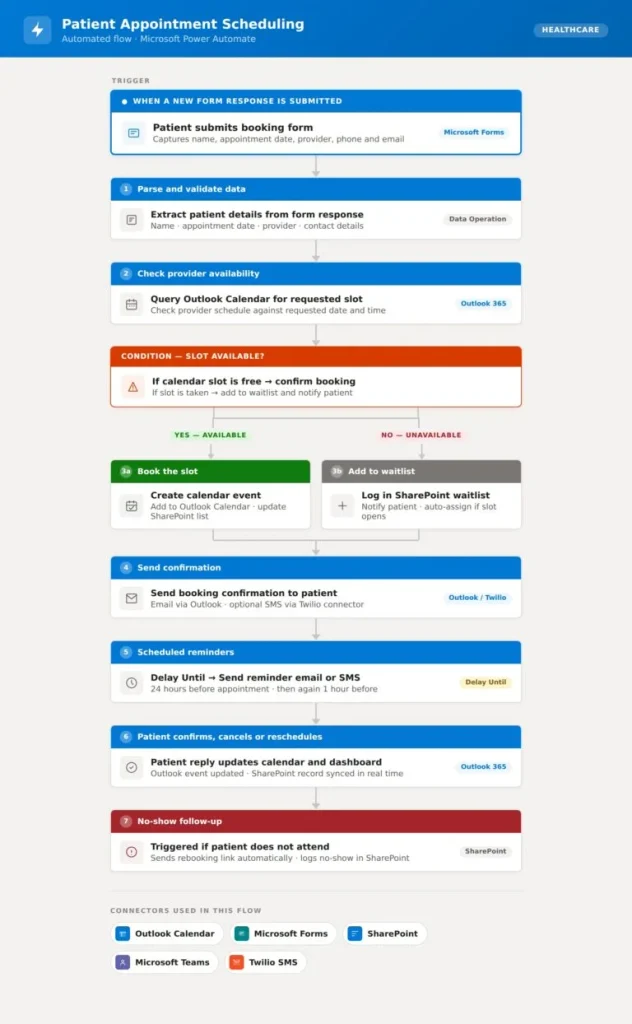
For most clinics, appointment scheduling is a daily grind that frustrates patients and drains front desk teams, and that’s exactly why it’s one of the most important healthcare workflow automations. Where booking is still done by hand, staff commonly sink 8 to 15 hours a week into answering calls, confirming slots, handling cancellations and chasing reminders. We’ve deployed this Power Automate flow across our healthcare clients, and the pattern repeats every time: the front desk reclaims its hours and no-shows start falling within the first month.
Once live, the flow handles everything on its own. A patient books online, the system verifies the provider’s availability, drops the appointment into the calendar and fires off a confirmation in a single pass. Two reminders follow automatically, one a day before the appointment and another an hour out. If the patient cancels or moves their slot, the calendar and staff dashboard refresh instantly. If they simply never turn up, a follow-up message with a rebooking link goes out without anyone lifting a finger.
Take one of our healthcare clients, a practice running two clinics that had always scheduled manually. After go-live, their front desk recovered 10 to 12 hours every week, and the double-reminder sequence visibly cut no-shows in the first month. The schedulers said the change they felt most was losing the morning confirmation calls, a chore that had swallowed hours of productive time each day.
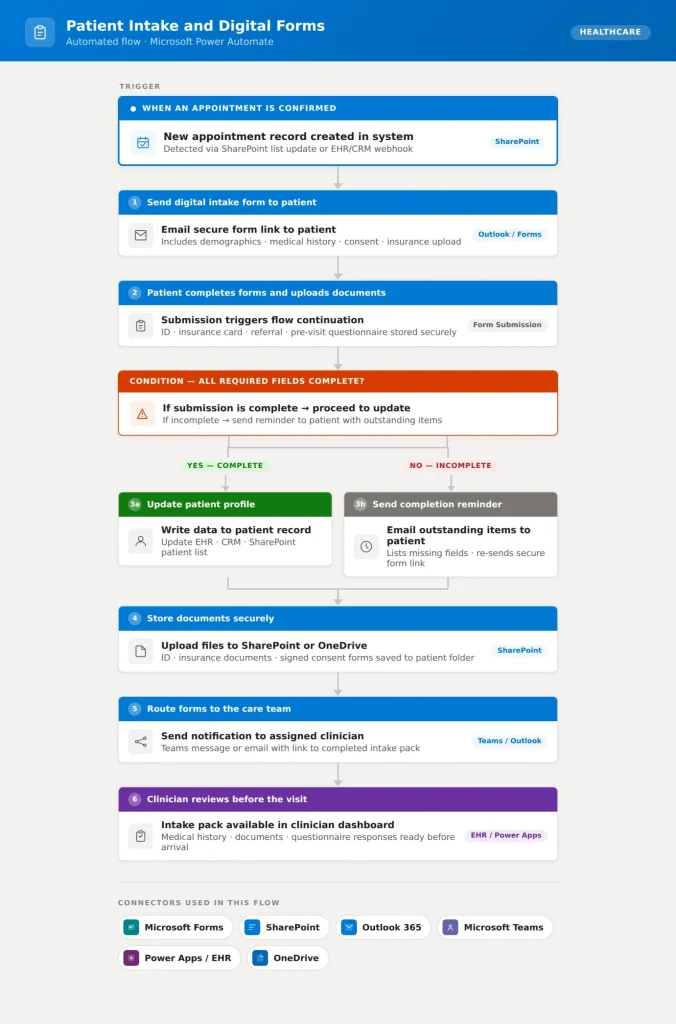
Few parts of the healthcare journey generate as much paper as patient intake, which also makes it one of the simplest to fix with automation. In clinics still running intake by hand, front desk teams lose hours deciphering handwritten forms, scanning documents and typing the details into the system, usually while the patient waits at the desk. For our healthcare clients, we’ve built digital intake workflows that remove this step altogether by having patients complete everything before they ever walk through the door.
The process kicks off the moment an appointment is confirmed. The patient receives a secure digital form covering the essentials: demographics, medical history, consent, insurance details and any pre-visit questionnaire. On submission, the system reviews it for completeness. Fully completed forms flow straight into the patient profile, while anything missing triggers a targeted reminder asking only for the outstanding fields. All documents are filed automatically in SharePoint or OneDrive, and the clinician is notified with the full intake pack ahead of the visit.
After an RPA outsourcing project with us, front desk staff at one client site said the biggest single difference was that the check-in bottleneck simply disappeared. Patients arrived with their paperwork already done, so receptionists were freed from data entry and clinicians spent more time with patients instead of waiting on records.
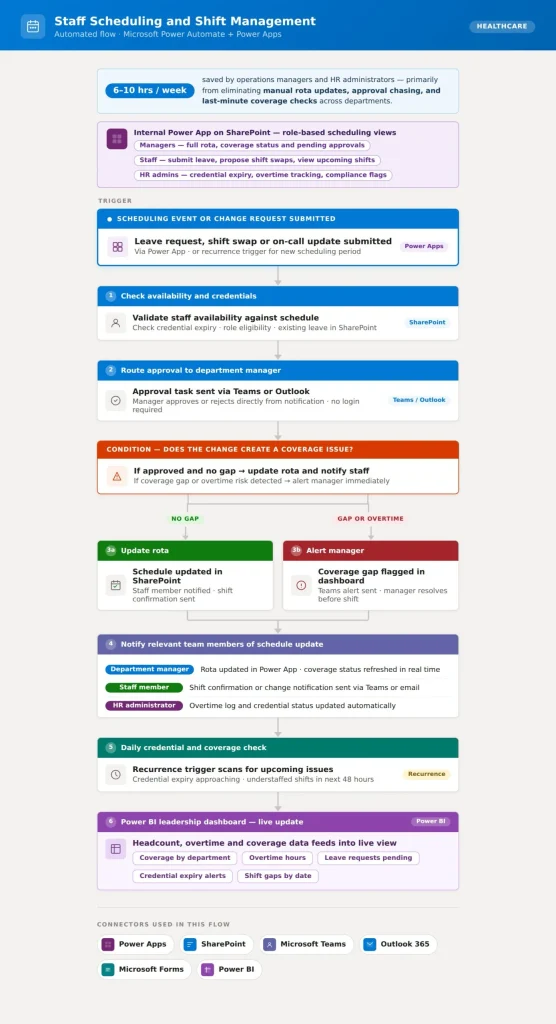
Building staff rotas by hand across a hospital or clinic is genuinely painful. Shift patterns, leave requests and on-call assignments all have to be balanced at once, across multiple departments, and a single last-minute change can take hours to untangle once the knock-on effects ripple through. Based on what we’ve built for healthcare clients, automating staff scheduling and shift management gives department managers and HR teams back 6 to 10 hours a week, mostly by stripping out the manual work of assembling the rota, chasing leave approvals and arranging last-minute cover.
We’ve built a Power App on SharePoint that gives managers, HR and frontline staff exactly the access they need. Managers can submit and approve scheduling requests, see live coverage by department and shift, and get in-app alerts for gaps or overtime risks. HR can keep track of staff credentials and working hours. Staff can check their own rota, put in leave or swap requests and receive shift confirmations, all in one place. Clinical leads don’t even need to open the app for the big picture: a weekly staffing summary lands in their Teams chat automatically, covering coverage status, leave volume and any approvals still waiting.
Behind the scenes, Power Automate runs the whole flow with SharePoint acting as the record for schedules and requests, using condition blocks to make sure every approval follows the right path. Teams and Outlook take care of notifications and confirmations. Live shift data feeds through the Power BI connector into a department coverage dashboard that updates in real time as records change.
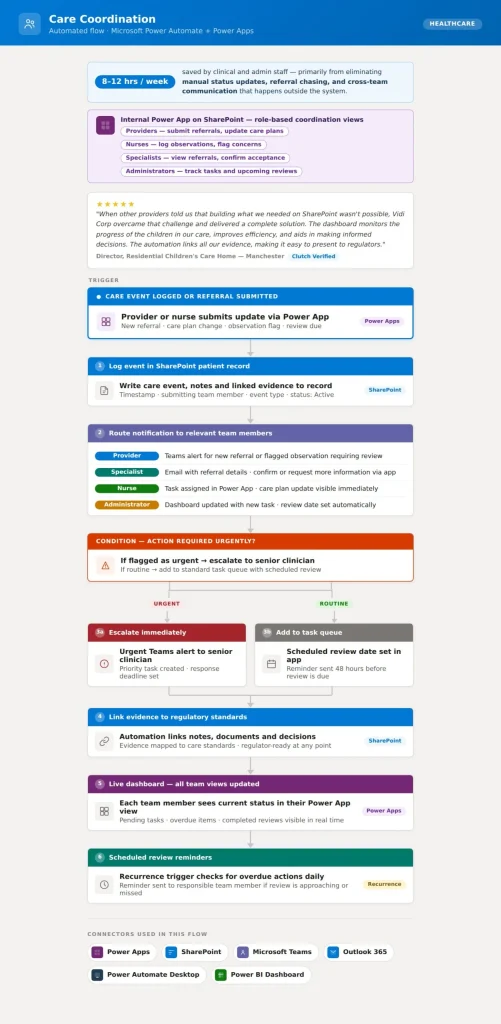
Care coordination breaks down when communication between providers, specialists, nurses, patients and admin teams depends on manual handoffs. Emails go unanswered, phone calls never get logged and status updates end up buried in spreadsheets. Automate those handoffs and care teams spend far less time hunting down information and far more time acting on it. Across the workflows we’ve built for care providers, automating coordination tasks typically frees up 8 to 12 hours per week for clinical and admin staff, largely by removing the manual status updates, referral chasing and cross-team messages that currently happen outside any system.
Our care coordination workflows use Power Automate as the automation layer and Power Apps on SharePoint as the platform for collaboration and visibility. Every team member gets a view built around their role. Providers submit referrals and care plan updates straight from the app. Nurses record observations and flag concerns, which automatically alerts the responsible clinician. Admins can see task status, upcoming reviews and outstanding actions across the entire caseload without having to ask anyone for an update. And where regulators or external agencies need evidence of care activity, the app links every record, note and decision automatically, so a complete picture can be pulled together on request.
Under the hood, SharePoint stores and manages the tasks, Teams and Outlook handle notifications and escalations, and Power Automate Desktop steps in where legacy systems or external portals need extra help retrieving or submitting information. A recurrence trigger runs scheduled care plan reviews and sends overdue-action reminders to the right team member, so nothing slips through the gaps between appointments or shift changes.
One client, a residential children’s care home in Manchester, came to us after other providers insisted that what they needed couldn’t be built on SharePoint. We proved otherwise. The Power App and automation solution we delivered tracks each child’s progress, links all evidence to the relevant regulatory standards and gives the team a live view across their whole caseload. The director told us the dashboard improved efficiency, supported informed decision-making and made presenting information to regulators straightforward.
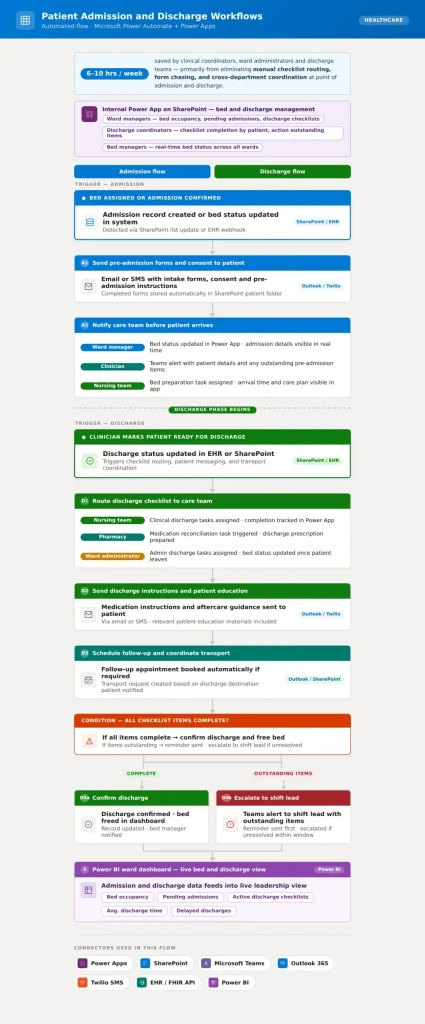
Admissions and discharges are among the hardest events to coordinate. Each one sets off clinical, administrative and patient communication tasks all at once, and when those depend on manual forms, phone calls and patchy system updates, delays stack up fast. Based on workflows we’ve built for healthcare clients, automating admissions and discharges saves clinical coordinators, ward administrators and discharge teams 6 to 10 hours a week, mostly by cutting out checklist routing, form chasing and back-and-forth between departments.
On the admissions side, the flow triggers when a bed is assigned or an admission is confirmed. Intake forms, consent documents and pre-admission instructions go to the patient automatically, while the care team gets an alert with the patient’s details and any outstanding items before arrival. Bed status updates in real time, so ward managers always have the current picture without calling the floor.
For discharges, the flow starts when a clinician marks a patient ready to leave. A discharge checklist goes out to nursing, pharmacy and the ward administrator, with each task assigned by role and tracked to completion. The patient receives medication instructions and education materials directly, follow-up appointments are booked automatically where needed, and transport is arranged based on their destination. Any checklist item not completed on time triggers a reminder and escalates to the shift lead.
Alongside the flow, we build an internal Power App that gives ward managers and discharge coordinators a live view of the whole department: bed occupancy, pending admissions and active discharge checklists in one place, with outstanding items actionable straight from the app. Power Automate ties it together using SharePoint for task and status records, Teams and Outlook for care team notifications, and Twilio or Outlook for patient messages. The diagram below shows the full trigger, action and integration structure.
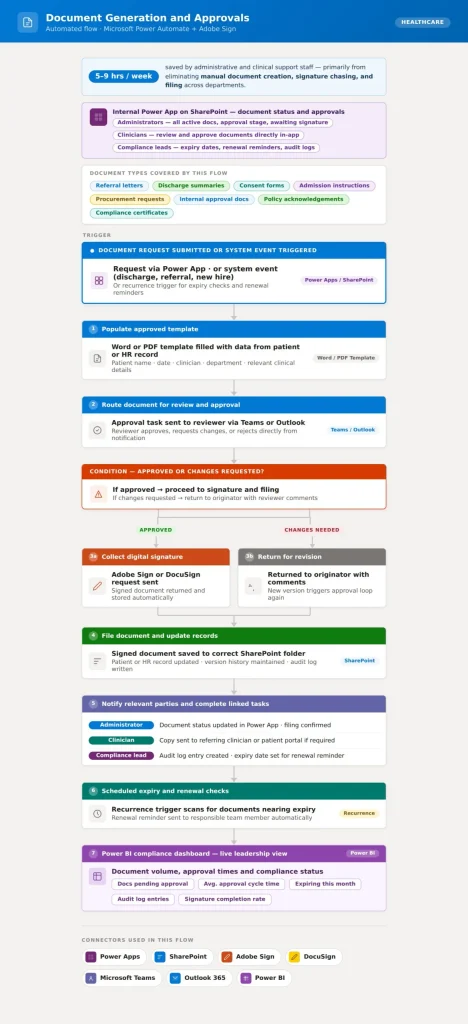
Automatic document generation is one of the most common RPA use cases, and it’s easy to see why in healthcare. Organisations produce a huge volume of documents every day, from referral letters, discharge summaries and consent forms to admission instructions, procurement requests and internal approvals. When those documents are created manually and passed around by email, the result is version confusion, missed signatures and no clear view of where anything sits in the approval chain. From the workflows we’ve built for healthcare clients, automating document generation and approvals saves administrative and clinical support staff between 5 and 9 hours a week, mainly by removing manual drafting, signature chasing and filing.
The flow begins whenever a document request arrives, whether through a Power App, a form, or a system trigger such as a patient discharge or a new referral. Power Automate populates an approved template with the right data, routes the document to the correct reviewer or approver, and collects a digital signature where one is needed. Version control happens automatically, with every new version stored in SharePoint and linked back to the original. Once approved, the document lands in the right folder, the requester is notified, and any linked tasks, such as sending a copy to the referring doctor or updating the patient record, are completed without anyone needing to step in.
A modern healthcare data platform works in layers. Each layer solves a different problem between the original source and the point where information is used.
| Layer | Healthcare Examples |
| 1. Source systems | EHR, claims, ERP, CRM, laboratory, imaging, pharmacy, medical devices |
| 2. Integration | FHIR APIs, HL7 messages, X12, replication, secure files, events, batch pipelines |
| 3. Storage and processing | Cloud or hybrid warehouses, data lakes, lakehouses |
| 4. Quality and identity | Patient matching, deduplication, normalization, completeness checks |
| 5. Governance and security | Ownership, lineage, consent, access, encryption, masking, retention |
| 6. Semantic layer | Shared measures, certified datasets, dimensional models, cohorts |
| 7. Consumption | Dashboards, applications, alerts, APIs, research environments, AI |
| 8. Monitoring | Freshness, failed pipelines, schema changes, cost, usage, model performance |
The integration layer must support both real-time and batch requirements. A patient-facing workflow may require low-latency FHIR APIs, while financial or historical analytics may work well with scheduled pipelines.
Storage should also follow workload requirements rather than a single technology preference. A warehouse may suit governed reporting, while lakehouse patterns can support large-scale structured and unstructured analytics.
Data quality and identity management are especially important in healthcare. Patient matching, provider identifiers, code normalization, reference data, and automated validation help ensure records refer to the correct people and concepts.
Microsoft Fabric and Power BI are one possible ecosystem for connecting ingestion, lakehouse storage, governed models, analytics, and reporting.
Vidi Corp also provides Microsoft Fabric consulting services, data integration consulting, and data engineering services for organizations building these environments.
A single patient’s story is usually scattered across the EHR, pharmacy system, lab system, imaging and claims, leaving clinicians to piece it together under time pressure. Modernization combines encounters, medications, lab results, imaging, referrals, diagnoses and claims into one governed patient view. Authorized clinicians stop hunting across systems and make decisions with complete context, so duplicate tests fall, and handoffs stop relying on memory or hurried phone calls. To prove the value, measure duplicate tests, referral completion, medication reconciliation and time spent searching for information.
Clinical records alone rarely reveal who is heading toward trouble. A patient can look stable in the EHR while their claims, utilization and social circumstances say otherwise. Combining EHR, claims, utilization and social-context data gives care teams a complete population picture, so they can identify higher-risk cohorts early and target outreach where it will actually move the needle instead of spreading resources thinly. Measure care-gap closure, readmissions, avoidable admissions and outreach conversion.
Capacity problems are obvious on the ward but invisible to the people who could fix them, because admissions, discharge, staffing, scheduling and bed data sit in separate systems. Modernization feeds it all into operational dashboards, refreshed at the pace each workflow needs, so teams can investigate constraints by facility, department, shift or service line and spot patterns like recurring discharge delays. Useful KPIs include length of stay, bed turnaround, emergency-department wait time, overtime and schedule utilization.
Denials drain revenue quietly because organizations see them one claim at a time, while the real causes stay hidden across separate systems. Connecting EHR, coding, claims, authorization, remittance and contract data makes recurring denial drivers visible, so revenue-cycle teams can drill from high-level trends down to specific payers, codes, facilities and root causes, and fix the source instead of reworking claims forever. Track denial rate, clean-claim rate, collection yield, accounts-receivable days and cost to collect.
Prior authorization is still one of healthcare’s most manual processes, with staff copying data between portals and waiting days for answers. Governed APIs can support patient access, provider access, payer exchange and electronic prior authorization, but they only work as well as the data behind them. Modernization makes that data accurate enough for automated exchange to be trusted and fixes the processes that determine whether APIs deliver. Track authorization turnaround, manual touches, information requests, denial reasons and API adoption.
Quality reporting consumes analyst time largely through arguments about numbers, because every facility calculates measures slightly differently. A governed semantic layer gives everyone one consistent set of measure definitions with full lineage back to source records, so disputes become quick lookups and reports move from weeks of manual assembly to a repeatable schedule. Track reconciliation effort, production time, submission errors, cost of care and contract performance.
Begin by identifying the clinical, operational, and financial outcomes the organization wants to improve. Priorities might include reducing claim denials, improving patient flow, accelerating regulatory reporting, strengthening population health analysis, or preparing trusted data for AI.
Review existing applications, databases, interfaces, reporting processes, data owners, and locations where protected health information is stored. Assess data completeness, duplication, timeliness, coding consistency, and accessibility to determine which issues create the greatest operational risk or business cost.
Possible results include clear modernisation priorities, measurable performance baselines, and a ranked inventory of systems and data issues.
Define how information will move from clinical, financial, operational, and third party systems into a modern data environment. The architecture should cover integration methods, cloud or hybrid storage, data models, analytics tools, disaster recovery, scalability, and system dependencies.
Technology decisions should reflect clinical requirements, reporting speed, security, cost, and the organization’s ability to manage the environment. The design should also divide modernization into manageable releases rather than attempting to replace every system at once.
An approved architecture and implementation plan aligned with business goals, clinical workflows, security requirements, and budget are part of the results
Assign accountable owners and stewards for critical datasets. Define how data is classified, accessed, approved, retained, shared, and used across the organization. Governance should also cover consent, lineage, quality standards, permitted uses, and incident responsibilities.
Build security and quality controls directly into data pipelines and platforms. Automated validation, access monitoring, audit trails, and clear approval processes help maintain trust as more teams begin using modernized data.
This leads to more reliable reporting, stronger protection of sensitive information, clearer accountability, and fewer disputes over data accuracy.
Select a use case with visible value, accessible data, committed users, and manageable risk. Suitable pilots include denial analytics, capacity reporting, automated quality reporting, patient flow monitoring, and financial performance dashboards.
Validate record counts, clinical values, financial totals, transformations, permissions, performance, and downstream reports. Both technical specialists and healthcare professionals should confirm that the solution accurately represents the underlying process.
What you get is a working solution that demonstrates value, validates the architecture, and reduces risk before wider implementation.
Integrate the solution into daily workflows through role specific training, updated procedures, user support, and ongoing monitoring. Retire duplicate reports or manual processes only after the replacement has been tested and accepted by users.
Compare performance against the original baseline and review adoption, reliability, security, cost, and user feedback. Use the findings to improve the platform and select the next department, dataset, or use case for modernization.
Faster reporting, reduced manual work, better decision making, stronger user adoption, and a clear plan for expanding modernization across the organization are part of the result.
A modernization partner should connect strategy to implementation. Evaluate experience across integration, architecture, data engineering, governance, healthcare analytics, security, testing, and change management.
Vidi Corp supports projects across integration, data pipelines, data warehousing, Microsoft Fabric, Power BI, and healthcare analytics. Organizations can also work directly with a business intelligence consultant for healthcare when the immediate priority is reporting and analytics.
Data modernization in healthcare is the process of improving how clinical, financial, operational, claims, and other health data is collected, integrated, stored, governed, protected, and used. It combines architecture, interoperability, quality, security, governance, analytics, and workflow improvements rather than focusing only on moving data.
It makes fragmented information easier to use across care coordination, reporting, revenue cycle, operations, cybersecurity, analytics, and AI. Modernization also helps organizations create more consistent controls and data definitions while improving their ability to exchange information with patients, providers, payers, and other authorized parties.
Data migration moves information from one system or location to another. Data modernization improves the wider environment around that data, including integration, architecture, governance, security, quality, analytics, and workflows.
Migration can therefore be one workstream within a larger modernization program.
Yes. A hospital can retain its core EHR while introducing APIs, integration platforms, governed data models, cloud or hybrid analytics, and modern reporting layers.
Selected legacy components can then be retired gradually when there is a clear operational case.


