

Outsourcing RPA is all about bringing in the experts – people with a real knack for designing, building and managing Robotic Process Automation workflows for your business – rather than trying to sort it all out yourself. What businesses are interested in is automating the dull repetitive tasks like processing invoices, getting approvals, putting reports together, on boarding new staff, processing documents, sorting through customer queries and inputting data across loads of different systems
As an RPA consultancy, we help businesses to sort out the nuts and bolts of automating their operational workflows using the right tools – not just Power Automate and Power Apps, but SharePoint, Power BI, Optical Character Recognition (OCR) tools, APIs, SQL databases and even AI Builder. For a closer look at the kind of flows we build, our Power Automate examples cover approvals, invoice handling, and document extraction. Typically our work involves smoothing out the day to day admin, getting different systems to talk to each other, making reporting a whole lot clearer, and reducing the manual work being done by Finance, HR, Supply Chain, Customer Service and Operations teams.
In this article we’re going to take a closer look at how RPA outsourcing works, the different ways businesses outsource and the ups and downs of automating workflows. We’ll also share some real life examples of RPA outsourcing – things like automating invoices, streamlining HR workflows, using OCR to process documents, managing stock, automating tasks, moving data around and helping with customer service.
Outsourcing RPA is when you hire an RPA developer to bring in robotic process automation systems for your business, rather than trying to develop them in-house. Rather than relying on your own staff to figure out the technical side of workflow automation and integration – which can be a real pain point for many companies – you outsource to people who do this sort of thing all the time.
These automations get used for the mundane, rule-based tasks that people have to do every day, like processing bills, extracting data from paperwork, sending approvals through to the right people, keeping records in sync across systems, crunching reports and sending out notifications internally.
The usual RPA outsourcing company will take care of all the technical heavy lifting – from figuring out how the workflows work, to designing the automations, to getting everything hooked up, to testing the whole thing, and then making sure it keeps running smoothly after it’s in use.
Lots of businesses prefer to go down the outsourced RPA route because sort of situation is often the case with automation projects: they need a particular set of tech skills, a fair bit of ongoing maintenance work and someone with experience working across all the various platforms – like Microsoft 365, ERPs, CRMs and databases.
BPO providers are under constant pressure to deliver quick turnaround times, cut operational costs, get a clearer view of what’s going on through reporting, and keep service quality up across a huge amount of work thats coming through.
By pairing RPA with outsourcing services, businesses can create hybrid work models where automation takes care of all the tedious admin tasks, while employees focus on actually talking to customers, dealing with exceptions, and working on the really important stuff.
Doing it this way lets outsourcing providers handle heaps more work without having to bring on more people to deal with the paperwork side of things just as fast.
Common RPA outsourcing projects include:
RPA also makes it much easier for BPO providers to get processes running smoothly and consistently. Automated workflows do the same thing every time, which means less chance of humans messing up and a more standard way of doing things across all the different departments and client accounts.
As BPO operations keep on growing, RPA has become a key part of how modern BPO works because its lets businesses squeeze more efficiency out of their operations without relying on a whole bunch of extra staff.
Businesses that decide to go with RPA automation have to weigh up the pros and cons of outsourcing the project to a third party or building their own internal team from scratch.
When going the in-house route, the company gets to be in the driving seat, managing everything from start to finish – development, integrations, testing, maintenance and all that comes with it. But to do it right you need to have experienced developers on hand, the right infrastructure in place and ongoing support from folks who know their stuff.
On the other hand, RPA outsourcing lets you tap into the expertise of automation specialists who’ve already got tons of experience implementing automation on all sorts of different systems and workflows. Our workflow automation consultants bring exactly that cross-system experience to every engagement. This can be a real game changer – it can speed up the implementation process and means you don’t have to worry about building an entire team from the ground up.
Some of the main differences include:
| Area | RPA Outsourcing | In-House Automation |
| Setup Speed | Faster implementation using existing expertise | Slower due to internal hiring and setup |
| Technical Expertise | Access to experienced automation specialists | Requires internal RPA knowledge |
| Maintenance | Managed by external provider | Managed internally |
| Scalability | Easier to scale across projects | Depends on internal resources |
| Upfront Investment | Lower initial internal resource requirements | Higher hiring and infrastructure costs |
| Process Knowledge | External provider learns business workflows | Internal teams already understand operations |
| Control | Shared with outsourcing provider | Fully internal control |
RPA outsourcing is often the best option for companies that don’t have a lot of automation skills, are trying to push through some pretty aggressive cost savings targets, are stuck with a bunch of legacy tools that don’t have APIs, or are dealing with huge volumes of data entry. And if you already use a BPO provider you can even use them to embed automation into your existing processes without having to build a whole new team.
For example, a mid-sized healthcare payer might decide to outsource their claims automation to get back on top of the backlog, verify the paperwork and meet those all important deadlines while the humans deal with the exceptions.
The way businesses approach RPA outsourcing can vary depending on how much they’re able to handle internally. Some have the resources to do it all, while others rely on outside help to get the job done. Companies might outsource the whole shebang, from finding out what needs automating through to maintaining the system. Or they might just tap a provider for development or support.
End-to-End RPA Outsourcing
This is the model where the outside experts do it all – from figuring out what goes on the automation list, right through to deployment, keeping the system running and making sure it’s supported. This approach is popular with businesses that don’t have an in-house automation team. It lets them hand it all over to a single provider and have them deal with every step of the process.
This model is used by a lot of companies that don’t have the internal resources to build an automation team from scratch. They want someone to take charge of the whole implementation process.
Staff Augmentation
Other companies might have their own automation teams but need a bit of extra capacity to get through a big project or an unexpected spike in workload. In this model, they bring in some external RPA developers or consultants to work alongside their own team and get things done faster.
Project-Based RPA Outsourcing
This is the model where businesses go to external RPA developers to automate a specific bit of their workflow or whole department. That might be automating the accounts payable process, or making the onboarding process for new staff more efficient. It’s also a good choice for projects that need OCR to extract information from documents, or to automate reporting – lots of different use cases.
Managed RPA Services
Managed RPA services are all about keeping existing automations ticking over. The outsourcing provider will handle monitoring, troubleshooting, keeping workflows up to date, maintaining the bots, and all the rest to make sure everything stays working smoothly over time.
Hybrid RPA Model
And then there’s the model where businesses take a bit of both worlds. They get an outside provider to build the initial automations and set up the governance rules, then over time the internal team starts to take over – taking care of day to day management and smaller workflow tweaks.
Businesses in finance, HR, supply chain, operations and customer service are leveraging RPA outsourcing to give themselves a break by automating repetitive tasks & getting rid of all that manual legwork. Below we’ve got some real world examples of how automation is being used to simplify the drudge work of invoice handling, employee management, document processing, tracking inventory, putting together reports & other operational workflows across different departments.
When it comes to finance and accounting, companies often turn to RPA outsourcing to automate the drudgery of repetitive admin tasks like processing invoices, getting approvals, reconciliations, reporting and all that paperwork. These tasks are super repetitive and often involve juggling multiple systems which makes them a prime target for automation.
We worked with a company that was really struggling with manually slogging through supplier invoices that kept coming in via email. The finance team was drowning in the endless task of having to open emails, download the invoices, and then somehow manage to save them into shared folders – it was a total nightmare. They were also having to forward off invoices to get them approved and then manually update the finance records once approval came back
As you can imagine, the whole thing was a real mess because it relied 100% on manual work, so approvals got held up all the time, finance records weren’t always up to speed, and there was even a risk that payments to suppliers were going to be delayed
To sort this out, our business process automation consultants implemented some automation magic using Power Automate, SharePoint, and Microsoft Teams.
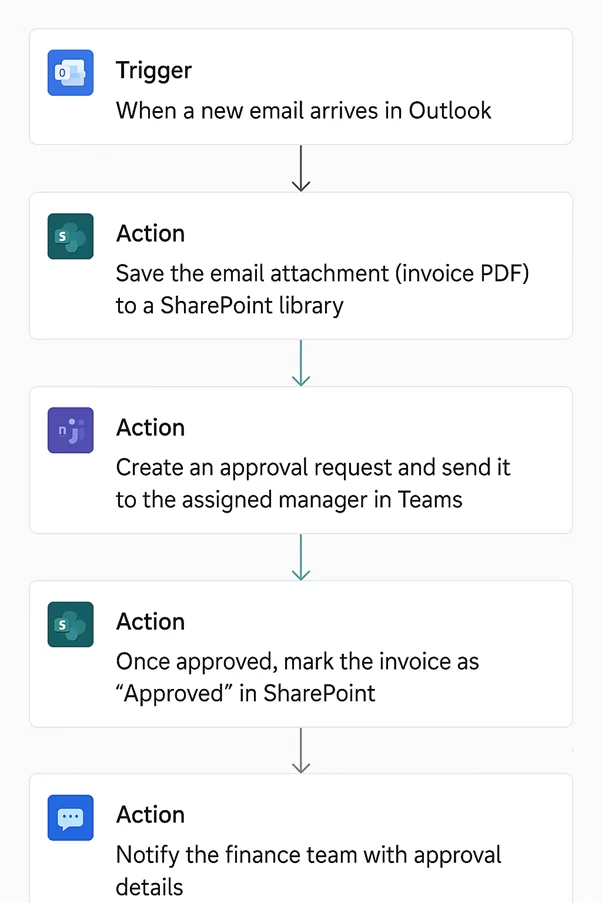
Our Power Automate consultants built a flow to keep an eye on a shared mailbox for invoices and automatically grab any new attachments as they came in. Then we had them stored safely in SharePoint alongside all the relevant metadata, so they were easy to track down whenever we needed them.
We also automated the approval bit, sending the requests directly to the managers in Teams, so they could quickly give the thumbs up (or down). Once the approvals came back, the system would automatically update the finance records and then let the finance team know if any invoices had been rejected.
Automating that whole process cut down on a ton of manual drudgery for the finance team, sped up the approval times, and basically centralised all the invoice storage inside SharePoint. Plus, it made them much more audit-ready with all that digital tracking and cut the risk of delayed payments to suppliers.
The HR department is also a big user of RPA outsourcing – they frequently outsource RPA projects to automate things like leave requests, keeping track of employee hours, onboarding new staff, getting approval from managers and sending notifications to employees. And let’s be honest – automation is a time-saver and lets the team get a better handle on what’s going on with their employees.
We worked with a company that was pretty much operating in the dark when it came to managing employee leave requests – no central system at all – employees just sent their requests over via email and HR had to keep track of everything using Excel
HR were essentially manually sorting through emails, hunting down duplicates, updating spreadsheets and trying to chase up managers to get approvals. The whole thing relied on emails landing in the right place and manual updates getting done, which – no surprise – meant that sometimes requests got lost, employees were left wondering whether or not their leave was going to be approved and managers had no idea who was even off.
To sort this out,our Power Automate consultants automated the entire process for leave requests with the help of SharePoint and Power Automate.
Now employees fill in a simple leave request form on SharePoint, which at least gets all the basics right and grabs the leave dates, what kind of leave they’re taking and a bit of extra info that managers might want to know. Power Automate then sends the approvals request straight to managers via Teams or Outlook, where they can log in and give the thumbs up or thumbs down in a couple of clicks.
When a request gets approved, the details will update automatically on SharePoint – no need for HR to make a manual update. And this gives them a live dashboard to keep track of what’s going on, all without having to bother with those Excel spreadsheets. Employees will get an instant email whenever a decision comes in for their request and managers will get a nudge so they can chase up any requests thats been outstanding a bit too long.
Overall, automating this process cut down on the HR workload, sorted out the visibility on who was off when, and made sure employees got the updates they needed on the progress of their leave requests in a timely fashion.
We worked with an organization that was struggling with employee attendance and work patterns. The company’s standard procedure was to have employees manually log their in and out times into a shared spreadsheet – a process that was just begging to go wrong.
The end result of this system was a whole load of problems. Employees would often forget to update their times, some records would turn out to be a bit dodgy, and the HR team would spend far too long chasing up missing info. And to add insult to injury, managers were left with no clear idea of who was in the office and who was getting any actual work done.
So our team decided to put the problem right and automate the whole login and logout tracking process using Microsoft Teams activity and Power Automate.
As it happens, when employees sign in to Teams, it automatically records their login time. And when they go offline or stop being actively engaged, it logs them out. And the best bit? All of these records get automatically stuffed into a SharePoint list – complete with employee details, timestamp, and all that jazz.
We also set up reporting to run automatically, so managers can get daily and weekly attendance summaries at a glance via Excel reports or Power BI dashboards. And just to give them that extra bit of peace of mind, we set up some optional alerts to notify them if nobody is showing up to work at the scheduled time.
The end result of all of this was real-time visibility into employee attendance, loads less manual HR administration, much more accurate records of work hours, and the ultimate bonus – no more timesheets to keep track of.
RPA outsourcing is also popular in the supply chain – they use it to automate tasks like tracking inventory, processing orders, scanning barcodes, extracting documents and all the logistics work. And for businesses, this cuts down on the time spent on manual processing and gives them a much clearer view of how things are running.
We worked with a company whose sales team was drowning in a sea of daily PDF order confirmations – they were getting them by the bucketload. Each one of those emails meant the sales team had to get up, open the PDF manually, dig out the customer and order details and then start typing them into an excel tracker – a tedious and time consuming process that took up hours of their day.
This process was riddled with data entry errors, mistakes in order numbers, quantities or product details would cause all sorts of downstream issues – stock allocation, invoicing, the whole shebang was messed up.
We came up with a plan to sort this out using Power Automate and AI Builder to automate PDF data extraction.
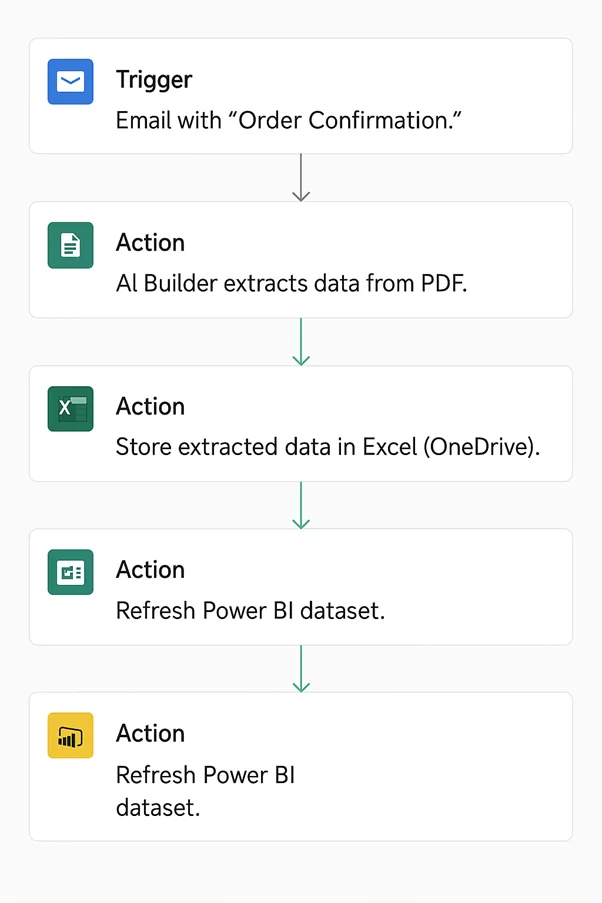
Our Power Automate consultants built a workflow that was used to keep a watchful eye on incoming order confirmation emails, saving each new file to SharePoint as it came in. Then AI Builder got to work, pulling the structured details from the PDF’s – customer name, order ID, product, quantity, and amount – the works.
The extracted data was then written straight into Excel or a SharePoint list, making it easy for the sales team to track what was going on. Plus they’d get a Teams or Outlook notification every time a new order came in so they could just glance over and validate the data.
By automating the whole thing we saved them hours of manual work, raised data accuracy to a whole new level and sped up the order processing process no end – it was a real game changer for the sales team, allowing them to focus on customers and not get bogged down in admin tasks.
We worked with a company that rents office plants to corporate clients. They had a major problem on their hands: trying to keep on top of inventory levels across all their different locations was a nightmare. And to make matters worse, they were relying on a jumbled collection of dozens of disconnected spreadsheets to keep track of stock levels, deliveries, and where all their inventory was stashed.
To keep these spreadsheets up to date, employees were having to put in over five hours every week, simply by hand. While that was a huge drag on productivity, it was even more frustrating for warehouse teams who were constantly struggling to find specific items in the stockroom. And with no single, unified view of the inventory data, the company was struggling to make informed choices about what to buy and how to run their operations.
So we set out to find a solution and what we came up with was an inventory management Power App that integrated beautifully with barcode scanning and shipping workflows.
Warehouse staff could just scan the barcodes on the inventory items straight from the app, and voila – those stock levels would automatically be updated and orders would be scheduled to be delivered to the right customers on time. The solution also hooked up with Ship Station to generate those freight labels for you automatically whenever an order was placed.
On top of that, our Power BI consultants built a reporting solution that would show, in real time, exactly how many inventory items each customer had on hand and where those items were located. It was a game-changer.
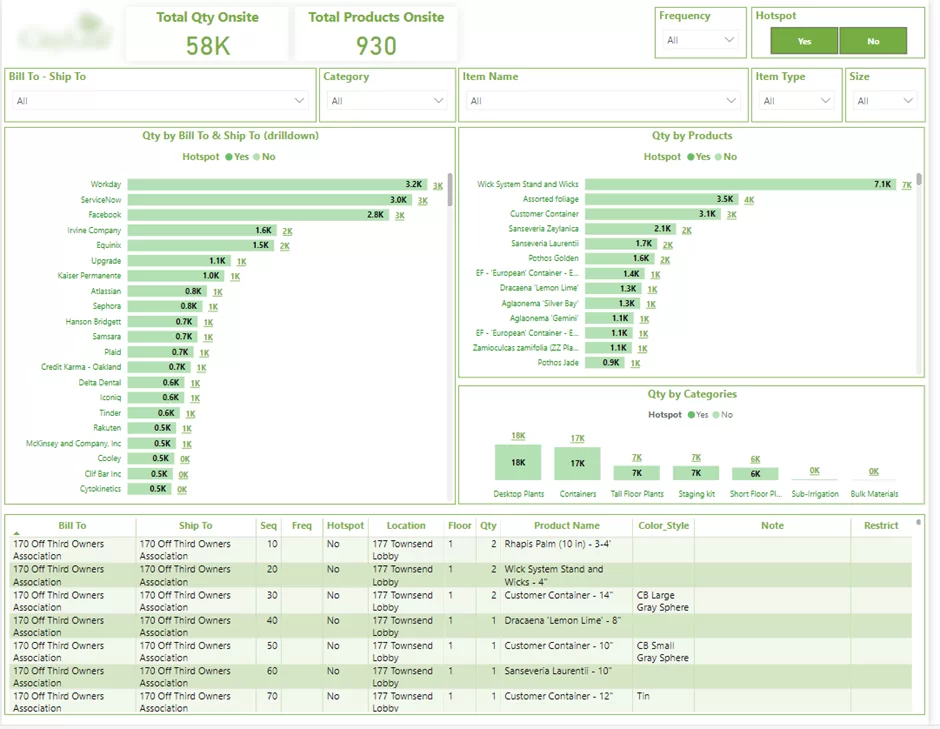
Thanks to this automation, the company was finally able to get a proper handle on their inventory levels, they were able to ditch all that manual work, their warehouse operations were simplified and they had a much better handle on stock levels and inventory location.
The operations team is a big user of RPA outsourcing too – they often outsource RPA projects to automate all sorts of repetitive coordination tasks like managing tasks, getting files in order, moving workflows and sending out all the internal reports.
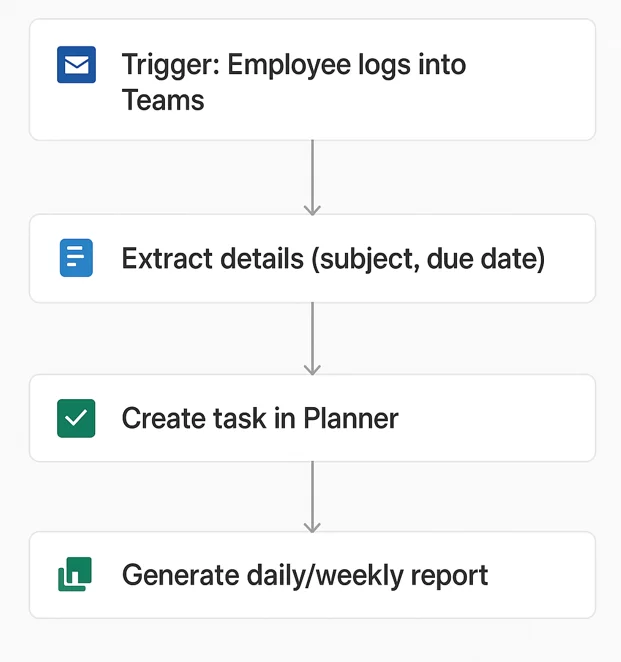
We worked with project managers who were constantly getting emails about new work requests & project updates. Every single day, they’d spend a chunk of time manually churning out tasks from those emails using Microsoft Planner.
To start, they’d need to open each email one by one, quickly review the request, then yank that info over into a new task in Planner, copying over things like descriptions and deadlines, and then hand it off to the right team member. Because this whole process was done manually, stuff got missed or entered wrong sometimes – & that would cause a delay or miscommunication when projects were actually underway.
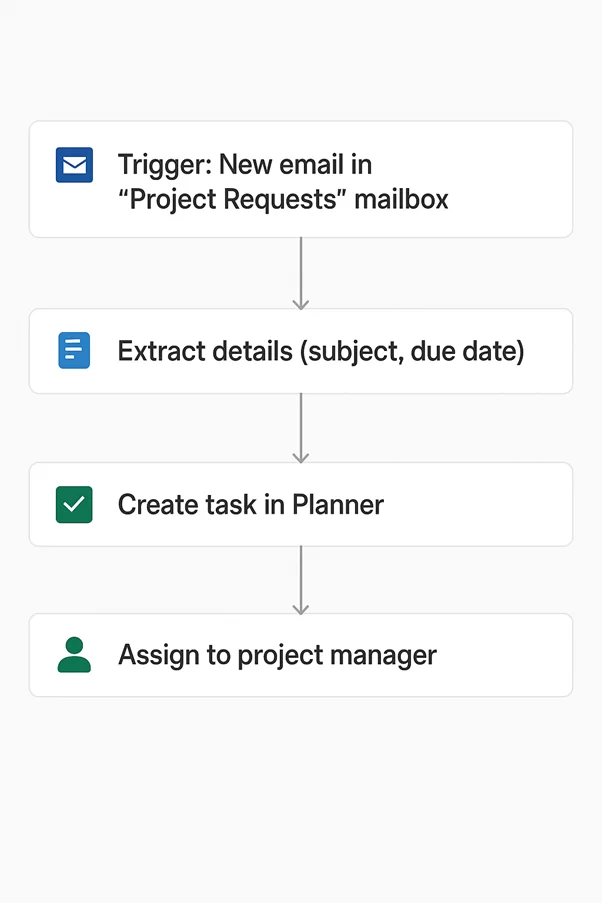
To solve this headache we automated task creation using Power Automate and Microsoft Planner.
As soon as a new email landed in the project requests inbox, Power Automate would automatically grab all the key info – like the subject line, task description & due date. Then the workflow would create a brand new task inside Planner, hook it up to the right team member & attach the original email for reference.
We also set up notifications so the assigned team members would get instant alerts via Teams or Planner as soon as a new task came in.
By automating this process, we knocked out most of that manual admin work, spotted task errors a lot less often, got projects assigned way faster & gave project managers bunch more time to get on with the actual work & planning, rather than getting bogged down in tedious admin tasks.
We were working with an organisation where employees from all sorts of different departments would just dump their files into a big shared folder with no thought about any sort of filing system or naming conventions. Over time that shared folder just became a mess, with loads of documents, spreadsheets, PDFs, presentations and images all jumbled up together. This made it an absolute nightmare for employees to track down the documents they needed quickly
Instead of spending hours digging through the folder to find what they were looking for, they were actually spending even more time trawling through the lot, and more often than not important files were getting overlooked or misplaced. The lack of any proper system meant collaboration was a slow and painful process, and everyday operations were really grinding to a halt.
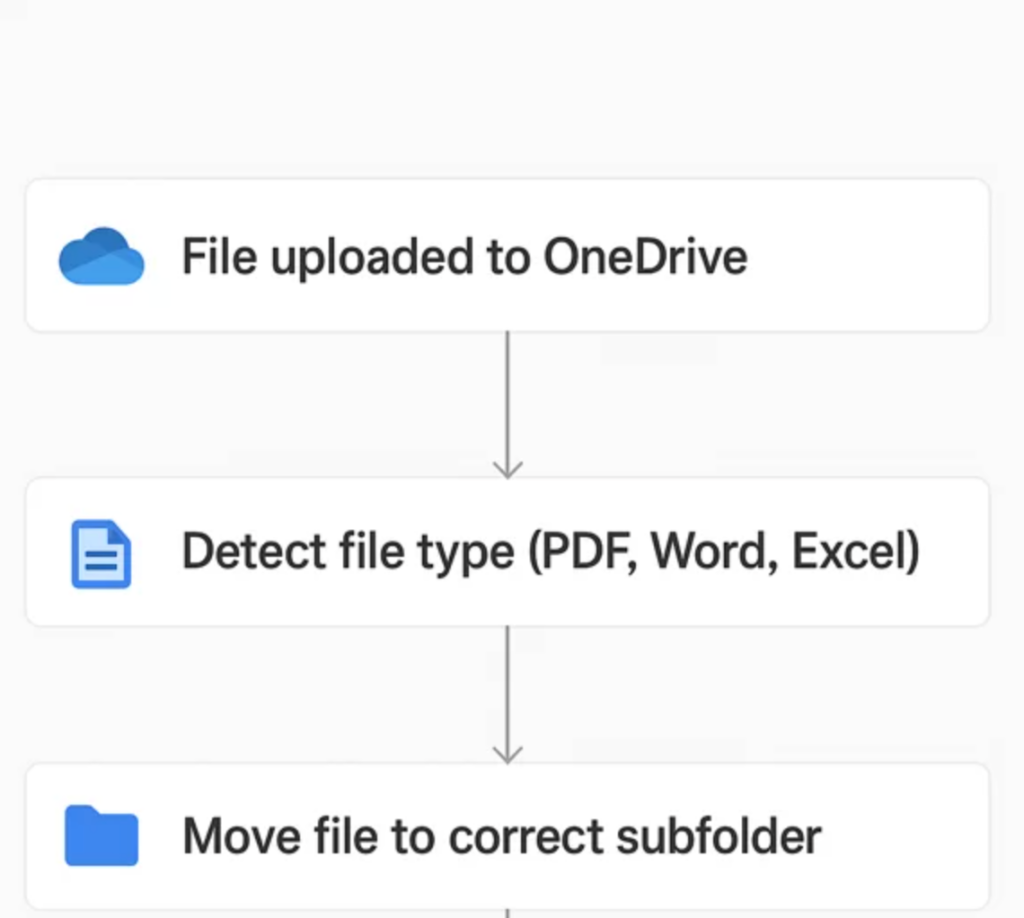
To sort this out, we used Power Automate to automate the organisation of their files.
We set up a workflow that would keep an eye on the shared folder and move any new files straight into the right place based on the type of file and any relevant metadata. So for example all the invoices would go into one folder, the reports would go into another and so on – all without anyone having to lift a finger and manually sort them out.
And just to make sure everyone was on the same page, we also set up some optional notifications to let employees know where they’d been stored – which made it a whole lot easier for them to find what they needed.
Thanks to this automation, the organisation’s filing system was suddenly looking a whole lot better, searching for documents was a thing of the past, the risk of files getting misplaced had dropped to almost zero, and collaboration between departments was back on track.
We tackled a SharePoint Online migration project that involved around 10 GBs of files – to put it bluntly, a pretty big job. One of the biggest headaches was dealing with the sheer volume of data — the initial migration just wasn’t going to cut it, taking forever and timing out left right & centre.
To fix this problem we broke the migration down into loads of smaller, more manageable chunks – this significantly improved the reliability of the migration process and meant it could actually finish without those pesky timeout errors kicking in.
The end result was a successful migration of files to SharePoint Online – and now the company uses the platform company-wide with over 1,000 staff members on board, and have also integrated some handy automations via Power Automate.
Customer service teams are also using RPA outsourcing to automate tasks like collecting customer feedback, sending tickets to the right people, sending notifications, and all that customer communication work. And the end result is a more consistent response and less time spent on the backend work.
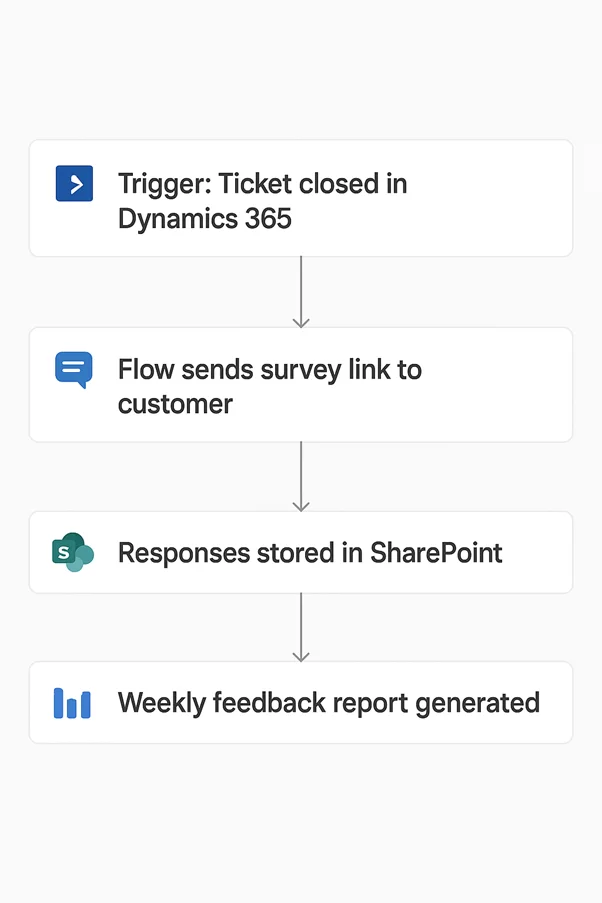
We worked with a support team that was getting pretty fed up with the hassle of manually collecting customer feedback after sorting out each support ticket. Before, everything was done manually through emails and spreadsheets – all a bit clunky and prone to human error.
The thing is, team members had to make a conscious effort to send out survey emails after each ticket had been closed – which often didn’t quite happen, or at least not in a consistent way, so some customers just got completely missed out on the chance to give their feedback. And even when they did get a survey email, the responses were basically scattered to the four winds – in emails and spreadsheets, so it was a nightmare trying to sift through them all and work out what the bigger picture is.
We came up with a solution by using Microsoft Forms and Power Automate to automate the whole feedback collection process.
So here’s how it works now: whenever a support ticket gets marked as resolved, Power Automate just kicks off automatically and sends out a personal survey email to the customer with a link to a Microsoft Forms survey – all pre-set to make the whole thing as smooth and hassle-free as possible. And then the survey responses get automatically chucked into Excel Online or SharePoint so that everything’s all nicely centralised and easy to track.
We also put in place some Power BI dashboards, so the people in charge can now get a pretty clear view of what’s going on with customer satisfaction trends and feedback analysis – no more fumbling around trying to make sense of a load of scattered data.
The upshot of all this automation is that it’s made the whole process a lot more consistent, got a lot more people to respond to the surveys, and generally made life easier for the support team – they’ve got less manual work to do and can focus on what really matters.
Businesses look to outsource RPA projects to cut down on tedious manual work, boost operational efficiency, and get automation up and running – all without having to build a big internal team of automation experts. Beyond saving money, outsourcing RPA also helps companies improve the accuracy of their processes, make them more scalable, get better visibility of how things are working, and make sure things are happening in a consistent way across different departments.
Quicker Implementation
When businesses outsource RPA, they can get automation projects up and running a lot faster because they don’t have to build an internal team from scratch. External providers already have heaps of experience with designing workflows, integrating systems, testing, and deploying automation solutions across all sorts of different systems and industries.
This saves a ton of time – time that would otherwise be spent getting from process discovery to actually having the automation up and running in production. We saw this with a procurement reporting automation project where outsourcing allowed our client to automate SAP Ariba data extraction and reporting workflows way faster than if they’d tried to build it all themselves internally.
Reducing Repetitive Work
One of the biggest advantages of outsourcing RPA is getting to reduce the amount of tedious administrative work that employees have to do. Automating tasks like data entry, approvals, document routing, reporting, sending notifications, and file management means employees can spend less time on these kinds of things and more time doing actual customer-facing work or work that’s more valuable in other ways.
Getting Expertise on Tap
Lots of businesses don’t have in-house RPA experts, or people who’ve got the experience to integrate workflows across multiple systems. Outsourcing gets you access to people who’ve already dealt with all the usual implementation headaches, know what the legacy systems are like, and know how to get workflow optimisation and governance working smoothly.
That’s especially handy for businesses that are just starting out with automation.
Accurate Processes
Manual workflows often create problems because of all the repetitive data entry, missed approvals, and inconsistent processing. RPA workflows, on the other hand, follow a set of pre-defined rules, so businesses can get more accurate data and reduce the number of operational mistakes they make in finance, HR, supply chain, customer service, and reporting.
Scaling Up
As operational workloads increase, manual processes just get harder to manage. Outsourcing RPA lets businesses scale up their repetitive workflows without having to hire loads more staff. Automated workflows can handle bigger volumes of requests, documents, or transactions all while keeping their processing standards the same.
Lower Internal Resource Requirements
Building an internal automation team means you’ve got to find developers, analysts, infrastructure specialists, and support staff – it’s a big ask. Outsourcing cuts out the need to hire loads of extra staff while still letting businesses automate across all their departments.
We saw this with a financial reporting automation project where outsourcing the implementation let them streamline their reporting workflows and reduce manual reporting effort without having to build a dedicated team.
RPA outsourcing has the power to really improve operational efficiency, but businesses still run into all sorts of problems getting it right. Most of these issues have nothing to do with the automation tools themselves, but rather the complexity of your processes, the limitations of your systems, the changes to your workflow and getting your team on board.
When Workflows Are A Mess
One of the biggest headaches is trying to automate a workflow that’s just a mess – inconsistent, poorly documented or all over the place.
When employees are doing things their own way for the same task, automation becomes a nightmare to implement. Typically you need to sort this out by standardising your workflows and documenting all the approval paths, exceptions and process rules before you even start developing the automation.
Working With Legacy Systems
And then there are businesses stuck with older systems that weren’t designed for modern integrations or automation workflows.
These systems often lack APIs or require manual interaction, which makes implementation a whole lot more complicated. To get round this, RPA providers often put together a combination of automation tools with OCR, database integrations, custom scripts, or middleware platforms to link up older systems with newer workflows. Many companies also bring in data integration consulting services to improve how data moves between legacy platforms and newer applications.
Dealing With Resistance To Change
Some employees get pretty resistant to automation because they’re not used to new workflows or are worried about changes to the way they work.
If you don’t do anything about it, your teams will probably keep on using the old manual processes even after automation has been deployed. To deal with this, you need to get your employees involved early on in the implementation process and provide them with training on updated workflows.
Keeping Your RPA Workflows Running
RPA workflows need constant monitoring and updating after they’ve been deployed. Changes to software platforms, forms, approval structures – or even just the APIs – can cause automations to fail over time.
Many businesses solve this by outsourcing the ongoing support and maintenance, as well as the initial implementation, so that their workflows continue to run smoothly.
Scaling Automation Across The Business
A lot of companies successfully automate one workflow, but then struggle when they try to expand automation across multiple departments.
As the number of automations increases, you need to develop stronger governance, documentation standards, monitoring processes and workflow ownership structures. If you can create a standardised automation framework early on, it will really help you scale RPA more effectively throughout the business. Many companies support this by implementing dedicated business process automation services to centralise workflow management and operational governance.
1. Standardize Your Processes Before You Automate
One of the biggest pitfalls businesses can fall into is trying to automate workflows that are all over the map – poorly documented, inconsistent and with lots of conflicting rules.
Before you even think about starting the automation process, get your processes mapped out clearly, identify the trouble spots, standardize your approval paths and cut out any unnecessary manual steps. Trust us, well-structured workflows are a whole lot easier to automate reliably.
2. Start With the High Volumes of Repetitive Tasks That Are Eating Up Your Time
The most successful RPA projects usually start out with repetitive, rule-based processes that are just sucking up too much of your staffs time.
Jobs like invoice processing, order handling, onboarding new employees, getting approvals, reporting and sending documents around are all usually great places to start because they can give you a quick win and a tangible measure of the operational improvements you’re getting.
3. Pick the Right Automation Partner – It Makes All the Difference
Whether you succeed or fail with RPA outsourcing comes down to choosing a partner that’s got the experience and expertise to integrate your workflows across all your systems and business environments.
When you’re choosing your partner, make sure you evaluate their technical know-how, their experience in your industry, their customer support, their governance processes and whether they’ve got any experience working with legacy systems that are holding you back.
4. Set Up a Robust Governance Structure and Longer Term Support
As automation starts to roll out across different departments, you’re going to need a more robust governance structure in place to keep an eye on things. That means setting up clear monitoring and documentation standards and making sure that each department knows who owns the workflow.
RPA workflows also need regular maintenance to keep them running smoothly, because systems and APIs will change over time and you’ll need to update your workflows to keep up. So it makes sense to start planning for longer term support from the very beginning, so you can avoid those workflow failures that can bring your whole process to a grinding halt.
5. Track the Impact It’s Having On Operations
Before you start your automation project, take a close look at your KPIs – what are you measuring and how are you tracking it?
Once you’ve got your workflows automated, tracking metrics like time to process, approval speed, error reduction, workload reduction and operational throughput will give you a clear idea of what’s working and what still needs tweaking – and that will help you identify the next areas to automate.
When looking to outsource RPA needs there’s often a pretty long list of providers to choose from – from the big boys of the enterprise consultancies right down to smaller outfits that make automation their whole thing. The best provider for the job is often going to depend on the complexity of the work flow, the techs you’re working with, what your budget is, and how much support you’ll need once it’s all up and running.
One of the leading RPA consulting and automation providers, Vidi Corp specialises in taking business process automations live for a bunch of the usual suspects – finance, HR, ops, customer service and reporting workflows. They’re super heavy on all the Microsoft tools like Power Automate, Power Apps, SharePoint, and Power BI, using that to build automation solutions that are cost-effective for everything from small business to enterprise customers.
The services they offer include:
Unlike some of the other RPA outsourcing providers out there who are all about making enterprise-scale RPA platforms sing and dance, Vidi Corp is also happy to build lower-cost automation solutions for companies that just want to get started with automating workflows without breaking the bank.
UiPath is one of the big players in the RPA game and pretty much all over the world at this stage. They’ve got a suite of tools that are perfect for big companies looking to automate work flows at scale.
These are the kinds of tasks that people use UiPath for – finance automation, document processing, customer service workflows, ERP integrations, and all the usual suspects when it comes to large scale automation – attended or unattended bot automation.
Automation Anywhere has a cloud-based RPA solution that’s really focused on enterprise automation and AI-powered workflow automation.
They’re usually the go to for organisations that are looking to automate all the back office stuff, finance processes, customer service workflows, and document processing tasks.
Blue Prism is all about providing enterprise robotic process automation and secure digital workforce management.
They’re the ones that are often relied on in the very heavily regulated industries like banking, insurance, healthcare, and government. For those industries, governance, security, and compliance are major pain points so having Blue Prism on side is a big deal.
Things are moving fast in the world of RPA outsourcing – we’ve gone from simply automating dull tasks like data entry to actually revolutionizing whole chunks of our business operations. The days when automation was only about churning out endless reports or automating approvals are long gone. These days, organisations are getting creative and teaming up RPA with AI, OCR, analytics, and integration platforms to take control of entire business processes from end-to-end.
In the BPO world, automation is fast becoming the heart of how we do business. Outsourcing providers are increasingly building their operations around a mix of human and bot-based workflows. This means bots are handling all the dull, repetitive admin stuff, freeing up staff to focus on where they really add value: talking to customers, making decisions and dealing with problems that need a human touch.
We’re also seeing more use of AI-powered automation, where RPA workflows can now tackle even the toughest document processing tasks – like reading through messy PDFs, sifting through emails, and even generating summaries. Oh, and guess what? They can even make decisions, using AI models and machine learning tools.
Low-code automation platforms like Power Automate are another big deal right now. These tools are making it possible for business types to build and scale workflows far faster without having to rely on big development teams. That’s a major step forward in making automation more accessible to everyone in the organisation.
As automation gets more widespread, you can bet that businesses are becoming more serious about how they govern it, keep it secure and make sure it scales. So – future RPA outsourcing projects will likely involve much tighter monitoring, centralised automation governance and tighter integration with all the other systems and platforms that keep the business running.
In the long run, RPA outsourcing is likely to shift from being all about automating individual tasks to being about building connected digital operations that make work easier across whole business functions.
RPA outsourcing lets you ditch the tedious manual work and get more done in less time, while also taking a serious hit out of your operational costs and growing your workflows without having to hire a whole army of automation experts. If it’s finance tasks, HR drudgery, reports, documents or customer service that’s eating into your day, you might be surprised by just how much you can get done once you’ve got the right automation game plan in place.
At Vidi Corp, we take a hands-on approach to build pragmatic automation solutions that actually make a difference – using Power Automate, Power Apps, SharePoint, Power BI, APIs, OCR & all that other cool tech like AI-powered workflows. We work really closely with our clients to make sense of the processes that aren’t working for them, stitch together any systems that are flying solo, and build workflows that just get along with the rest of their business.
If you’re looking to get your manual tasks sorted or just exploring RPA outsourcing for your business, get in touch and we can have a chat about what you’re trying to achieve and start talking about how to make it happen – no fuss or jargon, just a straightforward conversation about your goals!


