

RPA in logistics handles the manual order entry and status chasing that eats into a team’s day. It can take most of that repetitive work off your plate, but not on its own. How much it actually automates comes down to which processes you pick, how clean they are, and how well the flows handle the exceptions.
As an RPA consulting company, we have built automations for logistics operators, freight and transportation teams, and warehouse operations across the UK, US, and beyond. Our work replaces manual data entry with flows that capture orders, sync carrier tracking, reconcile invoices, and keep inventory accurate, running across the systems a team already uses.
This article walks through how we handle RPA in logistics at Vidi Corp: what it is, 6 use cases, and then the benefits, the challenges to plan for, the tools worth knowing, and how a project comes together from first process to live automation.
RPA stands for robotic process automation. In logistics, it means software bots that carry out the repetitive, rules-based tasks a person would otherwise do by clicking between systems, entering an order, checking a carrier’s tracking page, and matching an invoice to a purchase order. The bot follows the same steps a staff member would, just faster and without the copy-paste errors that creep in when someone does the same thing a hundred times a day.
It helps to be clear about what robotic process automation in logistics is not. The “robotic” part throws people off, but RPA has nothing to do with the physical robots or conveyor systems you see on a warehouse floor. It works entirely at the software level, moving data between the applications you already run, your TMS, WMS, ERP, carrier portals, and email.
It’s also not the same as AI. RPA follows fixed rules, so it’s a strong fit for structured, predictable work. Where a task needs judgment, like reading a non-standard document, it’s often paired with AI tools that handle the messy part and hand the clean data back to the bot. Most of the value in logistics, though, comes from the everyday rules-based work covered below.
Logistics runs on thin margins and tight timelines, and a surprising amount of the work holding it together is still manual. Someone rekeys an order, checks a carrier portal, chases an approval, updates a spreadsheet. It’s exactly the kind of work that quietly slows a business down as volumes grow, and it’s the first thing to buckle in a busy month.
That’s what makes RPA matter here more than in most industries. Logistics is full of high-volume, rules-based tasks that span several systems, and those are the conditions RPA is built for. A team that automates the routine data movement gets time back for the work that needs a person, handling exceptions, managing carrier relationships, and solving the problems a bot can’t. This is the core of business process automation: taking the predictable work off people so they can focus on the parts that need judgment.
The payoff shows up in a few ways. Manual data entry is one of the biggest sources of error in a logistics operation, and a wrong quantity or order number ripples through stock allocation, invoicing, and delivery. Automating that entry cuts the errors at the source. It also speeds things up, since a bot doesn’t wait for someone to get to a task, and it scales without a new headcount. There’s a visibility benefit too. When data moves automatically and lands in one place, managers get Power BI reporting they can act on instead of working from numbers that were current a few days ago, and in logistics that’s often the difference between catching a problem early and paying for it later.
Most of what slows a logistics team down isn’t complicated work, it’s repetitive work, the same details moved from one system to the next all day. Here are six places RPA takes that off people’s plates. The first four are automations we’ve built for clients, and the last two come up just as often when we scope a logistics operation.
Orders arrive however the customer chose to send them, a PDF on an email, an entry in a client portal, an EDI message, and someone has to read each one and key it into the ERP. It’s slow, and a mistyped quantity or order number follows the shipment all the way through to invoicing.
A bot reads the incoming order, extracts the fields, and enters them straight into the system, so the team validates the data instead of typing it. Nothing sits in an inbox waiting to be actioned.
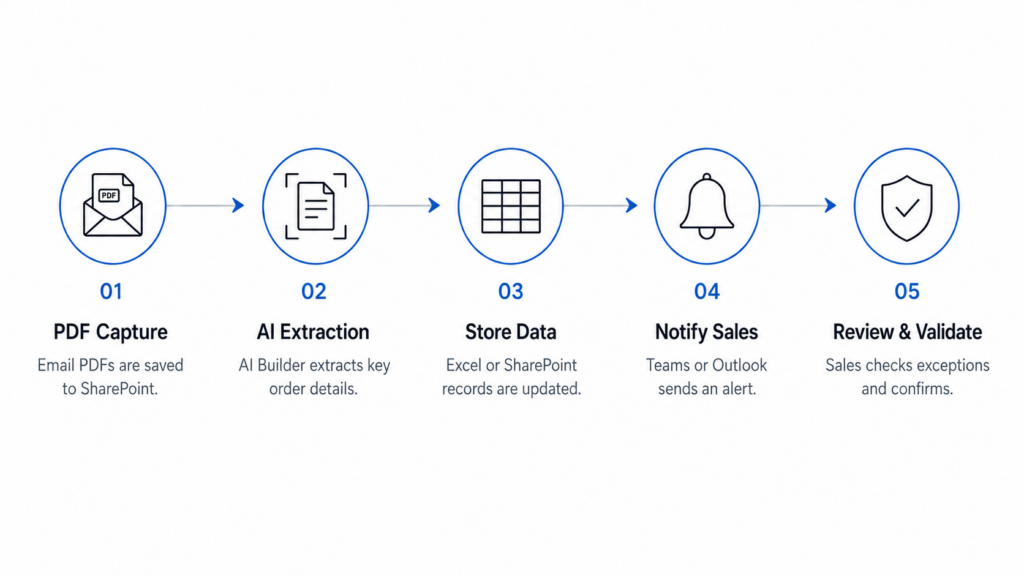
On one logistics engagement, signed contracts from Docusign were landing as PDFs in a shared mailbox and staff were copying the customer, order number, product, and quantity into a tracker by hand. We set up a flow with Power Automate and AI Builder that captures each PDF from email, extracts the details, and writes them into the system, leaving the team to glance over the result and confirm it. This kind of Power Automate OCR is quick to stand up and easy to adjust as formats change. It removed around five hours of manual entry a week, cut the order errors that had been feeding into stock and invoicing mistakes, and scaled comfortably to hundreds of orders a day without extra headcount.
Customers want to know where their freight is, and that answer sits in carrier systems that don’t talk to yours. Without automation, someone checks each carrier site and copies the status across by hand, so updates are always a little behind and nobody sees a problem until it’s already late.
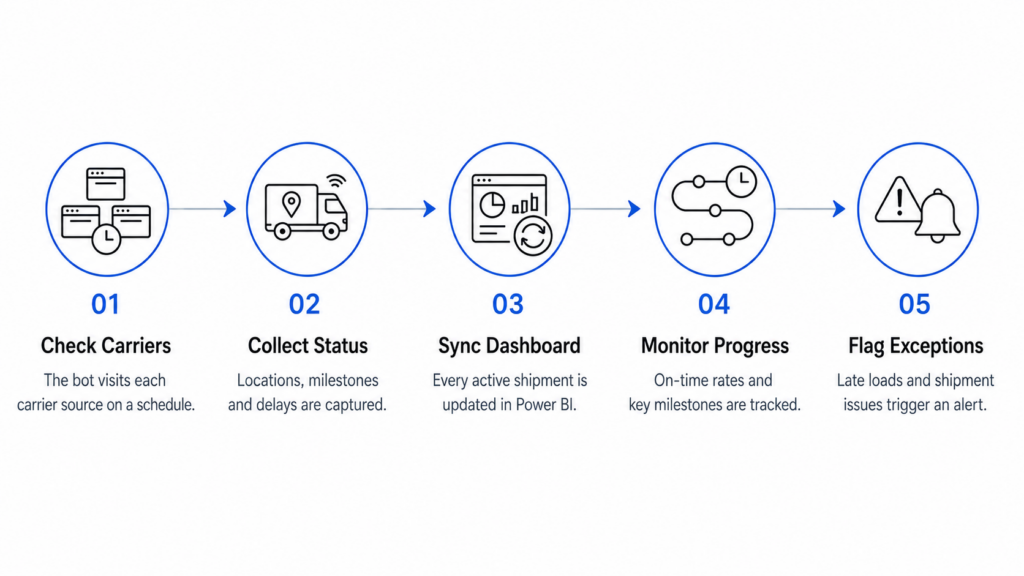
A bot scrapes those external carrier sources on a schedule, syncs the updates into your internal dashboard, and flags a shipment when it hits a milestone or slips behind. You catch the exceptions sooner, and the team stops fielding a day’s worth of “where’s my order” emails.
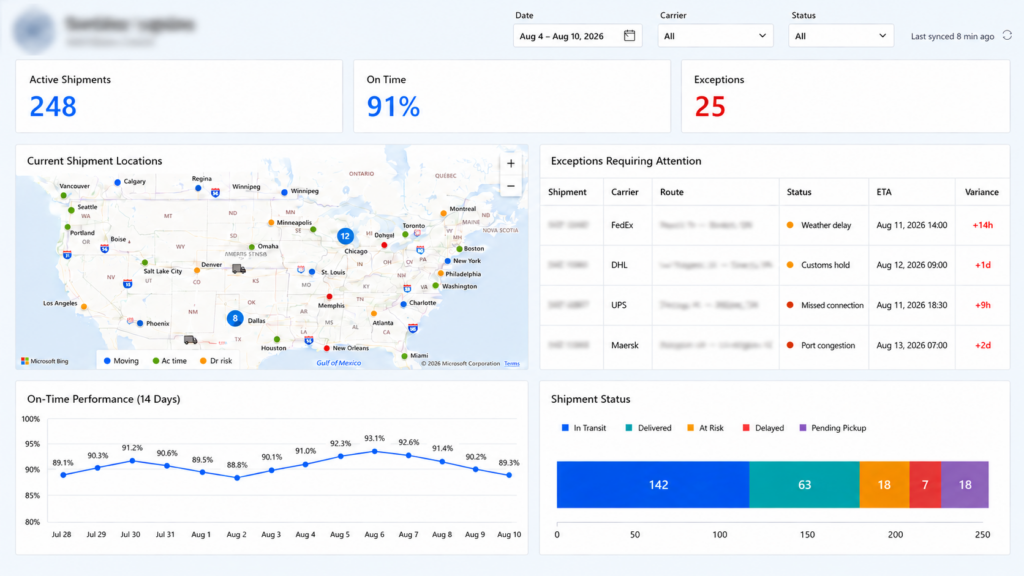
We built this for a logistics client whose team was checking several carrier portals by hand to piece together where things were. Our bot now pulls status from each carrier on a schedule into a single Power BI logistics dashboard, where the team sees every active shipment, the on-time rate, and the exceptions that need attention in one place. Instead of opening four portals to work out why a load is late, a coordinator spots the customs hold or missed connection straight away and gets on it, so problems get caught while there’s still time to fix them.
Before a carrier invoice gets paid it has to be checked against the bill of lading and the purchase order, and that reconciliation drags when invoices arrive as email attachments and approvals run over separate threads. Payments stall, and finance records fall behind.
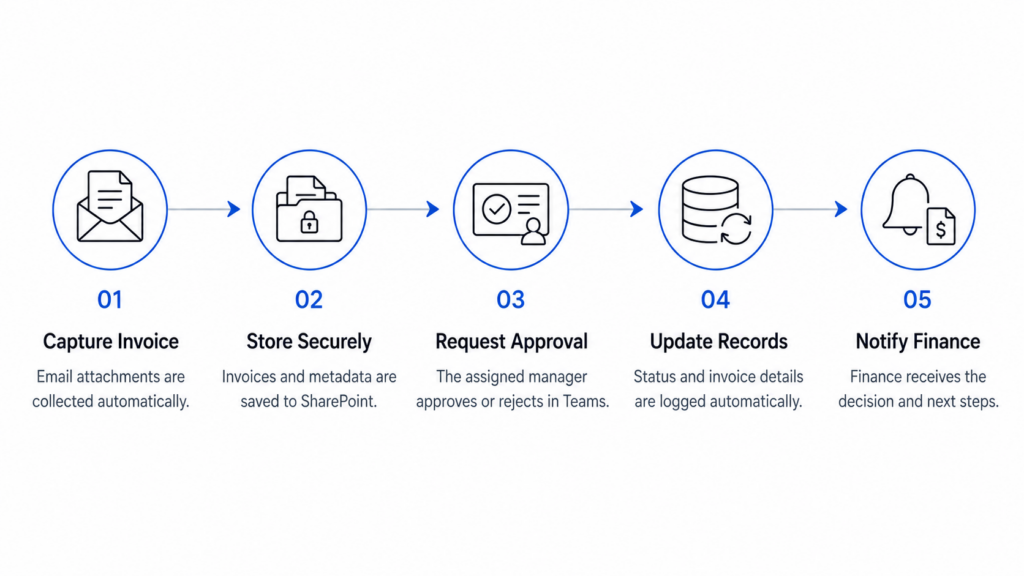
We created a full invoice approval workflow system that captures the invoice, cross-checks it against the PO, files it centrally, and routes it for sign-off, updating the finance record automatically once a decision comes back. The same approach works well beyond logistics, as our work on RPA in accounting shows.
Our team built this with Power Automate, SharePoint, and Teams approvals for a client whose invoices were coming into a shared mailbox and getting forwarded around for approval. The flow now captures each invoice into SharePoint, sends the approval straight to the right manager in Teams, and updates the record once they respond. Approvals that used to take days now clear in hours, invoices stopped getting lost in inboxes, and the finance team kept a clean audit trail without chasing anyone for sign-off.
Stock levels and locations have to stay in sync across the warehouse floor and the systems that report on them, and manual spreadsheet updates fall behind almost immediately. When the numbers can’t be trusted, reordering becomes guesswork and stock gets misplaced.
RPA keeps inventory current as goods move, triggers low-stock alerts, and can draft reorders before something runs out, so counts match reality.
This was the biggest single win we’ve seen. A company that rents office plants to corporate clients was tracking inventory across locations in dozens of disconnected spreadsheets, which took staff more than five hours a week to maintain and still left warehouse teams hunting for stock. We built an inventory management Power App that runs off the warehouse floor: staff scan an item’s barcode, and the scan updates the stock level and schedules a delivery in one go. It connects to ShipStation through API integration, so freight labels generate automatically as orders come in.
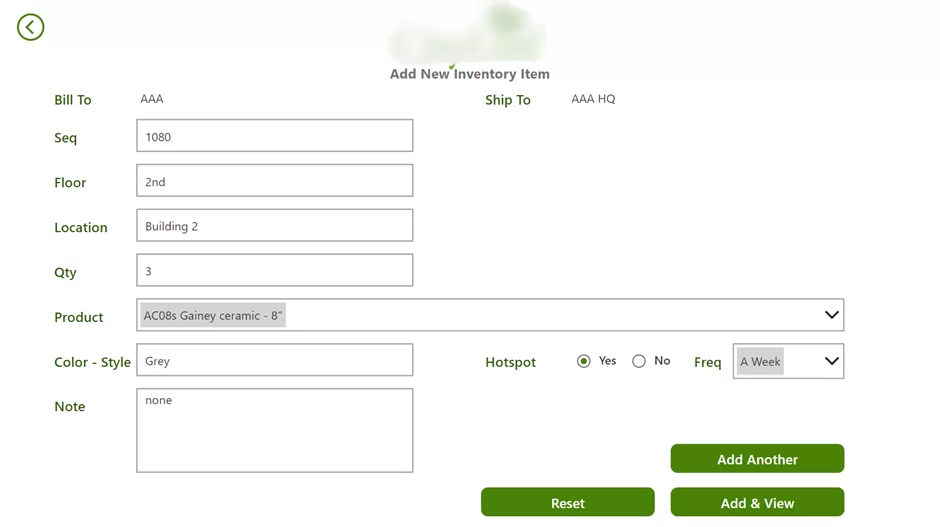
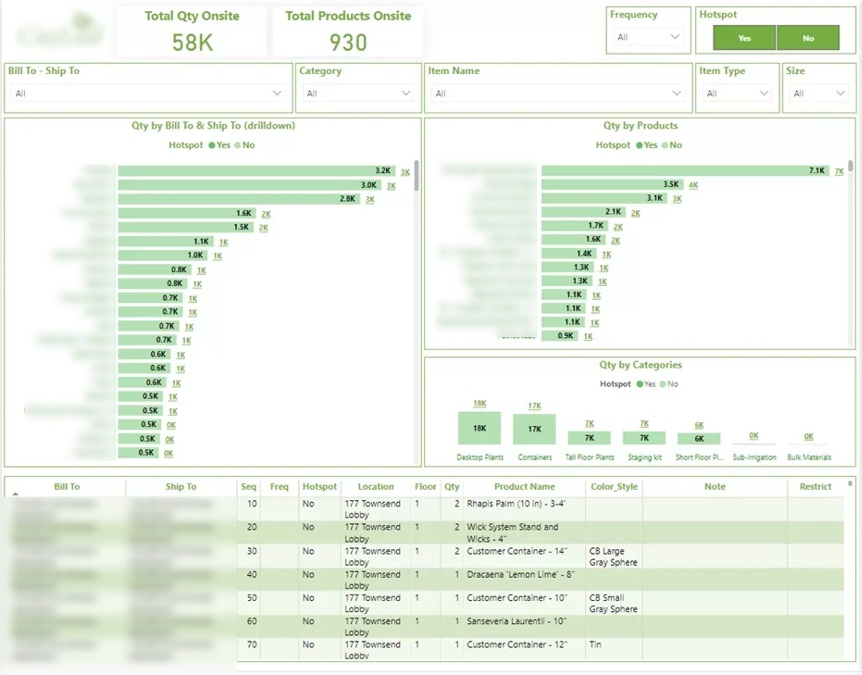
Our Power BI consultants paired it with a dashboard showing live stock quantity and location, and how much each customer is holding at any time. It gave back the five-plus hours a week the team had been losing to spreadsheet updates, made stock traceable to a location in real time instead of best-guess, and gave the company reliable numbers to plan purchasing around rather than reacting to shortages after the fact.
Cross-border freight comes with paperwork that has to be exact. A customs declaration or bill of lading with a missing field or a wrong code can hold a shipment at the border, and those details usually get copied from the original order into forms that follow a fixed format.
That copying is rules-based work, which makes it a natural fit for a bot. RPA can pull the shipment details straight from the order, populate the bill of lading and customs forms, check that nothing mandatory is blank, and flag anything that looks off before the document goes out. The team reviews the exceptions instead of filling in every field by hand, and the records stay consistent for audit. It’s the same document-handling pattern as the invoice work above, applied to the forms that move freight across a border.
Returns run the whole order process in reverse, and they tend to get handled more manually than outbound shipments. Someone logs the request, creates the authorization, updates stock once the goods come back, and triggers the refund or replacement, usually across the same systems the original order touched.
A bot can take the routine part of that off the team. It reads the return request, raises the authorization, updates inventory when the item arrives, and kicks off the refund or credit, leaving people to handle the cases that need a judgment call, like a disputed condition or a missing item. Because returns spike after busy periods, automating them stops the backlog building up right when the team is already stretched.
The use cases give a sense of what RPA does day to day. Here’s what it actually adds up to for a logistics business, with numbers from client projects.
Less Time Spent On Repetitive Work
RPA takes over the predictable jobs, moving data between systems, updating records, pulling reports together, so they happen on their own. That hands your team back the hours they’d otherwise lose to admin, and lets them spend that time on the work that needs a person: chasing shipment exceptions, managing suppliers, looking after customers.
On one project, automating the reporting alone gave our client back around 10 working hours a month that used to go on preparing those reports by hand.
Fewer Data Errors
Because a bot follows the same rules every time it moves information between systems, the slips that come from typing the same thing over and over mostly go away. Cleaner order, inventory, shipment, and billing data also means fewer bad numbers making their way downstream and causing problems later.
On one project, automated REST API feeds cut data-entry errors by 80% and pushed data integrity up to 99.7%.
Faster Access To Operational Information
RPA can keep feeding data from your source systems into databases and dashboards around the clock, so what the team is looking at is always current. That means shipment delays, inventory gaps, and other exceptions show up while there’s still time to act on them rather than days later.
One client went from reports that took 48 hours to produce to dashboards that refresh in under five minutes, and moved from weekly or monthly reporting to a daily view. Having that information on hand also helped them make strategic decisions around 40% faster.
Easier Scaling Across Systems
A bot runs the same rules-based workflow however many times you throw at it, so when transaction volumes climb, the admin doesn’t climb with them. Order handling, shipment updates, invoicing, and inventory reporting can all grow without piling the same extra hours onto your team.
For one of our clients, automation pulled data from six separate systems into a single central database and cut the manual consolidation work by 95%.
RPA isn’t a magic switch, and the projects that struggle usually trip over the same few things. Knowing them upfront is most of the battle.
The first is automating a broken process. If a workflow is messy or full of exceptions, automating it just makes the mess run faster. The fix is to tidy and standardize the process first, then automate the clean version, which is where experienced workflow automation consultants earn their keep. A good rule is that if you can’t write the steps down clearly, it isn’t ready for a bot yet.
The second is exception handling. Bots are excellent at the standard path and helpless when something unexpected shows up, a malformed document, a missing field, a portal that changed overnight. A well-built flow plans for this from the start, routing anything it can’t handle to a person instead of failing silently or pushing bad data through.
The third is picking the wrong first project. Teams sometimes start with the most complex, painful process, which is also the hardest to automate well, and the early stumble sours everyone on the idea. It’s better to start with something high-volume and rules-based, prove the value, and build from there.
The fourth is treating it as set-and-forget. Bots depend on the systems around them, so when a carrier redesigns its portal or an ERP updates, a flow can break. Automation needs an owner and a bit of ongoing maintenance, which is worth budgeting for rather than discovering the hard way.
There’s no shortage of logistics automation software on the market, from standalone RPA platforms to features built into TMS and WMS products. The right choice depends less on the tool’s feature list and more on what you already run and how much custom work you’re willing to maintain.
For most of the logistics clients we work with, the Microsoft Power Platform covers the ground well, mainly because the data already lives in Microsoft 365 and it slots in without a separate system to license and learn.
Power Automate handles the rules-based flows, the order capture, the approvals, the status syncing. AI Builder adds document reading where an order or invoice needs interpreting rather than just moving.
Power Apps gives frontline staff a simple interface, like the barcode-scanning app in the inventory example above. And Power BI turns the data the bots collect into reporting the team can actually use.
The practical advice is to choose for fit rather than features. A tool that integrates cleanly with your existing stack, that your team can be trained on, and that someone can maintain will deliver far more than a more powerful platform that sits half-used. If you’re not sure where your processes fit, it’s worth scoping them with someone who has built these flows before.
RPA implementation is less daunting than it sounds if you take it in order rather than trying to automate everything at once.
Logistics is where a lot of teams start, but the same approach carries across the wider supply chain. RPA in supply chain covers everything from procurement and purchase order processing to supplier onboarding, demand data consolidation, and the endless reconciliation between systems that don’t share data cleanly, which is often a data integration problem as much as an automation one. The pattern is identical, high-volume rules-based work that spans several applications, and the payoff is the same, fewer errors, faster cycles, and people freed from the copy-paste layer.
The one difference worth noting is that supply chain work often reaches further into planning and forecasting, where clean, consolidated data matters even more. Automating the data movement is what makes that possible, since a forecast is only as good as the numbers under it. Our work on maritime business intelligence is a good example of how far this can go once the underlying data is flowing reliably.
RPA earns its place in logistics by clearing the routine, rules-based work that quietly drains a team’s time, the order entry, the status checks, the invoice matching, the stock updates. Done well, it cuts errors at the source, speeds up work that used to wait on someone getting to it, and gives managers a clear view across the operation. The way in is to start small, prove the value on one high-volume process, and build out from there.
If you’re weighing up where automation could help your logistics operation, get in touch! We’ll look at your processes with you and give you an honest view of which are worth automating first.
Logistics automation is using software to take over the manual, repetitive work in a logistics operation, things like order entry, status updates, invoice checks, and inventory counts, so they happen without someone doing them by hand. RPA is one part of it, handling the rules-based tasks that move data between systems. It usually sits alongside other tools, a Power App for frontline staff, AI for reading non-standard documents, and Power BI for reporting, to cover a process end to end.
RPA stands for robotic process automation. In logistics it refers to software bots that handle repetitive, rules-based tasks like order entry, shipment tracking, and invoice reconciliation, working across the systems a team already uses rather than any physical warehouse robotics.
It means the same thing, robotic process automation. In a supply chain context it’s applied to procurement, purchase orders, supplier data, and reconciliation between systems, automating the routine data work so planning and forecasting rest on cleaner, more current information.
The market leaders most people mean are UiPath, Automation Anywhere, and Blue Prism. For teams already on Microsoft 365, Power Automate is a common alternative, since it delivers the same rules-based automation and integrates directly with the tools they run day to day.
No. RPA follows fixed rules and is best for structured, predictable tasks. AI handles judgment and interpretation, like reading a non-standard document. The two are often combined, with AI making sense of messy input and RPA moving the clean data through the process.


