

Every large organization runs on processes that nobody designed on purpose. An approval that lives in someone’s inbox and stalls the moment they go on holiday. A report that gets compiled by hand every Monday morning, copied cell by cell from three different systems. An onboarding checklist that takes IT half a day per new hire, with the same accounts created and the same permissions granted every single time. Individually, these tasks look small, almost too small to bother fixing.
Enterprise process automation solutions exist to take that work off people’s plates and hand it to software that never forgets a step, never loses an email and never takes a sick day.
As experienced automation implementation experts, we’ve helped companies like Ray-Ban, Delta Airlines and American Express pick the right processes to automate and build solutions that keep paying off long after go-live.
In this guide, you’ll see what these solutions look like in practice, which processes deliver the fastest returns and how real organizations have used them to cut approval times by 65%, reclaim more than 80 hours of admin work every week and free skilled staff to do the jobs they were actually hired for.
Enterprise process automation solutions are platforms and custom-built workflows that handle repetitive, rules-based business processes without human intervention. Instead of an employee moving data between systems, chasing approvals or copying figures into reports, software does it: reliably, instantly and at any volume.
The “enterprise” part matters. Automating a single inbox is easy. Enterprise process automation means workflows that span departments, connect multiple systems, handle exceptions gracefully and satisfy governance and audit requirements. A flow that works for one person breaks quickly when 5,000 people depend on it.
Enterprise Process automation isn’t one single thing. It comes in several flavours, and most companies end up mixing a few of them together to build a strategy that fits how they actually work. Here are the six main types you’ll come across.
Basic automation
This is automation at its simplest: taking small, repetitive tasks off your plate. You already use it more than you realise. Out-of-office email replies are basic automation. So is a monthly sales report that lands in your inbox on schedule without anyone lifting a finger. On their own these automations are modest, but they’re the building blocks everything else sits on.
Rule-based automation
Rule-based automation runs on simple “if this, then that” logic. You define the conditions, and the system acts whenever they’re met. Email filtering is the classic example. You set up rules based on the sender’s name or certain keywords, and incoming messages sort themselves into the right folders without you touching them.
Robotic process automation (RPA)
Robotic process automation uses software robots, or bots, to handle repetitive tasks a person would otherwise do manually. Data entry is a common one. Say a customer emails in an order. Instead of someone reading the email and typing the details into a spreadsheet, a bot extracts the order information and enters it automatically.
Business process automation (BPA)
Where RPA automates individual tasks, Business process automation automates an entire process from start to finish. Take order processing. A BPA setup can receive the order, verify it, check inventory, arrange shipping and generate the invoice, all without anyone stepping in along the way.
Integration automation
Integration automation keeps data and actions flowing between the different applications your business runs on. A typical example is syncing customer data between your CRM and your ERP system automatically, so both are always up to date and nobody has to copy information across by hand.
AI and machine learning automation
AI and ML take on tasks that depend on pattern recognition and prediction, which rules alone can’t handle. Better still, AI learns from data and adapts as things change. A retailer might use it to send personalised product recommendations based on each customer’s buying patterns, with the suggestions getting sharper as more data comes in.
Abstract benefits only get you so far. The examples below cover the automations we see delivering the most value inside enterprise-level organizations, starting with quick wins you can deploy in weeks and moving up to complex builds that transform entire departments.
One thing worth saying upfront: these patterns are not tied to a single product. The same workflows can be built on Microsoft Power Platform, dedicated RPA suites like UiPath and Automation Anywhere or open-source orchestration tools like n8n. The right platform depends on your existing stack, which we cover in the next section. The client results below come from builds we delivered on the Power Platform, but the underlying pattern in each case is transferable.
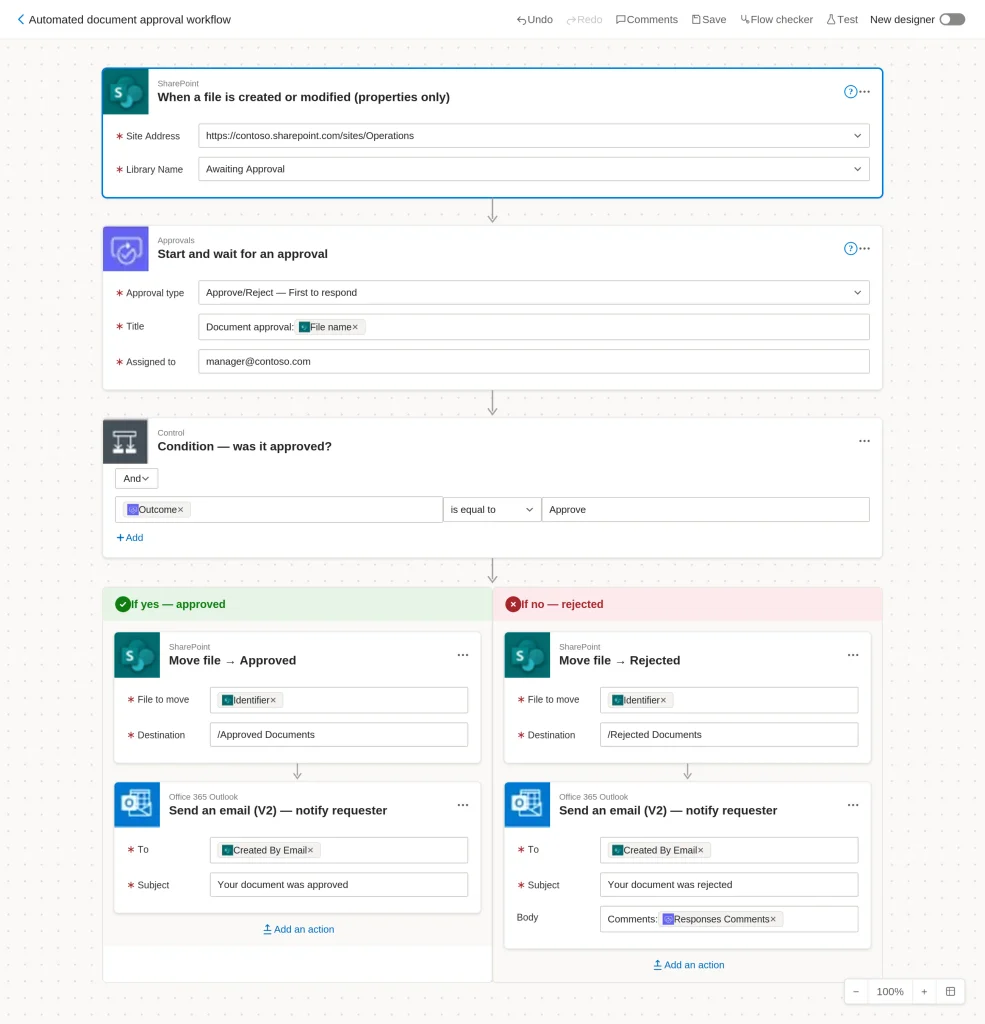
Approvals are the classic enterprise bottleneck: expenses, purchase orders, leave requests, document sign-offs, all traveling by email chain and all dependent on someone remembering to chase. Automating them is fast because the rules already exist, humans just enforce them.
An automated document approval workflow routes each request to the right approver based on amount, department or document type, sends reminders until a decision is made and records every outcome with a timestamp. Power Automate handles this natively with its built-in approvals feature, n8n covers it with form triggers and wait nodes for self-hosted setups, and lighter tools like Zapier or Make can manage simple single-step approvals for smaller teams.
When our Power Automate consultants built a centralized expense approval workflow for American Express, with claims submitted through an app front end and receipts attached digitally, approval times dropped by over 65% and finance gained a single auditable source of truth for every claim.
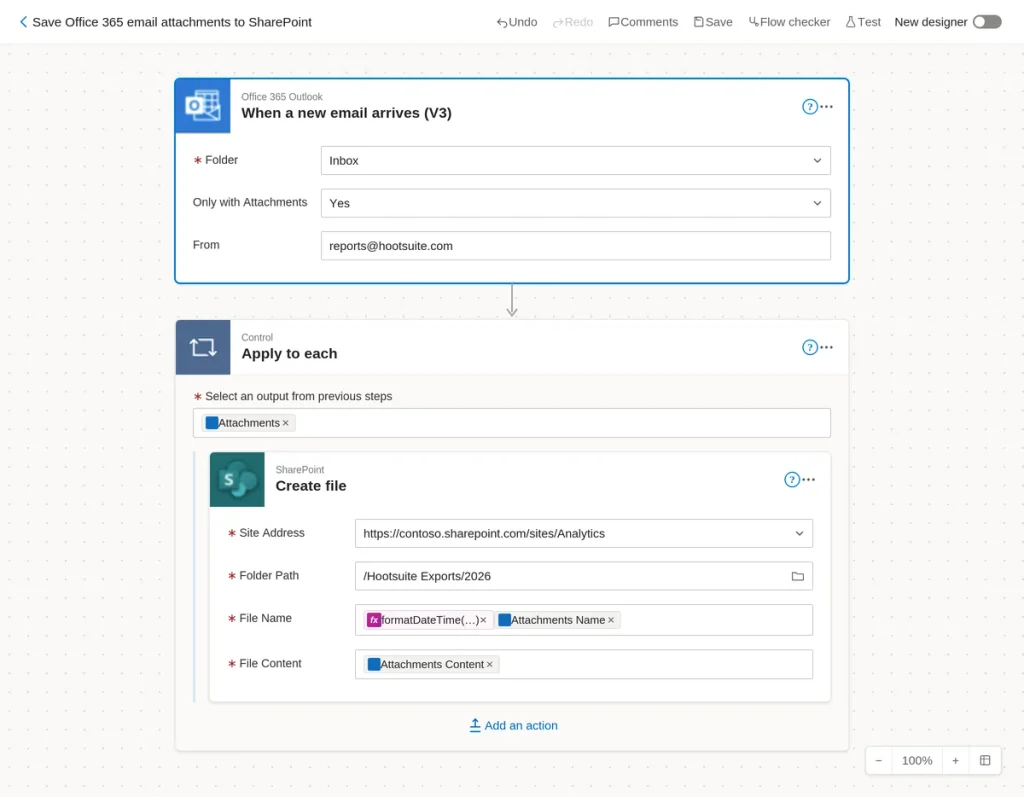
Accounts payable is one of the most automated functions in the enterprise for a reason. Someone receiving invoices by email, keying the data into the ERP and matching it against purchase orders is pure repetition, and the errors flow directly into payments and reconciliation.
Modern platforms utilise Power Automate OCR and AI extraction so that documents are captured, read and validated automatically, with only the exceptions routed to a person. The main options here are AI Builder on the Power Platform, UiPath Document Understanding, Automation Anywhere Document Automation and dedicated capture engines like ABBYY feeding a workflow tool. Mature enterprise deployments routinely push the majority of invoices straight through with no manual touch at all.
We built a version of this for a sales team drowning in PDF order confirmations: incoming PDFs are captured from email, AI extracts the key fields and the data lands directly in SharePoint with notifications for human review. It removed five hours of manual work per week and now scales to hundreds of documents a day.
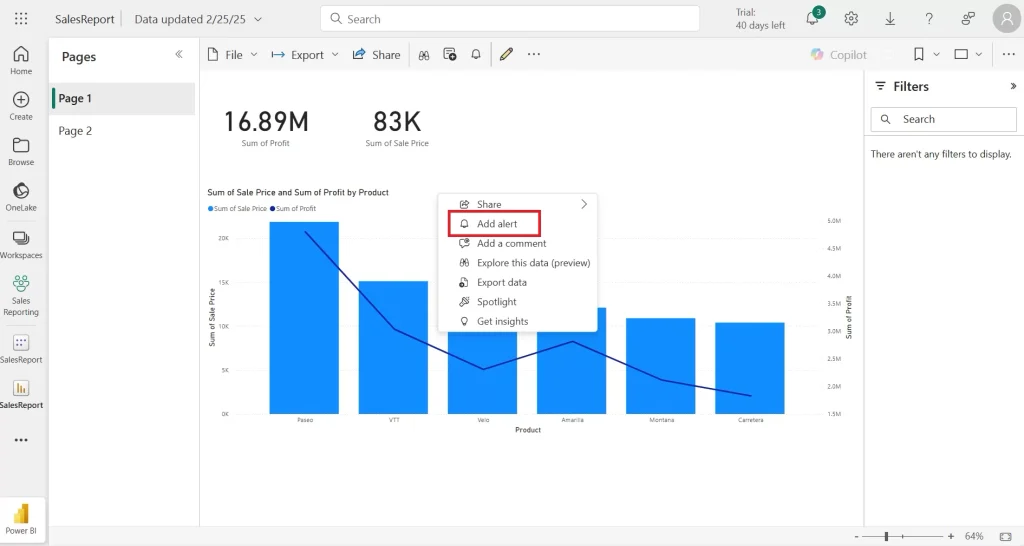
Enterprises run on recurring reports and data alerts, and someone usually compiles them by hand. Automating the cycle means data is pulled from source systems on a schedule, formatted and distributed to stakeholders without anyone pressing send.
Power Automate paired with Power BI is the obvious route in a Microsoft environment, n8n’s scheduled workflows do the same job against databases and APIs in mixed stacks, and Make or Zapier work fine for lighter reporting cadences.
The same pattern powers threshold alerts, such as notifying a budget owner the moment procurement spend approaches a limit, so problems surface while they can still be prevented rather than in next month’s review.
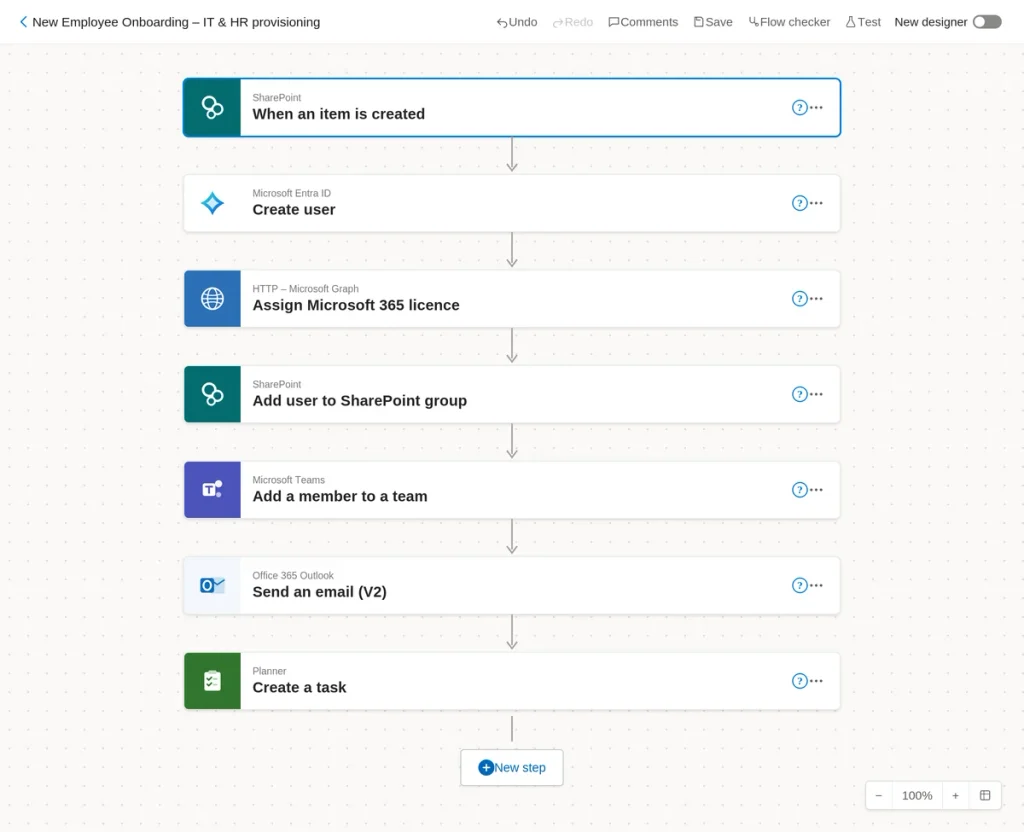
Onboarding is where quick wins graduate into enterprise-scale automation, because it spans HR, IT, security and facilities in a single process. In a Microsoft environment, the natural build is Power Automate orchestrating Entra ID, licensing, SharePoint and Teams, while identity-led alternatives like Okta Workflows, UiPath bots for legacy HR systems or n8n as the orchestration layer suit organizations with different stacks.
We’ve built flows where an HR form submission triggers everything downstream: the user account is created in Microsoft Entra ID, the correct license is assigned based on role, SharePoint and Teams access is granted and a personalized welcome email goes out. IT teams that previously spent half a day per new starter now spend minutes, and no step ever gets missed.
The impact scales with hiring volume, and industry case studies report onboarding cycles collapsing from days to hours once the cross-system handoffs are automated.
Generating client reports, proposals or compliance documents by hand caps how fast a business can grow.
Lift Consultancy’s engineers were manually copying inspection data into Word reports after every client visit, and the admin load per consultant kept climbing as the firm expanded.
We built a flow that pulls project data from SharePoint and populates standardized templates automatically the moment new audit data lands. On the Power Platform this runs through the Word connector against templated documents, and the equivalent exists elsewhere: n8n and Make both drive document generation through template services, and RPA bots can populate documents inside legacy applications that have no API at all.
The result for Lift: 80+ hours saved per week and a document process that supported 40% business growth without extra headcount.
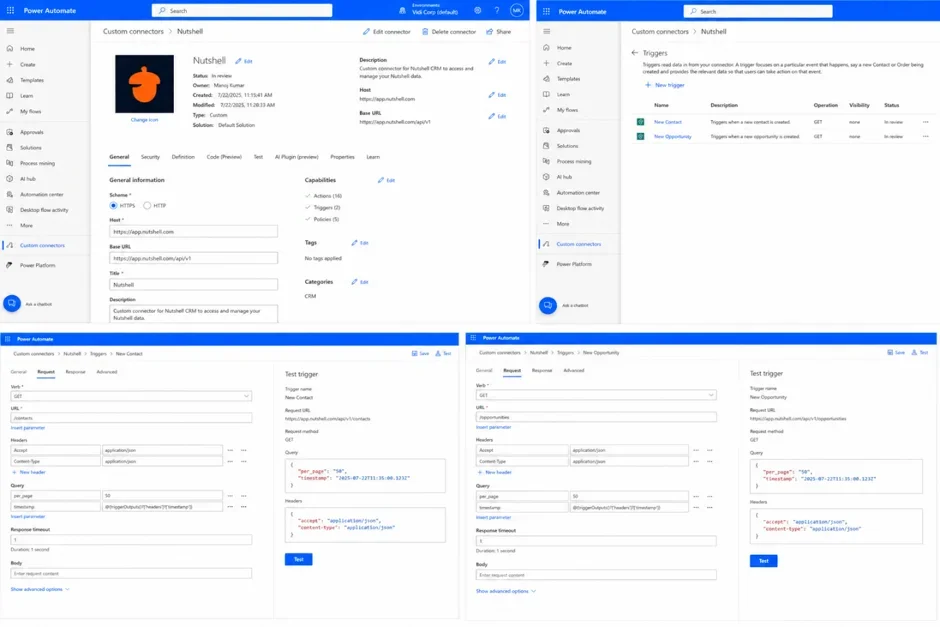
Enterprise automation often stalls on the one system that doesn’t have a connector. This is where platform choice shows its limits and engineering takes over, whether that means building a custom connector on the Power Platform, a custom node in n8n or an API integration in an RPA suite.
For a consulting firm running its pipeline in Nutshell CRM, our workflow automation consultants built a Power Automate custom connector that authenticated with the Nutshell API and exposed contacts, companies, opportunities and activities as ready-to-use actions, so their team could automate against the CRM directly with no raw HTTP requests. The same approach works for almost any system with an API.
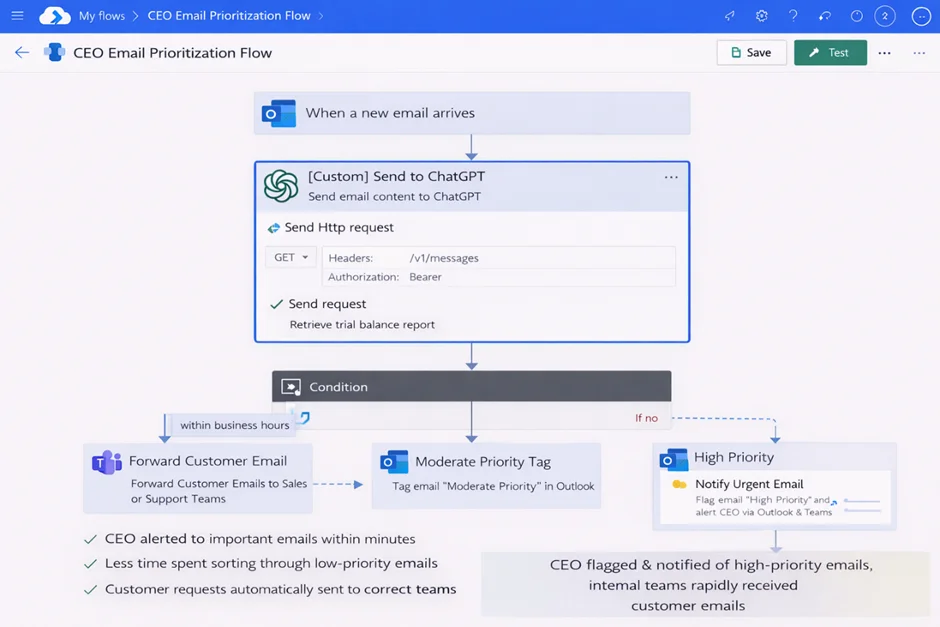
The newest generation of enterprise automation adds judgment to the workflow. Incoming items, whether emails, support tickets or security alerts, are classified by an AI model and routed, flagged or escalated based on the result.
Every major platform now has an answer here: AI Builder and Azure OpenAI on the Power Platform, agentic automation in UiPath and Automation Anywhere, and n8n’s AI agent nodes, which connect workflows to models from OpenAI, Anthropic and others.
We built this pattern for a CEO whose inbox had become unmanageable: each incoming email is sent to an AI model for priority classification, and the response drives automatic flagging, tagging and forwarding. The same triage pattern is now used across enterprise security and support operations, where orchestration platforms coordinate AI classification across dozens of tools so people only see what genuinely needs a human decision.
Every enterprise has data that lives in two places and matches in neither. A contact gets entered in Outlook but never reaches the CRM. A record gets updated in one regional system while the master copy sits untouched. Multiply that across hundreds of employees and thousands of records, and you get the gaps that make reports and forecasts unreliable.
Sync automations fix this by watching for changes in one system and pushing them to the others. The process itself is straightforward. A trigger fires when a record is created or updated; the flow checks whether a matching record already exists in the destination, then it either updates the match or creates a new entry. That duplicate check matters most. Without it, you are not syncing data; you are multiplying the mess.
Building one comes down to three decisions. First, pick your right source, the system whose version wins when two records disagree. Second, define the matching logic, usually an email address or an ID field that identifies the same record in both systems. Third, choose your platform. Connector-based tools are strongest here: Power Automate ships with over a thousand connectors, n8n offers 400+ nodes with the option to self-host, and iPaaS tools like Workato or MuleSoft take over when sync volumes and transformation logic get genuinely heavy.
Individually, these flows are small. Across a large workforce, they compound, quietly fixing the data quality problems that undermine reporting and forecasting before they ever reach a dashboard.
If you want to start somewhere, pick one pair of systems where mismatched data causes visible pain, often Outlook and the CRM, and map which fields need to stay aligned. Build a one-way sync first, run it alongside your existing process for a week or two and watch whether the duplicate logic holds up. Once it has proven itself, extend it to two-way sync or move on to the next pair of systems.
The business case usually rests on four outcomes.
The processes worth automating are almost always ones that pull qualified people into unqualified work. Finance analysts keying invoice data. IT engineers clicking through the same account setup for every new starter. When one of our clients, a UK engineering consultancy, automated its client report generation, the business recovered over 80 hours of consultant time every week.
Manual processes don’t just cost hours, they create waiting. Approvals sit in inboxes. Requests get forgotten. In our experience, automated approval workflows regularly cut cycle times from days to hours because reminders, routing and escalation happen without anyone chasing.
Manual data entry has a predictable failure rate, and in processes like invoicing or stock allocation those failures are expensive. Automated flows apply the same logic every time, and when something does go wrong, error handling routes the exception to a person instead of letting it slip through silently.
This is the outcome enterprises care about most. When a process is automated, doubling the volume doesn’t mean doubling the team. That same engineering consultancy scaled through 40% business growth without adding administrative staff, because the document workload that would have required new hires was already handled by automation.
The examples above name a lot of tools, so it’s worth stepping back and comparing them properly. They fall into four broad camps: platform suites tied to an ecosystem you may already own, dedicated RPA vendors, open-source and developer-first orchestration tools, and integration platforms built for data movement. Here’s how they stack up.
| Tool | Best for | Automation style | Pricing model | Watch out for |
|---|---|---|---|---|
| Microsoft Power Platform | Enterprises on Microsoft 365 | Cloud flows, desktop RPA and AI Builder in one suite | Per user or per flow, partly covered by existing M365 licensing | Premium connectors and AI credits add up beyond the basics |
| UiPath | Large-scale RPA programs, legacy system automation | Bot-driven RPA with document understanding and agentic AI | Per bot and per user, enterprise contracts | High cost and governance overhead for smaller estates |
| Automation Anywhere | Enterprise RPA with strong document processing | Cloud-native RPA and agentic process automation | Per bot, enterprise contracts | Similar investment level to UiPath, best at serious scale |
| n8n | Engineering-led teams, mixed stacks, AI workflows | Node-based orchestration, 400+ integrations, AI agent nodes | Per execution cloud plans, free when self-hosted | Self-hosting shifts uptime, security and maintenance onto your team |
| Zapier | Simple app-to-app automations, fast rollout | Trigger and action recipes across thousands of apps | Per task | Costs climb quickly at enterprise volumes, limited logic depth |
| Make | Visual multi-step scenarios on a budget | Visual scenario builder with branching | Per operation | Complex scenarios get hard to maintain and debug |
| Workato | Enterprise integration and workflow in one platform | Recipe-based iPaaS with strong governance | Per recipe or task, enterprise contracts | Pricing is opaque and rises with usage |
| MuleSoft | API-led integration at heavy data volumes | Full iPaaS and API management | Enterprise contracts | Integration platform first, workflow automation second |
| Okta Workflows | Identity-driven automation like onboarding and offboarding | No-code flows triggered by identity events | Bundled with Okta licensing | Narrow scope outside identity and access processes |
| ABBYY | High-accuracy document capture and OCR | Intelligent document processing feeding other tools | Volume-based licensing | A capture engine, not a workflow platform |
The honest answer is that none of these tools wins outright, because the right choice depends on what your organization already runs. If you live in Microsoft 365, the Power Platform gives you cloud flows, desktop RPA and AI in one suite that your licensing may already partly cover, and bolting a second automation vendor onto that estate is usually cost without benefit.
Dedicated RPA platforms like UiPath and Automation Anywhere earn their price when you’re automating legacy systems at serious scale, while n8n, Zapier and Make suit smaller teams or mixed stacks where speed matters more than governance. The iPaaS players make sense when data integration is the core problem rather than workflow. Before you commit to any of them, audit what you already pay for. Most enterprises discover they own more automation capability than they use, and the cheapest platform is usually the one already sitting in your license agreement.
The market offers plenty of options, from dedicated RPA vendors to workflow tools built into platforms you already own. Choosing between them is less about comparing feature lists and more about being honest about your systems, your people and the processes you actually need to fix. A few principles will save you from an expensive wrong turn.
Before you evaluate a single new vendor, take stock of what you already license. If your organization runs on Microsoft 365, the Power Platform gives you cloud flows, desktop RPA and AI Builder under licensing you may partly already have, with native connections to SharePoint, Teams, Outlook and Dynamics. That native fit matters more than it sounds. Every connector you don’t have to build, authenticate and maintain is one less thing that breaks at 2am, and adoption comes easier when automations live inside the tools your teams already open every morning.
Standalone RPA platforms make more sense when your landscape is genuinely mixed, with critical processes running through non-Microsoft systems that a single vendor’s connectors can’t reach. Even then, the question isn’t which platform is best in the abstract, it’s which one covers the largest share of your real processes with the least custom work.
The best first automations are high-volume, rules-based and painful: approvals, document generation, data entry, onboarding, report distribution. These are unglamorous, which is exactly why they work. The rules are already known, the volume means the savings compound weekly and the people currently doing the work will be your loudest advocates once it’s off their plate.
Resist the temptation to start with the most complex process in the business. A complicated first project takes months to deliver, ties up your best people and gives skeptics a long window to declare the whole initiative a failure before it produces anything. A simple flow that visibly saves a team three hours a week within a fortnight does more for your automation program than any strategy deck. Build credibility with quick wins first, then spend that credibility on the harder builds.
Enterprise workflow automation without ownership becomes shadow IT. It happens gradually. Someone in operations builds a flow that works, a colleague copies it, a department starts depending on it, and two years later a business-critical process is running on an automation nobody documented, built by someone who has since left.
Decide early who builds, who approves, how flows are documented and what happens when the person who built a critical flow leaves. Set up environments that separate experiments from production, use service accounts rather than personal credentials for anything a team depends on and keep a register of which flows exist and what they touch. None of this is exciting, but it’s the difference between an automation program that scales and one that becomes the next legacy problem.
The 95% happy path is the easy part. Enterprise-grade automation is defined by what happens with the missing field, the duplicate record or the system timeout. A flow that silently fails on an unexpected invoice format is worse than no flow at all, because everyone assumes the work is being done when it isn’t.
Good exception design means every failure has a destination. Errors route to a person with enough context to act, retries handle transient outages without duplicating records and anything the automation can’t confidently process gets flagged for human review rather than guessed at. This is where experienced implementation partners earn their fee, because the edge cases that break automations rarely show up in the demo. They show up in month three, at volume, in production.
The gap between businesses that talk about automation and businesses that benefit from it comes down to execution: picking the right processes, designing for exceptions and building on a platform that fits your existing systems.
If any of the examples above look like a problem you’re dealing with, contact us. The consultants at Vidi Corp will help you scope, design and implement an enterprise process automation solution shaped around the way your teams actually work.
A common example is an automated approval workflow. An employee submits an expense claim or purchase request through a form, the system routes it to the correct approver, sends reminders until a decision is made and records the outcome with a timestamp. Other frequent examples include employee onboarding, invoice data extraction and automated report generation and distribution.
Business process automation (BPA) redesigns and automates entire processes end to end, usually through APIs and native integrations between systems. Robotic process automation (RPA) uses software bots that mimic human actions like clicks and keystrokes, which makes it the right tool for legacy applications without modern integration options. Most enterprise process automation solutions combine both.
Costs vary with the platform, licensing and complexity of the processes involved. A simple workflow built on tools you already license can cost very little beyond setup time, while multi-system automations with custom connectors and AI components are larger projects. The honest way to assess cost is against the fully loaded cost of the manual work being replaced, which is usually far higher than teams expect.
Basic workflows can often be built visually without code. Enterprise-grade automation usually needs more: expressions, API calls, error handling and custom connectors. That’s why most enterprises pair internal citizen developers with a specialist partner for the complex builds.


