
The Power Pages examples you’re about to see are all real-life portals built for actual clients by our Power Pages consulting team. We’ve built portals for all sorts of clients from government agencies to energy companies to leading fractional CFO practices. We will show some of them in this article, explain who uses them and what business problem that each one of them solves.
These aren’t templates you can just copy and paste – each portal was built from scratch to fit the client’s own data sources, workflows, and user access needs. However, if you find that one of these Power Pages portals could be useful for your business, feel free to reach out! We could build a custom Power Pages portal for you!
Microsoft Power Pages is a platform that lets you build professional-looking websites, customer portals, partner portals, and public business applications that can be used by both internal and external users. That makes it great for all sorts of scenarios, from collaboration tools to secure data access and reporting portals.
Power Pages is built on Microsoft Azure, which provides the underlying security framework, scalability, and integration capabilities that the platform relies on. This means Power Pages can handle big user volumes without requiring a custom infrastructure – the backend is all handled for you.
Security is built into Power Pages at every level. You can choose from a range of authentication methods, including Microsoft accounts and external identity providers, so you can control exactly how users verify their identity before they can get in. Data is encrypted both in transit and at rest, and admins can set roles and permissions at a really granular level, so users only see the resources they need to access. And with real-time monitoring and security event logging, you can spot and respond to any potential threats as soon as they come up.
Power Pages also integrates with Microsoft 365 compliance tools, making it really easy to meet regulatory and organisational data requirements. You can configure portals to be fully public, fully private, or a mix of both – so access control is determined by the use case, not by the platform’s limits.
To show off what Power Pages can do, let’s take a look at some examples from real projects that our consultants worked on.
Some retailers that offer custom installs are struggling to create a professional online buying experience without having to invest in a fully custom-built website. Sales are happening over email, product info is all over the place, and order tracking relies on manual follow-up. A Power Pages e-commerce portal tackles this by grabbing everything and putting it into one branded, manageable site.


One such example was a bathroom products company that needed a complete customer-facing solution – and that’s what we built for them. The site includes a landing page that shows the product range alongside company info, a customer support number and video testimonials. Registered users can browse product pages in detail, add items to their shopping cart and make a purchase all through a Stripe checkout integration.
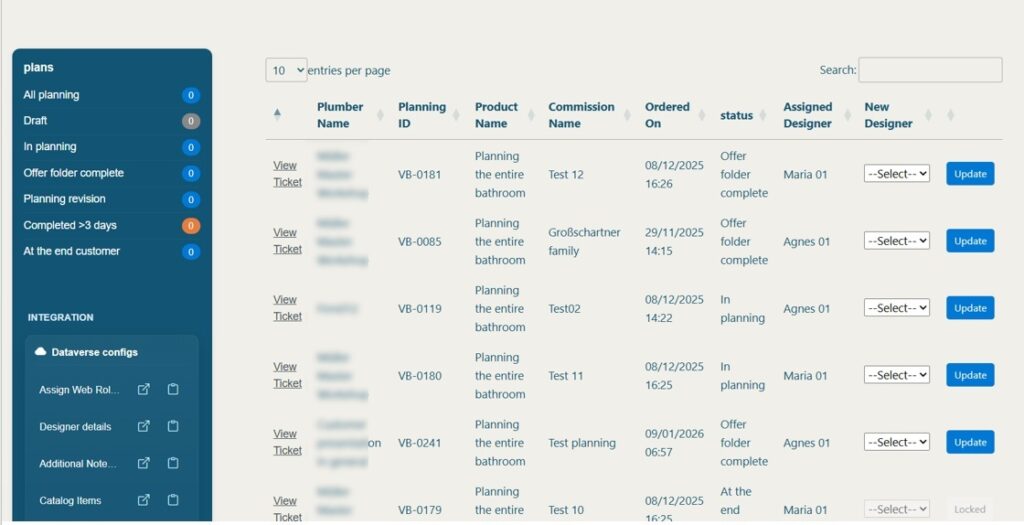
On the back end, the client has access to an admin dashboard where they can view orders and inspect order details – including installation addresses and customer notes.
The General Manager of NELO summed up our approach well when he said – “Manoj and his team are great at finding solutions and delivering results. They really understand the project and give valuable input that helps to improve it even more.”
If your company needs to gather data from external partners and you have outgrown Microsoft forms, Power Pages is a logical next step. Power Pages allows users to edit and delete data, not only enter it. You can also embed Power BI reports and distribute helpful content through your partner portal.
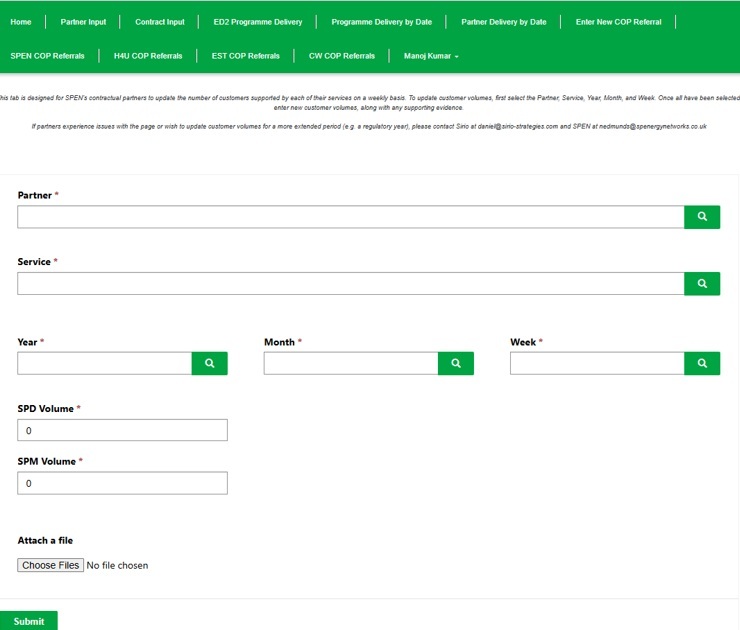
For example, our Power Platform consultants built a portal for a UK electricity provider to manage its network of partners. The Partner Input tab lets partners report weekly customer volumes by selecting their organisation, service, year, month and week, then submitting the latest figures along with any supporting evidence. This all feeds directly into performance tracking against contract commitments.
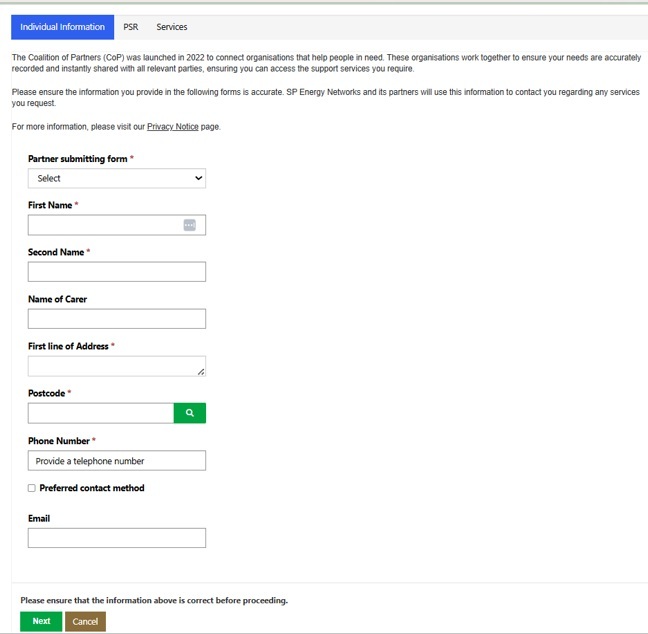
The Enter New COP Referral tab lets partners refer individuals to our client’s Priority Services Register or to support services offered by fellow members, with fields for contact details, eligibility and specific needs.
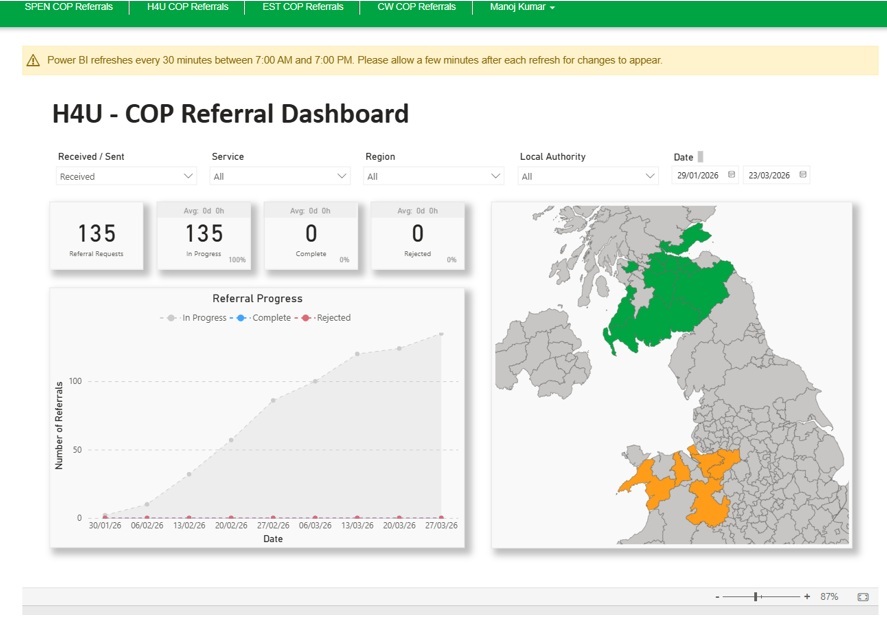
Our client confirmed the outcome himself – “I have worked with Vidi Corp on several projects, and they always complete on time and meet the specifications.”
Fractional CFOs managing reporting for multiple clients face an administrative burden. Creating Microsoft accounts for each client, assigning Power BI licences and granting access to individual reports takes time – and has to be repeated every time a new client is on board. A white-labelled Power Pages business intelligence portal fixes all that, giving clients a clean login experience without any Microsoft infrastructure on their end.
One such example was a fractional CFO practice that needed a scalable way to share financial dashboards with their clients. They were already using our QuickBooks Online Power BI connector and free dashboard template to automate reporting, so we embedded those dashboards directly into a Power Pages portal.
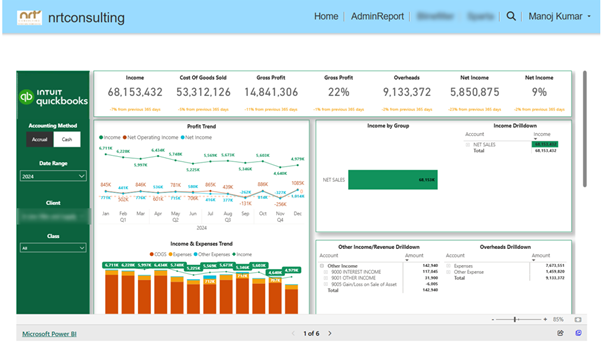
Each client logs in and sees only their own data. The portal was fully white-labelled making it look like a proprietary technology platform built by the CFO practice itself. This setup can be replicated for any practice or agency that needs to share reports with multiple clients under their own brand. Simply contact us to ask for the same setup!
The client’s response reflected both the technical outcome and the working relationship: “The team at Vidi have been great to work with – super responsive to all my questions, even helping me out with learning and making small changes on my own. They have the knowledge to customise anything you need, and their fees are very reasonable.” If this model fits how your practice shares reports, get in touch, and we can walk you through how it works.
Public sector agencies often need to share data with the public. Publishing raw datasets or internal reports does little to drive change. What is needed is a public-facing portal that shows the data visualisation along with some description of how the data was gathered, the goal of the research and the approach.
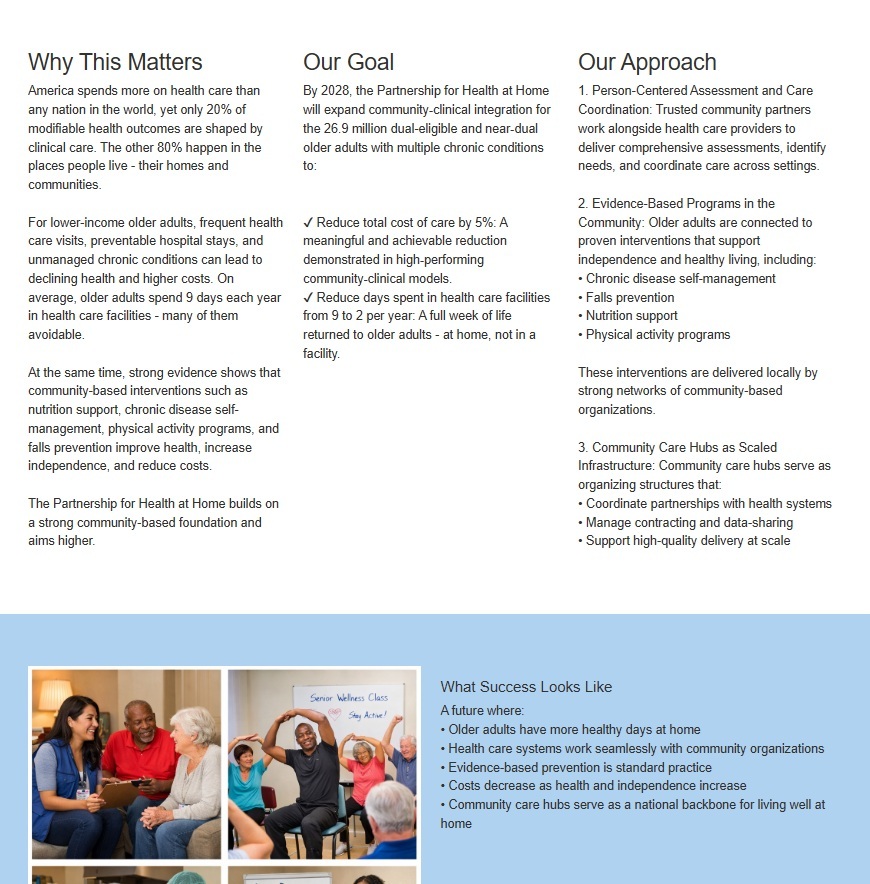
For example we built this Power Pages portal for the Centers for Disease Control and Prevention (CDC) as part of a major US initiative to prevent one million heart attacks in the next five years. The landing page gives an idea of just how big of a challenge that is, and where the opportunities lie – across the whole disease prevention landscape, through care model gaps and in underserved populations.
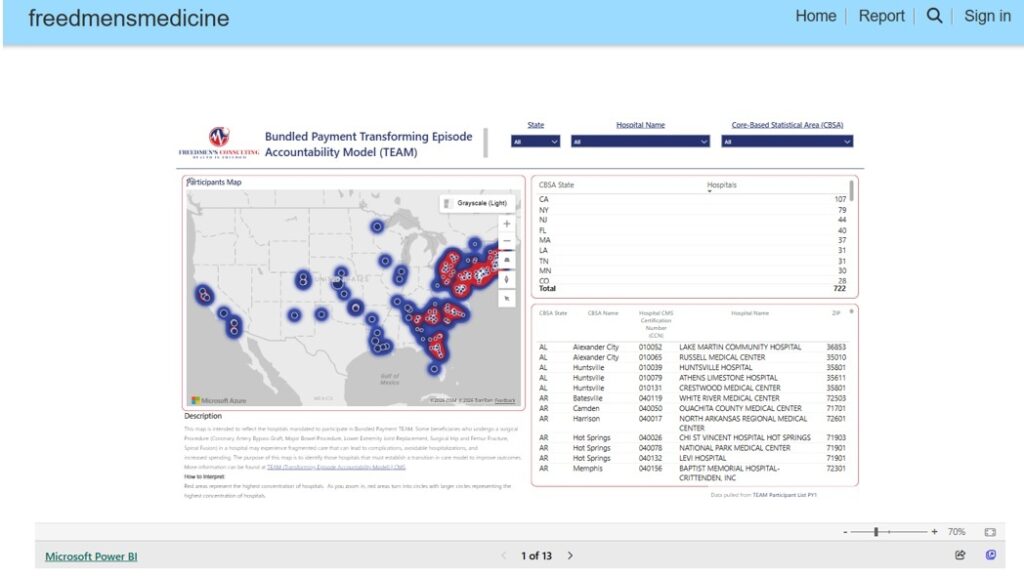
And then our dashboard development consultants created the interactive Power BI reports which give users a real-time look at how health outcomes are panning out for older folk all across the US. Each of these reports draws on public data from CMS – so you’ll see Medicare Advantage enrolment, Special Needs Plan coverage, ACO participation, quality performance and the spread of Community Care Hubs mapped out for the whole country. Users can zoom in and out to see the geographic variations in care models, spot areas with high concentrations of people who might be eligible for help, get a sense of where Community Care Hubs are operating currently, and find the gaps where help is needed but not getting to those who need it. And each of these reports has a little guide to help non-data-heads understand what they’re looking at.
Non-profits that need to share information with the public need more than just a static report wrapped in a nice cover. When you’re dealing with technical information that’s going to be read by the general public, the key is to make that information genuinely accessible. A Power Pages portal paired with embedded Power BI reporting can tackle both jobs at once.
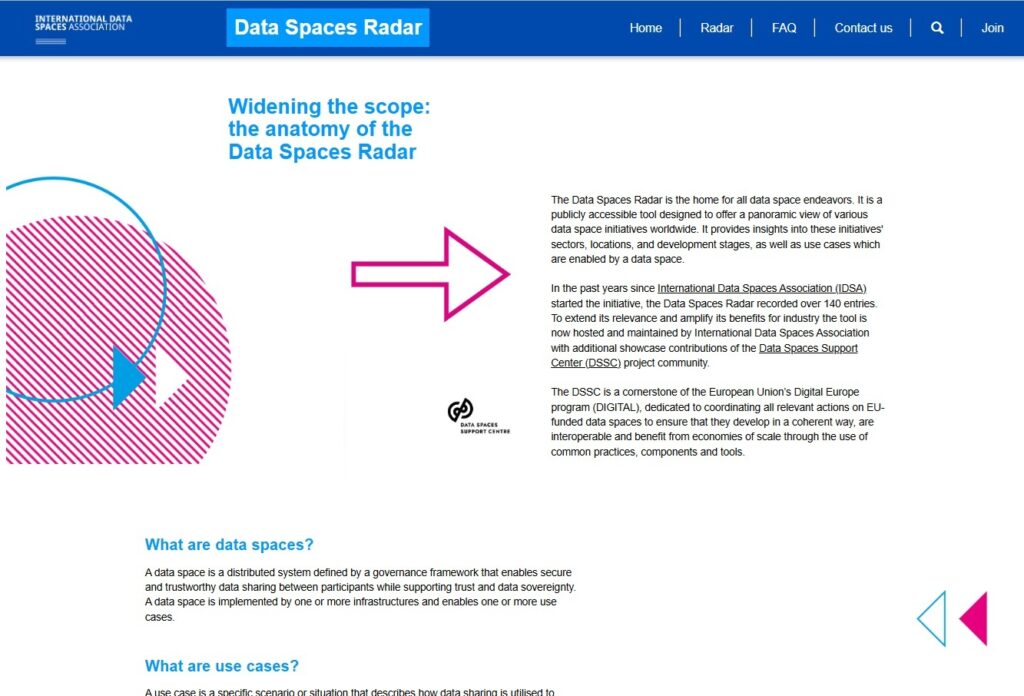
We partnered with a European non-profit that’s responsible for setting the standards for automated data exchange. This covers security, control and traceability across data spaces – not exactly a topic that makes for easy reading for most people. So the portal needed to explain it in a way that made sense, and then also present the underlying data in a way that anyone could explore. We built a Power Pages website that guides visitors through what data spaces are all about, and how the organisation does its analysis. And alongside this, our business intelligence consultants built a Power BI report that shows all the data spaces they’ve launched in Europe, letting users filter and explore by sector, country, and funding source.
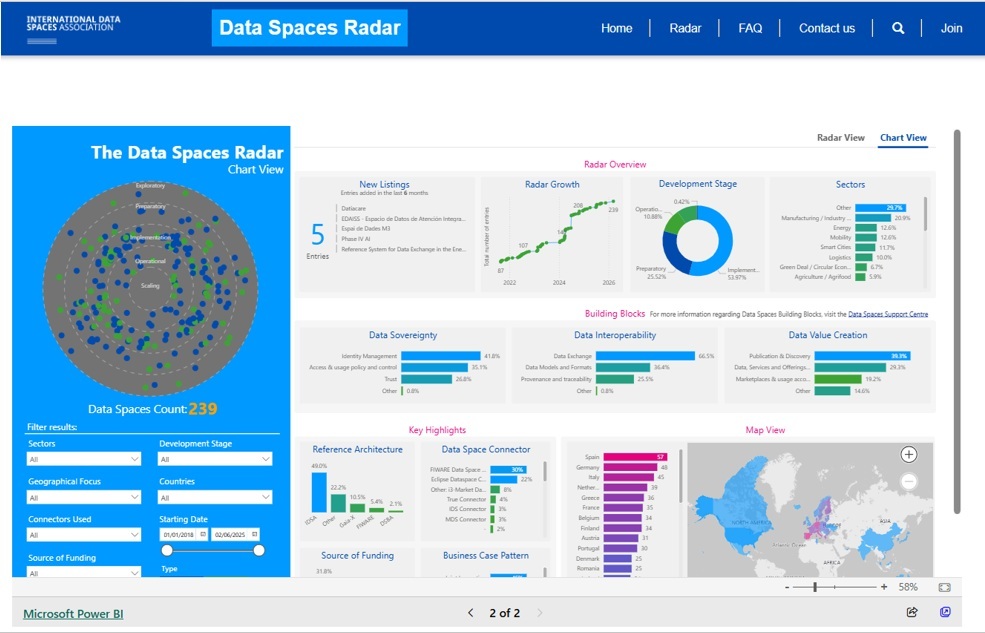
The end result is a public-facing resource that ticks all the boxes for the organisation’s reporting obligations, while also genuinely serving its audience. Visitors get to go from understanding the basic idea to exploring the actual data without leaving the portal – which makes it a practical tool for researchers, policymakers and members of the public alike.
There are many other Power Pages use cases that we have come across. Some of them are custom developed by our clients, others are standard templates offered by Microsoft. Let us show you some of them below.
There are of course limitless possibilities with Power Pages so we are not going to cover all of them. To mention some of them briefly, Power Pages can also be very useful for creating comminity forums, event registration portals and much more.
Microsoft have marketed Power Pages for customer service portals extensively by providing a ready-made Power Pages template. This template is integrated with Dynamics 365 so when your customers raise a support ticket, it gets automatically logged into Dynamics for your customer support team to process.
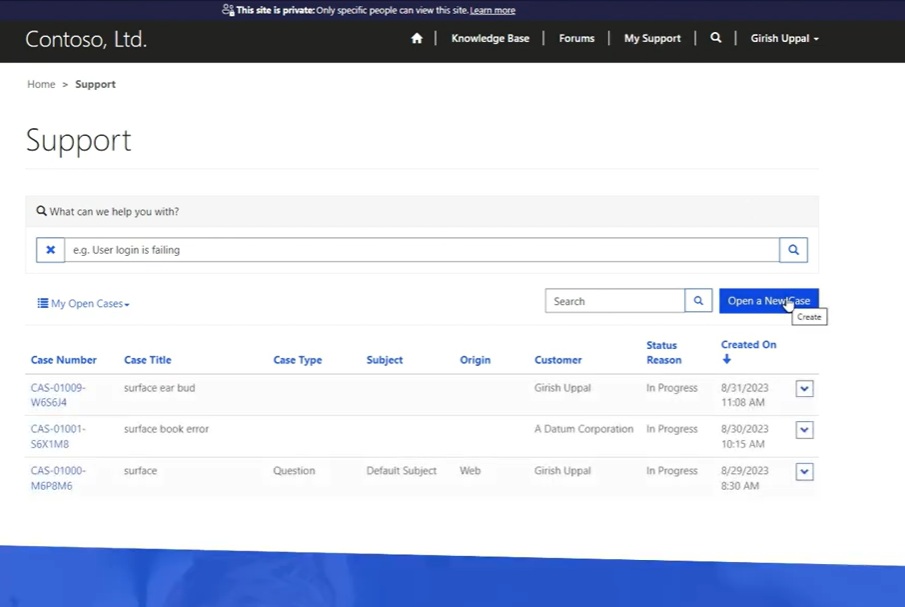
You can also provide some self-service information to your customers through this portal like FAQs, knowledge base, etc. This way you can potentially answer some client questions before they even reach out to you.
If you want to install this Power Pages template, please follow this video walkthrough.
Power Pages is convenient to use for processing grant or planning applications. You can use Power Pages as an interface for collecting all the data and attachments needed for the application from relevant parties. The collected data can then go to another internal Power Apps example that your team would use for reviewing it and approving or rejecting the application.
Microsoft provide a ready-made Power Pages template where authenticated users can apply and view the status of their application. Unathenticated users can read about all the requirements for the application.
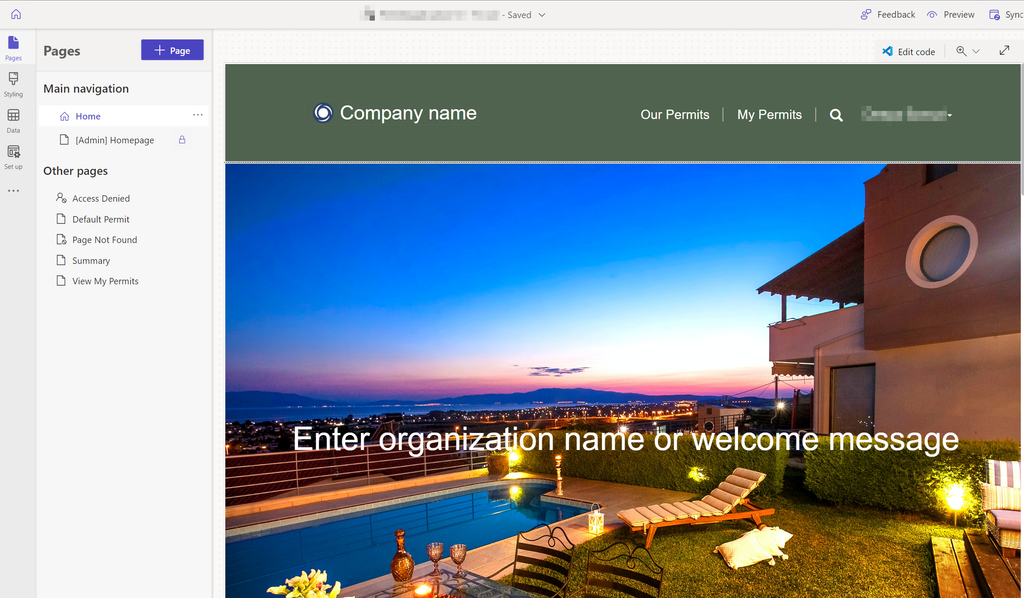
You can access this template from the Power Pages template library.
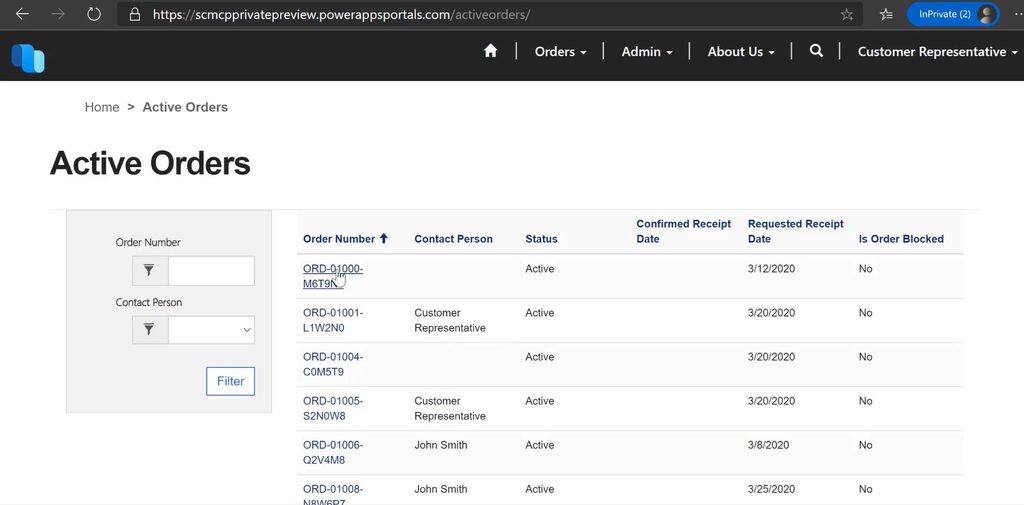
Microsoft also provide a ready-made template for supply chain management for B2B companies. This Power Pages example works with Dynamics 365 for supply chain allowing external customers to place orders and view deliveries.
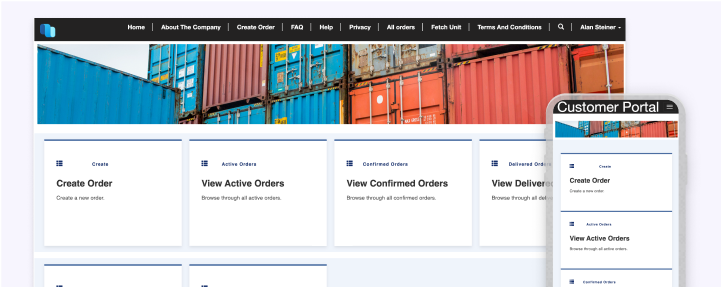
Customers can also check the status of active orders. This Power Pages portal essentially allows the customers to view the data from your Dynamics 365 supply chain without giving them an extra license and access to your internal systems.
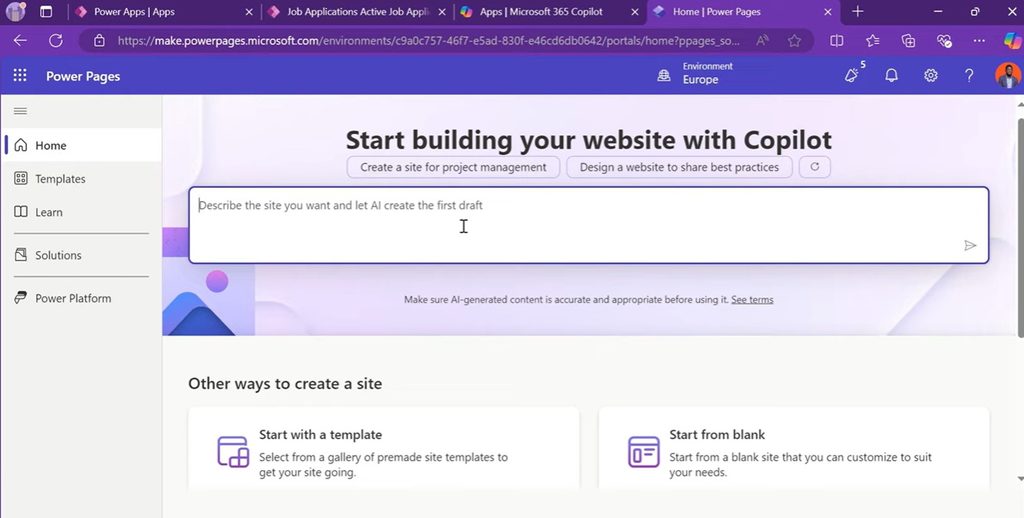
Microsoft have now released a Copilot agent helping you build your first Power Pages portal. You start by explaining the functionality that you need in natural language. The AI then scans through existing Power Pages templates and picks the parts that are relevant to your requests. The output is the v1 of your Power Pages portal which you can then populate with your content and customize however you need.
If you have no experience with Power Pages, this is probably the best starting point for you. If you get stuck with anything, feel free to reach out to our Power Pages consultants for help.
Power Pages is built for speed. It’s got a design studio with some seriously intuitive, visual tools that let teams build and customise websites without needing to write a ton of code. That’s a big plus for organisations that want to get customer-facing processes up and running without a long development cycle or a dedicated engineering team on board.
Security is a top priority for Power Pages and it’s built in right from the get-go. You get role-based permissions, data encryption and real-time monitoring on tap. One thing to keep in mind when setting up a new site: don’t build it in the default environment – go for a dedicated environment instead. That way, administrators can get proper control over permissions and security configuration from the word go.
Power Pages connects with all the usual suspects – Power BI, Power Automate, Dataverse and Dynamics 365. This means data from a portal can flow directly into existing workflows, reports can be embedded without needing third-party tools, and automated processes can be triggered by user actions on the site. For organisations already using the Microsoft ecosystem, integration needs minimal additional setup.
Power Pages runs on Microsoft Azure, which means the underlying infrastructure scales with demand. Whether a portal is serving fifty users or fifty thousand, the architecture handles it without needing manual intervention or infrastructure changes on your end.
The platform has a wide range of templates and starter layouts that can be adapted using themes, styles and component combinations. Teams can start from a blank page or build from an existing template depending on how much structure they need. For more dynamic content requirements, Power Pages supports the Liquid template language, giving developers fine-grained control over how content is rendered all from within the platform.
As a cloud-based platform, Power Pages lets administrators and developers manage and update sites from anywhere, without needing to maintain any local infrastructure. Updates, configuration changes and content edits are all handled through the browser-based design studio.
As much as we like Power Pages, we have had problems with it in some of our projects. We can confidently say that this technology isn’t suitable for all kinds of websites.
Firstly, we had some issues with fixing the position of cosmetic elements on the page. We had some projects where we finished the design for 100% resolution and then the client would zoom out in their browser to 80%. This caused some elements to move on the page and broke the alignment. This is probably something that Microsoft will fix eventually but it’s worth knowing about this limitation for now.
We also recommend to avoid Power Pages for B2C sites. There is no reason to pay more to Microsoft when your website traffic increases and in B2C the traffic is usually pretty substantial. In our opinion, common options like Shopify would be a better fit for this kind of websites.
We still recommend Power Pages to B2B companies, especially those who need to keep the data secure. If you need your websites to integrate with other Microsoft products like Dynamics 365, Power Pages is also a good option for that.
Power Pages is built around two core layers: a front end that users interact with directly, and a back end that handles data storage, processing and security. Knowing how these bits work together will give you a better idea of what the platform can and can’t do – and why it’s suited to enterprise-grade use cases.
The front end is what visitors actually see & interact with. This is everything from the web pages to the data input forms and the lists that pull in information from connected databases. With page layouts, headers, footers, and dynamic content all built from web templates that happily work with Liquid expressions and template tags, developers can knock up structured, data-driven pages without having to start from scratch and build their own web infrastructure.
The back end is where data lives and Power Pages has got this one covered. It talks natively to several Microsoft services, and we mean, several, including Dataverse – which acts as the master data storage layer, keeping all the records in line and easily accessible. Then there’s Azure Active Directory doing the authentication bit and deciding who gets to see what and under what conditions, and Power Automate taking care of the workflow automation – so whether it’s a form being submitted, a record being updated or just some random action on the site, Power Automate gets the processes kicked off.
Power Pages uses a web role system to decide what each user can see and do once they’re inside a portal – and to be honest, it’s pretty neat. You assign a role to a user and that role determines which pages, forms, and data they get to see. So an ops team member might get access to operations data and dashboards while an HR type gets just the bits that are HR-related – even if they’re both logging in to the same site. And it’s all done through a role-based approach, so access is super- granular and you hardly ever get any users stumbling across information that’s not supposed to be theirs. And it also means you can have a single portal serving all sorts of different users without having to build separate sites for each one.
Microsoft offers a range of different pricing plans for Power Pages, so whether you’re a small business or a big enterprise, you can choose one that fits.
These options should give you plenty of choices to fit in with your budget and your needs.
Our example sites are just the tip of the iceberg when it comes to what Power Pages can do. Whether you need a customer portal, a reporting hub for your partners, a public-facing data platform or an e-commerce shop, the same basic platform can be moulded to fit your needs.
If you have a use case in mind – or you’re still trying to figure out what you need – get in touch with Vidi Corp, and we’ll sit down with you to talk it through.


