
Shopify


Azure SQL

Excel
Our Shopify to Excel integration automatically syncs your data into Excel, enabling accurate reporting, analysis, collaboration, and forecasting.
Our connector delivers a complete, enterprise-ready integration tailored for e-commerce teams:
Automated Shopify Data in Excel
Eliminate manual CSV exports. Shopify data is synced directly into Excel on a schedule, keeping your reports accurate and up to date with minimal effort.
Flexible Reporting Environment
Work in Excel using formulas, pivot tables, Power Query, and charts, no new tools or training required. Build reports exactly the way your team prefers.
Handles Large Data Volumes Reliably
Designed to process high transaction volumes and long data histories without performance issues, even for fast-growing or high-volume Shopify stores.
Multi-Store Consolidation
Combine data from multiple Shopify stores into a single Excel dataset for consolidated reporting, cross-store comparisons, and group-level analysis.
Pre-Built, Analytics-Ready Structure
Data is delivered in clean, structured tables optimised for analysis, reducing data prep time and ensuring consistent reporting.
Accurate KPI Tracking
Track revenue, orders, refunds, AOV, customer metrics, and product performance using consistent calculations across all reports.
No Code, No Technical Setup
The integration is fully no-code, allowing finance, operations, and ecommerce teams to manage reporting without engineering support.
Export Shopify orders into Excel for flexible analysis of sales, margins, refunds, and customer behaviour without relying on native Shopify reports.
Access structured, analytics-ready order data, including customers, line items, taxes, shipping, payments, refunds, and multi-currency details. Automated exports keep your Excel tables refreshed on a schedule with clean, standardised formats.
Export Shopify product data into Excel for clear visibility into your catalogue, pricing, and inventory performance.
Capture structured product details including SKUs, variants, prices, compare-at prices, and stock levels.
Analyse product performance by category, vendor, or collection using pivots and formulas.
Track inventory changes, low-stock items, and discontinued products in a single spreadsheet.
With Vidi’s Shopify Connector, you can turn raw call data into actionable insights for smarter decision-making.
Import your Shopify data into any destination using our connector.







Challenge

Sales dashboard for an e-commerce company
An expanding e-commerce company utilised an alternative Shopify Excel connector. However, they faced significant delays in data loading, which extended the hours required for development tasks.
Solution

We deployed our Connector to transfer over 30 GB of Shopify data into an Azure SQL server database. This eliminated the need for Excel to handle the resource-intensive process of sending API requests to Shopify, reducing data loading times to under a minute.

Challenge
Geo Analysis for a Global E-Commerce Brand
A global e-commerce brand needed to analyse sales performance by region to adjust marketing strategies.
Solution
The store used our connector that enabled geo-analysis in Excel. Analysis provided insights into regional sales trends, customer preferences and inventory demand.

Challenge
Financial reporting for a multi-channel retailer
A retailer with multiple sales channels struggled to consolidate financial data from Shopify. This resulted in inaccurate reporting.
Solution
Our Shopify Excel connector automates data integration, enabling real-time financial dashboards to track revenue, expenses, and profitability across all channels.
Our no-code pipeline streams Shopify data into Azure SQL, where it’s optimised for scale and security. Excel then connects directly to the database, ensuring fast, reliable reporting even with high data volumes.

Install
Find the Shopify connector inside our client portal and click install. This will create all the tables inside the selected database. Your data will later flow to these tables.

Connect a new company
Authenticate to your Shopify account and select one or more companies you want to connect to.

Wait for the data to sync
The first database refresh will take a few hours as all the historical data will be extracted. Every refresh afterwards will take a couple of minutes. You can use the refresh status tab to view the refresh status.
Our Shopify Connector pulls data in an organised format, saving you countless hours in extensive data preparation. You will get ready-made tables, including:
Additional customisations are available upon request.
You get a FREE dashboard when you purchase our connector
The template includes the following pages:
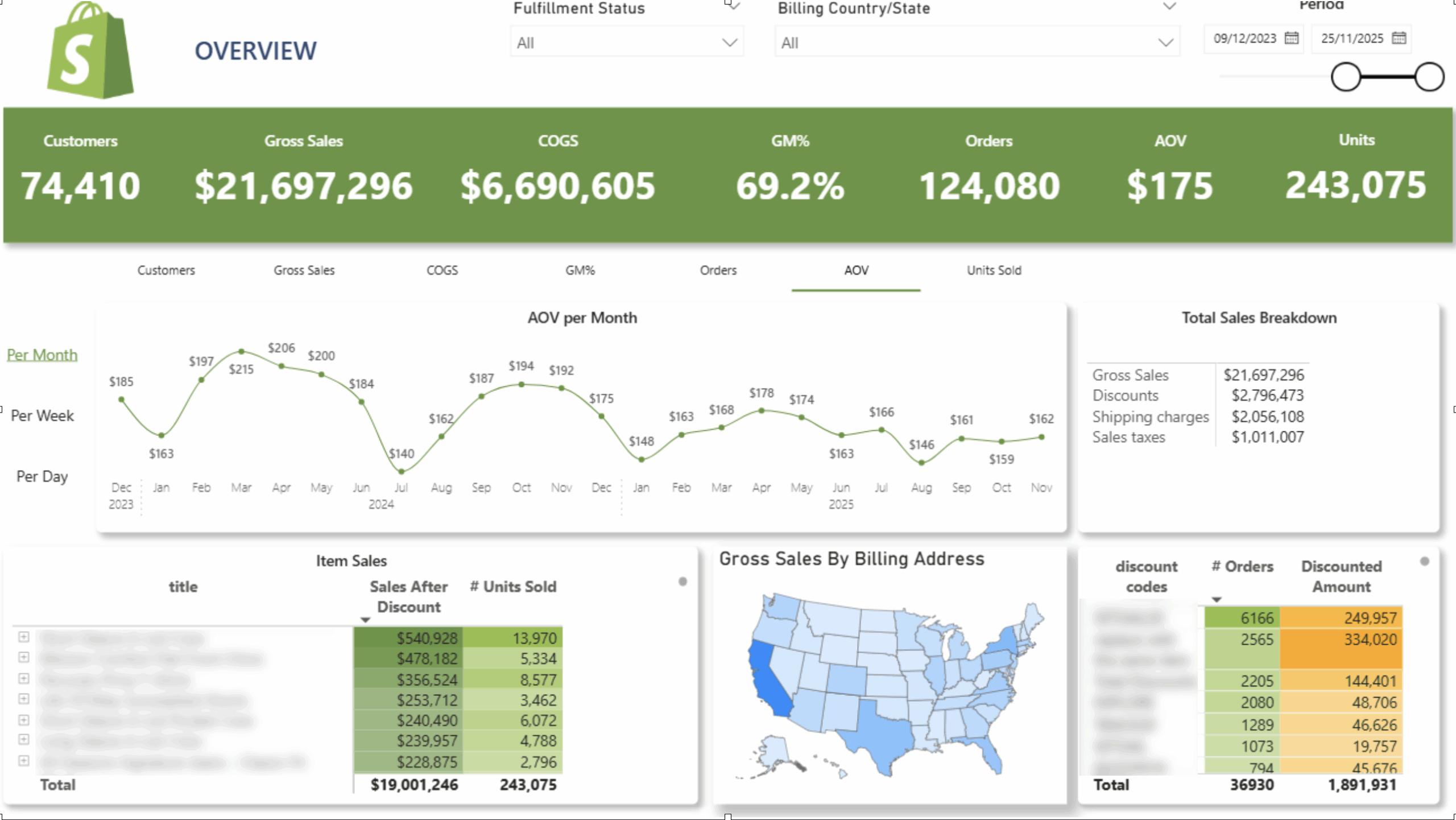
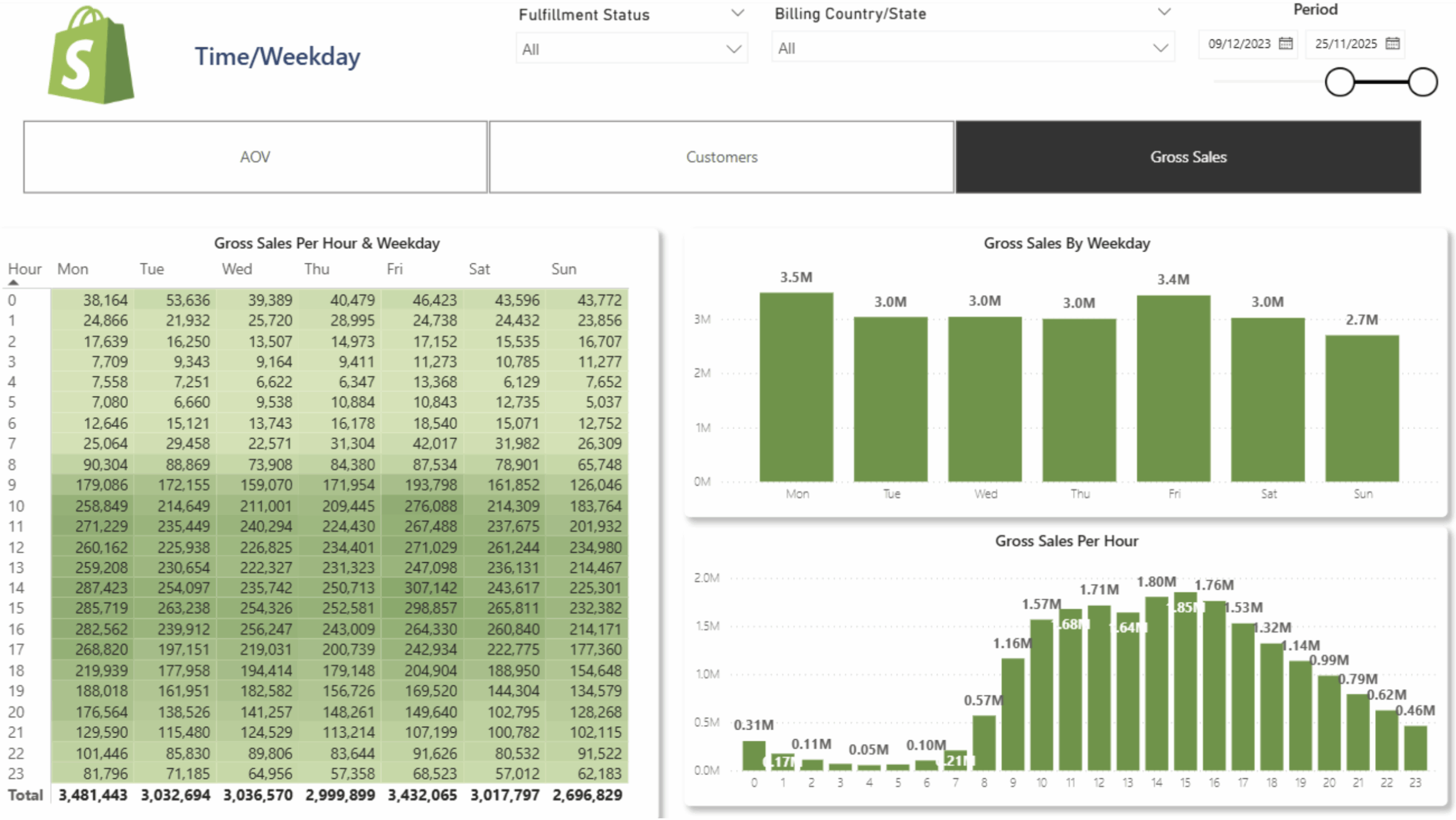
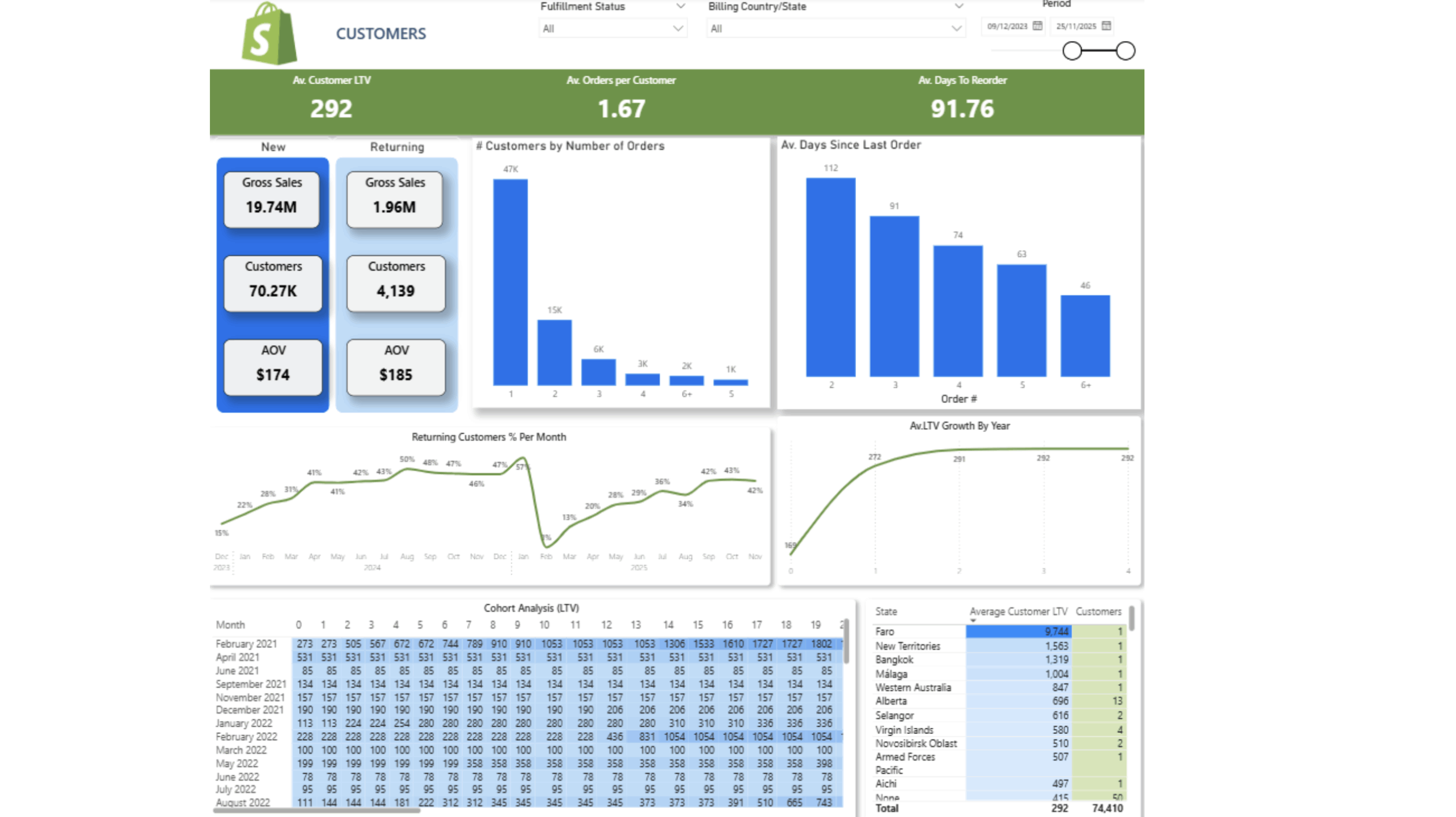
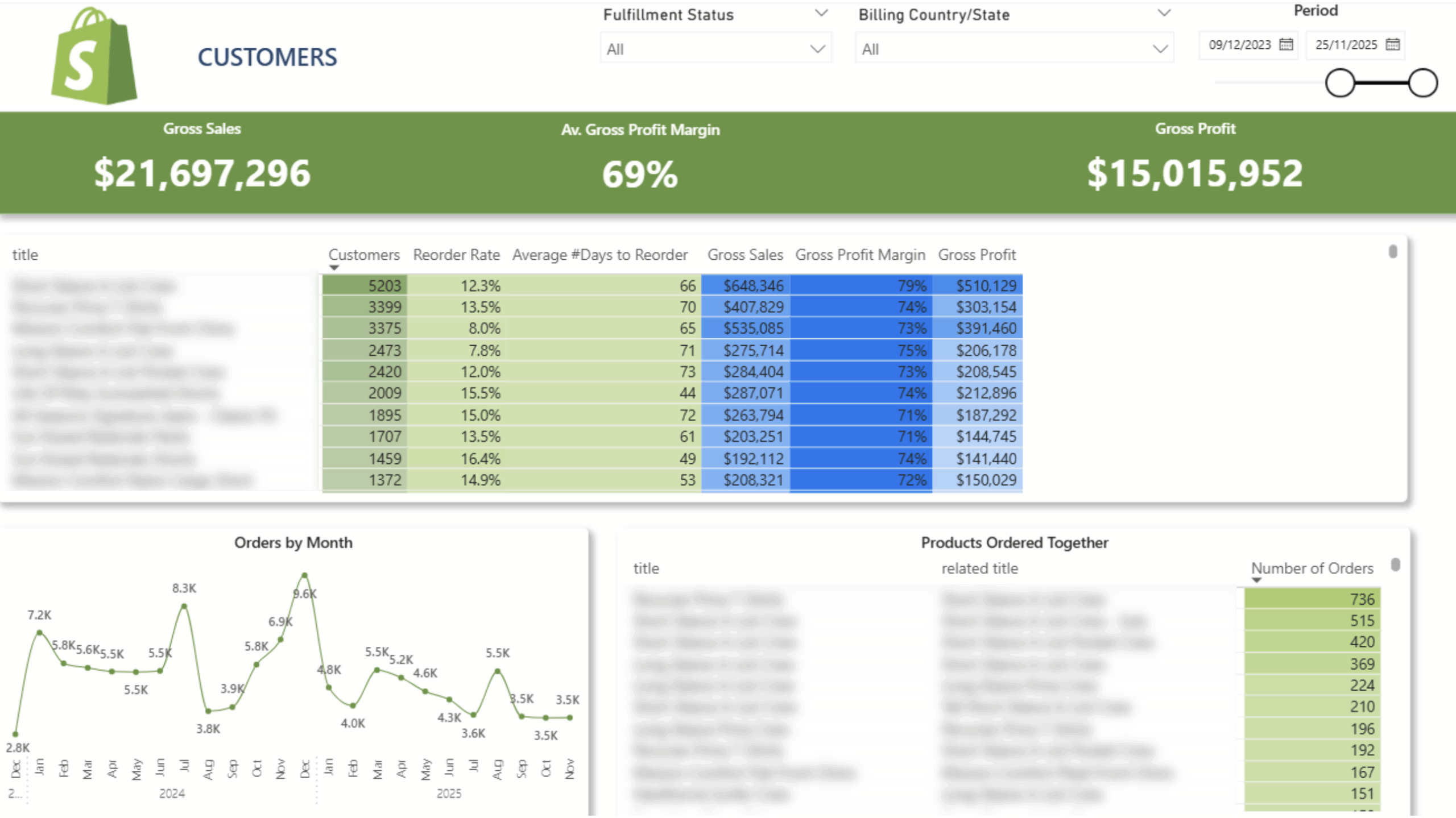
 Customer Lifetime Value
 Product Reorder Rate And Frequency
 Cohort Analysis
Items Bought Together
 New/Returning Customers
 Sales Per Hour and Weekday
Old price of the dashboard – $5000
New price – free with the purchase of our connector.
$1400 per year

14-day free trial

Unlimited number of Shopify accounts

Unlimited Customer Support
The team at Vidi has been great to work with! Super responsive to my numerous questions, and even going so far as to help me learn and make small changes on my own.
Chris Ginsbach

Great service and tools worked exactly as expected
Michael Khoury
Great group to work with, understood my needs and helped me design a solution that works
Michael Russell