
A store performance dashboard is essential for modern retailers who need clear visibility into sales, inventory, promotions, and customer behaviour across locations, as well as tracking customer activity in real time. As retail operations become more complex, relying on spreadsheets or disconnected reports makes it difficult to react quickly to trends. A well-designed dashboard brings all critical KPIs into one structured view, enabling faster and more confident decision-making.
At Vidi Corp, we specialise in building custom performance analytics dashboards in BI tools such as Power BI, Looker Studio, and Tableau. Our dashboards are fully automated, directly connected to POS, inventory, and e-commerce systems, and tailored to each retailer’s operational model. We have delivered advanced retail analytics solutions for global brands, including Ray-Ban, Dermalogica, and Chilly’s Bottles, helping them transform raw data into practical business insights.
Unlike manual reporting, which is slow, error-prone, and inefficient, real-time store performance dashboards provide instant, continuously updated data visualizations for better decision-making and collaborative insights.
In this article, we will walk through real examples of store performance dashboards we’ve built for retailers. You’ll see how different dashboards support sales optimisation, inventory management, channel analysis, and customer retention, and how they improve day-to-day retail performance.
A store performance dashboard is a reporting tool that analyses how a retail store performs across a range of key performance indicators. It consolidates operational and financial data into a single view, allowing management to monitor results in real time. Most dashboards rely on data extracted from point-of-sale systems.
Common data sources include POS platforms such as GoodTill, Lightspeed, and Shopify POS. We have experience integrating these systems into Power BI and automating data extraction to ensure reports refresh without manual intervention. The data can also be combined with inventory systems, e-commerce platforms, or internal spreadsheets to provide a complete view of operations.
A store performance dashboard allows retailers to monitor sales trends, inventory levels, promotion effectiveness, and customer retention in one place. Instead of reviewing separate reports, management can evaluate performance across multiple business areas at once. This supports faster decision-making and more consistent store management.
Store performance dashboards consolidate data from multiple locations into a single, structured view. Instead of reviewing separate reports for each outlet, management can compare stores side by side and identify performance gaps immediately. This is especially valuable for regional managers overseeing dozens of locations.
These dashboards can also combine multiple data sources, such as POS systems, inventory databases, e-commerce platforms, and marketing tools. Bringing everything into one data model ensures consistency and eliminates fragmented reporting. As a result, leadership gains a unified view of revenue, profitability, stock levels, and customer behaviour across the entire retail network.
For example, we helped a CEO centralise six disconnected systems into one reporting environment, reducing manual data consolidation by 95% and cutting reporting time from 48 hours to under 5 minutes. This enabled daily dashboards instead of weekly or monthly reporting.
Store dashboards turn raw data into operational decisions. Retailers can use sales trends and current stock levels to identify slow-moving items, reduce holding costs, and decide what inventory to reorder and when. This reduces stockouts and prevents over-ordering of slow-moving products.
They also support marketing and commercial strategy. Teams can create targeted offers based on purchasing behaviour and evaluate the effectiveness of promotions by analysing changes in revenue, margin, and average order value. Instead of guessing what worked, management sees measurable results.
One retail client used automated reporting to track key revenue and profitability drivers across multiple businesses. The insights helped them identify unexpected expenses, optimise product selection, and protect cash flow tied up in inventory.
Store managers and retail executives operate in fast-paced environments. They do not have time to analyse spreadsheets or manually calculate KPIs. Visual dashboards present the most important metrics in a clear, structured format.
Interactive charts, filters, and automated commentary highlight trends, risks, and opportunities immediately. Managers can drill down into specific stores, products, or time periods without requesting new reports from analysts.
For example, a retail company that migrated its reporting into a centralised Power BI and SQL environment highlighted the importance of clear visibility and timely refreshes. The automated dashboards ensured data was always up to date and ready to use, with direct and timely communication supporting smooth adoption.
A retail store performance dashboard serves as a command center for daily operations and management, offering real-time insights into the key metrics that matter most. By monitoring sales revenue, inventory levels, and customer feedback, retailers can optimize resource allocation and streamline their daily operations. The performance dashboard provides a visual interface for analyzing complex data, making it easier to spot trends, identify issues, and respond quickly to changes in the retail environment.
With automated reporting and real-time alerts, retailers can stay ahead of potential challenges and capitalize on emerging opportunities. The dashboard’s ability to consolidate data from multiple sources ensures that decision-makers have a complete and accurate picture of store performance at their fingertips. This enables more effective management of inventory, sales, and staff, leading to improved operational efficiency and better business outcomes. By leveraging these insights, retailers can make data-driven decisions that enhance performance, boost revenue, and keep their retail operations running smoothly.
A store performance dashboard is a vital tool for elevating customer experience and satisfaction in today’s competitive retail landscape. By tracking customer interactions, sales figures, and customer feedback, retailers gain a deeper understanding of customer behavior and preferences. The performance dashboard delivers real-time insights into how customers engage with the store, enabling retailers to quickly adapt to demand shifts and tailor their offerings to meet customer needs.
Key features such as customer satisfaction score tracking and customer engagement analysis help retailers pinpoint areas for improvement and develop targeted strategies to enhance the customer experience. The dashboard also provides a comprehensive set of metrics, including conversion rates, sales revenue, and customer retention rates, enabling retailers to measure the effectiveness of their customer experience initiatives. With these insights, retailers can refine their approach, boost customer satisfaction, and drive long-term loyalty, ensuring that every customer interaction contributes to the store’s overall success.
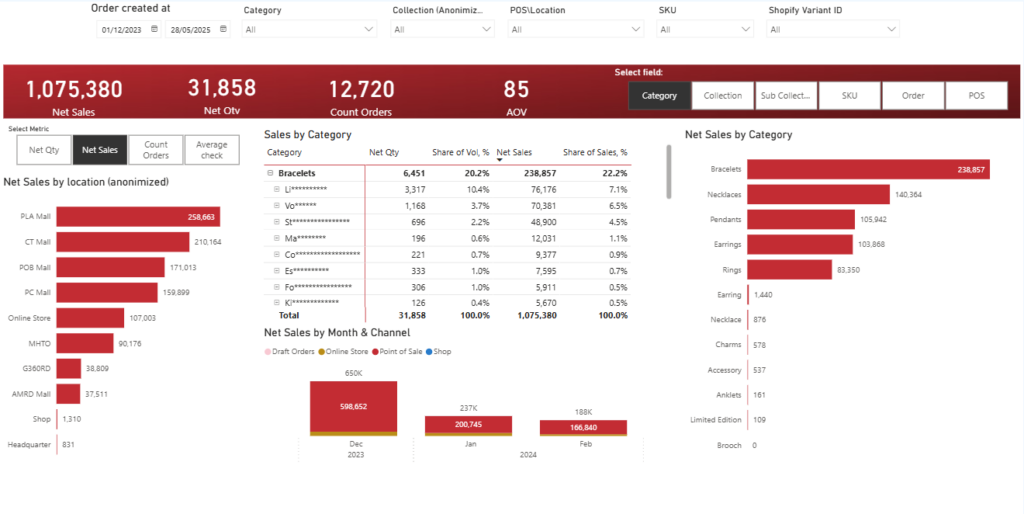
A retail store performance dashboard is designed for retail operations managers, regional managers, and executives who need visibility into sales and profitability across physical locations. It provides a clear breakdown of performance by store and product category. This type of dashboard is especially valuable for multi-store brands that need to monitor outlet-level trends and product mix in one place.
We built this Power BI dashboard for a jewellery brand that primarily sells through retail stores. The data is automatically extracted from Shopify POS using our Shopify connector and combined with the client’s internal spreadsheet that groups SKUs into collections and categories. The dashboard analyses key metrics, including Sales, Revenue, Average Order Value, and Number of Orders. Users can switch between these metrics using slicers and instantly change the breakdown by product category, collection, or sub-collection. Clicking on a specific store in the bar chart filters all other visuals, allowing management to analyse product performance at the store level with full drill-down capability.
This structure supports faster product and merchandising decisions. Management can quickly assess how newly launched collections perform compared to the core product line. Store managers can identify which categories drive revenue in their location. Regional leaders can compare outlets side by side and focus attention where margins or order values deviate from expectations.
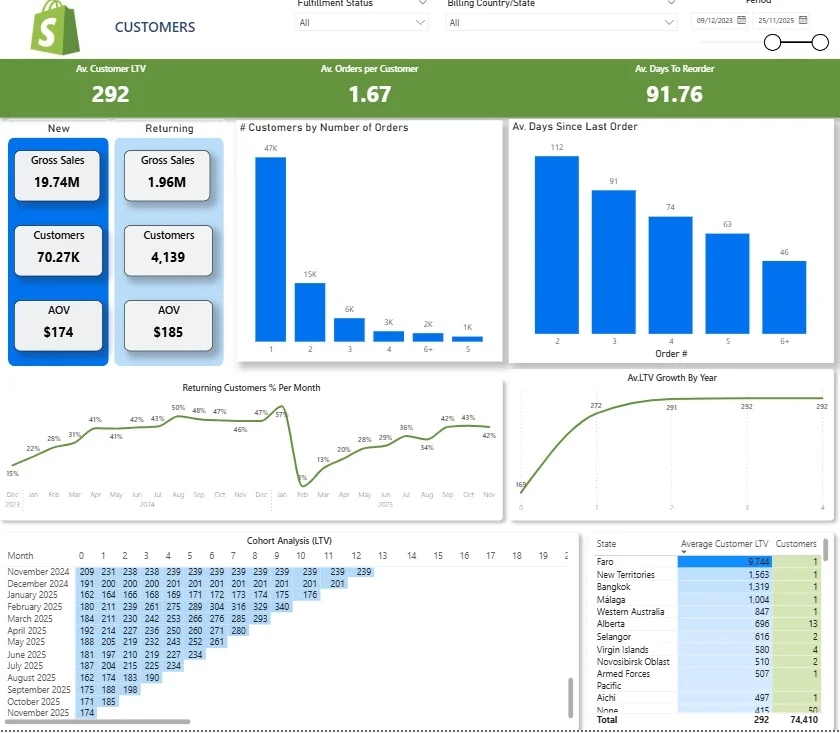
The Shopify Store Performance Dashboard is built for e-commerce founders and marketing managers who need to understand how customers behave after their first purchase. Using store performance dashboards, online retailers can gain valuable insights into customer preferences, allowing for personalized customer experiences. This dashboard focuses on retention, repeat purchasing patterns, and lifetime value. For brands running paid acquisition, this dashboard becomes a core decision-making tool.
We built this Shopify Customers Dashboard as part of our Shopify analytics template to analyse customer behaviour in depth. It begins by comparing new versus returning customers, alongside their associated revenue and average order value. A monthly line chart tracks the percentage of returning customers, helping teams monitor how effectively first-time buyers are converted into repeat customers. Another visual shows the distribution of orders per customer, clearly highlighting how many customers purchase once, twice, or multiple times.
The dashboard then analyses purchase timing and long-term value. A bar chart shows how many days customers take to place their second, third, and later orders, which supports email and paid reactivation planning. A lifetime value trend chart tracks how average LTV grows over time, helping ensure that customer acquisition cost remains below long-term revenue. At the bottom, a cohort table groups customers by their first purchase month and tracks LTV growth over time, making it clear how long each cohort takes to become profitable. Finally, LTV by state highlights the most valuable geographic markets, enabling smarter regional targeting and budget allocation.
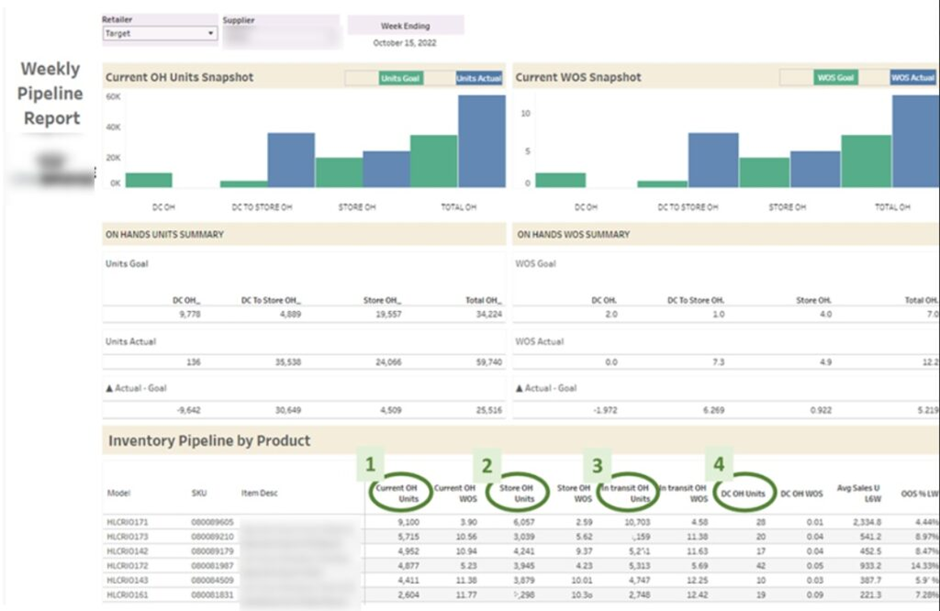
The Store Inventory Dashboard, also known as an inventory management dashboard, is designed for retail operations managers, supply chain teams, and buyers who need clear visibility into stock levels across stores and warehouses. It focuses on balancing demand with supply to avoid stockouts and excess inventory. This type of dashboard supports smarter replenishment and purchasing decisions.
Our BI consultants developed this inventory dashboard for a retail brand that needed tighter control over its product pipeline. The core KPIs include On-hand Units, which show how many items are currently available in stores and warehouses, and On-order Units, which represent stock that has been ordered but not yet delivered. These two metrics combine into Total Pipeline Units, giving a complete view of available and incoming stock. We also calculated Weeks of Supply by dividing Total Pipeline Units by Average Weekly Sales. This shows how many weeks the current pipeline can sustain demand. Another key metric is Units Sold Per Store Per Week, which normalises performance by dividing weekly sales by the number of stores stocking the product.
Beyond stock visibility, the dashboard analyzes weekly sales per product and calculates the average out-of-stock percentage. This highlights which products regularly run out and cost the company lost sales due to stockouts. These insights directly support conversations around increasing order quantities, adjusting replenishment cycles, and reallocating inventory between stores. The result is a more controlled supply chain process that protects revenue while reducing excess stock risk.
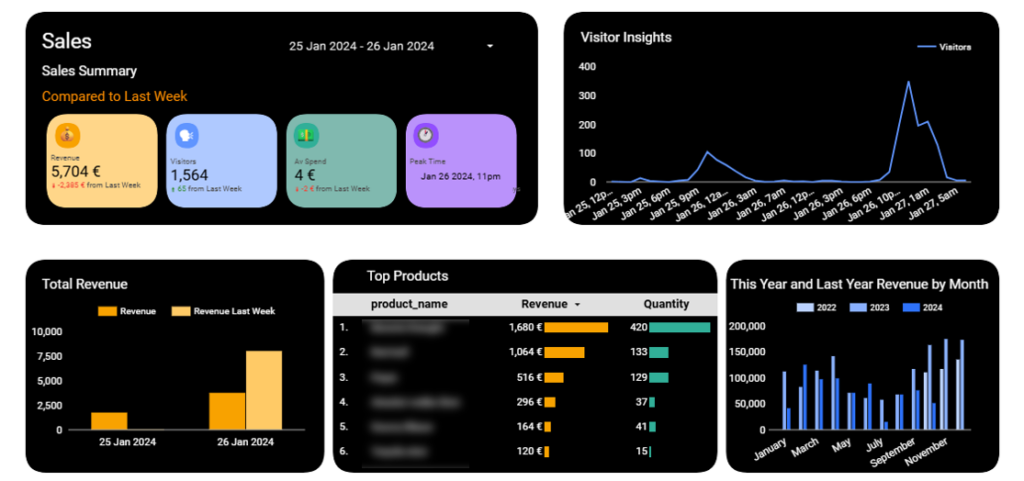
The Foot Traffic Dashboard is built for retail managers and operations teams who want to understand how store visits translate into sales. It connects in-store activity with revenue performance in one clear view.
Our Looker Studio consultants worked with a retail business that installed door sensors to capture the number of people entering the store. We automated the data extraction from these sensors and analysed footfall by hour. This data was then combined with revenue and quantity sold from the POS system, allowing us to evaluate sales performance alongside visitor volume.
This analysis helps retailers identify peak hours and measure visitor-to-customer conversion rates. Management can compare traffic patterns with sales trends to spot missed opportunities. The dashboard also supports smarter staff scheduling by aligning employee shifts with high-traffic periods, improving service quality while controlling labour costs.
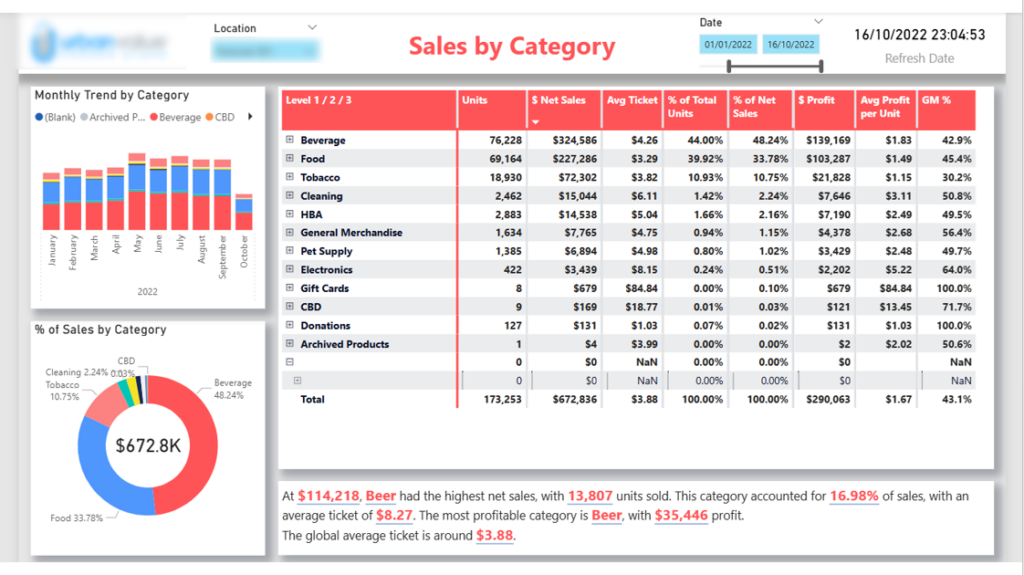
The Grocery Store Dashboard is designed for store managers, category managers, and retail executives who need a clear overview of category performance. It helps them understand which product groups drive revenue, volume, and profitability. This type of dashboard supports pricing, promotion, and assortment decisions.
Our Power BI developers built this dashboard to analyse sales by product category, including food, beverages, and tobacco. The main KPIs include revenue, units sold, average ticket price, profit, and profit margin. The charts on the left show monthly sales trends by category, while the pie chart visualises the percentage contribution of each category to total sales. At the bottom, an automated comment dynamically highlights the most profitable category and the category generating the highest sales for the selected period.
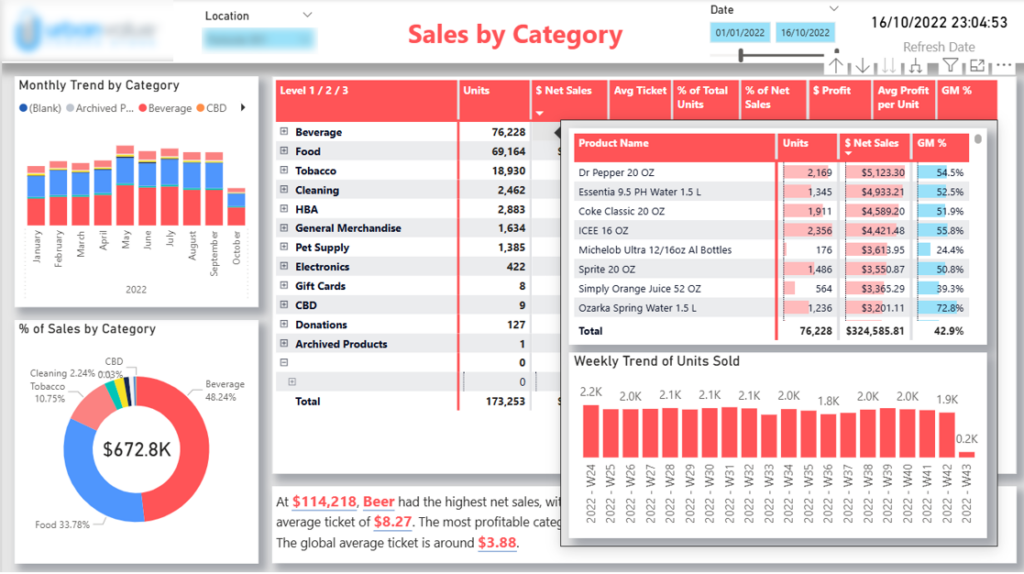
When users hover over a category in the table, they see a detailed breakdown by product, including sales, units sold, profit margin, and weekly trends.
This structure enables both high-level and detailed analysis in one view. Management can quickly identify which categories contribute the most to profit and which drive volume. Category managers can drill down into specific products to monitor margins and weekly sales trends. The automated commentary ensures that key insights are immediately visible, making performance reviews faster and more focused.
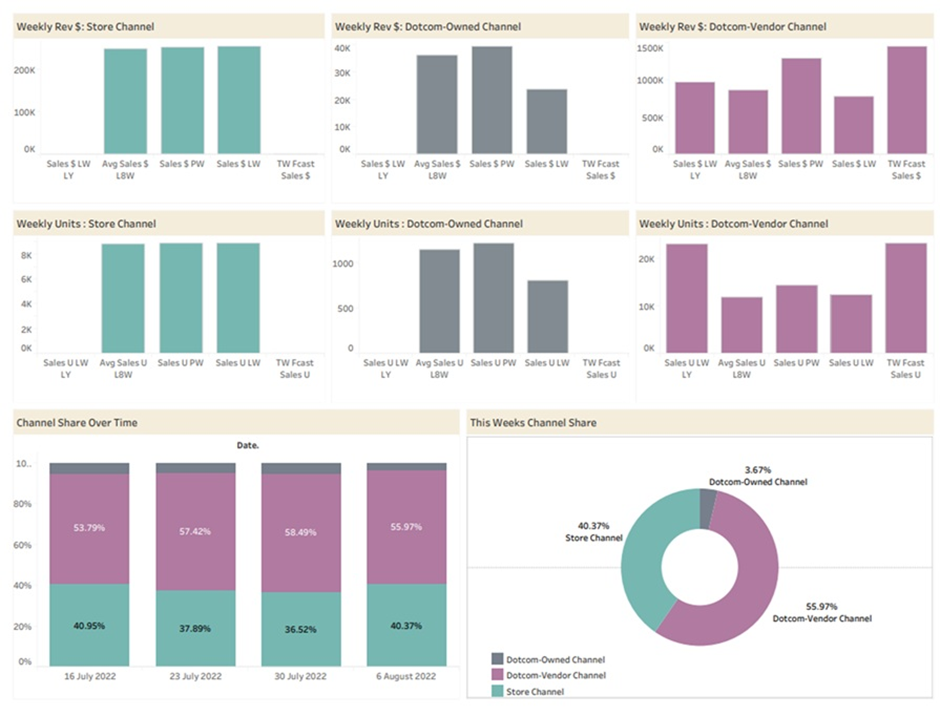
The Walmart Store Status Dashboard is designed for retail account managers, e-commerce managers, and brand owners who sell through Walmart’s brick-and-mortar and online channels. It provides a clear weekly view of performance by sales channel. This helps teams quickly assess whether growth is on track or requires intervention.
Our Tableau consultants built this dashboard for a retailer that distributes products through Walmart stores and Walmart.com. The report analyses last week’s sales, the average sales for the last eight weeks, forecasted sales for the current week, and sales for the same week last year. All metrics are segmented by channel, including physical stores and the online store. This structure allows management to compare short-term performance with historical trends and seasonality while clearly separating in-store and e-commerce results.
This channel-level visibility supports faster optimisation decisions. If online sales underperform compared to stores, the team can improve product images, refine descriptions, or adjust pricing and promotions. If brick-and-mortar performance declines, they can review packaging, shelf placement, or in-store marketing. By combining weekly tracking with forecasts and year-over-year comparisons, the dashboard turns Walmart data into a practical decision-making tool.
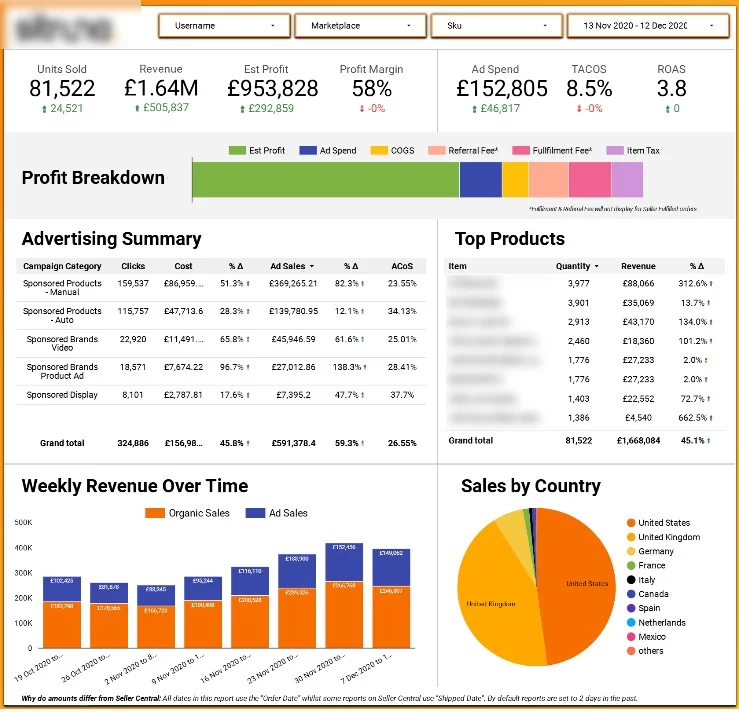
The Amazon Store Sales Dashboard is built for brand owners, e-commerce managers, and performance marketing teams who sell through Amazon. It combines organic sales from Amazon Seller Central with sponsored ads data from Amazon Ads. Analysing both together is essential to understand true profitability and growth.
We developed this dashboard for a retailer selling multiple products on Amazon. The top section shows high-level KPIs that measure overall performance and profitability. In addition to revenue and ad spend, we focus on Amazon-specific metrics such as ACoS (Advertising Cost of Sales), which shows ad spend as a percentage of ad-driven revenue, and TACoS (Total Advertising Cost of Sales), which measures ad spend against total revenue from both organic and paid sales. The dashboard also includes an advertising summary table by campaign, clearly highlighting where ACoS is highest and where optimisation is needed. Weekly trends compare organic and paid sales, while additional visuals break down performance by country and product.
This structure helps retailers optimise both advertising and organic strategy. Campaign-level analysis identifies inefficient ad spend and opportunities to reduce ACoS. Product-level insights highlight fast-growing SKUs that may benefit from increased budget or bundling strategies. By combining paid and organic performance in one view, the dashboard ensures that Amazon operations remain profitable and scalable.
Our store performance dashboards are developed in industry-leading business intelligence platforms such as Power BI, Looker Studio, and Tableau. We select the tool based on your existing technology stack, reporting requirements, and sharing preferences.
All dashboards are fully mobile responsive and can be accessed through dedicated mobile apps. This is especially useful for store managers, regional managers, and executives who are frequently on the move.
Whether visiting stores, travelling, or working remotely, you can monitor performance in real time directly from your phone or tablet.
Our dashboards are fully automated, covering data extraction, transformation, and refresh. We code direct integrations with your systems, such as POS platforms, inventory management tools, e-commerce platforms, and accounting systems.
Data refresh is scheduled multiple times per day, ensuring that your reports always reflect the latest performance without any manual intervention.
We implement role-based security to control data visibility across your organisation. If you want to share dashboards with store managers but restrict access to sensitive metrics such as profitability or margins, we can configure permissions accordingly.
This ensures that every employee sees only the information relevant to their role while maintaining full control over confidential business data
Implementing a store performance dashboard requires a strategic approach to ensure it delivers maximum value. Retailers should begin by identifying their key performance indicators (KPIs) and selecting the metrics that align with their business goals, such as increasing sales revenue or improving customer satisfaction. Customizing the performance dashboard to reflect the unique needs of the store incorporating features like real-time reporting, automated alerts, and intuitive data visualization, ensures that it becomes an indispensable tool for monitoring store performance.
To get the most out of the dashboard, retailers should establish clear objectives and regularly analyze the data to identify trends, uncover opportunities, and address challenges. Ongoing review and refinement of the dashboard’s metrics and strategies are essential for continuous improvement. Providing training for staff and keeping the dashboard updated with the latest data and features will help ensure widespread adoption and effective use. By following these best practices, retailers can leverage their store performance dashboard to drive business growth, enhance customer satisfaction, and make informed data.
A well-designed store performance dashboard gives retailers clarity, speed, and control. Instead of reacting to problems after they impact revenue, you can monitor sales trends, stock levels, channel performance, and customer behaviour in real time. With automated data integrations and clear visual reporting, decision-making becomes faster and more consistent across the organisation.
Whether you operate a single store or manage a global retail network, the right analytics framework can significantly improve profitability and operational efficiency. From POS integrations to inventory forecasting and channel-level analysis, custom dashboards turn your data into a structured decision-making system.
If you’re ready to build a store performance dashboard tailored to your business, contact us. Our BI consultants will assess your current setup, connect your data sources, and design a fully automated dashboard that supports smarter retail growth.


