

Running a small business means making decisions quickly, often with limited time and fragmented data. When key numbers live across spreadsheets, accounting tools, CRMs and marketing platforms, it’s easy to miss issues that directly impact cash flow and growth. A small business dashboard solves this by turning scattered data into a single, real-time performance view.
At Vidi Corp, we’ve delivered dashboard development services for 1,000+ small and mid-sized businesses across finance, sales, marketing and operations, and we’re the #1-rated BI consultancy on G2. We’ve worked with companies from early-stage startups to organisations with thousands of employees, helping them replace manual reporting with automated dashboards that save hours every week.
This guide explains what a small business dashboard is, why it matters, how much it costs and which metrics to track. It also gives you real client dashboard examples, free templates you can download today, and the best software tools to build them.
Small business dashboards are visual reporting tools that bring your most important data into one clear view. They replace scattered spreadsheets and manual reports with real-time charts that show how your business is actually performing.
Instead of digging through multiple tools, a dashboard pulls data from sales, marketing, finance, and operations into a single place. This makes it easier to spot trends, catch problems early, and act before small issues become expensive ones.
For small businesses with limited time and tight margins, dashboards aren’t about “advanced analytics.” They’re about saving hours each week, staying in control of cash flow, and making faster, more confident decisions based on what’s happening right now.
The fastest way to get started is with a pre-built template instead of building from scratch. The four dashboards below are our own templates: already designed, tested and quick to connect to your data. Our Power BI templates are free downloads, works with the matching Vidi Corp connector trial, and comes with a Power BI template installation guide so you can get familiar with the process before you commit to anything. When getting started, focus on the 5 to 7 metrics that matter most rather than tracking 50. A simple dashboard people check daily beats a comprehensive one nobody opens.
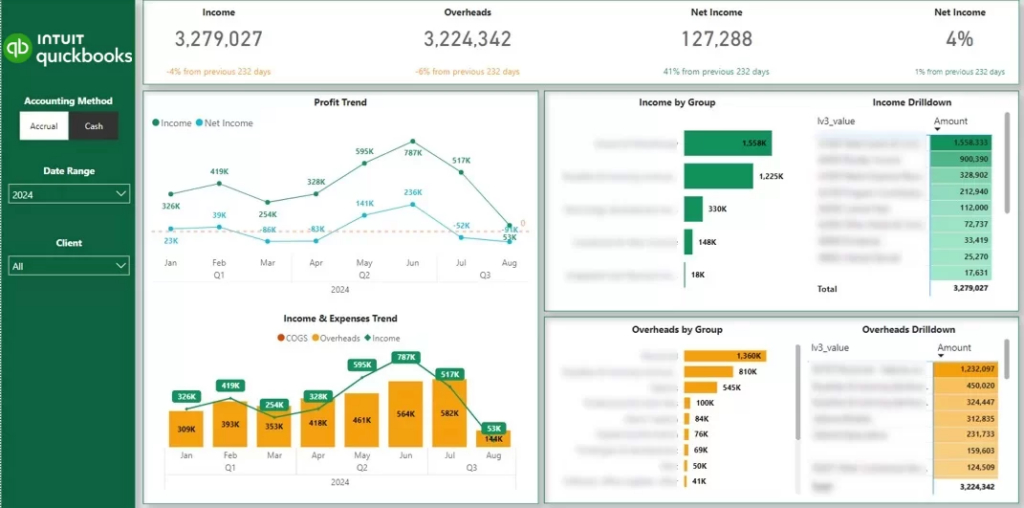
Data sources: QuickBooks Online, Xero, Zoho Books
Essential metrics for a small business financial dashboard: income, overheads and net income trends, cash vs accrual performance, profit margins by account or service, expense breakdown by category, outstanding and overdue balances
A small business financial dashboard gives owners a clear view of where money comes from, where it goes and how sustainable the business is. It replaces static profit-and-loss reports with trends and drill-downs you can actually act on.
Our financial dashboard template shows monthly trends for income, overheads and net income, giving business owners an instant view of financial performance over time. Income and overheads are broken down by account and individual transactions, making it easy to understand what drives each number. You can switch between accrual and cash accounting, filter by client (for businesses managing multiple QuickBooks accounts) and analyse results by class.
The template file is free; loading your live QuickBooks data requires the Power BI QuickBooks Online connector, and the template is included free with the connector trial. Watch the QuickBooks Online installation walkthrough for the full installation, then follow the numbered steps to set it up in about 5 minutes.
One manufacturing company that connected multiple QuickBooks Online companies through this setup reported on Clutch that it cut the time spent compiling financial reports across entities by over 75%, shortened its month-end close by several days and avoided the cost of migrating to a full ERP system.
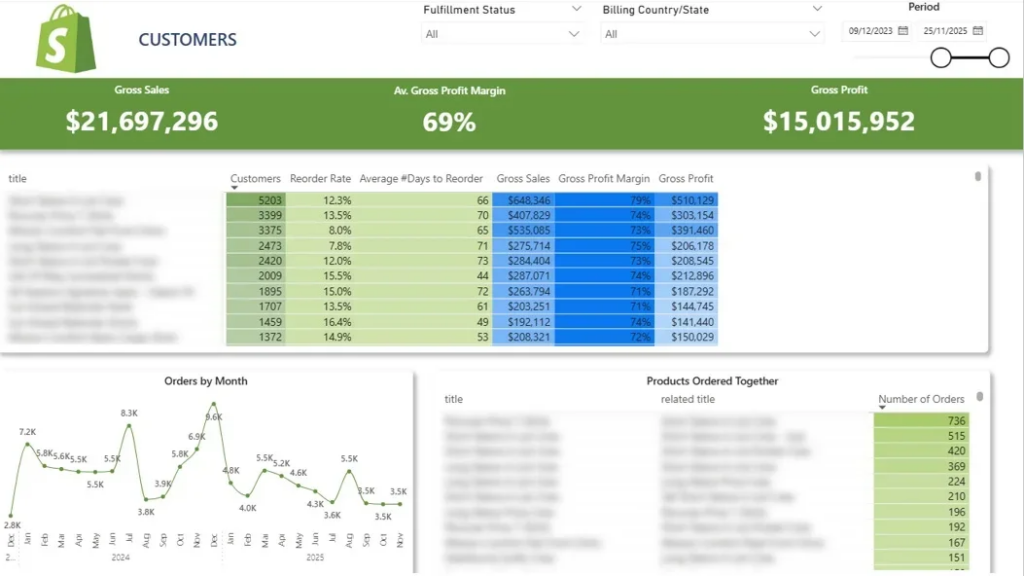
Data sources: Shopify, Magento
Essential ecommerce metrics to include: Customer LTV, Number of customers per product, reorder rate, average days between purchases, product-level revenue and profitability, monthly order volume by product, frequently purchased product pairs.
An ecommerce dashboard helps online retailers understand which products drive repeat revenue and where merchandising decisions can be improved. It goes beyond top-line sales to reveal buying patterns, reorder behaviour and product relationships.
We built this Shopify analytics dashboard for a merchant with a large product catalogue who struggled to decide which products to promote, bundle or phase out. The dashboard summarises product-level performance by showing how many customers purchased each item, how often they reordered and the average time between purchases. Selecting a product dynamically filters monthly order trends, making it easy to spot growth patterns and seasonality. It also highlights products frequently bought together, supporting smarter upsell, bundling and merchandising decisions.
The template file is free; loading your live store data requires the Shopify Power BI connector, and the template is included free with the connector trial.
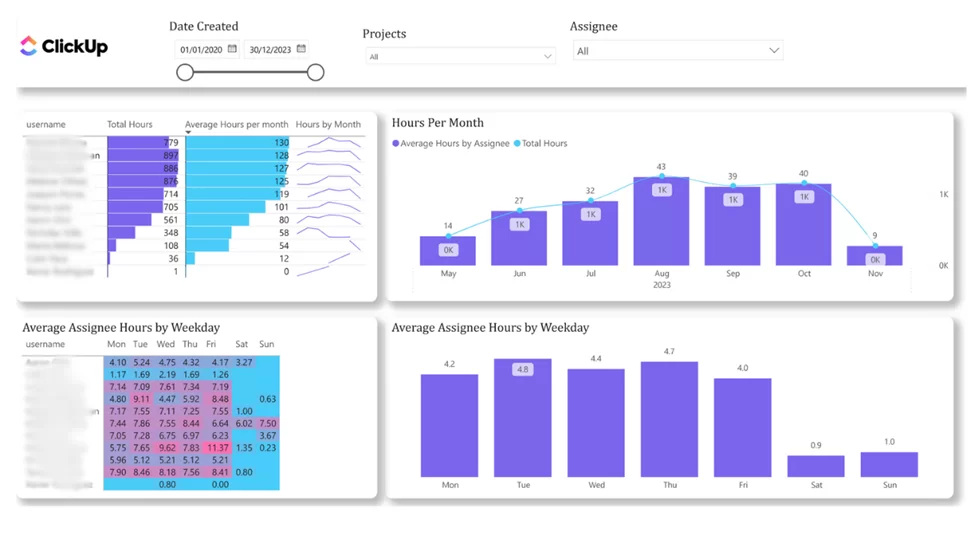
Data sources: ClickUp, Trello
Essential project management metrics to include: total hours worked by project and team member, average hours per day and per month, resource utilisation rates, workload distribution across projects, early signals of over- or under-utilisation
A project management dashboard helps service-based businesses stay profitable by showing how time and resources are actually being used. It connects project delivery directly to workload, capacity and team performance.
Our free ClickUp project management template measures how effectively human resources are being used based on logged work hours. It shows total hours and average hours worked per assignee, with views by day and month, across all projects or a selected workspace. By visualising workload trends over time, managers can quickly identify team members who are overworked or underutilised and reassign work before capacity is wasted.
The template file is free; loading your live workspace data requires the ClickUp Power BI connector, and the template is included free with the connector trial. Check out our ClickUp Video Installation
The five dashboards below are bespoke builds we created for specific clients, not download templates. We can design a similar one around your exact data sources and the questions you need answered.
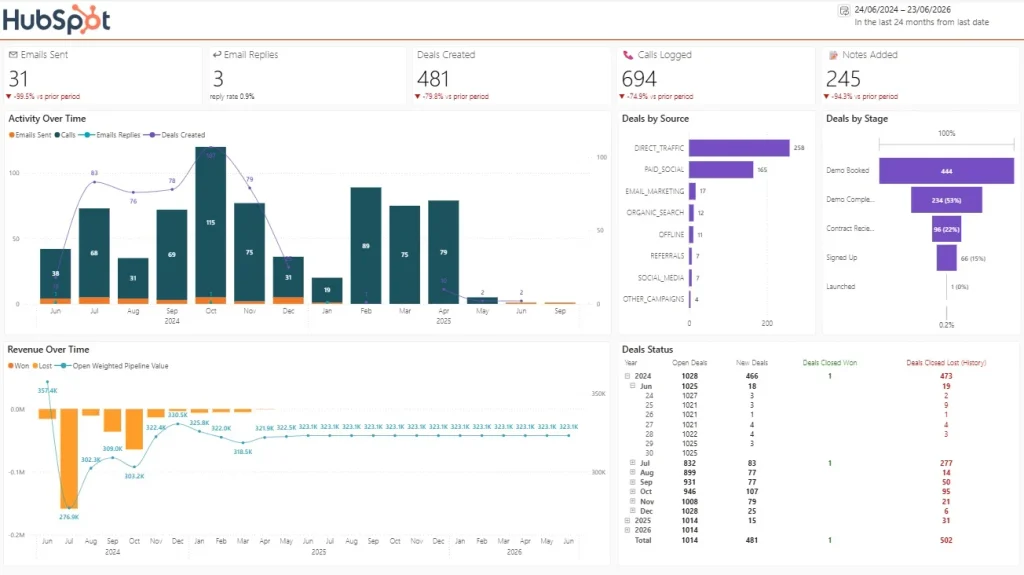
Data sources: Hubspot, Pipedrive, Zoho CRM
A sales dashboard gives small businesses a clear view of how revenue is generated and where deals get stuck. It brings pipeline activity, deal quality and sales performance into one place so teams can forecast more accurately and focus effort where it matters most.
This HubSpot sales overview template shows your pipeline value by stage, deal sources, funnel conversion rates, average deal size and performance by account owner, all pulled straight from your CRM. Instead of relying on static exports, sales managers get a live view of which lead sources produce deals that actually close, where the funnel leaks and whether the team is on track against target.
To install it, watch the video walkthrough above, then follow the same steps as the other templates: start the HubSpot Power BI connector trial, download the template file, open it in Power BI Desktop, authenticate and schedule the refresh. The template file is free with the connector trial.
Essential sales metrics to include: pipeline value and stage distribution, conversion rates between stages, average deal size and sales cycle length, revenue vs target, performance by salesperson or account owner
Data sources: Facebook Ads, Google Ads
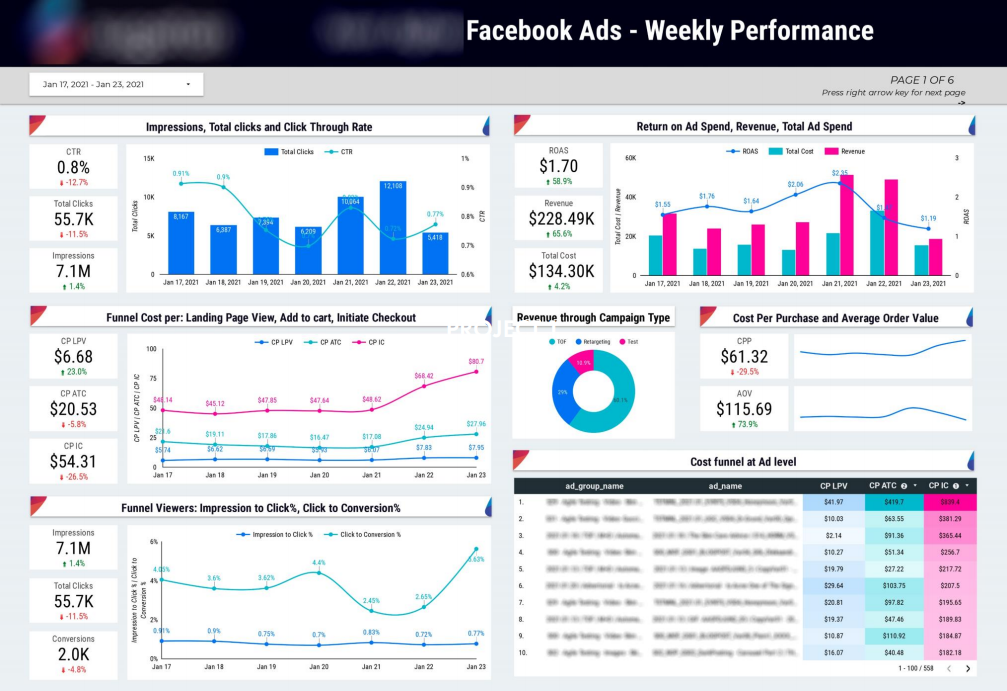
Essential marketing metrics to include: ad spend, revenue, and ROAS, impressions, clicks, and CTR, conversion rates between funnel stages, cost per key action, average order value (AOV)
A marketing dashboard helps small businesses understand what they’re getting back from their ad spend and where performance breaks down in the funnel.
Our marketing analysts created a dashboard that shows how efficiently Facebook Ads move users through the funnel, from impression to purchase. It tracks ad spend, revenue, and ROAS alongside impressions, clicks, and conversion rates at each stage.
By visualising cost per landing page view, add to cart, checkout, and purchase, businesses can quickly see where budgets are being wasted and where optimisation will have the biggest impact. For our clients, this dashboard supports faster budget decisions, better ROAS, and more confident scaling of profitable campaigns.
Data sources: your accounting system, CRM, project management tool and HR or payroll data, combined
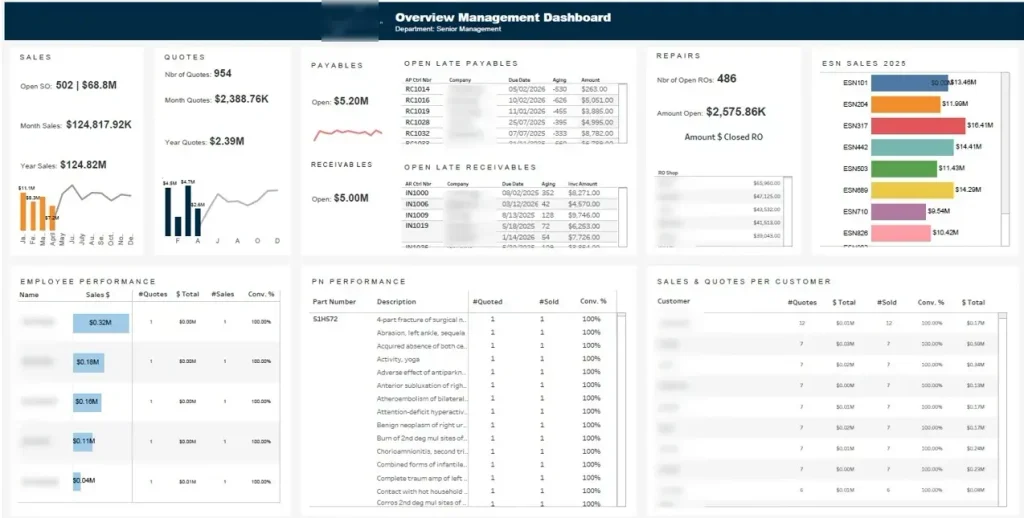
Essential CEO metrics to include: revenue and net income trends, cash position, sales pipeline and win rate, employee performance and utilisation, operational delivery status
A CEO dashboard is one dashboard to monitor the entire business. Instead of chasing department heads for updates, the owner or CEO opens a single screen and sees how sales, finances, people and operations are performing right now. The executive dashboard pictured above is a good example of the format: it combines sales results, financial performance, employee performance and operational metrics in one view, so the trade-offs between departments are visible at a glance rather than buried in four separate reports.
We build CEO dashboards that pull from whatever combination of systems your business runs on and roll them up into the handful of numbers that actually drive your decisions.
The CEO of a home services platform reported that after we centralised six systems into one database with live Power BI dashboards, report generation dropped from 48 hours to under 5 minutes, manual data consolidation fell by 9
Data sources: Facebook, Instagram, Linkedin, Youtube
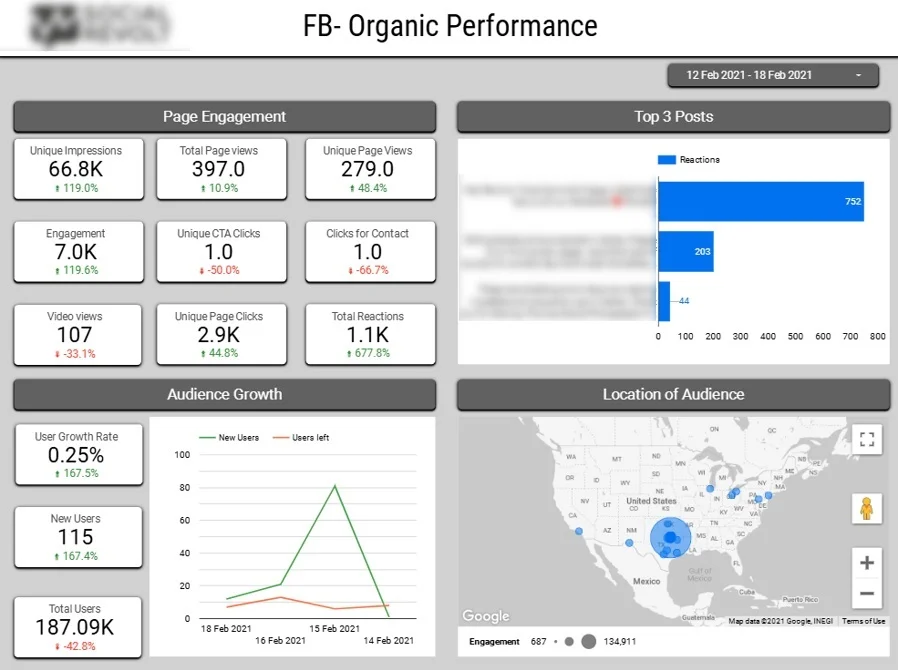
Essential social media metrics to include: total impressions, page clicks, reactions, engagements, top-performing posts, follower growth, unfollows, audience location by state
A social media dashboard helps marketing teams understand which content resonates with their audience and how social channels contribute to long-term growth. It focuses on engagement quality and audience trends rather than vanity metrics.
Our Business Intelligence experts created a Looker Studio social media dashboard that tracks impressions, clicks, reactions, and total engagement, with a dedicated view highlighting the top three posts by reactions. This makes it easy to identify which content formats and topics generate the strongest audience response.
Audience growth is monitored through new followers and unfollows over time, helping teams evaluate the real impact of campaigns and posting strategies. A geographic breakdown by U.S. state shows where engaged audiences are located, supporting more targeted content planning and regional campaign optimization.
For our clients, this dashboard simplifies client reporting, improves content decisions, and provides a clear link between posting strategy, engagement, and audience growth.
Data sources: Google Ads, Google Analytics
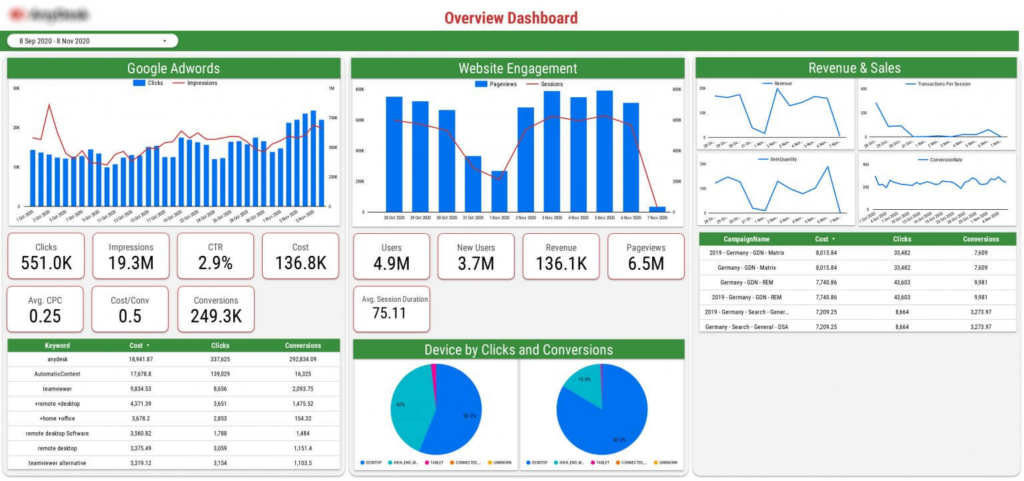
Essential Google Ads metrics to include: clicks, impressions, ad spend, conversions, cost per conversion, keyword performance, sessions, pageviews, revenue, conversion rate
A Google Ads dashboard helps businesses understand how paid search traffic turns into website engagement and revenue. By combining ad performance with website behaviour, it provides a complete view of campaign effectiveness.
We built this Google Ads dashboard for a SaaS company running Google Ads campaigns to drive product sign-ups and sales, while using Google Analytics to measure on-site behaviour. This dashboard shows how Google Ads spend translates into traffic, conversions, and revenue, combining ad performance with on-site behaviour from Google Analytics.
By linking keywords, campaigns, devices, and revenue in one view, it helps teams quickly identify which ads drive real business results and which waste budget. For our clients, this dashboard supports faster optimisation, clearer ROI tracking, and more confident budget decisions without switching between tools.
A small business KPI dashboard only works if it tracks the right numbers. Most SMEs need surprisingly few. Across 1,000+ dashboard projects, the businesses that get the most value track 5 to 7 KPIs consistently rather than 30 sporadically. Here are the ones that earn their place on the screen.
Financial KPIs. Net income trend, gross profit margin, cash position and runway, and overdue receivables. These four tell you whether the business is sustainable and whether a cash crunch is coming, which is exactly what a small business financial dashboard exists to show. If you only build one dashboard, build this one.
Sales KPIs. Pipeline value by stage, win rate, average deal size and sales cycle length. Together they let you forecast revenue instead of guessing, and they show where deals stall so you can fix the process rather than just push harder.
Marketing KPIs. Cost per lead, return on ad spend and conversion rate by channel. These separate the channels that produce customers from the channels that produce activity, so budget follows results.
Operations KPIs. Team utilisation, on-time delivery rate and hours logged per project. For service businesses, these are the difference between profitable delivery and quiet margin erosion.
Customer KPIs. Customer acquisition cost, repeat purchase or retention rate and customer lifetime value. Acquiring a customer usually costs several times more than keeping one, so these KPIs protect the revenue you already have.
Start with one KPI dashboard per decision-maker rather than one giant screen for everyone. The role-based examples in the next section show what that looks like in practice.
The right tool depends on where your data already lives and how much you want to spend. Here’s the short version, then the detail.
| Tool | Best for | Cost basis | Ease of setup |
|---|---|---|---|
| Power BI | Small businesses on Microsoft/Excel that plan to scale finance, sales and ops reporting | Free to build; ~$14/user/mo (Pro) to share | Moderate. Most powerful once set up; templates make it fast |
| Looker Studio | Marketing and SEO reporting on Google data (GA4, Google Ads, Search Console) | Free (some connectors add small monthly costs) | Easiest. Browser-based, Google-Docs-style sharing |
| Tableau | Teams that prioritise advanced visualisation and data exploration | ~$70/user/mo (Creator); ~$15/user/mo (Viewer) | Steeper. Best with a dedicated analytics resource |
Our recommendation for most small businesses is to start with Power BI. It combines strong automation, flexible modelling and low cost, handles finance, sales and operations reporting in one place, and won’t need rebuilding as you grow, which is exactly why our templates above are built for it. Choose Looker Studio if your world is Google Ads, GA4 and Search Console and you want free, shareable marketing reporting. Choose Tableau if presentation-grade visuals and deep exploratory analysis matter more than operational reporting and you have someone to own it.
Best for: Small businesses using Microsoft tools and planning to scale reporting
Power BI is a powerful business intelligence platform that turns raw data into interactive dashboards. It’s widely used by small and mid-sized companies that want automated reporting across finance, sales, and operations.
Key features:
Pricing: Power BI Pro: ~$14 per user / month
Why it works for small businesses:
Power BI combines strong automation, flexible modelling, and affordable pricing. It’s well suited for small businesses that want accurate financial, sales, and operational reporting without rebuilding dashboards as they grow. It’s also the platform all of our free small business dashboard templates are built for, so you can start with a working dashboard rather than a blank canvas
Best for: analysing data from Google products (Gads, GA4, Google Search Console) and sharing data outside of your organisation
Looker Studio is Google’s free dashboarding tool and a popular starting point for marketing and performance reporting.
Key features:
Pricing: Free (connectors may add small monthly costs)
Why it works for small businesses:
Looker Studio is ideal when budgets are tight and data already lives in Google tools. It delivers shareable dashboards with no license cost, making it a strong starting point for marketing and SEO reporting.
Best for: Businesses that prioritise advanced visualisation and exploration
Tableau is known for its high-quality visuals and powerful data exploration capabilities. It’s often used by teams that want to analyse data from multiple angles and present insights clearly.
Key features:
Pricing:
Tableau Creator: ~$70 per user / month
Tableau Viewer: ~$15 per user / month
Why it works for small businesses:
Tableau is a good fit when visual quality and exploratory analysis matter most. It’s powerful, but usually best suited to small businesses with dedicated analytics needs rather than simple operational reporting.
Cost is usually the first question, and the honest answer is that it depends how much you build yourself. There are three realistic routes.
1. DIY with a free template: $0. Download one of our free Power BI templates, connect your data and you’re running at no cost beyond a Power BI licence to share (~$14/user/month). This is the fastest way to get real financial or operational visibility today.
2. Off-the-shelf software you set up: the monthly SaaS cost. If you’d rather work in a ready tool, budget for licensing: Looker Studio is free, Power BI Pro is ~$14/user/month, and Tableau runs from ~$15/user/month (Viewer) to ~$70/user/month (Creator). Connectors that auto-pull from platforms like Facebook Ads or HubSpot may add a small monthly cost.
3. A custom-built dashboard we develop for you: from ~$1,000. Most of our small business projects start around $1,000+, which typically buys a one-to-two-page dashboard from an easy source such as Excel or SQL. A starter dashboard is roughly 10 hours of development; our consulting rate is about $100/hour for one-off projects, dropping toward $75/hour on longer ongoing engagements. Ongoing software licensing then runs $14 to $75/month depending on platform and users.
What actually drives the price: the number of data sources (every new source adds modelling time), refresh frequency, complexity of the KPIs and calculations, and whether you need a data warehouse (many small businesses don’t at the start). The way to keep it affordable is to start small: nail the 5 to 7 metrics that matter now, then scale. If you want a firm number, tell us your data sources and we’ll scope it.
Small businesses can’t afford delayed insights when margins are tight. Missing a trend for even a week can lead to cash flow stress, lost customers or inventory issues that escalate quickly. The core benefit of a dashboard is that it surfaces problems while there’s still time to act, and it eliminates the hours of manual reporting spent pulling numbers from multiple tools just to understand performance.
The best practices are short: track the 5 to 7 KPIs that directly drive revenue, cash flow and delivery, connect the dashboard to the tools your data already lives in so it refreshes automatically, and design it so the key insight is obvious in ten seconds.
The common mistakes are the mirror image: tracking too many metrics so nothing stands out, relying on manual updates so the dashboard quietly goes stale, filling the screen with vanity metrics like followers and pageviews that don’t connect to money, and using a generic layout that doesn’t reflect how your business actually operates. If your dashboard fails, it will almost certainly be for one of those four reasons.
Small business dashboards aren’t about having more data. They’re about having the right data, in the right place, at the right time. When your key metrics are clear and up to date, decisions become faster, simpler and far less stressful.
The most effective dashboards start small. Focus on the metrics that drive revenue, cash flow and delivery today, then expand as your business grows. With the right setup, dashboards quickly pay for themselves by saving time, reducing risk and improving performance. If you’re ready to stop relying on spreadsheets and manual reports, we can help. Start with a ready-made template, or get in touch and we’ll build a custom small business dashboard tailored to your goals.
A small business dashboard is a visual reporting tool that pulls data from your finance, sales, marketing and operations tools into one real-time view. Instead of checking multiple spreadsheets and apps, you see your key numbers on a single screen. It helps owners spot problems early and make faster, more confident decisions.
Yes. Vidi Corp offers free downloadable Power BI templates, including a QuickBooks Online finance template, a Shopify ecommerce template, a ClickUp operations template and a HubSpot sales template. The template files are free; each one loads your live data through the matching Vidi Corp connector, and the template is included free with the connector trial.
Start with 5 to 7 metrics that directly affect revenue, cash flow and delivery rather than tracking everything. For most small businesses that means net income trend, cash position, profit margin, pipeline value, customer acquisition cost and conversion rate. Our SME KPIs section above breaks these down by role.
Custom small business dashboards typically start from around $1,000 for a one-to-two-page build from a simple data source, at roughly $100 per hour of development. Ongoing software licensing usually runs $14 to $75 per month depending on the platform and number of users. The main cost drivers are the number of data sources, refresh frequency and overall complexity.
Looker Studio is the easiest to start with, since it’s free, browser-based and integrates directly with Google Analytics, Google Ads and Search Console. Power BI is the best all-rounder for finance and operations reporting and stays affordable at about $14 per user per month. The right choice mainly depends on where your data already lives.
Start the free trial of the matching Vidi Corp connector, download the .pbit template, open it in the free Power BI Desktop app and sign in with your connector credentials when prompted so it loads your data. You can then publish it and schedule automatic refresh so the dashboard stays up to date on its own. Each template on this page has a video walkthrough, and our installation guide covers every step with screenshots.
Yes, a well-built dashboard is designed to grow with you. Start with the core metrics and one or two data sources, then add sources, pages and deeper analysis as your reporting needs mature. Power BI in particular handles large datasets and additional users comfortably, so you won’t need to rebuild as you scale.


