

Modern manufacturing runs on data. From machines on the shop floor to ERP systems, warehouses, quality records, and finance platforms, every part of the operation generates information. The challenge is not collecting data, it’s turning it into something useful. A manufacturing company can leverage manufacturing analytics dashboards to gain data-driven insights, enabling better decision-making and improved operational efficiency.
As a data visualisation consultancy, we have delivered 1,000+ custom manufacturing analytics and dashboard solutions across operations, finance, quality, inventory, logistics, and sales. We specialise in building custom manufacturing dashboards that connect directly to ERP, MES, warehouse, quality, and machine data, helping manufacturers improve control, reduce inefficiencies, and support continuous improvement across their operations.
In this article, we explain what manufacturing analytics dashboards are, why manufacturing KPI dashboards matter in manufacturing, and how different manufacturing data visualization dashboard types support operational and business performance. We also walk through real dashboard examples, outline how to build effective manufacturing analytics dashboards, and cover the tools commonly used to support manufacturing analytics initiatives.
Manufacturing analytics dashboards are interactive reporting tools that bring together production, operational, financial, and supply chain data into a single dashboard that consolidates data from multiple sources.
Unlike manual reports or disconnected spreadsheets, manufacturing analytics dashboards centralise information from machines, ERP systems, warehouse systems, quality records, and financial platforms. They present this data through visualisations such as charts, KPIs, and trend analyses, making performance easy to interpret at a glance. An easily accessible platform ensures that important metrics and manufacturing metrics are available to all relevant team members, improving communication, training, and proactive decision-making.
These dashboards help manufacturers:
As manufacturing environments become more complex and data-rich, manufacturing data visualization dashboards play a critical role in connecting operational activity with measurable business outcomes. A performance dashboard provides real-time visibility into important metrics and supports proactive management, offering the structure and clarity needed to improve performance, increase efficiency, and support continuous improvement across the entire manufacturing value chain.
A manufacturing KPI dashboard is a powerful tool that helps streamline processes and improve production efficiency by making performance visible while there’s still time to act. On a production floor, waiting for end-of-shift reports or weekly spreadsheets often means problems are already baked into output, quality, or delivery. A manufacturing KPI dashboard puts the current state of operations in front of teams as it’s happening.
By tracking KPIs in real time or near real time, manufacturers can spot downtime, slowdowns, quality issues, or delivery risks the moment they emerge. This enables teams to improve production efficiency by identifying and addressing operational bottlenecks quickly. Instead of reacting after losses occur, teams can intervene early, limit impact, and keep production on track.
KPI dashboards also create shared awareness. When performance is visible across lines, shifts, or plants, operators, supervisors, and managers work from the same facts. That clarity improves accountability, speeds up communication, and helps teams focus on the issues that matter most.
Most importantly, manufacturing KPI dashboards support continuous improvement. By consistently measuring performance, highlighting trends, and exposing root causes, they help manufacturers streamline processes, improve efficiency, reduce waste, and make better decisions under real operational pressure.
Manufacturing data forms the backbone of effective decision-making in the manufacturing industry. By capturing and analyzing the right data, manufacturers can optimize production processes, improve quality, and reduce costs.
Harnessing manufacturing data across these categories enables manufacturers to make data-driven decisions, streamline production processes, and achieve their business objectives.
Manufacturing analytics dashboards support different functions across the manufacturing value chain, from the shop floor to finance, logistics, and commercial teams. Each dashboard type focuses on a specific area of performance, but together they provide a complete picture of how a manufacturing business operates.
Each example shows how data is structured, which metrics are tracked, and how dashboards are used in practice to support day-to-day decisions, improve control, and drive measurable performance improvements across operations, finance, inventory, quality, logistics, and sales.
Manufacturing operations dashboards give real-time visibility into how machines and equipment perform on the shop floor. They focus on usage, reliability, and wear to help teams keep production running smoothly and avoid disruptions.
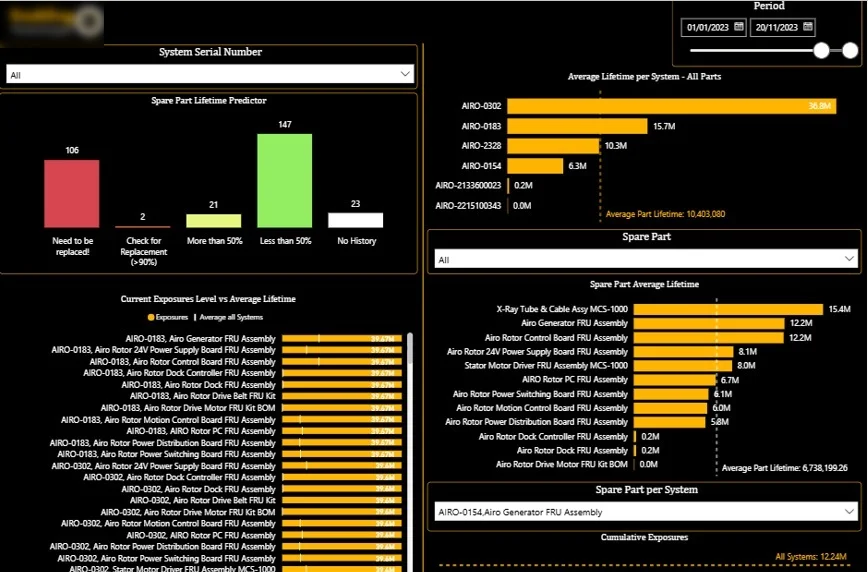
This dashboard includes:
This manufacturing operations dashboard developed by our Power BI specialists enables condition-based maintenance by making component wear and replacement timing fully transparent. By identifying parts operating beyond safe thresholds and aligning maintenance actions with real usage data, it reduces unplanned downtime, improves spare-part planning, and helps maintain stable production.
Manufacturing finance dashboards track the costs directly linked to production. They focus on operational expenses and key cost drivers to help finance and operations teams manage spending and maintain healthy margins.
These dashboards show how costs change over time, where expenses are concentrated across departments or projects, and which categories have the greatest impact on overall manufacturing performance.
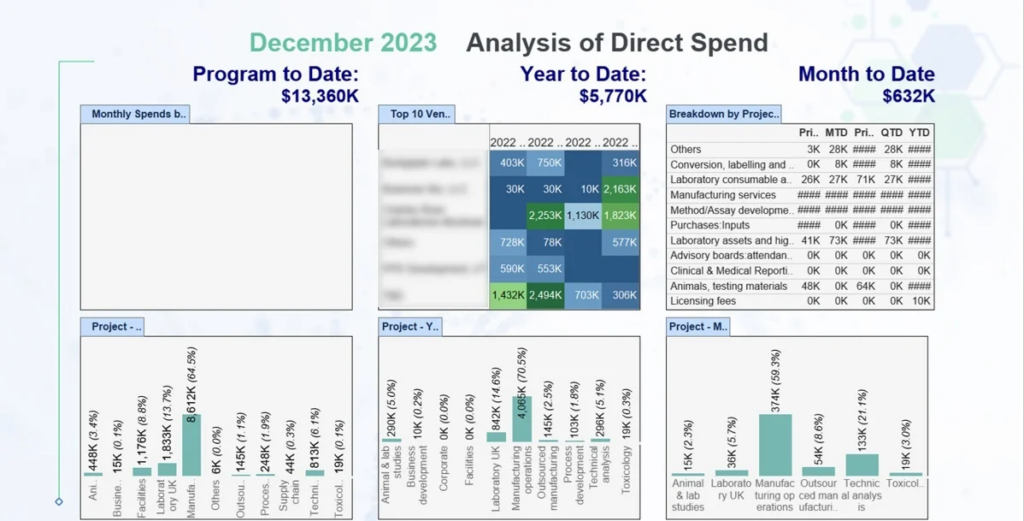
This dashboard includes:
Our BI experts developed a manufacturing finance dashboard developed by our BI experts that provides clear financial visibility into production-related costs. By showing how expenses evolve over time and where they are concentrated, it enables finance teams to identify overspending early, strengthen cost control, and make more informed decisions to protect profit margins in cost-intensive manufacturing environments.
Manufacturing CapEx dashboards track how capital is invested across the business and ensure spending remains aligned with long-term strategic plans. They are especially important in capital-intensive industries where plants, equipment, and infrastructure require significant upfront investment and ongoing asset replacement.
These dashboards show how capital budgets are allocated, where investment is concentrated, and whether projects remain within approved spending limits.
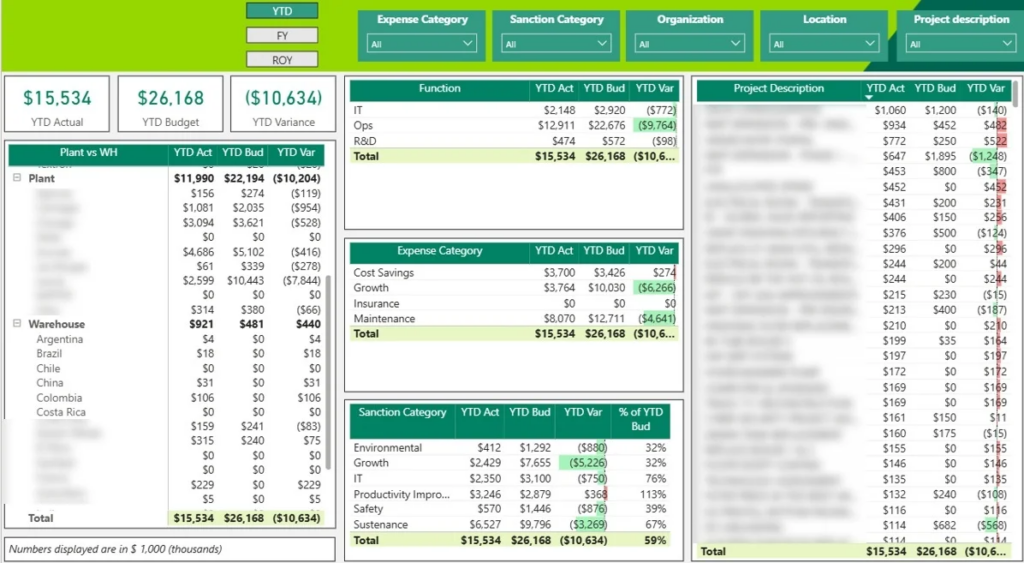
This dashboard includes:
Our manufacturing CapEx dashboard enables leadership teams to monitor whether investment commitments remain within the annual capital budget. By providing clear visibility into overspend risks and project performance, it supports better capital allocation decisions, stronger financial control, and more strategic prioritisation of long-term manufacturing investments.
Manufacturing inventory management dashboards track how much material, work-in-process, and finished goods are held across warehouses and storage locations. They focus on stock levels and available capacity to support effective production planning and order fulfilment.
These dashboards show where inventory is stored, how much space remains available, how quickly goods move in and out of the warehouse, and where bottlenecks or capacity constraints may arise.
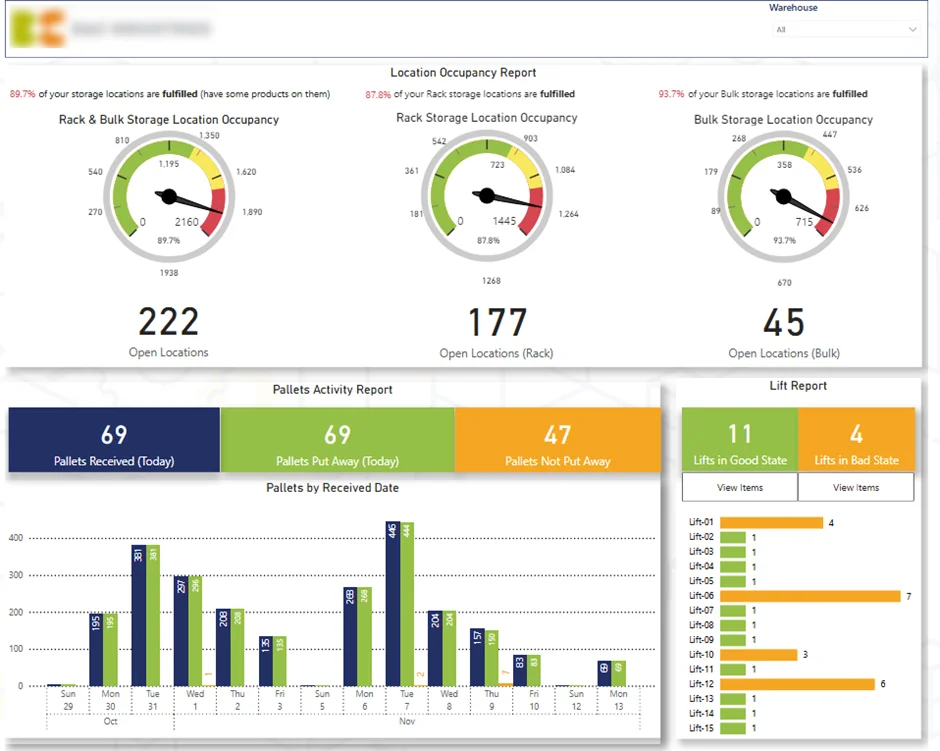
This dashboard includes:
Our dashboard gives warehouse and supply-chain teams visibility into inventory and storage capacity. By showing how much stock is on hand, how much space is available, and where inbound bottlenecks occur, it supports better inventory planning, faster put-away decisions, and smoother warehouse operations. As a result, manufacturers can avoid overfilling warehouses, reduce working capital tied up in stock, and keep inventory flowing efficiently to fulfil customer orders.
Manufacturing quality control dashboards monitor product quality throughout the production process. They concentrate on defects, rejections, and customer complaints to help teams understand where quality issues occur and how they evolve over time.
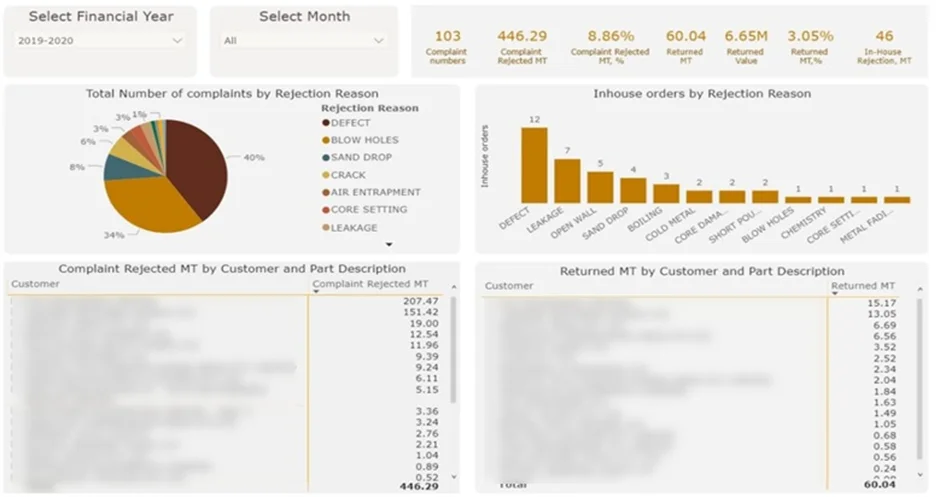
This dashboard includes:
Our data visualisation specialists built a manufacturing quality control dashboard that shows where defects occur most frequently and which issues generate the highest cost. It enables quality teams to prioritise corrective actions, reduce waste and rework, and address root causes more effectively. As a result, the business strengthens quality control, lowers rejection-related losses, and protects customer relationships through consistent product performance.
Manufacturing logistics dashboards oversee the movement of finished goods from the warehouse to the customer. They concentrate on fulfilment progress, shipping status, and on-time performance, allowing teams to address slowdowns quickly, prioritise urgent orders, and maintain dependable delivery performance.
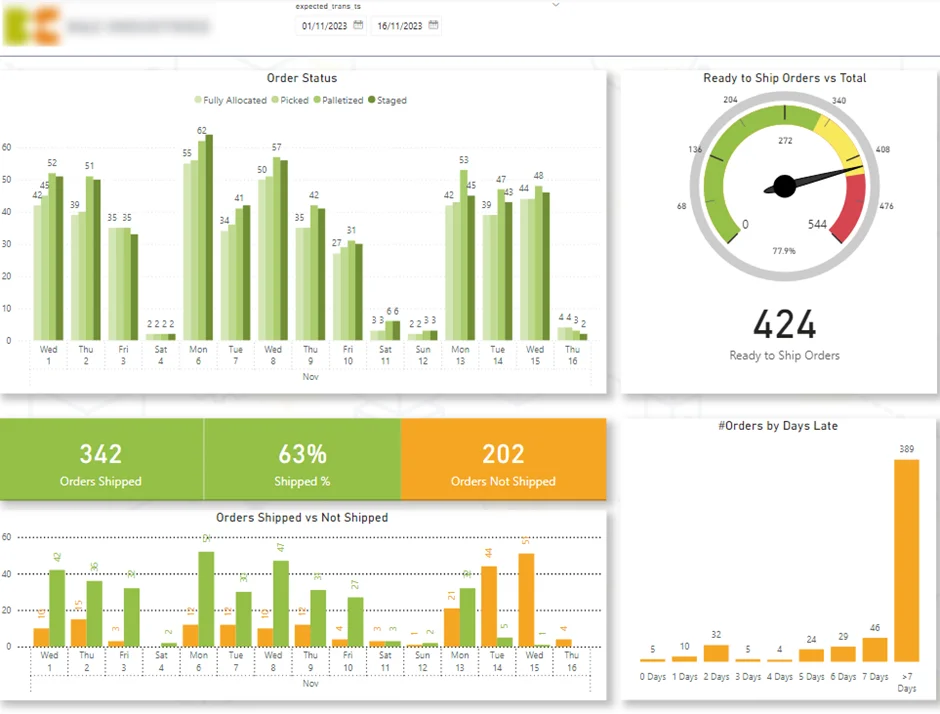
This dashboard includes:
Our manufacturing logistics dashboard developed by our Power BI experts specialists shows logistics teams outbound fulfilment performance. It enables proactive prioritisation, smoother order flow, and better service-level control. As a result, manufacturers improve on-time delivery, protect customer satisfaction, and increase overall warehouse efficiency.
Manufacturing sales dashboards monitor how revenue develops across products, customers, and business units. They focus on identifying the drivers behind sales performance and understanding how growth shifts over time.
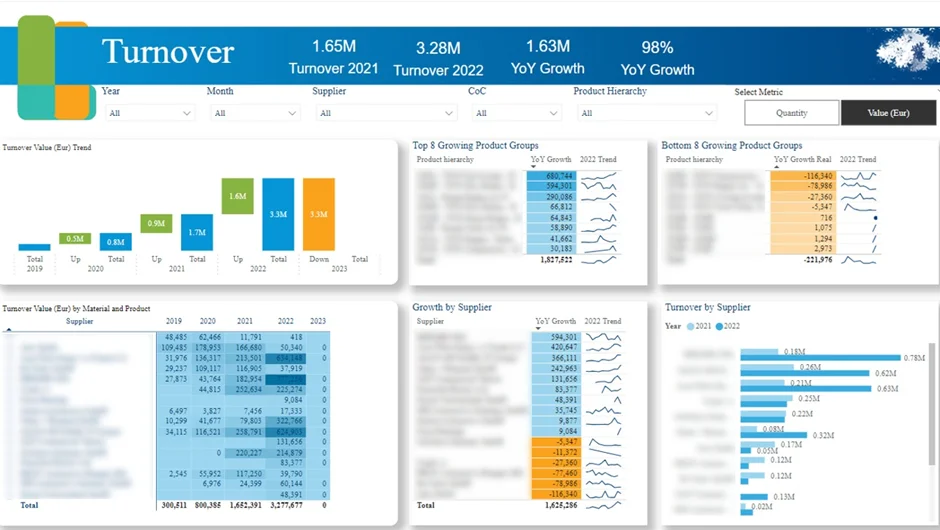
This dashboard includes:
Our manufacturing sales dashboard provides leadership with insight into what is driving revenue growth and where performance is weakening. By moving beyond topline revenue and analysing growth at supplier and product level, it supports earlier identification of market trends and proactive supply chain adjustments. As a result, the business can prioritise high-growth opportunities, address declining segments, and align commercial strategy with measurable sales outcomes.
Building a manufacturing analytics dashboard is less about visual design and more about structuring the right data so it supports real decisions on the shop floor and beyond. The goal is to connect operational, financial, and supply chain data into a single view that reflects how the business actually runs.
1. Define the purpose and users
Start by identifying who will use the dashboard and what problems it needs to solve. Operators, maintenance teams, planners, and executives all need different views. Clearly define the decisions the dashboard should support and select a focused set of KPIs that matter for those users.
2. Connect and integrate data sources
Manufacturing data typically sits across multiple systems. Dashboards often combine data from ERP, MES, quality systems, warehouse systems, and machine or IoT data. Using dedicated data connectors, these sources can be integrated into a single, structured model to avoid fragmented insights and conflicting numbers.
3. Prepare and model the data
Once connected, data needs to be cleaned, aligned, and structured. This includes creating relationships between production, quality, inventory, and finance data, and defining consistent metrics that can be trusted across the organisation.
4. Design clear, role-focused visuals
Visuals should be simple, purposeful, and easy to interpret at a glance. Key metrics belong at the top, trends in the middle, and detailed breakdowns below. Filters and drill-downs allow users to explore data by plant, line, product, or time period without cluttering the main view.
5. Deploy, secure, and improve
After publishing the dashboard, access should be controlled so users only see what’s relevant to their role. Feedback from real users helps refine KPIs, visuals, and interactions over time. The most effective manufacturing dashboards evolve as processes, priorities, and data maturity improve.
Manufacturing analytics software and tools help companies analyse data from across their operations. They are used to bring together information from production, quality, logistics, inventory, and finance so performance can be tracked in one place.
Most manufacturers work with several systems at once, such as ERP, MES, warehouse management systems, quality tools, and machine or IoT data. Analytics software connects these systems and turns their data into manufacturing data visualization that teams can use day to day.
With the right tools in place, manufacturers can move away from manual reporting and scattered spreadsheets. Instead, they gain a consistent way to monitor KPIs, spot issues early, and support ongoing improvement across the business.
While manufacturing dashboards offer significant benefits, organizations often encounter challenges that can limit their effectiveness. Addressing these challenges is key to realizing the full value of manufacturing dashboards.
By proactively addressing these common challenges, manufacturers can maximize the impact of their manufacturing dashboards and support a culture of data-driven decision-making.
The future of manufacturing analytics dashboards is being shaped by rapid advancements in technology, promising even greater value for manufacturers seeking to optimize their operations.
As these trends continue to develop, manufacturing dashboards will become even more integral to achieving operational excellence, supporting real-time data analysis, and driving innovation in the manufacturing industry.
Manufacturing analytics dashboards give teams the visibility they need to improve performance across operations, quality, inventory, logistics, and finance. When data is structured correctly and presented in the right way, it becomes a practical tool for faster decisions, better control, and continuous improvement.
At Vidi Corp, we design and build custom manufacturing analytics dashboards tailored to how your business actually operates. From connecting complex data sources to delivering clear, role-specific insights, we help manufacturers move from fragmented reporting to decision-ready analytics.
Contact us to discuss your manufacturing analytics needs and see how a custom dashboard can support smarter, data-driven decisions across your organisation!


