

If you are considering DOMO as a business intelligence tool, you are likely trying to answer a few practical questions: what DOMO is actually good at, how it compares to other BI tools, and whether it makes sense for your reporting needs.
This article is written to help you understand how DOMO is used specifically for business intelligence. We focus on its DOMO’s BI capabilities, key features, pricing, and real-world dashboard examples across marketing, finance, and sales. The goal is to give you enough clarity to decide whether DOMO is the right platform for your organisation, without getting lost in product marketing or unnecessary technical detail.
As the #1 rated BI consultancy on G2, we work with business intelligence tools every day. We have delivered 1,000+ BI dashboards for 600+ clients, including Google, Heineken, and Dermalogica. This hands-on experience allows us to objectively compare DOMO with other tools and explain where it performs well, where it has limitations, and when it is, or isn’t, the right choice for a BI implementation.
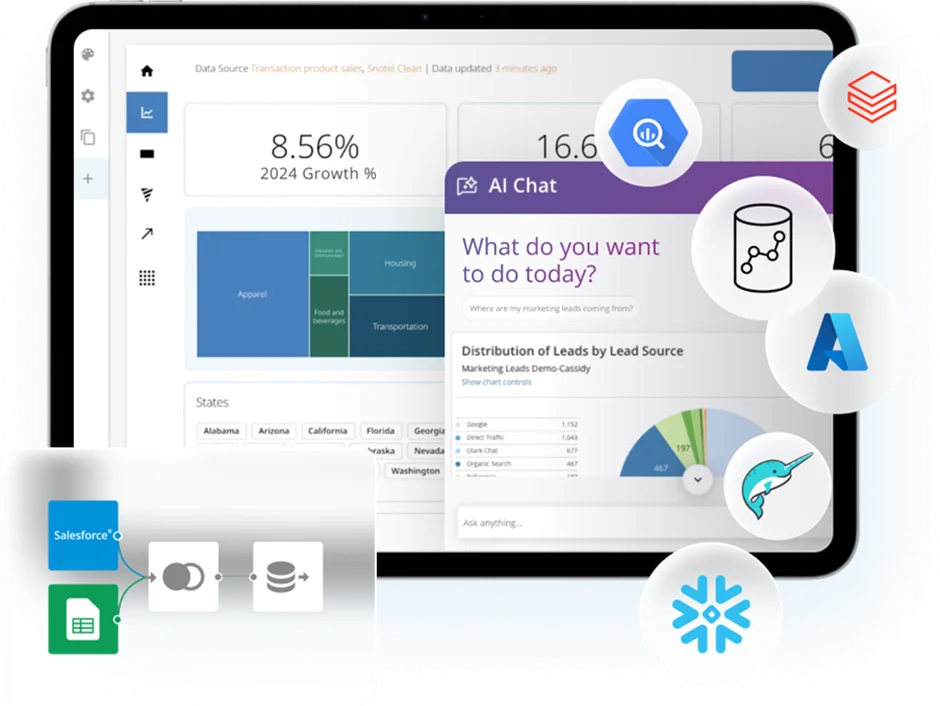
DOMO is a cloud-based data platform designed to help businesses turn data into decisions and actions.
The core component of DOMO is business intelligence, where teams build interactive dashboards to monitor KPIs, analyze performance, and explore data from multiple sources in one place.
Beyond dashboards, DOMO has expanded into apps and workflows. These allow teams to design data entry forms, capture inputs from users, and trigger automated workflows. Common use cases include submitting and approving requests, routing tasks for review, and integrating with third-party tools such as Asana or other operational systems.
DOMO also has AI embedded throughout the platform. DOMO AI can be used inside workflows through AI agents to automate tasks like image-to-text extraction, which is useful for processing invoices or documents. It can also answer ad-hoc questions directly from the same datasets used in DOMO dashboards. In addition, DOMO provides pre-built AI models for use cases such as time-series forecasting, sentiment analysis, and other advanced analytics.
This article is specifically about using DOMO for business intelligence, so we won’t go into details about DOMO AI and workflows. If you are interested in those, you can contact our DOMO consultants to learn more.
DOMO’s business intelligence capabilities focus on bringing data together, making it easy to analyze, and delivering insights in real time.
DOMO can connect to data from both cloud-based and on-premise systems, allowing businesses to work with marketing, sales, finance, product, and operational data in one environment. Once connected, data can be combined into a unified view that supports consistent reporting across teams.
The platform enables users to visualize data through interactive dashboards that are designed to be explored, not just viewed. Metrics can be filtered, segmented, and drilled into, making it easier to understand what is driving performance and where attention is needed.
DOMO also supports real-time monitoring and alerts, so users can be notified when key metrics change or cross-defined thresholds. This ensures that insights are delivered at the right time and decisions are made based on current data rather than static reports.
DOMO offers 2,000+ pre-built connectors, which is one of its biggest differentiators compared to other BI platforms. These connectors cover cloud applications, marketing platforms, CRMs, finance systems, databases, and many niche tools, reducing the need for custom integrations.
By combining a large connector library with flexible refresh and blending options, DOMO provides a strong data foundation for dashboards, alerts, workflows, and AI-driven analysis.
DOMO Workbench is a desktop-based tool used to connect DOMO to on-premise data sources that are not directly accessible from the cloud. It is typically used when data sits behind firewalls, on local servers, or in internal databases that cannot be exposed publicly.
Workbench allows teams to securely extract data from sources such as on-premise databases, Excel and CSV files, and legacy systems, and push that data into DOMO on a scheduled basis. This makes it possible to keep on-premise data in sync with cloud data, enabling unified dashboards and analytics without changing existing infrastructure.
DOMO Stories is a data storytelling feature that allows teams to present insights in a structured, narrative format rather than standalone dashboards.
With Stories, users can combine charts, KPIs, text, and images into guided views that explain what the data means and why it matters. This makes it easier to communicate insights to executives and non-technical stakeholders, align teams around key takeaways, and turn dashboard data into clear, decision-focused narratives.
Magic ETL is DOMO’s no-code data transformation tool used to prepare and shape data before it is analyzed.
It allows users to clean, join, filter, and transform data using a visual, drag-and-drop interface, without writing SQL or scripts. Magic ETL is commonly used to standardise data from multiple sources, apply business logic, and create analytics-ready datasets that feed directly into DOMO dashboards, alerts, and workflows.
Magic ETL has some limitations around the complexity of data transformations, but you can work around these by using SQL ETL, where you can write custom formulas for data transformations.
DOMO Writeback allows users to write data back to source systems directly from DOMO dashboards, turning analytics into an interactive, two-way experience.
This capability is especially useful for planning and forecasting use cases, such as financial forecasting, where directors can review actuals in a dashboard and enter forecast adjustments without leaving DOMO. Writeback is currently supported for around 25 connectors, including Google Drive, OneDrive, Salesforce, and Smartsheet. This functionality is relatively unique to DOMO and is not available in most other ad-hoc reporting tools, such as Power BI, Tableau, or Looker Studio.
Personalised Data Permissions in DOMO allow organisations to control exactly what data each user can see, while still working from shared dashboards and datasets.
Permissions can be applied based on roles, teams, or individual users, ensuring that people only access data relevant to their responsibilities. This makes it possible to safely share the same reports across departments or regions, protect sensitive information, and scale analytics across the business without duplicating dashboards or data models.
DOMO Apps extend dashboards by turning insights into interactive, action-driven experiences.
Within apps, teams can visualize data using DOMO Stories and enrich them with interactive elements such as buttons and controls. These buttons can launch DOMO workflows, enabling users to take action directly from the app—for example, submitting a request, approving an item, or triggering an automated process. This allows businesses to move beyond passive reporting and embed analytics directly into day-to-day operations.
DOMO Embedded Analytics allows businesses to embed DOMO dashboards and insights directly into external applications, portals, or customer-facing products.
With embedded analytics, companies can securely share interactive reports with customers, partners, or external users without giving them full access to the DOMO platform. This makes it possible to deliver data-driven experiences inside SaaS products, client portals, or internal tools, while maintaining control over data access, permissions, and branding.
DOMO Alerts are designed to notify users when data changes and requires attention, without the need to constantly monitor dashboards.
Alerts can be set on metrics, thresholds, or trends, and are triggered automatically when conditions are met, such as a KPI dropping below target or exceeding a defined limit. Notifications can be delivered through the DOMO platform and other supported channels, ensuring the right people are informed at the right time.
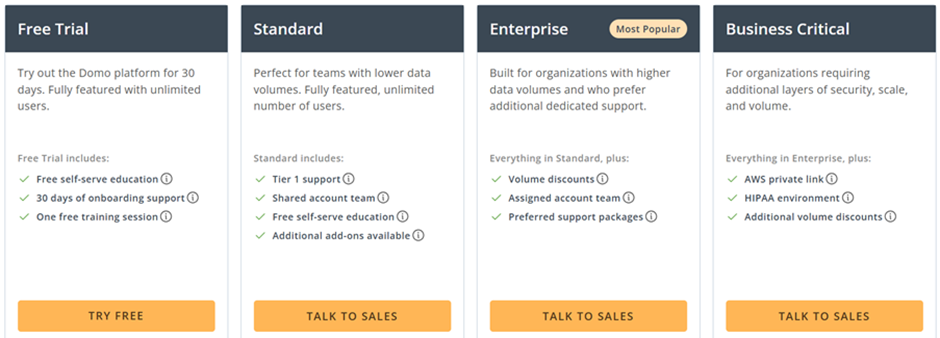
DOMO pricing is not fixed or publicly listed and is based on a custom, usage-driven model rather than per-seat licensing.
Based on our experience, DOMO sales reps negotiate the subscription price individually with every organization. This pricing strategy is obviously targeted at enterprise-level customers and more mature data teams.
Some of our customers reported paying around $10,000-20,000 per year for their DOMO license but the exact price depends on your data volume.
If at this point you feel like DOMO isn’t for you or it is too expensive, you may consider some alternatives. At Vidi Corp, we also provide business intelligence consulting services in Power BI, Tableau, and Looker Studio, so we can confidently help you compare DOMO to them.
Power BI is the most widely used self-service reporting tool. It costs $14 per user per month and provides almost all the same features as DOMO. You can not create apps and workflows in Power BI but you can Microsoft Power Apps and Power Automate for this purpose, which are also very cost-effective.
Power BI supports 250+ native connectors, works well with large data volumes, and integrates well with all the other Microsoft technologies. It also benefits from strong AI assistance and familiarity for teams with Excel experience, making adoption faster.
Tableau is known for its best-in-class data visualisation capabilities and is often preferred for deep analytical work and complex visuals such as geospatial analysis. It scales well with large datasets and integrates tightly with Salesforce. However, it is more expensive than Power BI (license costs $15-70 per user per month) and can feel more technical and overwhelming for new users despite its flexibility.
Looker Studio is a free, fully web-based reporting tool most commonly used for marketing analytics. It integrates well with Google products and has many low-cost third-party connectors. Looker Studio works best for simple dashboards and external reporting, such as sharing reports with clients or investors, but it has limited customisation and no on-premise data support.
On the other hand, if you feel like DOMO is potentially for you, you might be interested in seeing examples of DOMO dashboards. We have some DOMO business intelligence dashboards for you below to demonstrate how your data could be visualized inside DOMO.
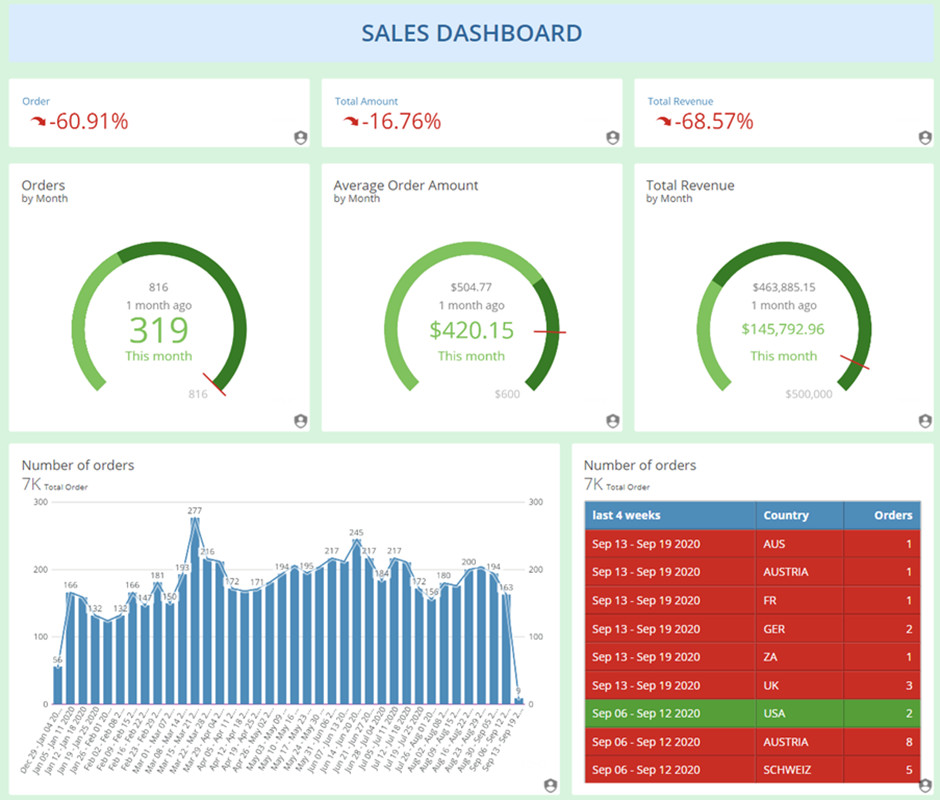
DOMO works well for marketing dashboards because it connects to a large number of marketing platforms and allows data to be blended natively, without relying on third-party tools. This makes it easier to analyse performance across channels and tie marketing activity directly to business outcomes.
In one of our marketing analytics case studies, we built a DOMO dashboard that combined data from multiple Google Ads accounts, Google Analytics properties, e-commerce platforms, and call tracking systems across several markets. The dashboard standardised currencies, blended marketing and revenue data, and allowed stakeholders to compare performance across countries, channels, and time periods. As a result, the client gained clear visibility into which campaigns and channels were driving profitable growth and could make faster, data-driven decisions without manual reporting.
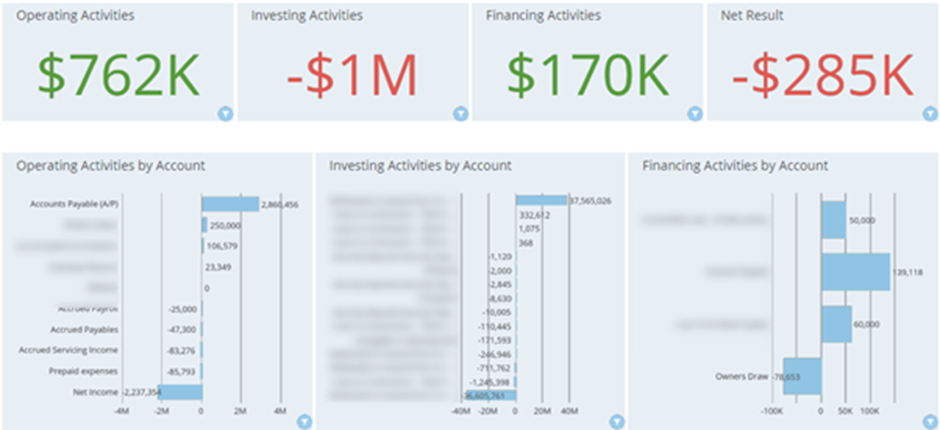
DOMO is a strong fit for finance dashboards because it can connect directly to accounting systems, ERPs, and spreadsheets, and blend financial data with operational and commercial metrics in one place. This enables finance teams to move beyond static reports and monitor performance in near real time.
In one of our finance analytics case studies, we built a DOMO dashboard using data from QuickBooks Online to analyse P&L, balance sheet, and cash flow performance. The dashboard compared year-to-date results with prior periods, highlighted monthly variances across key accounts, and gave finance leaders clear visibility into cash flow drivers. This allowed the client to identify trends earlier, improve forecasting accuracy, and reduce time spent on manual financial reporting.
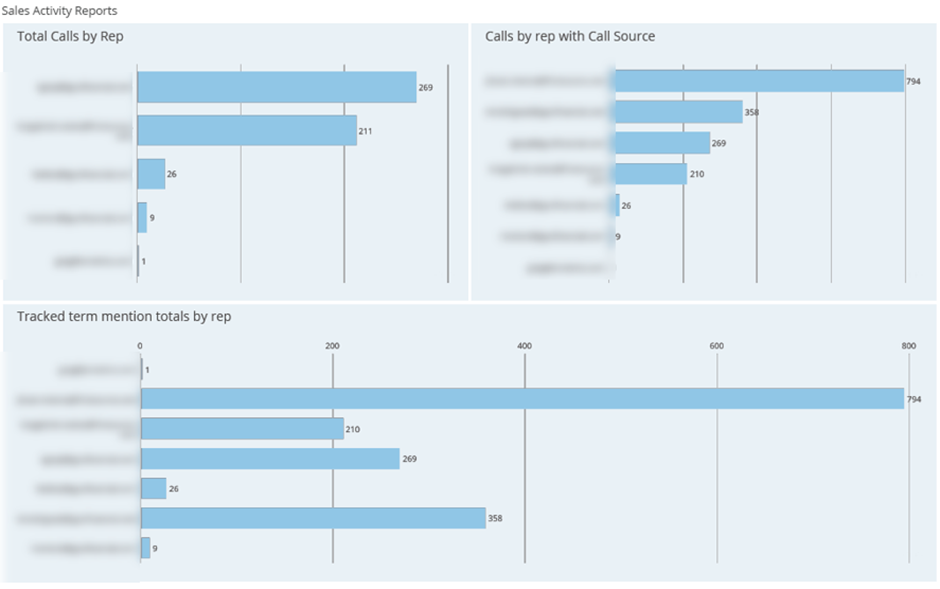
DOMO is well-suited for sales and CRM dashboards because it can combine pipeline, activity, and revenue data from multiple systems into a single, real-time view. Sales teams can analyse performance across reps, regions, and deal stages while keeping forecasts and KPIs continuously up to date.
In one of our sales analytics case studies, we built a DOMO dashboard using data from HubSpot to track sales activities, pipeline value, and forecasted revenue. The dashboard analysed booked meetings, calls, and deal progression by sales rep, helping sales leaders identify leading indicators of future revenue. This gave management better forecasting visibility and enabled more proactive sales team management based on live CRM data.
There are several ways to get started with DOMO, depending on how quickly you want to see results and how much internal expertise you have.
If speed is a priority, working with DOMO consultants is the fastest way to design and deliver dashboards, workflows, and integrations. Experienced consultants can help define use cases, connect data sources, and build scalable solutions without a long learning curve.
For a quicker start, you can also explore pre-made dashboards and apps in the DOMO App Store. These templates cover common use cases such as marketing, sales, and finance reporting, and can be customised to fit your data.
Finally, DOMO provides free training through DOMO University, which includes guided courses for beginners and advanced users. These resources help teams learn how to build dashboards, transform data, and use advanced features at their own pace.
DOMO is a strong business intelligence platform for organisations that need to connect many data sources, work with real-time dashboards, and extend analytics into alerts, writeback, and apps. Its connector ecosystem and interactive BI capabilities make it a good fit for complex, enterprise-level reporting, while its pricing and technical depth mean it should be evaluated carefully against alternatives.
If you are considering DOMO, our BI consultants at Vidi Corp can help you decide and implement it effectively. We work across DOMO, Power BI, Tableau, and Looker Studio and can support you with tool selection, dashboard development, or migrations. Get in touch to discuss your use case and see whether DOMO is the right BI platform for your organisation.


