

Business process automation is the practice of using technology to automate repetitive workflows such as approvals, document processing, data entry, and reporting. Instead of employees performing routine administrative tasks manually, automated systems execute these actions based on predefined rules and triggers. Many business process automation use cases involve streamlining everyday operations across departments to improve efficiency, reduce errors, and ensure processes run consistently.
As a business automation consulting company, we have developed numerous workflow automation solutions for finance teams, HR departments, operations teams, and marketing organisations that needed to streamline manual processes. These solutions connect business systems, automate approvals, process documents, and generate reports automatically, allowing teams to manage growing workloads with greater efficiency and visibility.
This article explains what business process automation is, why it is important for modern organisations, and common business process automation use cases across departments such as finance, HR, operations, customer service, marketing, and IT. It also covers practical automation examples, real-world use cases, key benefits, implementation steps, and the software tools used to build effective business process automation solutions.
Business process automation (BPA) is the use of technology to automate repetitive tasks within business workflows. Instead of employees performing the same administrative steps manually, automated systems execute these tasks based on predefined rules and triggers.
Automation can handle activities such as approvals, data entry, document processing, report generation, and system updates. For example, when a request form is submitted, an automated workflow can route it to the correct manager for approval, update records automatically, and notify the requester of the outcome.
Business process automation is commonly used across departments such as finance, human resources, operations, marketing, and customer support. By connecting different systems and automating routine tasks, organisations can reduce manual effort, improve accuracy, and ensure processes run consistently.
Many tools are available for business process automation, ranging from simple workflow platforms to advanced robotic process automation systems. These tools help organisations automate approvals, manage documents, connect systems, and process data without relying on manual work. Choosing the right platform depends on the complexity of workflows, integration requirements, and the systems already used within the organisation.
At Vidi Corp, we primarily build automation solutions using Power Apps, Power Automate, and Power BI. We have extensive experience implementing automation projects with these tools because they integrate easily with business systems and allow organisations to automate workflows, manage data, and create reporting dashboards within a single ecosystem.
Power Apps is used to build custom business applications that replace manual processes such as spreadsheets, email requests, or paper forms. For example, we develop apps for processes like leave requests, expense submissions, inventory management, or internal service requests. These apps provide structured forms, centralised data storage, and controlled workflows that improve visibility across teams.
Power Automate is used to automate workflows between systems and applications. It allows us to create automated processes for approvals, document handling, notifications, reporting, and data transfers. For example, we use Power Automate to automatically route approval requests, capture documents from emails, generate reports on a schedule, or trigger alerts when certain business conditions occur.
Power BI complements automation by providing reporting and analytics dashboards built on top of automated data pipelines. After workflows collect and process data, our Power BI experts create dashboards that allow managers to monitor performance, analyse trends, and make decisions based on real-time insights.
By combining these three tools, we help organisations automate complex workflows, centralise operational data, and build reporting systems that improve visibility across the business. This approach allows companies to scale operations more efficiently while reducing administrative workload and maintaining consistent processes.
Automation has become increasingly important as businesses manage growing volumes of data, transactions, and operational tasks. Without automation, many organisations struggle to maintain efficiency as their operations expand. Automated workflows help companies manage complex processes more reliably while reducing dependence on manual work. By streamlining repetitive tasks, automation leads to improved efficiency across business operations, resulting in faster, more accurate processes and better resource utilization. By streamlining repetitive tasks, automation leads to improved efficiency across business operations, resulting in faster, more accurate processes and better resource utilization.
Another key reason automation is important is scalability. As businesses grow, the number of internal processes and customer interactions increases. Automation allows organisations to handle larger workloads without significantly increasing administrative effort, making it easier to scale operations while maintaining consistent service quality.
Automation also supports digital transformation by connecting systems, data, and teams more effectively. When processes are automated, information flows faster between departments, enabling quicker responses to operational challenges and market opportunities.
Finally, automation helps organisations remain competitive. Businesses that automate routine processes can operate faster, reduce operational costs, and allocate more resources to strategic initiatives such as innovation, customer experience, and growth. Business leaders rely on automated processes and data tracking to make informed strategic decisions and monitor overall business performance.
Business automation can be applied across many departments to streamline routine work and improve operational efficiency. By automating repetitive processes, organisations can reduce manual effort, improve accuracy, and ensure workflows run consistently. In our projects, we typically implement these solutions using Power Apps, Power Automate, and Power BI to connect systems, automate workflows, and provide clear reporting.
Many internal processes require approvals, such as expense claims, purchase requests, or leave applications. Without automation, these requests are often sent through email, which creates delays and makes it difficult to track their status.
We typically solve this by building Power Apps forms where employees submit requests and attaching Power Automate workflows that route approvals automatically to the correct manager. The system records each approval step and sends notifications once a decision is made. This approach speeds up approvals, eliminates follow-up emails, and ensures every request is tracked in a central system.
Businesses frequently manage documents such as invoices, contracts, and operational reports. Manually entering information from these documents into spreadsheets or systems is slow and prone to errors.
Using Power Automate, we build workflows that capture documents from email or shared folders, extract key data fields, and store the information in structured systems such as SharePoint or databases. This removes manual data entry, improves accuracy, and allows teams to process large volumes of documents much faster.
Automation is often used to manage routine customer communications such as confirmation emails, feedback surveys, or service notifications.
For example, our Power Automate experts build Power Automate workflows that automatically send follow-up surveys when a support ticket is resolved or trigger confirmation emails after a form submission. These automated communications ensure consistent customer interactions while reducing the need for manual follow-ups.
Many organisations rely on data to support decision-making but still collect and compile reports manually. This process can be time-consuming and often leads to outdated reports.
We automate data pipelines using Power Automate to collect information from multiple systems and then build Power BI dashboards that present the data in real time. This ensures managers always have access to up-to-date insights without spending time preparing reports manually.
Automation can also support project management by turning incoming requests into structured tasks automatically.
For example, we often use Power Automate to capture requests from emails or forms and create tasks in project management tools. The task details, deadlines, and attachments are populated automatically, and the responsible team member receives a notification. This ensures requests are captured consistently, improves visibility into workloads, and helps teams manage projects more efficiently.
Business process automation can be applied across many departments to streamline repetitive workflows and improve operational efficiency. By automating routine tasks, organisations can reduce manual effort, improve data accuracy, and ensure processes run consistently as the business grows.
Below are several real-world examples of how automation is used in areas such as finance, human resources, operations, customer service, marketing, and IT. Each example shows how businesses can replace manual processes with automated workflows that save time, improve visibility, and support better decision-making.
Finance teams handle large volumes of repetitive work such as invoice processing, expense approvals, and financial reporting. When these processes rely on emails and spreadsheets, they slow down approvals and make it difficult to maintain accurate records. Business process automation helps finance teams streamline document handling, improve data accuracy, and ensure financial information is always up to date.
Invoice processing automation handles repetitive tasks such as capturing invoices from email, routing them for approval, and updating financial records. Automating these steps reduces delays, improves accuracy, and ensures finance teams maintain up-to-date records.
We implemented this solution for a finance team that was overwhelmed by manually handling supplier invoices. Because the process relied on manual actions, approvals were delayed, records were not always updated on time, and supplier payments risked being late.
We automated the workflow so incoming invoices were captured automatically from email and stored in a central document library with searchable metadata. The system then routed approval requests to the relevant manager, who could approve or reject directly from a notification. Once approved, the finance records were updated automatically.
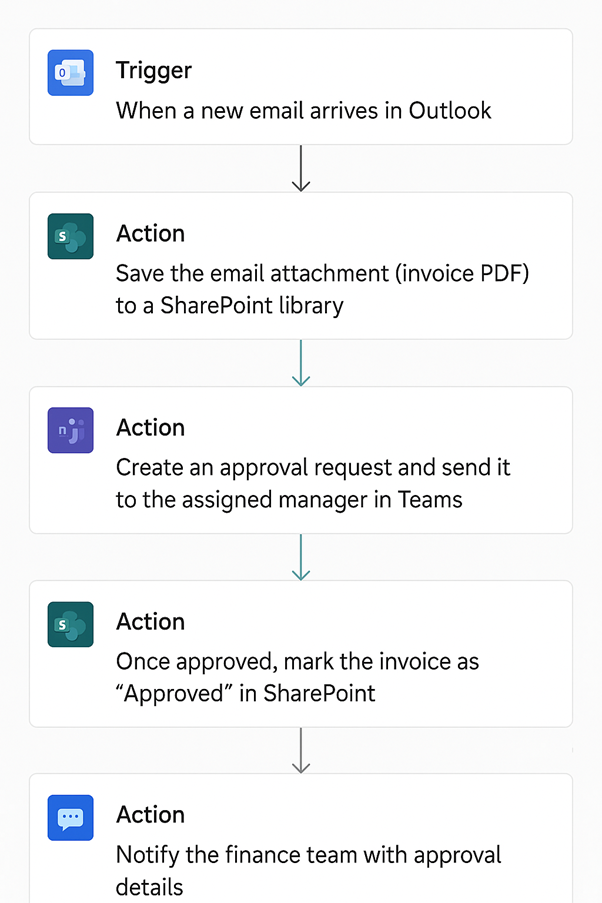
This automation eliminated manual invoice handling, accelerated approvals, ensured all invoices were centrally stored, and helped the company maintain accurate and audit-ready financial records.
Expense approvals are one of the most common internal finance workflows. Without automation, employees submit claims through emails or spreadsheets, which often leads to delays and poor visibility.
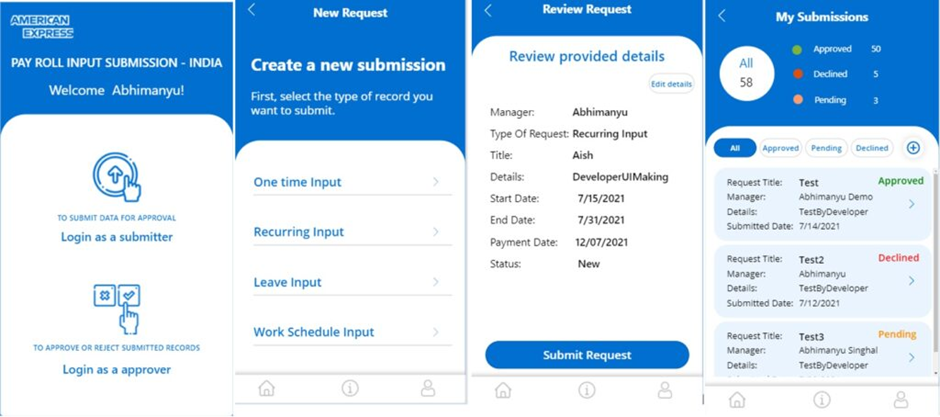
Our Power Automate experts implemented a centralised expense approval system for a finance department where claims were previously submitted via email attachments.
Employees now submit expenses through a simple application where receipts are attached digitally. Requests are automatically routed to the correct manager for approval.
The automation reduced approval times by over 65%, eliminated follow-up emails, and gave the finance team a single view for expense records.
Human Resources departments manage many internal processes such as employee onboarding, leave management, payroll administration, and recruitment. In many organisations, these processes still rely on emails, spreadsheets, and manual approvals. As the workforce grows, these manual workflows become harder to manage and often lead to delays, missed requests, and limited visibility for managers.
Business process automation helps HR teams standardise these activities by introducing structured request forms, automated approval workflows, and centralised tracking systems. Automating routine HR processes reduces administrative workload, improves transparency, and ensures that employee requests are processed consistently and on time.
Leave management is one of the most common HR processes that benefits from automation. Without a structured system, leave requests are often submitted through emails and tracked manually in spreadsheets. This approach makes it difficult for HR teams to monitor requests, while managers struggle to understand team availability when planning projects.
We worked with a company that had no centralised system for managing employee leave requests. Employees emailed managers or HR when requesting time off, and HR manually tracked requests in an Excel sheet while managers approved them through email replies.
This process often caused missed requests, unclear approval statuses, and limited visibility into team availability. In some cases, overlapping leaves disrupted project planning.
Our RPA consultants implemented an automated leave request workflow where employees submit requests through a structured form. Requests are automatically routed to managers for approval, and the status is updated in a central list visible to HR.
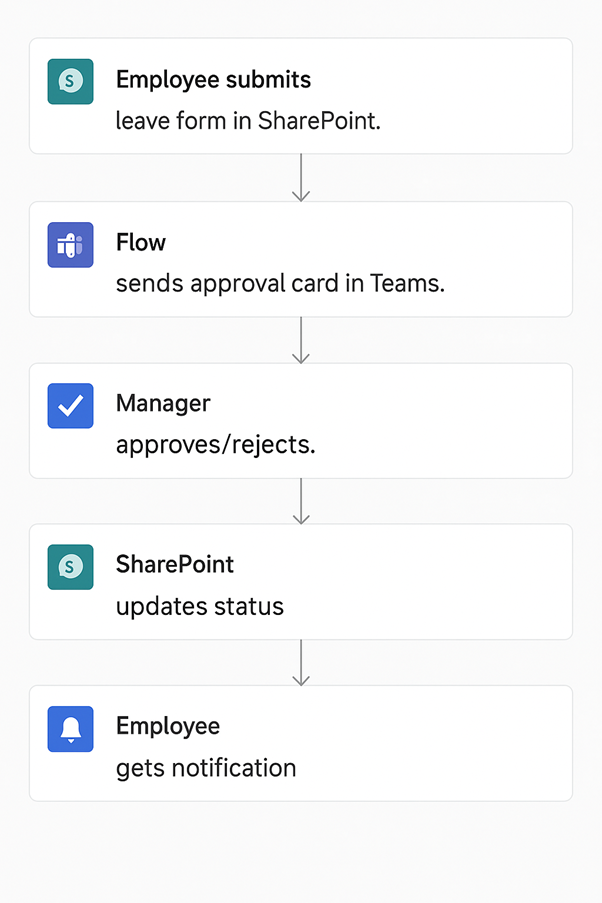
Employees receive instant notifications about approval decisions, and managers get reminders for pending requests. This automation eliminated manual tracking, ensured no requests were missed, and gave HR and managers a clear overview of team availability.
Tracking employee working hours is an important HR and operations process used to monitor attendance, calculate payroll, and understand workforce productivity. In many organisations, employees record their working hours manually in spreadsheets or timesheets. This approach often leads to missing entries, inaccurate records, and additional administrative work for HR teams.
We implemented an automated attendance tracking system that captures employee login and logout activity automatically. Each entry is stored in a central system with details such as employee name, login time, logout time, and total working duration. The system also generates daily and weekly reports that managers can review through dashboards or exported reports.
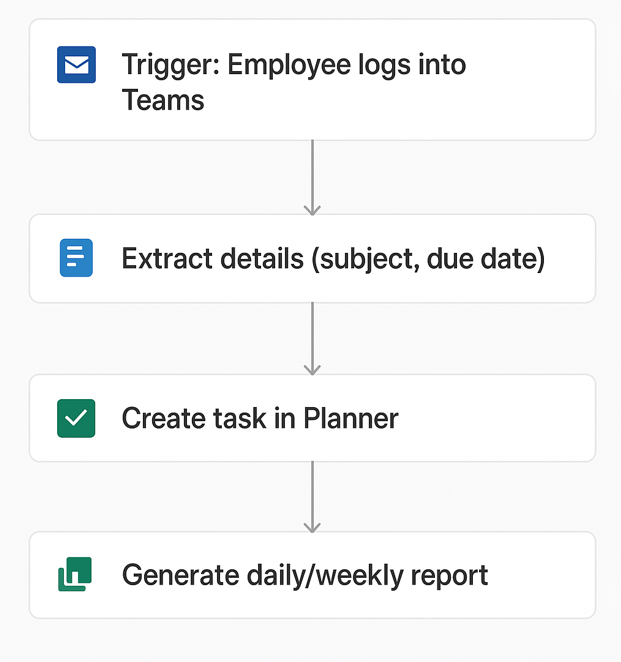
The automation improved attendance accuracy and eliminated manual timesheets. HR teams reduced administrative work, while managers gained real-time visibility into employee activity and productivity.
Operations teams manage many routine processes such as reporting, file organisation, and task coordination. Automating these workflows helps organisations improve efficiency and ensure processes run consistently without manual intervention.
Scheduled reporting is a common automation use case for teams that need decision-makers to receive timely updates without relying on manual follow-up. In many organisations, dashboards already contain the right insights, but reports still have to be exported and shared manually. This often creates delays, inconsistent formatting, and dependency on one person to distribute updates.
We worked with a company whose management team relied on weekly dashboards to track performance. Although the data was already available, the team still had to export reports or screenshots manually and email them to executives each week.
We automated the reporting workflow so dashboards are exported automatically and delivered to executives on a schedule.
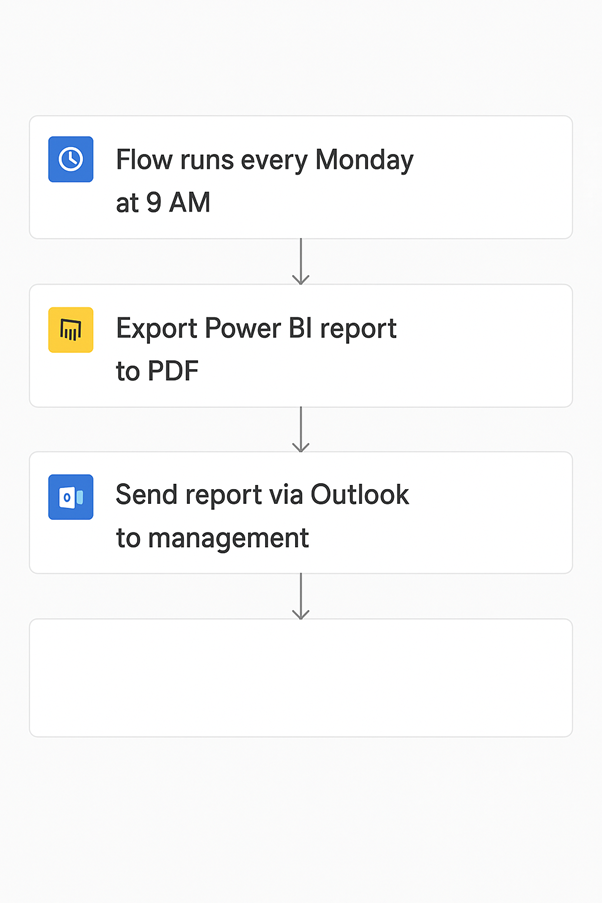
With this automation, executives received consistent reports on time every week without depending on manual effort from the sales team. It saved hours of repetitive work, removed inconsistencies in report formatting, and reduced the risk of missed updates when key staff were unavailable. Leadership gained faster access to performance insights, which supported quicker and more reliable decision-making.
Automating task creation helps teams turn incoming requests into structured work without manual admin. Instead of reading emails, copying details, and assigning tasks by hand, businesses can convert requests into ready-to-action tasks automatically. This reduces repetitive work, improves consistency, and helps teams focus more on delivery.
Our team built this type of automation for project managers who regularly received work requests by email. They previously had to open each message, interpret the request, create a task manually, copy over the subject, description, and deadline, and assign it to the right person. This process took time, created room for errors, and slowed down project execution.
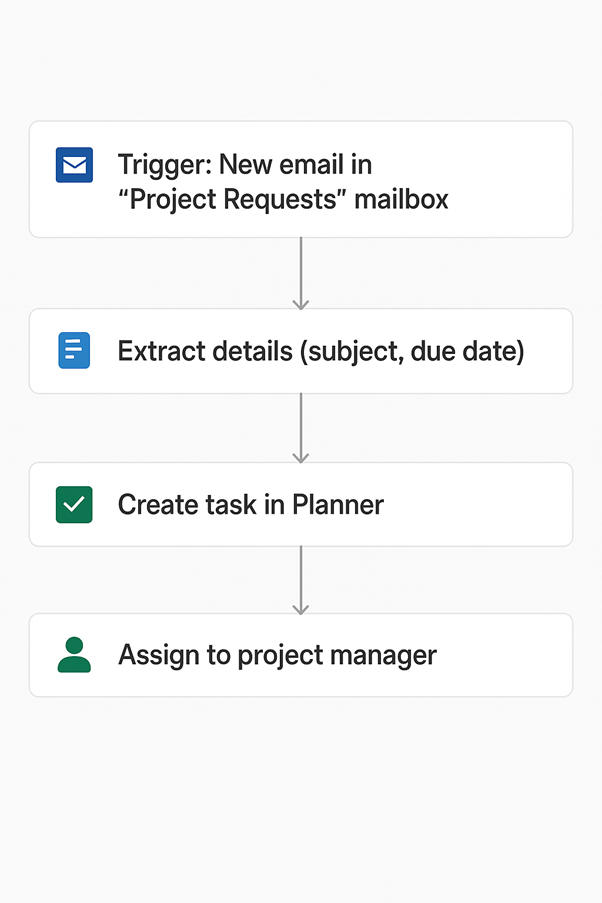
This automation saved project managers significant time by removing repetitive task entry. It improved accuracy because task details were captured automatically from emails and reduced the risk of missing requests. Teams also gained a centralised view of incoming work, enabling faster task assignment, better project coordination, and higher overall productivity.
Unstructured document storage can slow productivity and make it difficult to locate important files. When employees store documents in shared folders without organisation, files quickly become difficult to manage.
We solved this problem for an organisation where employees across different departments were saving files into one shared folder. Over time, the folder became cluttered with no naming conventions or organised subfolders. We built an automated workflow that monitored the folder, identified file types, and moved each file into the correct subfolder automatically.
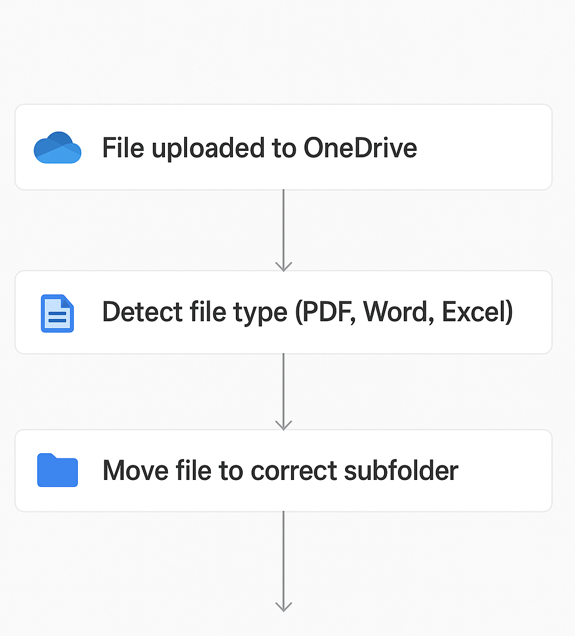
This automation made documents much easier to find and reduced the risk of files being misplaced or overlooked. Employees spent less time searching through disorganised folders, which improved productivity and reduced frustration. It also supported better collaboration by giving teams a cleaner file structure that could scale across projects and departments.
Customer support teams rely on feedback to measure service quality and improve processes. Automation ensures feedback is collected consistently and stored in a central system for analysis.
Customer feedback collection is an important support process because it helps businesses measure satisfaction and identify service issues after tickets are resolved. When feedback requests are sent manually, teams often forget to follow up, emails are inconsistent, and responses end up scattered across inboxes or spreadsheets. This makes it difficult for managers to measure customer satisfaction accurately or spot trends over time.
We worked with a support team that wanted to collect customer feedback after resolving tickets. Our team automated the entire workflow by triggering a survey email whenever a ticket was marked as resolved. Customers received a standardised message with a feedback form, and all responses were stored in a central system for tracking and analysis.
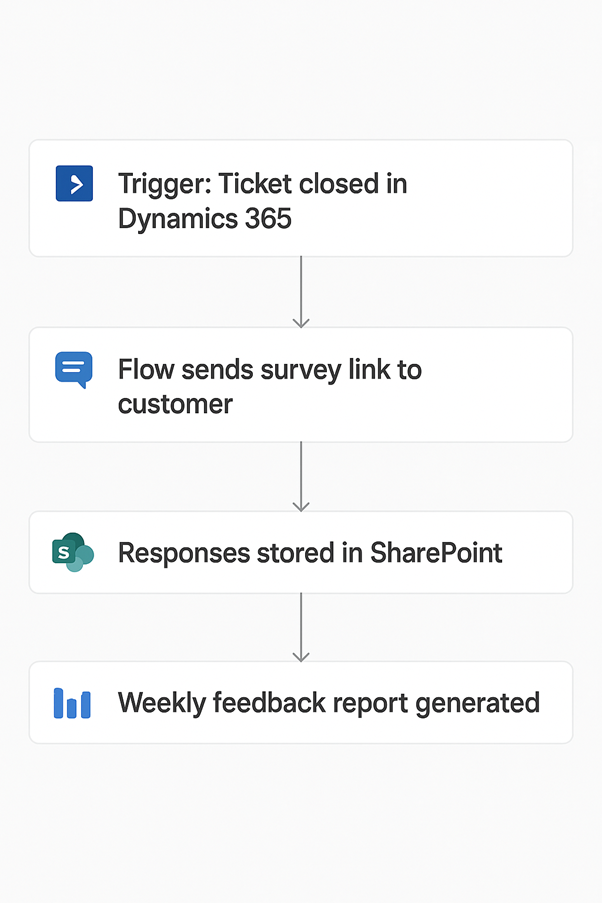
The automation ensured every resolved ticket triggered a feedback request, which improved consistency and increased response rates. It saved the support team time by removing manual follow-up work and gave managers a clear, centralised view of customer satisfaction data. This made it easier to identify service issues, track trends, and improve support processes over time.
Marketing teams must monitor brand mentions and maintain consistent content publishing. Automation helps teams respond quickly to customer interactions and manage campaigns more efficiently.
Social media monitoring helps marketing teams track what customers, partners, and industry voices are saying about their brand online. When this is done manually, team members have to check platforms repeatedly throughout the day, which is inefficient and easy to miss. As a result, customer questions, complaints, or positive mentions may go unnoticed for too long.
Our team worked with a marketing team that needed to monitor the company’s online reputation and customer engagement. Our team built an automated workflow that detects every new brand mention and sends a real-time alert to a dedicated team channel. Each notification includes the post content, user details, timestamp, and a direct link so the team can review and respond quickly.
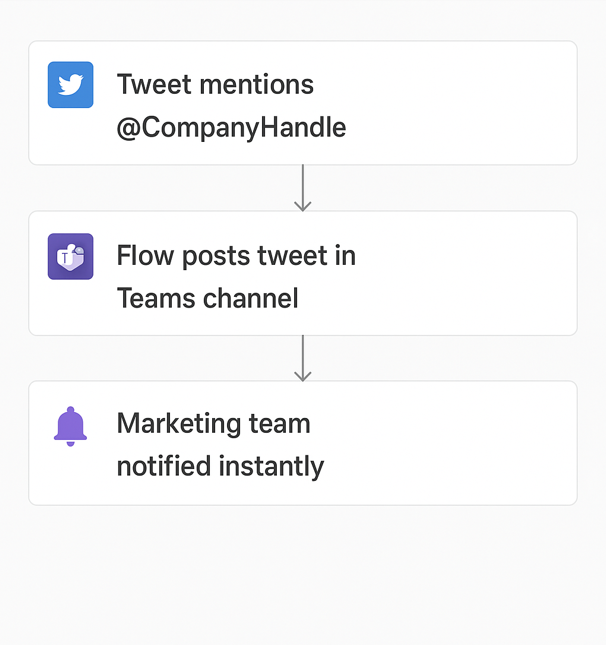
The automation gave the marketing team instant visibility into brand mentions without constant manual checking. It improved response times, reduced the risk of missed customer interactions, and helped the company maintain a stronger online reputation. It also centralised social media monitoring in one place and created a scalable setup for broader social listening in the future.
Social media post scheduling helps marketing teams plan, queue, and publish content automatically at the right time. Without automation, posts are often published manually, which makes the process harder to manage and increases the risk of delays or missed posting times. It can also force teams to rely on expensive third-party tools just to maintain a consistent publishing schedule.
Our automation experts implemented an automated content calendar where posts are scheduled and published automatically at predefined times.
The automation reduced manual effort and removed the need for costly external scheduling tools. It ensured posts were published consistently and on time, which helped improve campaign coordination and maintain a stronger online presence. It also gave the team a shared and centralised content schedule, making collaboration and planning much easier.
IT teams frequently manage tasks such as extracting data, integrating systems, and maintaining reliable data pipelines across multiple platforms. When these processes are handled manually, they become slow, repetitive, and prone to errors. Business process automation helps organisations collect and process large volumes of data more efficiently while ensuring the information remains accurate and consistently available for reporting and analysis.
Web scraping is commonly used by organisations that need to collect data from public websites for market research, competitor monitoring, or reporting. However, when this data is gathered manually, employees must repeatedly copy information from web pages into spreadsheets or databases. This process is time-consuming, inconsistent, and difficult to scale as the volume of data increases.
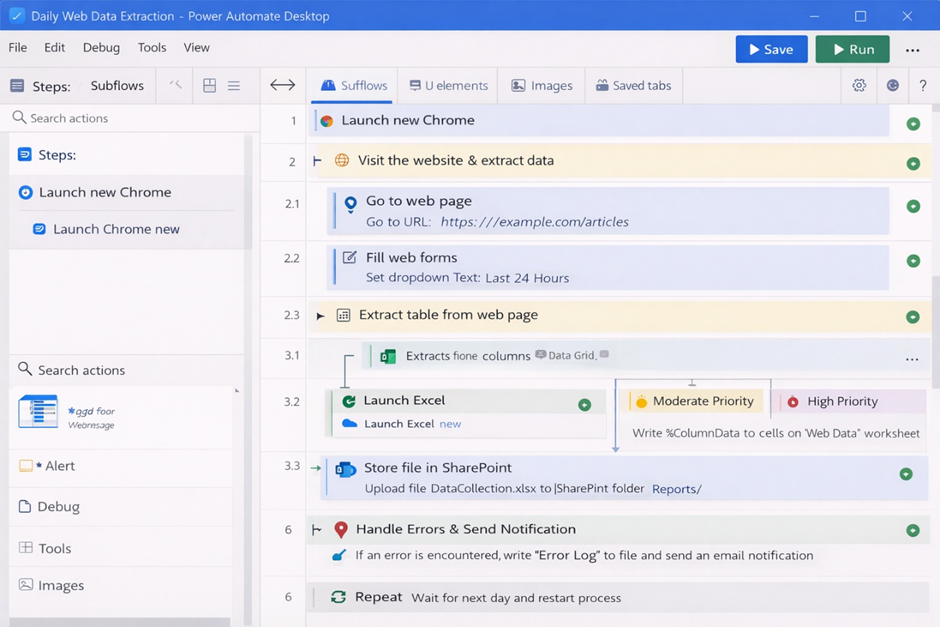
We developed an automated workflow that navigates the target website, extracts the required data fields, and stores the information in a structured dataset for analysis. The automation runs on a scheduled basis, ensuring the data is collected regularly without manual intervention.
The automation reduced manual data collection by over 80% and ensured information was captured consistently every time. Teams gained access to reliable and up-to-date datasets without spending hours copying data manually. This improved reporting accuracy, supported faster analysis, and enabled decision-makers to work with current market insights.
Supply chain teams manage processes such as inventory tracking, stock replenishment, and asset location monitoring. When these processes rely on spreadsheets or disconnected systems, it becomes difficult to maintain accurate stock levels or track where items are located. Business process automation helps supply chain teams centralise inventory data, improve visibility, and ensure stock movements are recorded in real time.
Inventory management is a common supply chain process that benefits from automation. When inventory is tracked manually in spreadsheets, businesses often struggle to maintain accurate stock levels, locate items quickly, or understand how inventory is distributed across locations or customers.
We worked with a company that rents office plants to corporate clients and struggled to monitor inventory across locations. Staff spent several hours each week updating spreadsheets and often had difficulty locating specific items or understanding current stock levels.
To solve this problem, we developed a custom inventory management application that allows warehouse staff to scan item barcodes and update stock automatically. The system also generates shipping labels when orders are placed and tracks where each inventory item is located. In addition, we built a reporting dashboard that shows how many items are assigned to each client and where they are deployed.
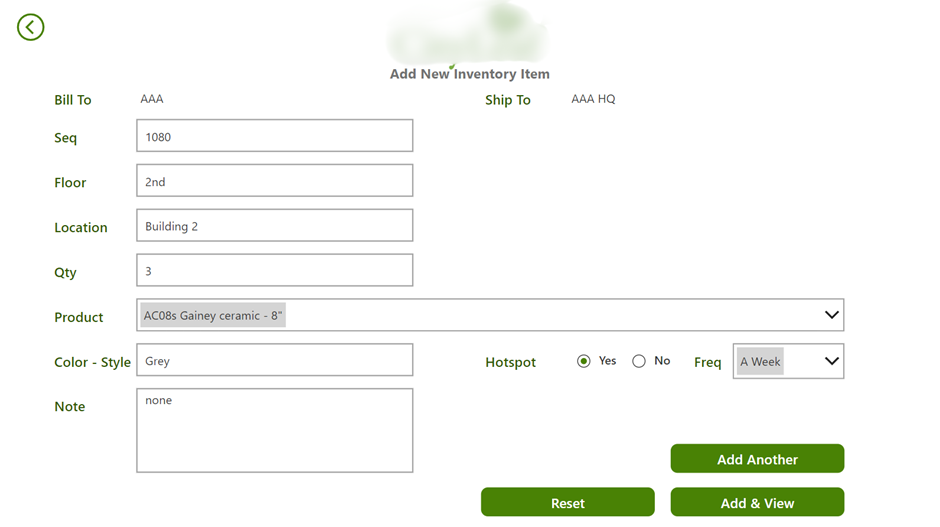
This automation removed the need for manual spreadsheet updates, improved inventory accuracy, and provided a real-time view of stock levels and asset locations. As a result, warehouse teams could manage inventory more efficiently while management gained clearer visibility into supply chain operations.
Business process automation helps organisations streamline repetitive workflows and reduce reliance on manual tasks. By using automated workflows, companies can execute routine processes faster, more accurately, and with greater consistency. This allows teams to focus on higher-value activities while ensuring operations run reliably in the background.
One of the most immediate benefits of business process automation is the reduction of manual work. Tasks that previously required employees to download files, copy data between systems, or send repetitive emails can be completed automatically within seconds.
For example, in our invoice processing business process automation use case, invoices were captured from email, routed for approval, and recorded automatically. This removed hours of manual handling and allowed the finance team to focus on financial analysis rather than administrative work.
Automation enables organisations to process higher workloads without increasing staff effort, improving overall operational efficiency.
Manual data entry and repetitive tasks often lead to mistakes such as incorrect values, missing records, or duplicated entries. Automation reduces these risks by applying consistent rules and validation steps every time a workflow runs.
As a result, businesses benefit from cleaner data, more reliable records, and fewer operational mistakes.
Automated workflows often centralise data and create clear tracking systems for approvals, requests, and operational activities. This improves visibility across departments and helps managers understand what is happening in real time.
For example, in our leave management automation, HR teams gained a central system that tracked all leave requests and approval statuses. Managers could instantly view team availability and plan workloads accordingly.
This level of transparency helps organisations manage resources more effectively and reduces confusion around internal processes.
When repetitive administrative tasks are automated, employees can spend more time on meaningful and strategic work. Instead of performing manual updates, teams can focus on problem-solving, analysis, and customer engagement.
In our automated task creation workflow, project managers no longer had to manually convert email requests into project tasks. Tasks were generated automatically, allowing managers to focus on coordinating projects rather than handling administrative steps.
This shift improves productivity and allows employees to contribute more value to the organisation.
Automation also improves customer interactions by ensuring processes run quickly and consistently. Automated notifications, faster approvals, and immediate responses help businesses deliver a more reliable service.
For example, in our customer feedback automation, surveys were sent automatically after support tickets were resolved. This ensured every customer received a feedback request and allowed the company to respond quickly to satisfaction issues.
By streamlining internal processes, automation ultimately leads to faster service, better communication, and stronger customer relationships.
Implementing business process automation requires a structured approach to ensure workflows deliver real operational improvements. Instead of automating everything at once, organisations should focus on processes that are repetitive, rule-based, and time-consuming.
1. Identify Processes Suitable for Automation
Start by identifying workflows that involve repetitive manual work such as approvals, data entry, reporting, or document handling. These processes usually occur frequently and follow clear rules, which makes them ideal candidates for automation.
Examples include invoice approvals, employee leave requests, report distribution, and task creation from emails.
2. Map the Current Workflow
Before building automation, document how the existing process works. Identify each step, the people involved, and the systems used.
This helps reveal bottlenecks, unnecessary steps, and points where errors occur. A clear process map ensures the automation reflects the real workflow and removes inefficiencies instead of replicating them.
3. Design the Automated Workflow
Once the process is mapped, design the automation logic. Define triggers, actions, approvals, and system integrations.
For example, a workflow may start when a form is submitted, route the request to the appropriate manager, update records automatically, and send notifications to stakeholders.
4. Test and Deploy the Automation
Before rolling out automation across the organisation, test the workflow with sample data and real scenarios. This ensures triggers work correctly, approvals flow properly, and system integrations behave as expected.
After testing, deploy the automation and make it available to the teams who will use it.
5. Monitor and Improve the Process
After deployment, monitor the automated workflow to ensure it performs as expected. Track metrics such as processing time, error rates, and user adoption.
Continuous monitoring allows organisations to refine workflows, expand automation to additional processes, and maximise long-term efficiency gains.
Business process automation helps organisations streamline repetitive workflows, improve operational efficiency, and maintain consistent processes as they grow. Many business process automation use cases involve automating tasks such as approvals, reporting, document processing, and data collection so businesses can reduce manual effort, minimise errors, and give teams better visibility into daily operations.
As shown throughout this guide, automation can be applied across departments including finance, HR, operations, customer service, marketing, and IT. Implementing the right automation workflows helps organisations handle increasing workloads, improve decision-making, and allow employees to focus on more strategic work instead of routine administrative tasks.
If your organisation is looking to automate manual processes or build scalable workflow automation solutions, contact us to discuss how we can help design and implement business process automation tailored to your operations!


